

















Vogoo AI
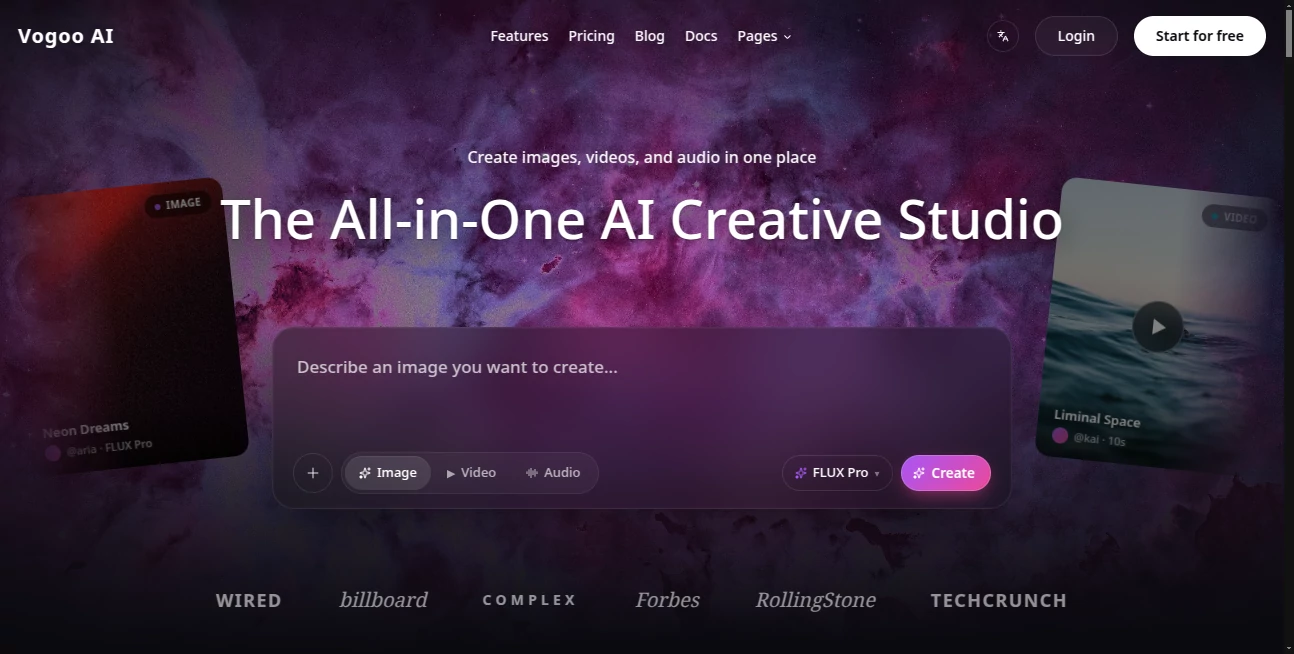
What is Vogoo AI?
There’s something exciting about opening one single place and being able to go from a rough idea to a finished visual, a short video, or even a matching audio track without switching tabs or learning new software. Vogoo delivers exactly that feeling. You describe what you want, drop in a reference if you have one, and it handles the heavy lifting across images, motion, and sound. Creators I know keep coming back because the workflow feels connected — one idea can evolve naturally from still to moving to voiced without losing momentum or style.
Introduction
In a world where content needs keep growing, most creators waste too much time jumping between different tools. Vogoo brings everything together in one thoughtful studio. Whether you’re making launch visuals, social clips, product shots, or full short-form stories, the platform lets you move seamlessly between text-to-image, image-to-video, video extension, and audio generation. It’s built for real workflows — marketers testing campaign concepts, designers prototyping scenes, or solo creators building entire reels in one sitting. The results often feel polished enough to publish with only minor tweaks, which is rare when so many AI tools still feel experimental.
Key Features
User Interface
The workspace is calm and focused. A clean prompt area, easy reference uploads, and clear options for video length, aspect ratio, and style sit right where you need them. Switching between image, video, and audio modes feels natural, and previews load fast enough that you stay in the creative zone instead of waiting. It’s the kind of interface that disappears when you’re in flow — intuitive for beginners yet powerful enough for daily professional use.
Accuracy & Performance
What stands out is the consistency. Characters keep their look across image and video generations, styles stay coherent when you remix or extend, and motion feels natural rather than robotic. Generation times are reasonable, and the outputs hold up well for social, ads, and even light professional work. The model seems tuned to understand creative intent, so prompts like “cinematic product reveal at golden hour” actually deliver that mood instead of generic results.
Capabilities
You get strong text-to-image, image-to-video, video extension, text-to-audio, and remix tools all in one place. Popular workflows like turning selfies into group shots, creating smooth transitions, or generating mood-based audio loops are built right in. It supports trending effects and styles that creators actually use right now, making it easy to stay current without hunting for the latest model elsewhere. The ability to stay inside one studio while iterating from still to motion to sound is genuinely refreshing.
Security & Privacy
Your creations and reference files are handled with care. The platform focuses on letting you create without unnecessary data collection or long-term storage of private projects. For freelancers, brand teams, and personal creators, that respectful approach builds real trust.
Use Cases
A marketer drafts ten campaign variations in the morning and has polished visuals plus short videos ready by lunch. A content creator builds a week’s worth of Reels by remixing one strong image into multiple motion clips with matching audio. A product founder turns rough mockups into lifestyle shots and demo videos without hiring a photographer. An educator creates engaging explainer visuals and voiceovers in one flow. Wherever ideas need to move from concept to shareable asset quickly, this studio keeps the momentum alive.
Pros and Cons
Pros:
- Truly all-in-one workflow — images, video, and audio in the same space.
- Strong consistency when moving from stills to motion.
- Fast enough to support real creative iteration instead of long waits.
- Trending effects and styles keep your output current without extra effort.
- Clean, focused interface that respects your time.
Cons:
- Longer or highly complex videos may need multiple generations or external editing.
- Some advanced features and higher limits live behind paid plans.
Pricing Plans
Free access lets you explore and create meaningful work right away. Paid plans unlock faster generations, higher quality outputs, more daily credits, and priority access to new features. The structure feels fair — you can start small and grow as your needs increase, without being forced into a big commitment before you’re sure.
How to Use Vogoo AI
Start with a clear prompt describing the scene or style you want. Upload a reference image if you need stronger visual control. Choose image, video, or audio mode, adjust any simple settings like duration or aspect ratio, and generate. Review the result, remix or extend if needed, and download. The loop is fast enough that you can try several variations in one session and still have time to refine. For longer projects, build scene by scene and combine in your favorite editor.
Comparison with Similar Tools
Many platforms force you to switch tools for different media types, breaking your flow and style consistency. Vogoo keeps everything connected, so your image style carries naturally into video and audio. It’s less about raw technical power and more about usable creative speed for real-world work — exactly what busy creators need.
Conclusion
Good creative work shouldn’t feel like wrestling with technology. Vogoo makes the process feel closer to actual making — fluid, focused, and fun. Whether you’re building a brand, growing a following, or just exploring ideas, having images, motion, and sound in one thoughtful studio changes how quickly you can go from spark to finished piece. For anyone who creates content regularly, that kind of seamless experience is hard to give up once you’ve felt it.
Frequently Asked Questions (FAQ)
Do I need experience with AI tools to start?
Not at all. The interface is straightforward and most people get good results on their first few tries.
Can I use my own images as references?
Yes — uploading references often gives the strongest and most consistent results.
How good is the video quality?
It delivers smooth, cinematic motion suitable for social media, ads, and concept work. Longer or ultra-complex scenes may need external editing.
Is there a free way to try it?
Yes, you can start creating immediately with free credits.
AI Creative Writing , AI Image to Video , AI Video Generator , AI Text to Video .
These classifications represent its core capabilities and areas of application. For related tools, explore the linked categories above.

Vogoo AI Alternatives Product
AI Dance Vid…

Blipix
VideoFlux

Veo 3.2
Seedance 2.0…

KOOX AI

Wan 2.6

Seedance 2.5

Seedance 2.0…
