Voice Memo Exporter
What is Voice Memo Exporter?
Voice memos are one of the easiest ways to capture an idea, record a conversation, save a personal story, or think through a problem while walking. The trouble starts when those recordings pile up. A library of hundreds of recordings can quickly become difficult to search, organize, back up, or actually use.
Voice Memo Exporter is designed to solve that problem for Mac users with large Apple Voice Memos libraries. Instead of handling recordings one at a time, it creates a structured local archive containing the original audio, transcripts, metadata, and export-ready documents. The result is a searchable collection that can be used for writing, research, personal archives, and AI-assisted work.
One particularly useful feature is the combined Master Transcript. Rather than opening hundreds of individual recordings, users can work with one dated document containing their available transcripts. It can then be searched, backed up, or brought into tools such as ChatGPT, Claude, Notion, Obsidian, or a writing application.
Key Features
- Bulk archiving of Apple Voice Memos available on a Mac
- One combined, searchable Master Transcript
- Local transcription performed on the Mac
- Original audio copied into a separate archive without modifying the source recordings
- Preservation of available recording dates, titles, and metadata
- Export options including TXT, Markdown, DOCX, and PDF
- Metadata files in JSON and CSV formats
- Search, rename, review, and organize recordings before archiving
- No subscription and no required cloud upload
- Archive files remain in a folder controlled by the user
User Interface
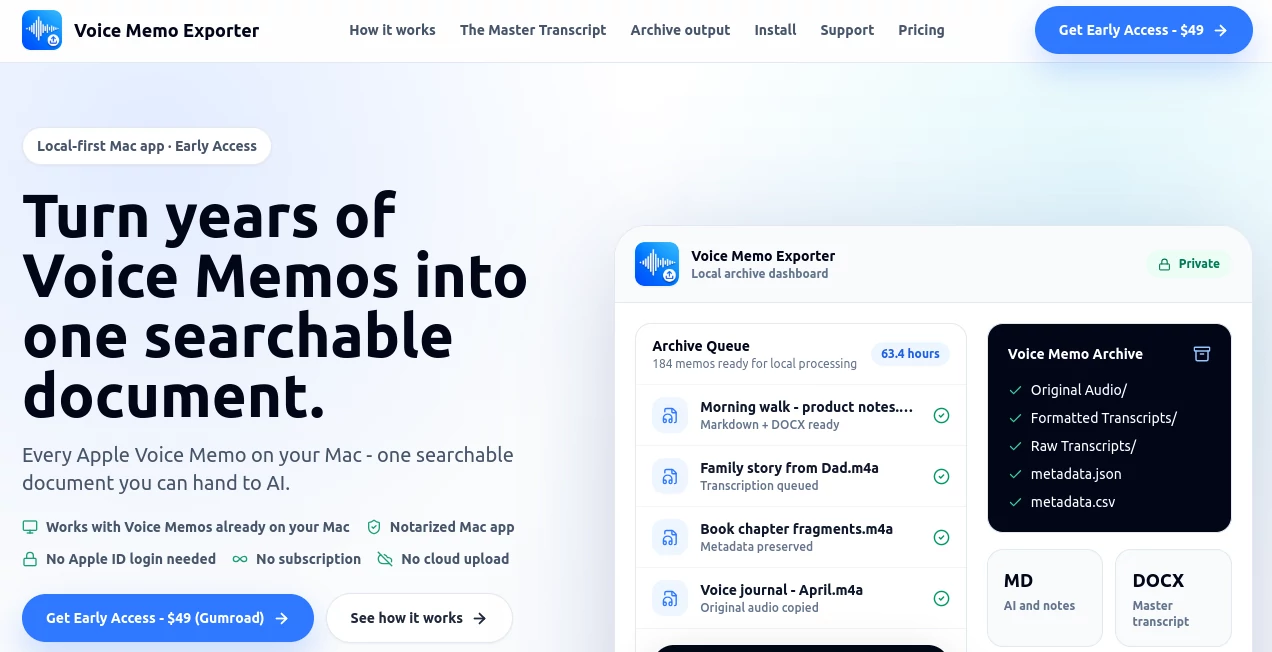
The interface is centered around the archive rather than unnecessary menus. Users can review recordings, see what is ready for processing, and build a structured collection on their Mac. The workflow is especially helpful for people who have accumulated years of recordings and need a practical way to bring order to them.
The archive itself is also easy to understand. Audio files, formatted transcripts, raw transcripts, metadata, indexes, and reports are stored in a conventional folder structure. That makes the finished archive feel less like data trapped inside an application and more like a collection of files the user actually owns.
Accuracy & Performance
Transcription is performed locally on the Mac, which removes the need to send recordings to a remote transcription service. As with any speech-to-text system, results depend on the quality of the original recording. Clear speech recorded close to the speaker generally produces better results, while background noise, music, and overlapping conversations can make transcription more difficult.
The application takes a practical approach to imperfect transcripts. Even when a transcript needs editing, the copied audio, metadata, dates, and archive structure remain available for reference. This is useful for large personal libraries where having everything organized is often more important than achieving perfect transcription on every single recording.
Capabilities
The main strength is the complete workflow. Users can locate Voice Memos already available on their Mac, review what they want to archive, copy the original recordings, generate local transcripts, preserve available metadata, and create a Master Transcript.
The Master Transcript can be exported in several useful formats. Markdown is particularly convenient for AI and note-taking workflows, while DOCX is better suited to editing and PDF provides a stable format for reading or sharing. TXT offers a simple option that works almost anywhere.
The metadata system is another valuable detail. Recording dates and titles can be preserved in archive files rather than relying only on filesystem timestamps. This matters because exporting an audio file can otherwise result in a new file date that no longer reflects when the original recording was actually made.
Security & Privacy
Privacy is one of the strongest aspects of the workflow. The application is designed around local processing, with transcription taking place on the user's Mac rather than requiring audio to be uploaded to a cloud server. It does not require an Apple account login to retrieve recordings and does not download recordings directly from Apple's servers.
The original Voice Memos are not modified. Instead, a separate archive is created, giving users a safer way to organize and preserve their collection. The resulting files can also be moved, backed up, or stored independently without being locked into a proprietary archive format.
Use Cases
This approach is particularly useful for writers who record ideas while walking or driving and later struggle to turn those thoughts into usable material. A single Master Transcript can become a searchable source of ideas for articles, books, newsletters, scripts, or personal projects.
It can also be valuable for founders and creators who use voice notes as an informal idea database. Instead of searching through hundreds of recordings manually, they can work with a dated text archive and quickly locate previous thoughts.
Family history is another interesting use case. Interviews with parents or grandparents, personal stories, and old voice journals can be preserved alongside their original audio and readable transcripts. For researchers, students, and professionals, the same workflow can provide a more manageable archive of recorded notes and interviews.
For AI users, the Master Transcript offers an especially practical workflow. Instead of repeatedly feeding individual recordings or transcripts into an AI assistant, a user can provide a consolidated text file as context and ask questions about their own accumulated material.
Pros and Cons
Pros
- Designed specifically for large Apple Voice Memo collections
- Bulk workflow instead of manual one-by-one exporting
- Local transcription keeps recordings on the Mac
- Creates a useful combined Master Transcript
- Preserves available dates, titles, and metadata
- Supports TXT, Markdown, DOCX, and PDF exports
- Original recordings are left untouched
- No recurring subscription
- Files remain accessible outside the application
Cons
- It requires a Mac and is not designed for Windows computers
- Only recordings available on the Mac can be processed directly
- Intel Macs are not supported
- Local transcription quality can vary with recording conditions
- Users with only a small number of recordings may not need a dedicated bulk archive workflow
Pricing Plans
The product uses a one-time purchase model rather than a recurring subscription. Early Access is priced at $49 for the first 100 buyers, with the public launch price planned at $79. The license includes the core archive, transcription, Master Transcript, metadata, and export functionality.
A 30-day refund policy is also offered if the application does not work with the user's Mac setup. For someone with hundreds of recordings, the one-time pricing can be appealing compared with services that charge recurring fees for transcription or cloud storage.
How to Use the App
First, make sure the Voice Memos you want to archive are available in the Voice Memos application on your Mac. If recordings are still downloading or cannot be played locally, they should be allowed to finish syncing first.
Next, choose a local folder where the archive will be created. Review the available recordings and select the material you want to preserve. The application then copies the audio into the archive while keeping the original recordings unchanged.
Once processing begins, transcripts, metadata, archive indexes, and the combined Master Transcript are generated locally. When the process is finished, the resulting files can be searched, backed up, edited, or exported into formats that fit different workflows.
For example, a writer could export the Master Transcript as Markdown and use it as background material for an AI writing session. Someone preserving family recordings might prefer PDF for reading and sharing, while a researcher could use CSV and JSON metadata for additional organization.
Comparison with Similar Tools
Traditional transcription applications and this workflow solve slightly different problems. Generic transcription services are often built around uploading a specific audio file and receiving a transcript. That can work well for a meeting or interview, but it does not necessarily address the larger problem of organizing several hundred old Voice Memos.
The manual Apple workflow has the opposite limitation. Exporting individual recordings is possible, but doing it repeatedly becomes tedious, and important information such as the original recording date may not remain attached to the exported file in the way users expect.
The local archive approach sits between these options. It combines bulk exporting, transcription, metadata preservation, structured storage, and a consolidated document into one workflow. That makes it more relevant to people who are dealing with an entire library rather than a single recording.
Conclusion
For anyone who has accumulated hundreds of voice recordings, the biggest challenge is rarely making another recording. It is making the recordings useful again. A searchable archive changes that equation by turning a long list of forgotten audio files into material that can be read, searched, organized, backed up, and reused.
The combination of bulk Voice Memo archiving, local transcription, preserved metadata, multiple export formats, and a single Master Transcript gives Mac users a straightforward way to regain access to years of captured thoughts. The privacy-first design is an added advantage for personal journals, family stories, business ideas, and other recordings that users may not want sitting on a third-party server.
For people who record more ideas than they can realistically write down, this is a practical bridge between spoken thoughts and a usable personal knowledge archive.
Frequently Asked Questions (FAQ)
Does it work with Apple Voice Memos?
Yes. It is designed to process Voice Memos that are already available on a Mac. Recordings that exist only on an iPhone need to be synced to the Mac or manually exported before they can be imported.
Does it upload recordings to the cloud?
No. The application is designed for local processing on the Mac, so audio does not need to be uploaded to a remote server for transcription.
Can the original recordings be damaged or changed?
No. The workflow creates a separate archive and copies the recordings rather than moving, renaming, deleting, or modifying the originals.
Can the transcripts be used with ChatGPT or Claude?
Yes. The combined Master Transcript can be exported as Markdown, TXT, DOCX, or PDF. The Markdown version is particularly convenient when transferring text into AI or writing workflows.
Does it preserve the original recording dates?
Available recording dates and titles can be preserved in metadata files and the archive index. This is useful because ordinary audio exports can otherwise receive a new filesystem creation date when they are copied out of Voice Memos.
What Macs are supported?
The application supports Apple Silicon Macs, including M1, M2, M3, and M4 models or newer, running macOS 12 Monterey or later. Intel Macs are not supported.
Is there a monthly subscription?
No. The pricing is based on a one-time purchase rather than a recurring subscription.
What export formats are available?
The archive can include original audio, raw and formatted transcripts, TXT, Markdown, DOCX, PDF, JSON metadata, CSV metadata, and archive index files.
AI Productivity Tools , AI Transcription , AI Speech to Text .
These classifications represent its core capabilities and areas of application. For related tools, explore the linked categories above.
Voice Memo Exporter details
Website unavailable — View Alternatives
Pricing
- Free
Apps
- Web App
Categories

Voice Memo Exporter Alternatives Product

MachineTrans…

BulkPicTools

Magpie

VideoLens

KarmaGuy

Arobis AI Vi…

TO MD

Khuram Youraj

Jamy.ai | Au…