
Cinematique
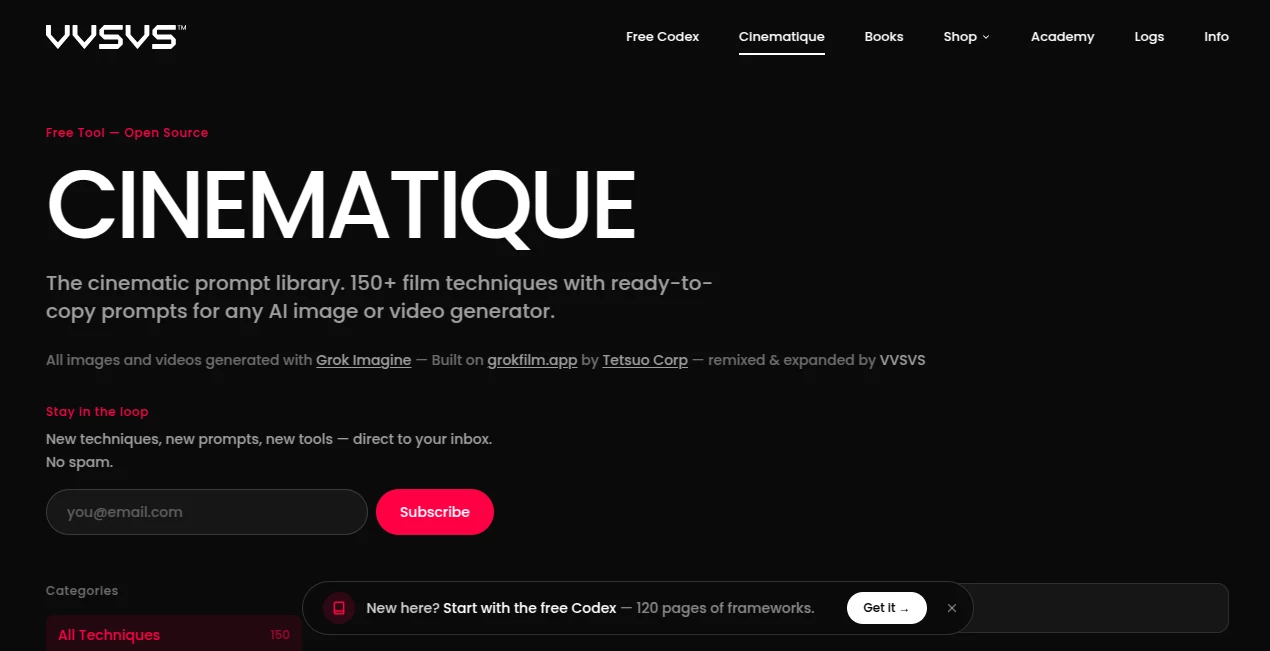
What is Cinematique?
There’s a special satisfaction when AI video actually feels like it was shot on a film set — the lighting has weight, the camera moves with purpose, and the emotion lands. This tool delivers that experience more consistently than most. You describe a scene, add a reference if you want, and it returns short clips that look directed rather than randomly generated. I’ve shown results to friends who normally roll their eyes at AI video, and they’ve been genuinely impressed by how natural the motion and atmosphere feel. It’s the kind of tool that makes you want to keep creating because the output finally matches the picture in your head.
Introduction
Most AI video tools still struggle with the basics: characters change appearance, motion looks robotic, or the cinematic quality is missing. Cinematique focuses on bridging that gap. It aims for film-like results with thoughtful lighting, smooth camera language, and emotional coherence. Whether you’re a filmmaker prototyping ideas, a marketer building ads, or a creator making short stories, it gives you usable footage that feels intentional. The difference is noticeable from the first generation — the clips have atmosphere and rhythm instead of the usual AI randomness.
Key Features
User Interface
The workspace is clean and director-friendly. A prominent prompt area lets you describe your vision naturally, with options for reference images, camera movements, and style guidance right where you need them. Previews appear reasonably fast, and the flow supports quick iterations without feeling cluttered. It’s built for people who think in shots and sequences rather than just random clips, making the creative process feel smoother and more focused.
Accuracy & Performance
The model pays attention to cinematic details — motivated camera moves, natural lighting falloff, and consistent character appearance across frames. Motion has weight and realism instead of the floaty or jerky feeling common in other tools. Generation speed is practical for real workflows, and the reliability means fewer frustrating reruns. It handles complex prompts involving multiple subjects and emotional beats better than most I’ve tried.
Capabilities
You can generate from text, reference images, or hybrid inputs. It supports cinematic camera directions, different aspect ratios for film, social, or vertical formats, and strong consistency for characters and environments. The tool excels at short narrative scenes, product reveals, music visuals, and atmospheric storytelling. Outputs feel closer to directed footage than typical AI experiments, making them easier to use in actual projects or as strong starting points for further editing.
Security & Privacy
Your prompts and generated videos are handled with care. The platform focuses on delivering the output without unnecessary long-term storage or data sharing. For creators working with original concepts or client work, this respectful approach gives confidence to experiment freely.
Use Cases
A filmmaker uses it to quickly mock up emotional key scenes before pitching or storyboarding. A brand creates cinematic product stories that feel premium without expensive shoots. A musician turns song lyrics into atmospheric music videos that match the track’s mood. Short-form creators build Reels with film-like quality that stand out in crowded feeds. Indie teams prototype narrative sequences to test tone and pacing. Whenever you need video that feels crafted rather than generated, it becomes a valuable creative partner.
Pros and Cons
Pros:
- Cinematic quality with intentional lighting and camera work.
- Strong consistency in characters and visual style across shots.
- Natural motion that feels directed rather than artificial.
- Good balance between creative control and ease of use.
Cons:
- Clip lengths are best for short, focused scenes (multi-shot helps for longer stories).
- Mastering the best prompts takes a bit of practice, like most advanced video tools.
- Higher resolutions and priority access require paid plans.
Pricing Plans
A free tier lets you test the quality and workflow with daily generations. Paid plans unlock higher resolutions, longer clips, faster processing, and more generous limits. The pricing feels reasonable for the step up in cinematic quality and reliability — many creators find it pays for itself by saving time on traditional production or stock footage.
How to Use Cinematique
Start with a descriptive prompt that includes mood, action, and cinematic direction (“golden hour, lone detective walking down rainy neon street, slow tracking shot”). Add reference images for character or style consistency if needed. Choose your aspect ratio and length, then generate. Review the result, refine the prompt or add instructions for adjustments, and download. For longer stories, build multiple connected shots and combine them later. The more cinematic your thinking in the prompt, the better the output usually becomes.
Comparison with Similar Tools
While many AI video tools focus on speed or raw generation, this one prioritizes film-like quality and intentional direction. It stands out in consistency and atmosphere compared to tools that produce more random or floaty motion. The balance of creative control and cinematic results makes it especially appealing for users who need footage that looks directed rather than purely algorithmic.
Conclusion
Creating video that feels cinematic no longer requires a full crew or massive budget. This tool brings that capability closer to everyday creators by combining strong technical quality with thoughtful controls. It respects your vision while handling the heavy lifting, resulting in clips you can actually be proud of. For filmmakers, marketers, storytellers, and creators who care about mood and quality, it opens up exciting new possibilities. The future of video creation feels a little more reachable with tools like this.
Frequently Asked Questions (FAQ)
How long are the generated videos?
Best for short, impactful scenes (typically 4–12 seconds), though multi-shot workflows allow longer storytelling.
Do I need reference images?
Not required, but they significantly improve character consistency and style control.
Can I use it for commercial projects?
Yes, paid plans include commercial rights for the generated content.
What aspect ratios are supported?
Horizontal, vertical, and square formats for different platforms and uses.
How cinematic is the output really?
It focuses on film-like lighting, motivated camera movement, and emotional tone — much closer to directed footage than typical AI results.
AI Animated Video , AI Image to Video , AI Video Generator , AI Text to Video .
These classifications represent its core capabilities and areas of application. For related tools, explore the linked categories above.

Cinematique Alternatives Product

Motion Contr…

v04 ai

SnapVee Stud…
veo 4

Grok Imagine…

Kling-4 Vide…
Wan 2.7

Seedance 3.0

Seedance 2 V…