
WaiverKit
What is WaiverKit?
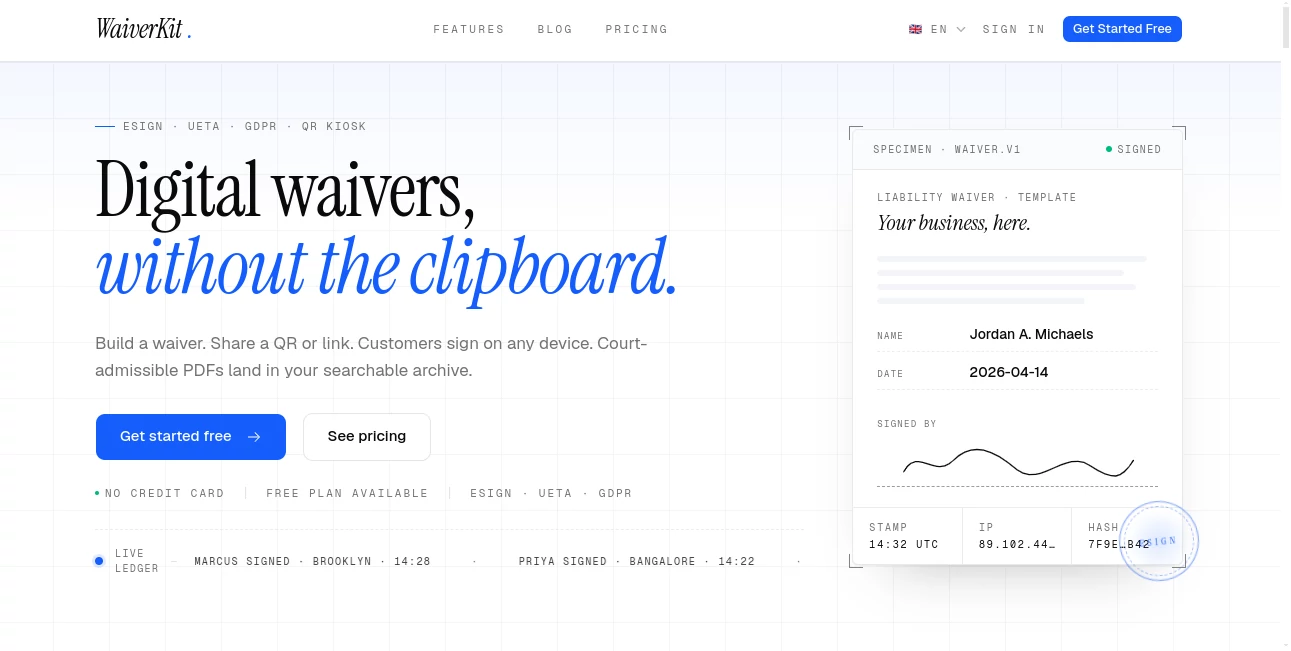
Managing paper waivers can quickly become frustrating for businesses that handle frequent customer sign-ups, appointments, or safety agreements. Lost forms, unreadable handwriting, and difficult document searches create unnecessary work for teams.
This digital waiver solution helps businesses replace traditional paperwork with a faster signing experience. Customers can complete forms from their own devices, while businesses receive organized, searchable records with electronic signatures and secure document storage. The platform is designed for gyms, studios, events, rentals, wellness providers, and any organization that needs reliable consent collection.
With features such as AI-assisted waiver creation, QR code signing, automated confirmations, and legally structured PDF records, this tool makes the entire process smoother for both businesses and their customers. It removes the clipboard from the front desk and turns waiver management into a simple digital workflow.
Key Features
User Interface
The platform provides a clean and practical dashboard that allows users to create, edit, manage, and search waivers without technical knowledge. The visual builder makes it easy to add text fields, checkboxes, signature areas, dates, and custom questions.
Businesses can create a waiver template quickly and share it through QR codes, website links, email, SMS, or booking flows. Customers complete the process directly on their phones, creating a convenient experience without requiring shared tablets or extra hardware.
Accuracy & Performance
The system focuses on accurate document collection and reliable record management. Each signed waiver can include important verification details such as timestamps, IP information, device details, and document integrity tracking.
The AI-powered drafting assistant helps users create initial waiver templates from simple descriptions. For example, a business can describe the type of activity and required information, then refine the generated form before publishing it.
Capabilities
The platform combines digital signatures, form creation, document storage, and automation features in one place. Key capabilities include:
- AI-assisted waiver drafting from simple prompts
- Drag-and-drop waiver form builder
- QR code-based customer signing
- Searchable waiver archive
- PDF generation for completed documents
- Electronic signature collection
- Automated email delivery of signed copies
- Expiry reminders and follow-up automation
- Multi-language waiver support
- CSV and PDF export options
- Minor and guardian consent workflows
Security & Privacy
Security is an important part of digital document management. The platform is designed with privacy-focused features including encrypted data handling, compliance support, and detailed audit records for signed documents.
Businesses can maintain a clear history of each agreement, making it easier to locate important records when they are needed for customer service, internal reviews, or compliance requirements.
Use Cases
This solution is suitable for many industries where signed agreements and customer consent are essential.
- Gyms and Fitness Studios: Replace paper membership waivers with quick mobile signing during check-in.
- Tattoo Shops: Collect consent forms, health questions, and release agreements before appointments.
- Adventure Sports: Manage participant agreements for activities involving safety risks.
- Events and Venues: Collect attendee permissions and required acknowledgments.
- Wellness Businesses: Store client forms and health-related questionnaires digitally.
- Equipment Rentals: Capture customer agreements before rental transactions.
Pros and Cons
Pros
- Easy setup without technical skills
- Reduces dependency on paper forms
- Fast QR code signing experience
- AI assistance speeds up waiver creation
- Searchable digital document archive
- Supports multiple industries and workflows
- Includes a free plan for beginners
Cons
- Primarily focused on waiver and consent workflows rather than general document management
- Advanced business features require paid plans
- Companies with highly customized legal requirements may still need manual review
Pricing Plans
The platform offers flexible pricing options for individuals, small businesses, and larger organizations.
- Free: A free forever option with basic waiver creation and limited monthly signed waivers.
- Starter: Designed for small businesses needing more templates and higher usage limits.
- Pro: Includes advanced features such as QR kiosk mode, custom branding, exports, and multilingual support.
- Business: Built for larger teams requiring multiple locations, user roles, and dedicated support.
How to Use WaiverKit
Getting started is simple and does not require development skills. Users can follow a straightforward workflow:
- Create a waiver template using the visual builder or AI assistant.
- Add required fields, questions, and signature sections.
- Share the waiver through a QR code, link, or customer communication channel.
- Allow customers to sign from their own device.
- Access completed documents from the searchable dashboard.
Comparison with Similar Tools
Compared with traditional digital signature platforms, this solution focuses specifically on waiver management and customer consent workflows. Instead of adapting a general document signing service, businesses get features designed around real-world waiver collection.
The combination of QR signing, AI-assisted form creation, searchable archives, and industry-specific workflows makes it a strong option for businesses that regularly collect customer agreements.
Conclusion
For businesses still relying on paper waivers, moving to a digital workflow can save time, reduce administrative tasks, and improve customer experience. This platform provides a practical way to create, distribute, sign, and manage waivers from one organized system.
Whether you run a fitness studio, event space, rental business, or service company, the ability to collect signed agreements quickly and retrieve records whenever needed can make daily operations much easier. With automation features and a user-friendly approach, it offers a modern replacement for outdated clipboard-based processes.
Frequently Asked Questions (FAQ)
Can customers sign waivers from their phones?
Yes. Customers can open a shared link or scan a QR code and complete the signing process directly from their own mobile device.
Does the platform support AI-generated waivers?
Yes. The AI assistant can create a draft waiver based on a user's description, which can then be edited and customized.
Are signed documents stored digitally?
Yes. Completed waivers are stored in a searchable archive and can be accessed when needed.
Who can benefit from this tool?
Gyms, studios, tattoo shops, event organizers, rental companies, wellness providers, and many other businesses that collect signed agreements can benefit from this solution.
Is there a free plan available?
Yes. A free plan is available for users who want to start creating and managing digital waivers without an upfront payment.
AI Documents Assistant , AI Productivity Tools , AI Forms & Surveys , AI Contract Management .
These classifications represent its core capabilities and areas of application. For related tools, explore the linked categories above.

WaiverKit Alternatives Product
Zamicus

TypingFirst

CoolVerdict

eesel AI

Block Poster…
AnyToURL

Fillout.com

AI Business …

Create Filla…