TRAE Work
What is TRAE Work?
TRAE Work is a professional AI work assistant designed to help people turn ideas, information, and everyday tasks into finished work. Instead of being limited to a single type of task, it is built around a broader workspace approach, making it useful for professionals who deal with research, planning, writing, analysis, documentation, and product-related work.
One of its strongest ideas is the ability to move from a simple instruction toward an organized result. You can describe what you need in natural language and let the AI help structure the task, work through the required steps, and refine the output. This makes it particularly interesting for people who regularly switch between different types of professional work.
Key Features
The platform brings several AI-powered capabilities together rather than forcing users to rely on separate tools for every stage of a project. Its agent-based approach can help with planning, execution, research, and other multi-step workflows.
- AI assistance for professional and knowledge-based tasks
- Agentic workflows for handling multi-step requests
- Context-aware assistance that adapts to the task
- Support for research, product planning, analysis, and content-related work
- Custom agents for specialized workflows
- Integration with external resources through MCP
- Desktop, web, and mobile access
User Interface
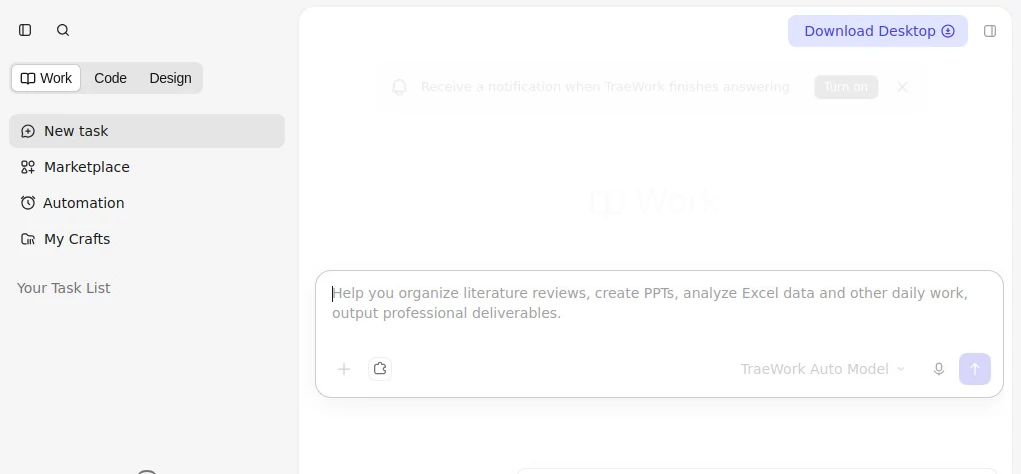
The interface is designed around the idea of working with an AI collaborator rather than simply entering isolated prompts. This makes the experience more suitable for projects where several steps are involved.
A practical advantage is the ability to stay focused on the objective instead of constantly switching between different applications. For example, someone preparing a product proposal can use the assistant to organize research, structure the document, and refine the final result without treating every step as an unrelated conversation.
Accuracy & Performance
Performance depends on the complexity of the task, the information provided, and the underlying model being used. The platform's context-focused approach is particularly useful for longer workflows because the assistant can work with more information instead of treating every request as a completely isolated instruction.
For complex assignments, this can make a noticeable difference. A vague request can be developed into a clearer plan, while larger tasks can be divided into smaller actions. Users should still review important facts, calculations, business decisions, and other high-impact outputs before using them.
Capabilities
The system is designed to go beyond basic question-and-answer interactions. Its agent framework can plan tasks, use available tools, and coordinate different steps required to reach an outcome.
Custom agents are another useful part of the experience. Users can define specialized agents around particular workflows, tools, skills, and logic. Agents can also operate as sub-agents, which opens the door to more sophisticated workflows where different AI specialists handle different parts of a larger task.
MCP support adds another layer of flexibility by allowing agents to access external resources when required. The platform also provides browser-based capabilities that can help agents interact with web elements, inspect console information, and assist with debugging-related work.
Security & Privacy
Security is an important consideration when AI agents are connected to projects and external services. The platform has introduced sandboxing and a multi-layer security approach for AI-assisted development workflows. Its agent-sharing system also performs security checks on shared agent and MCP configurations, including scans for sensitive information such as API keys, tokens, and credentials.
Even with these protections, users should avoid providing unnecessary confidential information and should review permissions before connecting external services to an AI workflow.
Use Cases
There are many situations where this type of AI workspace can be useful. A product manager might use it to turn an early idea into a structured product specification. A marketer could use it to organize campaign research and develop a practical marketing plan. A researcher can use it to gather information, compare findings, and structure a report.
It can also be useful for developers and technical teams. More complex workflows can involve multiple agents, external tools, project context, and iterative execution. The result is an environment that feels closer to working with a small digital team than using a traditional chatbot.
- Product research and planning
- Business and marketing research
- Writing and document preparation
- Data analysis and knowledge work
- Project planning and coordination
- Software and product development workflows
- Research reports and structured documentation
- Automating repetitive professional tasks
Pros and Cons
Pros
- Designed for broader professional workflows rather than one narrow task
- Strong agent-based approach for multi-step work
- Supports custom agents and sub-agents
- MCP support expands the range of connected tools and resources
- Available across web, desktop, and mobile experiences
- Can help bridge the gap between an idea and an actionable result
Cons
- Complex workflows can require time to learn and configure properly
- AI-generated results still require human review for important work
- Usage depends on the selected plan and AI consumption
- Some advanced workflows may be more than casual users need
Pricing Plans
The service uses a usage-based pricing model in which AI requests are calculated according to the number of tokens processed and converted into dollar usage deducted from the user's monthly balance. Current membership options include Free, Lite, Pro, Pro+, and Ultra tiers, giving users different levels of usage depending on their needs.
The paid structure was introduced with tiers ranging from $3 per month for Lite to $100 per month for Ultra. The available benefits vary by plan and can include additional usage, larger context windows, and bonus usage. A 14-day Pro trial is also available for new users under the current membership system.
Because AI usage and model costs can change over time, users should check the current pricing information before choosing a plan.
How to Use TRAE Work
Getting started is straightforward. Begin by describing the result you want in normal language instead of trying to write a highly technical prompt. The more useful context you provide, the easier it is for the AI to understand what you are trying to accomplish.
- Open the web, desktop, or mobile experience.
- Describe the task or outcome you want to achieve.
- Provide relevant context, files, requirements, or constraints.
- Let the AI organize the task and work through the required steps.
- Review the generated work and provide feedback where necessary.
- Use additional agents or connected tools when the workflow requires them.
For a simple task, a short instruction may be enough. For a larger project, it is worth explaining the goal, audience, constraints, preferred format, and expected result. That extra context can make the interaction considerably more useful.
Comparison with Similar Tools
Many AI assistants are excellent at answering questions or generating individual pieces of content. The main difference here is the emphasis on completing workflows. Instead of stopping after producing an answer, the system is designed to help plan, execute, connect tools, and move through multiple stages of a task.
It also sits between general-purpose AI assistants and specialized professional software. Developers can use agentic coding workflows, while non-technical professionals can focus on research, planning, writing, analysis, and other forms of knowledge work. The custom-agent framework gives organizations another option: creating specialized AI workers around their own processes.
That makes it particularly appealing to users who have outgrown simple prompt-and-response tools and want an AI system that can participate more actively in their workflow.
Conclusion
TRAE Work takes an ambitious approach to AI-assisted professional work. Its biggest strength is not simply generating text or answering questions, but helping users organize and execute multi-step tasks with context, tools, and specialized agents.
For professionals who regularly move between research, planning, writing, analysis, and project execution, having these capabilities in one workspace can reduce the amount of manual coordination required. It is especially interesting for users who want AI to become a more active part of their workflow rather than another application they occasionally consult.
As with any AI system, the best results come from combining automation with human judgment. Used that way, it can become a practical assistant for turning rough ideas into structured, usable work.
Frequently Asked Questions (FAQ)
What is TRAE Work?
It is a professional AI work assistant designed to help users handle tasks such as research, planning, writing, analysis, product work, and other multi-step professional workflows.
Can it be used by people who are not developers?
Yes. The product evolved from a developer-focused AI experience into a broader workspace intended for professionals across different roles, including product, design, research, marketing, and other areas.
Does it support custom AI agents?
Yes. Users can create specialized agents with their own tools, skills, and logic. These agents can also work as sub-agents within larger workflows.
Can it connect to external tools?
Yes. MCP support allows agents to access external resources when appropriate, expanding what they can accomplish beyond the basic workspace.
Is it available on mobile?
Yes. The current product suite is available across web, desktop, and mobile, allowing users to continue working when they are away from their primary computer.
How does pricing work?
AI usage is calculated according to tokens processed and converted into dollar usage. Current membership levels include Free, Lite, Pro, Pro+, and Ultra, with different usage allowances and benefits.
Can it handle complex tasks?
Yes. Its agentic architecture is designed for multi-step tasks where planning, tool usage, context management, and iterative execution are required. For important work, users should still review the final result before relying on it.
Is it useful for software development?
Yes. The broader product ecosystem includes dedicated AI coding capabilities as well as autonomous agent workflows that can work with existing codebases, plan implementation, use tools, and assist with testing and deployment.
Can I use it for research and business tasks?
Yes. Research, product specifications, marketing plans, reports, data analysis, and cross-functional project work are among the professional scenarios the platform is designed to support.
AI No-Code & Low-Code , AI Code Assistant , AI Research Tool , AI Developer Docs , AI Developer Tools .
These classifications represent its core capabilities and areas of application. For related tools, explore the linked categories above.

TRAE Work Alternatives Product

globalize.now

GLM 5

Roipad

Ecom Mediate…

Schema Synth

JustCopy.ai

Agent Grid

Project Mela

HY Motion