
WZRD
What is WZRD?
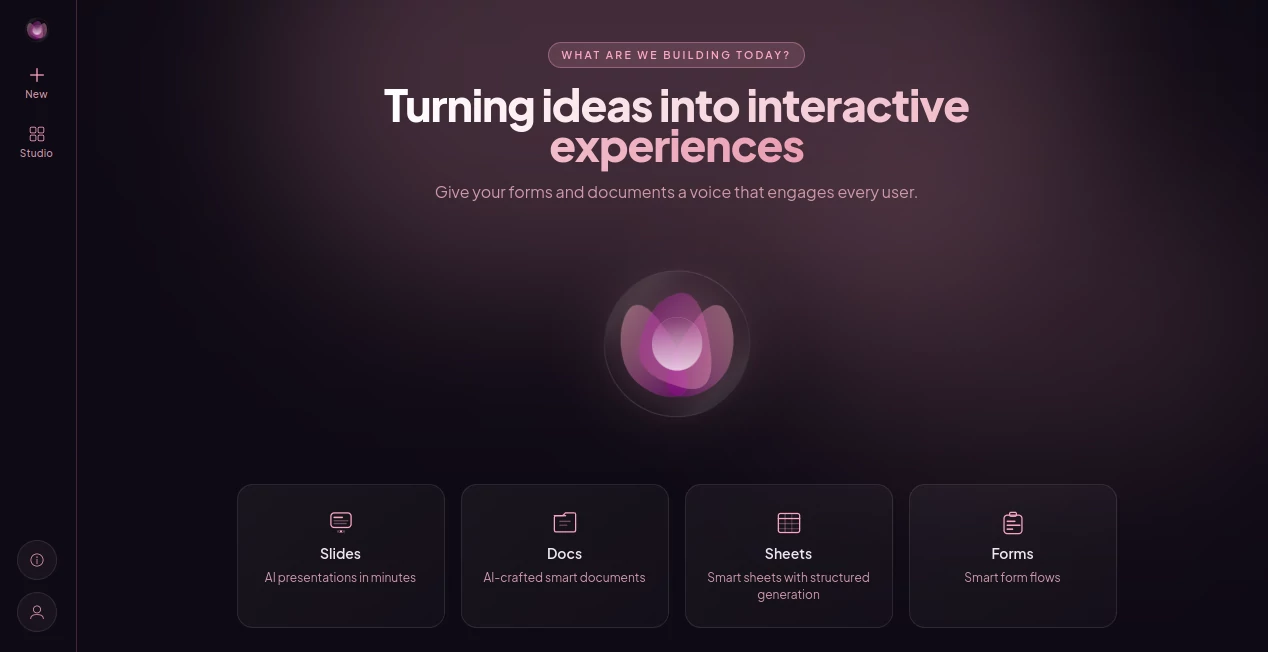
WZRD takes a fresh approach to everyday business documents by turning static files into interactive experiences. Instead of creating a document and hoping people read every page, you can describe what you want to build and let the platform create the structure for you.
The platform brings Docs, Sheets, Slides, and Forms together in one workspace. Its central idea is simple: start with an outcome rather than a blank page. You can describe an onboarding flow, proposal, briefing pack, survey, contract, lead form, or other business experience, and the system works from that description.
What makes the approach particularly interesting is the conversational editing experience. Rather than navigating through layers of menus and settings, you can tell the system what needs to change. For example, you might ask it to make an experience warmer, add a budget step, or match a particular brand direction. The platform then adjusts the structure accordingly.
For teams that spend a significant amount of time preparing documents, collecting information, presenting ideas, or building customer-facing workflows, this can make the process considerably more fluid.
Key Features
- AI-assisted creation from a simple description or idea
- Support for documents, spreadsheets, presentations, and forms
- Conversational editing instead of relying heavily on traditional menus
- Interactive documents designed to respond to users
- Interactive forms that can adapt their questions based on responses
- Lead capture experiences that can qualify prospects while collecting information
- Customer onboarding flows built around conversational interactions
- Contracts designed to provide answers in plain language
- Shareable live experiences that can be published and distributed
- Insights based on how visitors interact with published experiences
- A centralized studio for creating and managing projects
User Interface
The interface is built around conversation rather than a traditional collection of complicated controls. You begin with an idea, describe the experience you want, and move through the creation process with the system.
This approach can be especially useful for people who know what they want to achieve but do not want to spend time figuring out which settings or templates are required. The workspace also keeps different types of projects together, making it easier to move between documents, sheets, slides, and forms.
The result feels closer to working with a creative assistant than filling out a conventional software configuration screen.
Accuracy & Performance
The platform focuses on understanding intent, audience, structure, and the desired action behind a request. That distinction matters because generating a document is only part of the job. A useful business experience also needs an appropriate structure and a clear path for the person interacting with it.
Its workflow is designed to move from describing an idea to generating, refining, publishing, and sharing the finished experience. Because changes can be requested conversationally, users can iterate without rebuilding the project from scratch each time.
As with any AI-assisted creation system, the quality of the final result depends on the clarity of the initial request and the information provided. Reviewing important business, legal, financial, or customer-facing content before publishing remains a sensible step.
Capabilities
The range of possible applications is one of the strongest aspects of the platform. A sales team could create a proposal that answers common objections. A design agency could build an onboarding experience that collects client requirements. A business could create a quote request that gathers the details needed before a sales conversation.
Other examples include surveys that ask relevant follow-up questions, employee onboarding experiences that guide new hires, event registration flows, patient intake forms, feedback experiences, internal knowledge resources, and briefing materials.
The underlying concept is consistent across these examples: instead of treating a file as something people simply read, the content becomes an experience that can interact with the person using it.
Security & Privacy
The public product information does not provide enough detail to make broad claims about encryption, data retention, compliance certifications, or third-party data sharing. Organizations considering the platform for sensitive business information should therefore review the provider's current privacy and security documentation before deployment.
This is particularly important for contracts, customer information, employee records, financial documents, and other material that may contain confidential data.
Use Cases
Client Onboarding: Build an interactive onboarding flow that collects company information, goals, budget details, and brand preferences in a more engaging format.
Sales Proposals: Turn a conventional proposal into an experience where prospective clients can explore important information and get answers to common questions.
Lead Qualification: Create lead-capture experiences that collect contact information while asking useful qualification questions along the way.
Surveys and Feedback: Build forms that can respond to previous answers and create a more natural flow than a long list of unrelated questions.
Contracts: Present agreements in a format designed to help users understand important information and ask questions in plain language.
Employee Onboarding: Create guided experiences that help new employees navigate their first days and find relevant information.
Events: Design registration experiences that collect the information organizers actually need without overwhelming attendees with a lengthy static form.
Internal Knowledge: Turn company information into an accessible resource that can help employees find answers when they need them.
Pros and Cons
Pros
- Starts from an idea rather than a blank document
- Combines multiple productivity formats in one workspace
- Conversational editing makes iteration straightforward
- Designed for interactive rather than purely static content
- Useful for customer-facing and internal business experiences
- Supports a broad selection of practical business use cases
Cons
- The concept may require some adjustment for users accustomed to traditional office software
- Public information about pricing is limited
- Detailed security and compliance information is not prominently provided on the public product page
- AI-generated business content should still be reviewed before publication
Pricing Plans
Publicly available information on the current pricing structure is limited, so specific plan prices should not be assumed. Businesses evaluating the platform should check the latest commercial terms directly with the provider and confirm which features, usage limits, publishing options, and collaboration capabilities are included.
For teams considering it for regular business use, it is also worth evaluating the expected volume of projects and interactive experiences before choosing a plan.
How to Use the Platform
Start by describing the experience you want to create in plain language. Instead of thinking about individual fields, pages, or design elements, explain the outcome you want the finished project to achieve.
For example, a design agency could describe a client onboarding experience that collects company information, goals, branding requirements, and budget expectations.
After the initial generation, review the structure and continue refining it through conversation. You can request changes such as adding a question, adjusting the tone, introducing a new step, or adapting the experience to match your brand.
Once the project feels right, preview the result, publish it, and share the resulting live experience with your audience. Interaction data can then provide useful feedback about how visitors engage with what you created.
Comparison with Similar Tools
Traditional office suites are excellent when the primary goal is to create conventional documents, spreadsheets, presentations, and forms. This platform takes a different direction by focusing more heavily on turning those formats into interactive experiences.
Form builders typically concentrate on collecting responses, while document editors focus on writing and formatting. Here, those ideas are brought closer together, allowing a document or form to become part of a more conversational workflow.
For users who simply need a standard PDF, spreadsheet, or presentation, a conventional office application may still be the more familiar choice. For teams that want their content to interact with customers, prospects, employees, or other audiences, the experience-oriented approach can be considerably more compelling.
Conclusion
WZRD presents an appealing alternative to the traditional idea of business documents. Rather than treating a proposal, form, contract, or presentation as a finished file that someone has to read from beginning to end, it turns the content into something people can interact with.
The ability to start with an idea, refine the result through conversation, and publish a live experience makes the platform particularly interesting for agencies, sales teams, marketers, operations teams, and businesses building customer-facing workflows.
Its biggest strength is not simply generating content. It is the attempt to change what that content can do once it reaches the person on the other side.
Frequently Asked Questions (FAQ)
What can I create with this platform?
You can create documents, spreadsheets, presentations, forms, onboarding experiences, proposals, surveys, contracts, lead-capture flows, briefing materials, and other interactive business experiences.
Can I create an experience from a simple idea?
Yes. The workflow is designed around describing the outcome you want and allowing the system to generate an initial structure from that description.
Can I modify a generated project?
Yes. The platform supports conversational refinement, allowing you to describe changes rather than relying entirely on traditional menus and settings.
Can the experiences be shared with other people?
Yes. Projects can be published as live experiences and shared with the intended audience.
Is pricing publicly available?
Detailed current pricing is not clearly published on the public product page. Users should confirm the latest pricing and available plans directly with the provider before subscribing.
AI Documents Assistant , AI Productivity Tools , AI Forms & Surveys , AI Presentation Generator .
These classifications represent its core capabilities and areas of application. For related tools, explore the linked categories above.

WZRD Alternatives Product

AllInOneTools

Ryne AI

HTMLSlides

QR Menu Gene…

Alai

Agentys

SlideStorm AI

Luffy

Denoisr