


















YappJam
What is YappJam?
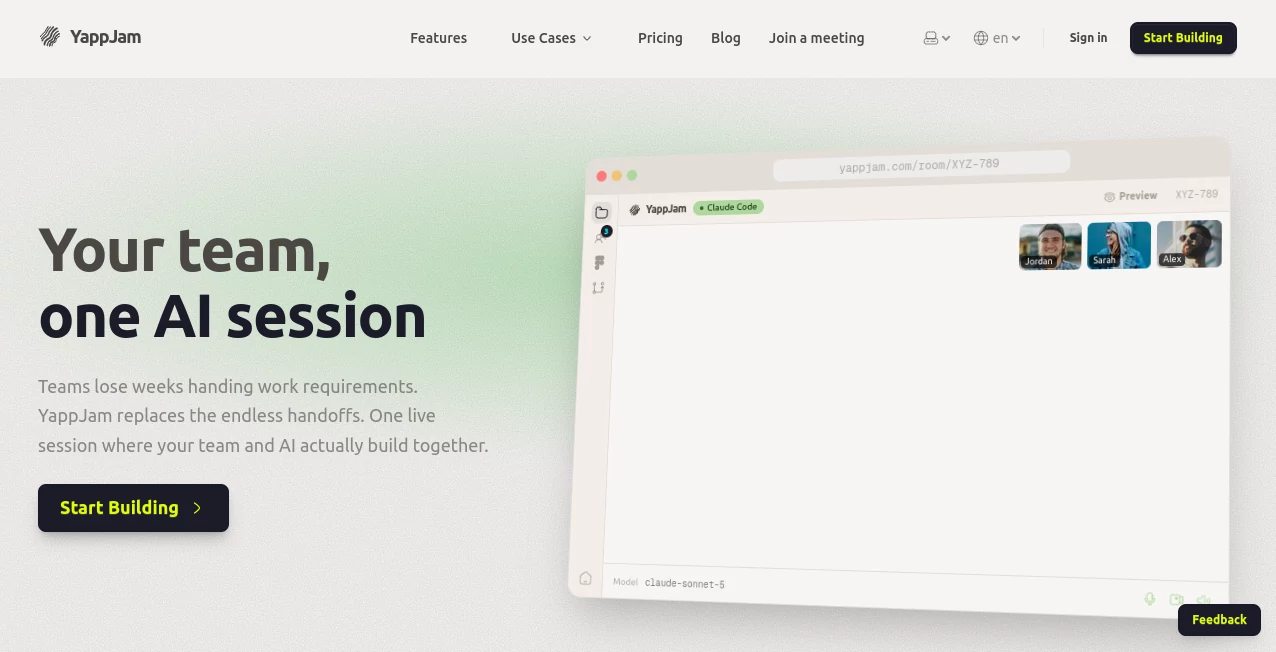
YappJam is a collaborative AI-native workspace built for teams that want to move from an idea to a working product without the usual back-and-forth between product, design, and engineering. Instead of separating discussions, mockups, coding, and reviews into different tools, the platform brings people and AI agents into one shared session.
The concept is refreshingly practical: team members can contribute at the same time, AI can work directly inside the development workspace, and everyone can see the result as it takes shape. A product manager can describe a requirement, a designer can bring in a Figma concept, and a developer can guide the implementation without waiting for a long handoff.
For startups, product teams, hackathons, and cross-functional groups, this approach can make building software feel much more like a live working session than a chain of tickets and meetings.
Key Features
- Shared AI sessions where multiple team members can contribute in real time.
- AI development support powered by Claude, Codex, Gemini, and Grok.
- Live previews that update as the product is being built.
- GitHub integration for cloning repositories, pushing branches, and creating pull requests.
- Figma synchronization that gives AI visual context from product designs.
- Built-in voice and video communication for teams.
- Speech-to-text dictation for hands-free prompts.
- Multiple tool integrations for development workflows.
- Unlimited rooms on the Pro plan.
- Support for guests in shared rooms.
User Interface
The interface is designed around the idea of a shared workspace rather than a traditional single-user AI chat. A room acts as the central place where conversations, team input, AI activity, and the working product come together.
This makes the experience particularly useful when several roles need to stay involved. Instead of sending a design file to a developer, waiting for implementation, and then reviewing screenshots later, the team can work through the changes together while seeing the application running.
Accuracy & Performance
Performance depends partly on the AI model selected and the complexity of the task, but the workflow is designed to reduce the time normally lost between decisions and implementation. AI agents can read, write, and edit files within the workspace, while the automatically running development server provides an immediate view of the result.
The ability to switch between supported AI providers during a session is also useful when different models perform better for different development tasks. Teams can experiment with the model that best fits their particular requirement instead of being locked into a single provider.
Capabilities
The platform covers a surprisingly broad portion of the product-development cycle. Teams can start with a new project or clone an existing GitHub repository, invite colleagues through a room code, work alongside AI, preview changes, and eventually push the finished work back to GitHub.
Figma synchronization is especially useful for design-led development. Once a design is connected, AI can use its visual context while working on the implementation. Voice communication and dictation add another layer of convenience, allowing people to discuss an idea and turn it into an actionable prompt without constantly switching applications.
Security & Privacy
Security is an important consideration when AI has access to development environments. The service states that workspaces are isolated and connections are encrypted. It also says that source code is not stored permanently and that code remains in the user's GitHub repository.
Teams should still review their own repository permissions, connected integrations, and organizational security requirements before using any AI development environment with sensitive projects. The platform also publishes policies covering acceptable use and security-related practices.
Use Cases
- Product development: Product managers, designers, and developers can work on the same feature without relying on lengthy handoffs.
- Startup teams: Small teams can combine planning, design, coding, and review into a single working session.
- Hackathons: Participants can move rapidly from an idea to a functional prototype while keeping the whole team involved.
- Frontend development: Designers can provide Figma context while developers guide AI through implementation.
- Existing applications: Teams can clone a GitHub repository and use the workspace to work on new features or improvements.
- Remote collaboration: Voice, video, shared sessions, and live previews help distributed teams stay aligned.
- Learning: Students and developers can observe how natural-language requirements translate into working software.
Pros and Cons
Pros
- Combines team collaboration and AI-assisted development in one workspace.
- Supports several major AI model providers.
- Real-time collaboration makes cross-functional work easier to follow.
- GitHub integration fits naturally into existing development workflows.
- Figma synchronization connects design and implementation.
- Live previews make it easier to review changes immediately.
- Voice, video, and dictation reduce the need to jump between collaboration tools.
Cons
- The workflow may be more than a solo developer needs.
- Token-based plans require teams to keep an eye on usage.
- AI-generated code still needs human review before production use.
- Teams with highly specialized development environments may need to verify compatibility with their existing workflow.
Pricing Plans
The Pro plan starts at $36 per month and includes 1 million tokens per month, with a 14-day free trial for new subscribers. It includes meetings, scheduling, multiple AI model providers, more than 10 tool integrations, unlimited rooms, and up to 10 guests per room. Higher token allowances are available.
The Team plan starts at $65 per seat per month and provides 2 million tokens per user each month. It adds team member management, automatic per-seat billing, and per-seat allowances while retaining the Pro features.
An Enterprise option is also available for larger organizations that require additional flexibility, scale, and governance. Organizations interested in this level can contact the company for details.
How to Use YappJam
- Start a new session or connect and clone an existing GitHub repository.
- Share the room with your product, design, and development teammates.
- Describe the feature, problem, or product idea you want to work on.
- Let each team member contribute requirements, design decisions, and technical direction.
- Connect a Figma design when visual context is important.
- Work with the AI agent as it reads, creates, and modifies the project.
- Use the live preview to review the result as development progresses.
- Iterate together until the feature is ready.
- Push the changes to GitHub and create a pull request when the work is ready for review.
Comparison with Similar Tools
Many AI coding products focus primarily on helping one developer write or understand code. This platform takes a different approach by making the AI session a shared environment for an entire product team.
That distinction matters in real-world development. A designer does not necessarily need to become a programmer, and a product manager should not have to translate every requirement into a technical specification before an AI agent can act on it. The shared-session model gives each role a place in the same workflow.
It also goes beyond simple AI chat by combining development tools, live previews, GitHub workflows, Figma context, and team communication. For someone working alone, a traditional AI coding assistant may be simpler. For a group building a product together, the collaborative approach can be considerably more useful.
Conclusion
For teams frustrated by the slow handoff between product ideas, design files, development tasks, and code reviews, this platform offers an interesting alternative. Its biggest strength is not simply AI-generated code; it is the attempt to put the people responsible for building a product and the AI helping them inside the same working session.
The combination of collaborative rooms, multiple AI models, GitHub, Figma, live previews, and built-in communication creates a workflow that feels particularly well suited to fast-moving product teams. It can also be valuable for hackathons and startups where getting a functional idea in front of users quickly matters.
As with any AI development environment, human review remains essential. But when the goal is to reduce unnecessary handoffs and let a team turn an idea into a working feature together, this is a compelling approach worth exploring.
Frequently Asked Questions (FAQ)
What is YappJam used for?
It is designed for collaborative AI-assisted product development. Teams can plan, design, build, preview, and ship software together in a shared AI session.
Which AI models are supported?
The platform supports models from Anthropic, OpenAI, Google, and xAI, including Claude, Codex, Gemini, and Grok. Supported models can be switched during a session.
Can non-developers use the platform?
Yes. The workflow is designed for cross-functional teams, so product managers and designers can contribute requirements and visual context while developers provide technical direction.
Can I connect an existing GitHub repository?
Yes. Users can connect GitHub, clone repositories into a workspace, work on them collaboratively, push branches, and create pull requests.
Does it work with Figma?
Yes. Figma synchronization allows AI to access visual design context, making it possible to move from a mockup toward an implemented interface within the same workflow.
Is there a free trial?
New subscribers can receive a 14-day free trial on the available paid plans, subject to the plan's terms.
How much does the Pro plan cost?
The Pro plan starts at $36 per month for 1 million tokens per month. Additional token allowances are available.
Is the source code stored permanently?
The service states that source code is not stored permanently and that code remains in the user's GitHub repository. Teams should nevertheless review permissions and security requirements before connecting sensitive projects.
AI Team Collaboration , AI Project Management , AI Code Generator , AI Developer Tools .
These classifications represent its core capabilities and areas of application. For related tools, explore the linked categories above.

YappJam Alternatives Product

Notion

Online White…

Candidate Sc…

Klyra AI
Layven
LaunchBoard

RepoClip

Ito AI

Toonifyit
