


















YouTube to Transcript AI
What is YouTube to Transcript AI?
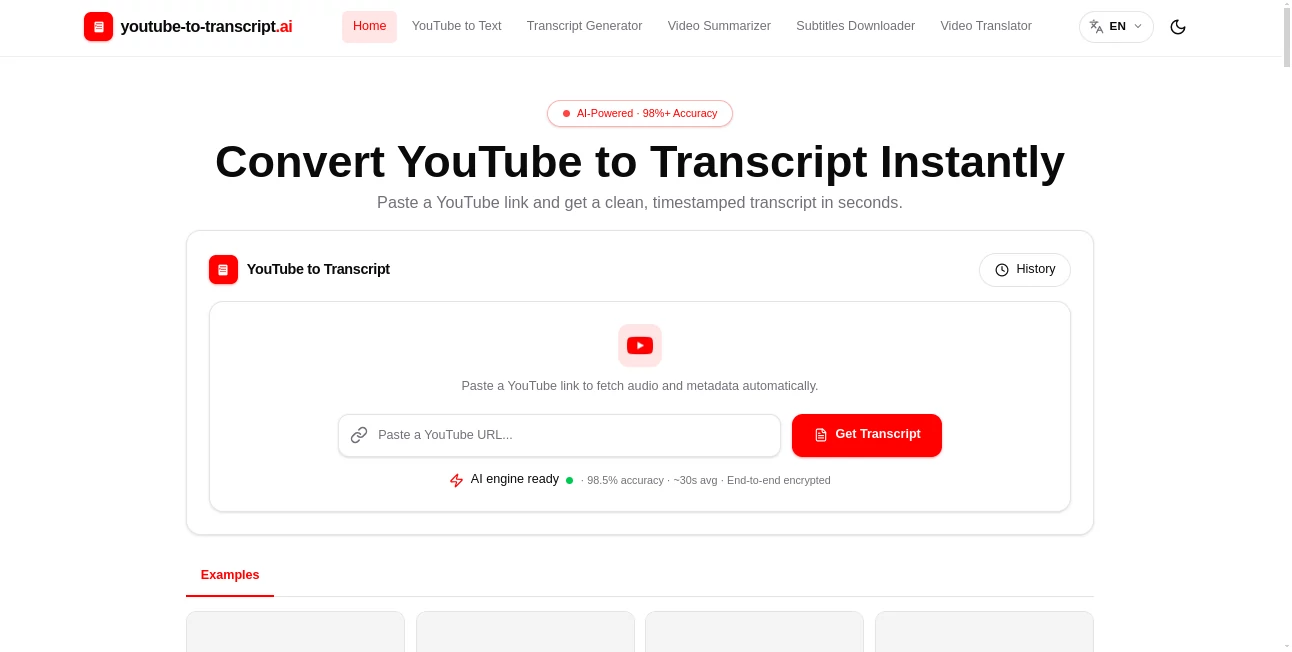
YouTube to Transcript AI is a practical transcription tool designed for anyone who wants to turn spoken content from YouTube videos into clean, searchable text without spending time typing everything manually. Instead of repeatedly pausing and replaying a long video to catch a sentence, users can paste a YouTube link and receive a timestamped transcript in seconds.
The service supports regular YouTube videos, Shorts, and most embedded video formats. It can first retrieve available subtitles and, when captions are not available, use speech recognition to generate a transcript directly from the video's audio. This makes it particularly useful for interviews, lectures, webinars, tutorials, podcasts, press conferences, and other long-form content.
What makes the workflow especially convenient is that the transcript is not simply displayed as a block of text. Users can search through the content, jump to specific moments using timestamps, review important sections, generate summaries, identify speakers, and export the result in several common formats.
Key Features
- Fast YouTube video transcription from a simple video link.
- Timestamped transcripts for easier navigation and verification.
- Automatic use of existing subtitles when they are available.
- AI speech recognition for videos without available captions.
- Support for more than 100 languages.
- Automatic language detection for supported content.
- Speaker labels for conversations, interviews, podcasts, and panels.
- Searchable transcripts for finding specific words or sentences quickly.
- AI-generated summaries and key points.
- Export options including TXT, DOCX, SRT, VTT, and CSV.
- Support for long-form video content.
- Subtitle and content-repurposing workflows from a single transcript.
User Interface
The interface keeps the main task refreshingly simple. There is no complicated setup to work through before getting started. A user copies a YouTube link, places it into the input field, and starts the transcription process.
After processing, the transcript can be reviewed directly, with timestamps helping users understand where each section appears in the original video. The ability to search, highlight, copy, and export the result makes the interface suitable for both occasional users and people who work with video content regularly.
For someone dealing with a one-hour interview, for example, being able to search for a particular phrase instead of manually scrubbing through the entire recording can make a noticeable difference.
Accuracy & Performance
The service advertises transcription accuracy of more than 98%, with the homepage currently showing an average processing time of around 30 seconds. Actual results can naturally vary depending on audio quality, background noise, accents, overlapping speakers, and the clarity of the original recording.
One useful aspect of the system is its fallback approach. When existing YouTube captions are available, they can be retrieved first. If captions are unavailable, speech recognition can be used to create the transcript from the audio instead.
For important quotations, published articles, research, or professional material, it is still sensible to compare the generated text with the original video. Automated transcription is a productivity shortcut, not a replacement for final human verification.
Capabilities
The tool goes beyond basic speech-to-text conversion. Timestamped transcripts make it possible to locate specific moments in long videos, while searchable text turns a video into something much easier to analyze and reference.
Speaker identification is another useful addition. When a recording contains several people, separating speakers makes interviews, roundtable discussions, podcasts, and meetings considerably easier to read.
There are also several export formats available. TXT works well for simple notes, DOCX is convenient for editing, SRT and VTT are suitable for subtitle workflows, while CSV can be useful when transcript data needs to be organized or processed elsewhere.
The summarization feature adds another layer of usefulness. Instead of reading every line of a lengthy transcript, users can generate a shorter overview and identify important ideas or quotes more quickly.
Security & Privacy
Privacy is addressed as part of the service's workflow. The website states that links and transcripts are protected with end-to-end encryption and that users can delete stored content when needed.
That is particularly relevant for professionals who regularly process interviews, educational material, internal presentations, or other recordings. As with any online transcription service, users should still consider the sensitivity of the material they submit and review the provider's privacy terms before processing confidential information.
Use Cases
Students and teachers: Long lectures can be converted into searchable study material. Instead of replaying an entire class to find one explanation, students can search the transcript and jump directly to the relevant timestamp.
Journalists and researchers: Interviews and press conferences often contain valuable quotations buried inside lengthy recordings. A timestamped transcript provides a much faster way to locate and verify those statements.
Content creators: A single long-form video can become the source for blog posts, newsletters, social media content, captions, short clips, and show notes. Having the spoken material in text form makes this repurposing process much easier.
Podcast editors: Editors can use transcripts to identify interesting sections, prepare episode notes, find potential clips, and create subtitles without listening through an entire episode multiple times.
Marketers: Webinars, interviews, product presentations, and competitor content can be converted into searchable text for research and content planning. Key quotes and recurring topics are much easier to identify once the video becomes text.
Language learners: Learners can read along with spoken material, review unfamiliar expressions, and return to precise sections of a video using timestamps.
Businesses: Teams can turn tutorials, recorded presentations, training videos, and other educational material into documents that are easier to review, organize, and reuse.
Pros and Cons
Pros
- Simple link-based transcription workflow.
- Fast processing for many everyday transcription tasks.
- Supports more than 100 languages.
- Works with videos that may not have existing captions by using speech recognition.
- Timestamped transcripts make long videos easier to navigate.
- Speaker labels improve readability for conversations and interviews.
- Multiple export formats support different workflows.
- AI summaries help users quickly understand lengthy content.
- Useful for students, creators, researchers, journalists, and marketers.
Cons
- Transcription quality can depend heavily on the original audio.
- Strong background noise or overlapping speech may affect accuracy.
- Important professional or published quotations should still be manually verified.
- Large-scale users may eventually need higher usage quotas as expanded packages are introduced.
Pricing Plans
The core transcription, translation, and summarization features are currently available for free for everyday use. Users can paste a YouTube link and process content without an upfront payment.
The website also states that expanded quota packages are planned for users who need to process larger volumes of videos or have higher usage requirements. These packages are expected to be introduced in the future, with limited-time offers planned around their release.
For someone who only needs to transcribe lectures, interviews, tutorials, or occasional YouTube videos, the current free access makes the service particularly attractive because there is no need to commit to a paid plan before testing the workflow.
How to Use the Tool
- Copy the URL of a YouTube video, Short, or supported embedded video.
- Paste the link into the transcription input field.
- Start the transcription process.
- Wait while available subtitles are retrieved or speech recognition processes the audio.
- Review the generated transcript and timestamps.
- Search the transcript to find specific words, quotes, or sections.
- Generate a summary when you need a quick overview of the video.
- Copy the text or export it as TXT, DOCX, SRT, VTT, or CSV depending on your next step.
Comparison with Similar Tools
Traditional transcription methods usually require substantially more manual work. Listening to a video while typing everything yourself provides control, but it becomes inefficient as the recording gets longer. Browser extensions can make transcription convenient, but they may offer fewer export options or require additional permissions.
YouTube's built-in transcript feature is useful when the goal is simply to read or copy a short section. However, it is less convenient when users need downloadable files, searchable workflows, summaries, or subtitle-ready formats.
This service sits between those approaches by combining the convenience of an online converter with features normally associated with dedicated transcription software. The ability to obtain TXT, DOCX, SRT, VTT, or CSV files from the same workflow is particularly useful for people who move transcripts between writing, editing, subtitle, and research tools.
For everyday YouTube transcription, the combination of speed, multiple export formats, timestamps, speaker labels, multilingual support, and AI summaries makes it a strong option worth considering.
Conclusion
Turning a video into useful written information should not require repeatedly pressing pause and rewind. This transcription platform offers a straightforward way to make YouTube content searchable, editable, and reusable.
Its biggest strength is the combination of a simple starting point with practical features underneath. A single video can become a timestamped transcript, a short summary, subtitle files, study notes, research material, or the foundation for a new piece of content.
For creators, researchers, students, marketers, journalists, and anyone who regularly works with spoken video, that can save a surprising amount of time. The free access also makes it easy to try the workflow before deciding whether more advanced usage is needed.
Frequently Asked Questions (FAQ)
Is the transcription service free?
Yes. The website currently states that transcription, translation, and summarization features are available for free for everyday use. Expanded quota packages for heavier users are planned for the future.
Can it transcribe a YouTube video without captions?
Yes. When existing captions are unavailable, the service can use AI speech recognition to generate a transcript directly from the video's audio. The final accuracy will depend on factors such as audio quality, background noise, accents, and overlapping speech.
Which transcript formats are available?
The available export formats include TXT, DOCX, SRT, VTT, and CSV. This makes the resulting transcript suitable for plain-text notes, document editing, subtitles, web video workflows, and structured data processing.
Does it support multiple languages?
Yes. The service supports more than 100 languages and can automatically detect the spoken language for supported content. This makes it useful for multilingual videos, language learning, research, and international content workflows.
Can I get timestamps in the transcript?
Yes. Generated transcripts can include timestamps that stay aligned with the video timeline. They are useful when checking quotations, finding specific moments, preparing subtitles, or navigating long recordings.
Can multiple speakers be identified?
Yes. Speaker labels can be displayed for videos containing multiple people. This is particularly helpful for interviews, podcasts, meetings, panel discussions, and roundtable conversations.
Can the transcript be summarized?
Yes. AI-powered summaries can turn lengthy transcripts into shorter overviews and highlight important ideas or key points, making it easier to understand long videos without reading every line.
AI Transcriber , AI Translate , Video , AI Transcription .
These classifications represent its core capabilities and areas of application. For related tools, explore the linked categories above.
YouTube to Transcript AI details
Website unavailable — View Alternatives
Pricing
- Free
Apps
- Web App
Categories

YouTube to Transcript AI Alternatives Product

AutoDub

Video Transl…
WhisperWebUI

livetalktran…

vizstudio

AI Manga Tra…

AI page tran…

Quso AI
Video To Text
