
Zanta
What is Zanta?
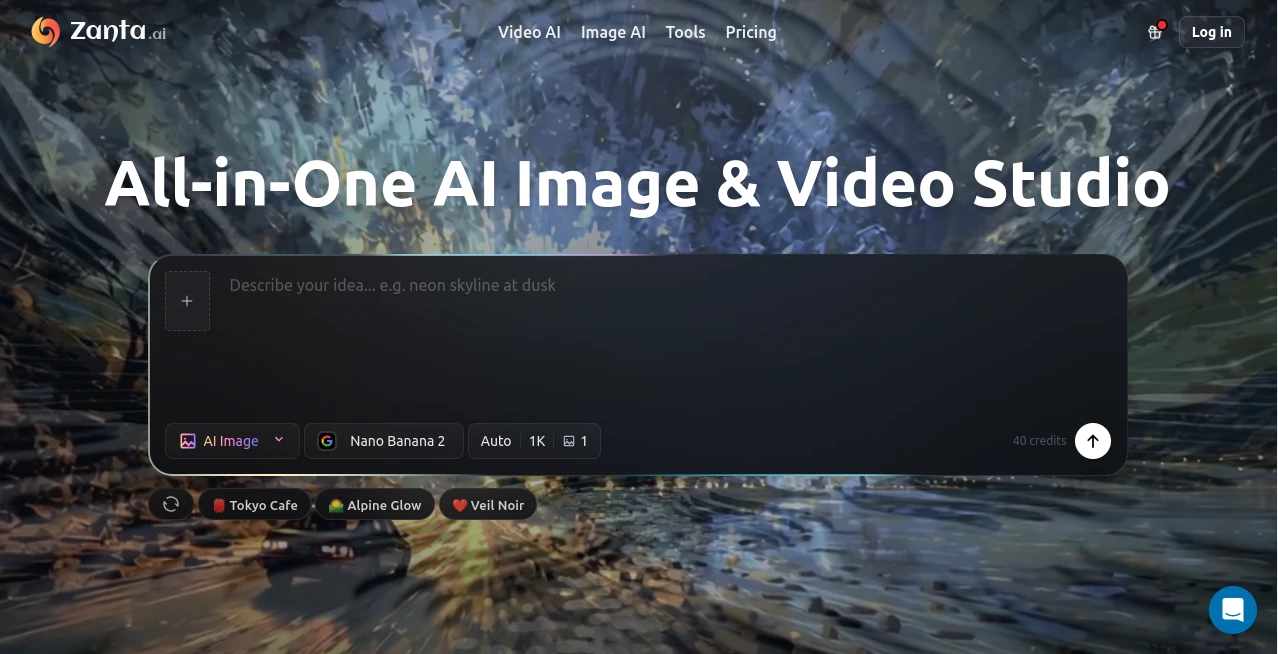
I’ve tried quite a few AI creative tools, but most force you to jump between different platforms depending on whether you need a still image or motion. This one brings everything together in a single, surprisingly smooth browser experience. You can start with a text prompt, upload a reference photo, or combine both, then choose the right model for the job — whether that’s a polished static visual or a cinematic short clip. The first time I generated a full product scene and then turned it into a short video, I realized how much time and mental energy this kind of unified workspace saves.
Introduction
Creating visuals used to mean switching between separate tools for images and video, often losing consistency along the way. Zanta solves that by letting you stay in one place from idea to finished asset. It supports powerful models for both stills and motion, with smart comparison features so you can test different approaches quickly. Whether you’re building marketing assets, product visuals, social content, or just experimenting creatively, it removes the usual friction and keeps your focus on the result instead of the tools. The interface feels thoughtful rather than overwhelming, which is rare in this space.
Key Features
User Interface
The workspace is clean and focused. A prominent prompt area, easy upload for reference images, model selector, and clear settings for aspect ratio and quality. You can generate, compare multiple variations side-by-side, and iterate without losing momentum. Everything stays in one tab, so your creative flow rarely gets interrupted. It’s one of those tools that disappears into the background and lets you concentrate on the idea itself.
Accuracy & Performance
The outputs show strong understanding of both artistic intent and technical quality. Text inside images renders cleanly, faces stay consistent in video, and motion feels natural rather than robotic. Generation times are reasonable, and the ability to compare different models on the same prompt helps you quickly find what works best for each project. In practice, it delivers usable assets faster than piecing together results from multiple separate tools.
Capabilities
You get text-to-image, image-to-image, text-to-video, image-to-video, and hybrid workflows all in one place. It supports a wide range of models (including Nano Banana for detailed stills and strong video options like Veo and Kling). Features like upscaling, editing, and style control give you fine-tuning power without complexity. The platform excels at both creative exploration and practical production needs — from concept art to polished marketing assets.
Security & Privacy
Your prompts and uploaded images are handled securely during generation. The platform follows standard best practices for user data, giving creators confidence when working with client projects or sensitive brand material. Outputs belong to you, and the system is designed to respect creative ownership.
Use Cases
A small brand turns a product photo into multiple lifestyle variations and then into short ad clips without leaving the studio. A content creator generates consistent character scenes for a video series. A designer quickly mocks up campaign visuals in different styles to present to clients. An indie filmmaker prototypes storyboards with motion to test pacing. It fits naturally into solo creative work, agency workflows, and team collaboration where speed and consistency matter.
Pros and Cons
Pros:
- Truly all-in-one — images and video in the same workspace.
- Strong model selection and comparison tools help you pick the best output.
- Clean, fast interface that supports real creative flow.
- Good balance between artistic quality and practical production speed.
- Regular updates with new models keep it competitive.
Cons:
- Higher quality or longer video generations use more credits.
- Some very complex or highly specific artistic directions may still need iteration.
Pricing Plans
It offers a free tier with daily credits so you can test the quality and workflow without commitment. Paid plans provide more credits, faster generation, higher resolutions, and access to premium models. The structure is straightforward and scales with your needs — whether you’re a casual creator or someone generating assets daily.
How to Use Zanta
Open the studio, write your prompt or upload a reference image. Choose the right model for your goal (still or video), adjust settings like aspect ratio, and generate. Compare variations side-by-side, refine the prompt or reference if needed, and download the winner. For video, you can start from text, an image, or both for better control. The process stays fast and iterative, letting you move from idea to polished asset without switching tools.
Comparison with Similar Tools
Many platforms force you to choose between strong image tools or decent video tools. This one combines both effectively in a single environment with good model variety and comparison features. It avoids the fragmentation that slows down most creative workflows while delivering competitive quality across both stills and motion. For creators who need both formats regularly, the unified approach is a noticeable advantage.
Conclusion
Creative work should feel exciting, not exhausting. This platform removes unnecessary friction so you can spend more time on ideas and less time managing tools. Whether you’re building a brand, creating content, or just exploring visual concepts, it gives you a capable, well-organized studio that adapts to your needs. In a crowded AI creative space, its focus on practicality and workflow makes it stand out as a tool worth using regularly.
Frequently Asked Questions (FAQ)
Do I need to download anything?
No — everything runs directly in your browser.
Can I use my own images as starting points?
Yes — image-to-image and hybrid modes work very well with reference photos.
How good is the video quality?
It produces smooth, coherent clips with natural motion, especially when using strong reference images.
Is there a free way to try it?
Yes — daily credits on the free tier let you test both image and video generation.
Who is this best suited for?
Marketers, designers, content creators, and teams that need both still visuals and short video assets quickly.
AI Photo & Image Generator , AI Image to Video , AI Video Generator , AI Text to Video .
These classifications represent its core capabilities and areas of application. For related tools, explore the linked categories above.

Zanta Alternatives Product

Veo 3.2
Veo 4 AI Vid…

BananaFrame
Sora 2 Video

Free GPT IMG

HappyHorse A…

Kling O1

Image3

Seedance 2.0