

















ZeroGen
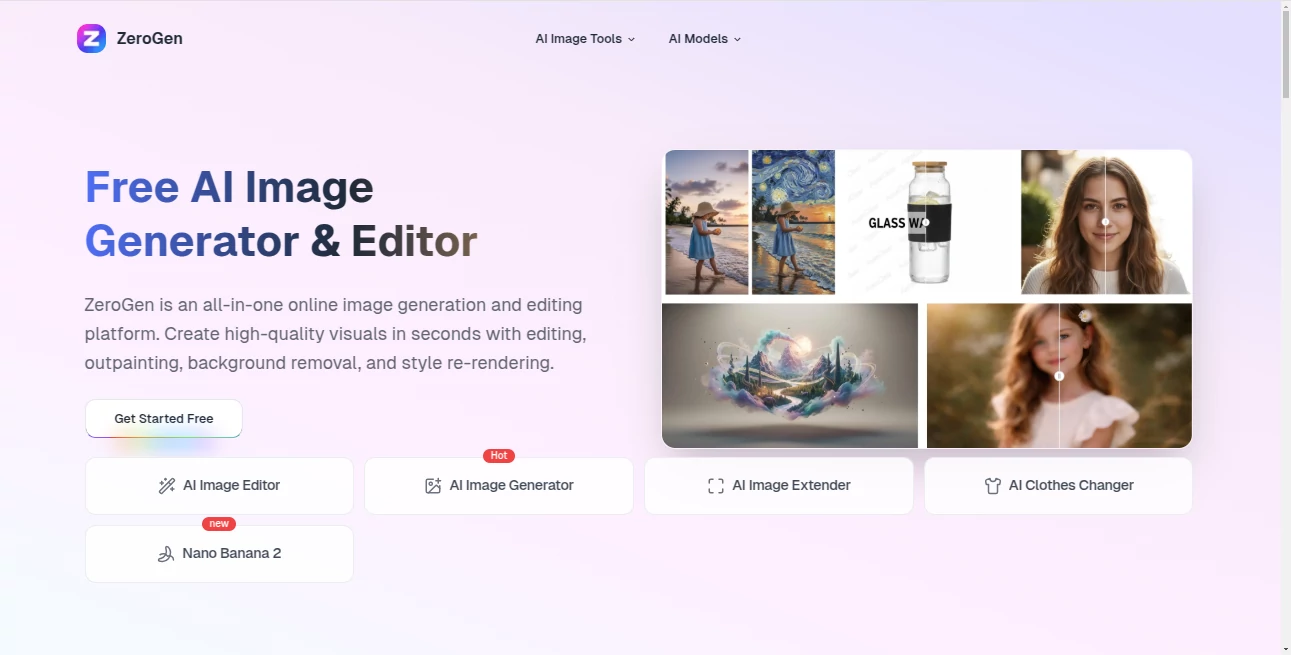
What is ZeroGen?
Let’s be real for a second. You’ve probably been there—juggling three different tabs just to get one decent image ready. One tool for generating the visual, another for removing the background, and a third to extend the canvas because the composition just feels off. It’s exhausting, and it kills your creative flow.
That’s exactly why this platform feels like such a breath of fresh air. Instead of forcing you to hop between multiple subscriptions and clunky interfaces, it brings everything under one roof. Think of it as the Swiss Army knife for modern creators. Whether you need to whip up a product shot from a text prompt, erase a messy backdrop, or expand an image beyond its original borders, you can do it all in seconds without ever leaving the page. No steep learning curves, no hidden hurdles, just pure creative speed.
After spending some time putting it through its paces, it’s hard not to get excited about how much time it actually saves. For anyone running a small business, managing social media, or just experimenting with digital art, this feels like having a full design team right inside your browser.
Key Features
This isn't just another run-of-the-mill image generator. What makes this platform stand out is how it combines generation with heavy-duty editing capabilities. Most tools force you to pick a lane—you either generate or you edit. This one refuses to choose. It gives you the whole playground.
User Interface
The first thing you’ll notice is how uncluttered everything feels. There’s no overwhelming dashboard or endless dropdown menus trying to confuse you. The layout puts the generation box front and center, with editing tools tucked neatly on the side where you actually need them. It’s fast, responsive, and doesn’t lag even when you’re working with high-resolution files. You don’t need to be a tech wizard to figure things out. Honestly, if you can type a sentence and click a button, you’re already ahead of the game.
Accuracy & Performance
Speed is great, but it means nothing if the output looks like a glitchy mess. Fortunately, that’s not an issue here. The rendering happens in real-time, and the results are crisp, coherent, and surprisingly aligned with what you actually asked for. Whether you’re prompting for a realistic product shot or a surreal piece of concept art, the engine understands context well. It doesn't chop off heads or turn hands into weird spaghetti shapes. I tested it with some tricky prompts involving reflections and shadows, and it handled them better than most dedicated generators twice the price.
Capabilities
Let’s talk about the heavy lifting. Beyond just generating images from scratch, you’ve got some serious firepower here. The outpainting feature is a lifesaver when you need to uncrop a vertical shot into a horizontal banner. The background removal tool works instantly—no more messing with the magic wand tool for ten minutes. And the style re-rendering option allows you to take an existing visual and completely change its aesthetic to match different brand guidelines or creative moods. It’s like having a chameleon for your artwork.
Security & Privacy
Nobody wants their work floating around in some data black hole. The platform respects that you own what you make. There’s no fine print about training future models on your private uploads unless you opt in. For businesses handling sensitive product visuals or personal projects you want to keep under wraps, that peace of mind matters. They’ve built it on cloud infrastructure that keeps things secure without compromising on delivery speed.
Use Cases
Who is this actually for? Pretty much anyone who touches visuals on a daily basis. E-commerce store owners can snap a quick photo of a product, remove the background, and generate a clean lifestyle image in under a minute. Social media managers can take an old post graphic and extend it or re-render it to fit a completely new campaign theme. Indie game developers can generate concept art for characters and environments without hiring a full-time illustrator. Even students working on presentations find it useful for whipping up unique diagrams or eye-catching covers. It bridges the gap between "I have an idea" and "I have a visual" faster than you’d expect.
Pros and Cons
Pros:
The biggest win here is the consolidation. You stop paying for three separate subscriptions when one does it all. The speed is addictive—seriously, going back to slower tools feels painful afterward. It’s also incredibly forgiving for beginners; if you mess up a prompt or don't like an edit, starting over takes two seconds. The output quality holds up against industry giants, which is impressive for an all-in-one platform.
Cons:
Nothing’s perfect. While the range of styles is broad, extremely niche artistic movements might require very specific prompt engineering to get right. Also, because it’s a browser-based tool, you’ll need a stable internet connection to work. Offline editing isn't an option here. For the vast majority of users, these are minor inconveniences compared to the time saved.
Pricing Plans
Getting started is risk-free. You get free credits just for signing up, which lets you test the waters and see if the workflow clicks for you. Once you’re hooked, there are scalable options depending on how much you create. For casual users or small teams, the lower tiers are more than generous. For power users churning out hundreds of assets a week, the higher volumes offer better value per credit. It’s structured fairly—no one likes surprise bills or throttled access right in the middle of a project.
How to Use ZeroGen.io
Step one is the easiest: head to the site and register using your email. Once you’re in, you’ll land on the main creation dashboard. To generate something new, just type what you want into the prompt box and hit generate. To edit an existing image, upload your file and choose your weapon—background removal, outpainting, or style transfer. The tools are right there on the canvas, so you can tweak in real time. When you’re happy with the result, download it in your preferred format. The whole process is designed to feel like second nature after just a few minutes of playing around.
Comparison with Similar Tools
Compared to standalone editors like Photoshop, this obviously can't do complex layer masking or video editing—but it wasn't designed to. Compared to other AI generators like Midjourney, the big difference is the integrated editor. Midjourney is fantastic for generating, but if you need to fix a hand or remove an object, you’re exporting to another app. This platform eliminates that step. Against free tools like Canva’s AI suite, the quality of generation and outpainting here feels more robust and less templated. It sits in a sweet spot: powerful enough for pros but accessible enough for beginners who don't know what a "latent diffusion model" is.
Conclusion
It’s rare to find a tool that actually delivers on the promise of "all-in-one" without compromising on quality. This platform does exactly what it says on the tin. It makes creating high-end visuals feel less like work and more like playing around with ideas. You save time, you save money on multiple subscriptions, and you end up with assets that look polished and professional. If you’re tired of complicated workflows or slow render times, give the free credits a spin. Chances are, you’ll wonder how you ever managed without everything being in one place.
Frequently Asked Questions (FAQ)
Do I need to download software to use this?
Nope. It runs entirely in your web browser. No installations, no updates to worry about.
Can I use the images commercially?
Yes. Unless you’re generating something that infringes on a specific trademark (like a exact copy of a Disney character), the images you create are yours to use for business or personal projects.
What happens if I run out of free credits?
You can either wait for a refill (depending on current promotions) or pick a paid plan that fits your usage. The platform is upfront about costs, so no surprises.
Is it good for team collaboration?
Absolutely. Teams working on brand assets can share the same style presets and streamline approvals without exporting files back and forth constantly.
AI Photo & Image Generator , AI Design Assistant , Photo & Image Editor .
These classifications represent its core capabilities and areas of application. For related tools, explore the linked categories above.

ZeroGen Alternatives Product

ai banana
gemini water…
seedream 6
Kirkified AI
SwapAnything

Sovibe AI
MikeSullyToo…
Quant AI

Createimg.ai
