

















Ziddny World
What is Ziddny World?
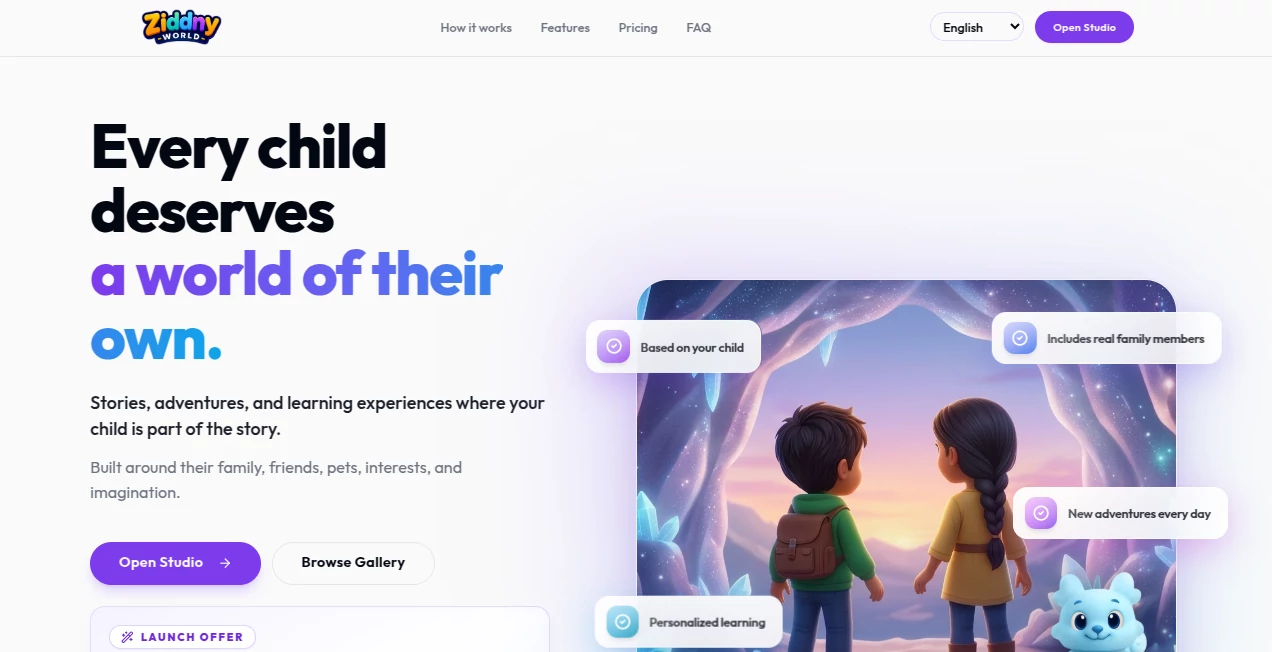
What if a bedtime story could actually be about your child? Instead of reading about a completely unfamiliar character, children can step into adventures built around their own interests, family members, pets, and imagination. That simple idea makes storytelling feel much more personal and gives parents a new way to combine entertainment with learning.
This platform is designed for families with children aged 2–10 and turns personalized storytelling into an interactive experience. Parents can create characters, choose an age and reading level, add favorite people or pets, and shape the topics and tone of upcoming adventures. The result is a growing story world that can change as the child grows.
The approach is particularly appealing for parents who want screen time to feel more meaningful. A story can become a reading exercise, a gentle science lesson, a language-learning activity, or simply a relaxing adventure before bed. Rather than making learning feel like homework, the experience places educational elements naturally inside the story.
Key Features
- Personalized stories built around a child's age, interests, family, friends, and pets
- Optional child photos for more personalized character illustrations
- Interactive adventures where children become part of the story
- Personalized reading practice based on the child's reading level
- Science adventures covering subjects such as planets, dinosaurs, and volcanoes
- Language-learning stories in multiple languages
- Family stories featuring siblings, grandparents, and pets
- Warm read-aloud narration included with completed stories
- Child Mode that hides editorial tools while children are watching or reading
- Controls for story tone, topics, and content guardrails
- Fresh adventures that can be generated as a child's story world develops
- Printable story options and plans for additional story formats
User Interface
The setup is deliberately straightforward. Parents begin by creating characters with information such as a name and age, with a photo being optional. They then describe who the world is for and add people, pets, interests, or other details that matter to the child.
The four-step setup keeps the experience from becoming a complicated creative project. You do not need to write an entire story yourself. Once the basic information is provided, the platform can turn those details into an adventure.
The child-focused experience is also separated from the editing side through Child Mode. This is a thoughtful touch for families who want children to concentrate on the story rather than on controls and settings.
Accuracy & Performance
The strongest part of the experience is not traditional factual accuracy in the way a search engine is judged. Its real strength is how closely stories can follow the information supplied by parents. Age, reading level, interests, characters, themes, and preferred tone can all influence the resulting adventure.
Parents can also review a generated script before the illustrations and narration are produced. That extra checkpoint is useful when the story is being created for a young child and gives adults an opportunity to refine the content before finishing the adventure.
Generation is designed to be quick enough for everyday use. The service says that setting up a child's world takes only a few minutes, after which new stories can be created without requiring parents to plan and write them from scratch.
Capabilities
The platform goes beyond simple bedtime stories. Reading practice can be adapted to a child's level, while science adventures can introduce subjects such as dinosaurs, planets, and volcanoes through imaginative situations. Language-learning stories can also be created in English, Arabic, Japanese, Spanish, Portuguese, Italian, German, Turkish, and French.
Another interesting capability is continuity. The child's universe can grow over time rather than treating every story as an isolated piece of content. A family member introduced in one adventure can become part of future stories, making the experience feel more like an ongoing fictional world.
Stories can also include narration, making them suitable for bedtime or situations where a child wants to listen rather than read. The service currently offers interactive stories and printable PDFs, while story video and coloring-book formats are presented as upcoming features.
Security & Privacy
Child safety is clearly positioned as an important part of the experience. The platform is designed for children between 2 and 10, and story requests and generated scripts are checked against child-safety rules.
Parents remain responsible for choosing the topic, tone, and characters, while Child Mode can hide editing controls during a child's viewing or reading session. Importantly, uploading a child's photo is optional. Parents can create a character using basic information such as a name and age without providing an image.
For families using AI-generated children's content, these controls provide a useful balance between personalization and parental oversight.
Use Cases
- Bedtime: Create calm narrated adventures that fit naturally into a child's nighttime routine.
- Reading practice: Use stories tailored to the child's reading level to make reading more engaging.
- Early education: Introduce science, vocabulary, and other concepts through imaginative adventures.
- Language learning: Practice multiple languages through stories rather than isolated exercises.
- Family storytelling: Bring siblings, grandparents, parents, and pets into personalized adventures.
- Travel and car rides: Use narrated stories as a more engaging form of entertainment while traveling.
- Creative play: Give children a fictional world where their own interests can become part of the adventure.
Pros and Cons
Pros
- Strong personalization around the child's real interests and relationships
- Suitable for both entertainment and educational activities
- Supports multiple languages
- Includes narration with completed stories
- Photo upload is optional
- Parents can review scripts before completing a story
- Child Mode provides a simpler viewing experience for children
- No recurring subscription is required
- Story Passes do not expire
Cons
- The experience is primarily aimed at families with children aged 2–10
- Story creation uses Story Passes, so frequent users may need to purchase additional credits
- Some planned formats, including story video and coloring books, are not yet available
- The best experience requires parents to spend a few minutes setting up the child's story world
Pricing Plans
The service uses a Story Pass system rather than a recurring subscription. This is convenient for parents who do not want another monthly bill and allows credits to remain available until they are needed.
- Continue the Adventure: $8 for 4 Story Passes ($2 per pass)
- Family Pack: $18 for 10 Story Passes ($1.80 per pass)
- World Builder: $34 for 20 Story Passes ($1.70 per pass)
- World Builder Plus: $48 for 30 Story Passes ($1.60 per pass)
A new verified account can currently receive one complimentary Story Pass as part of the launch offer. A Quick Story normally uses one pass and typically includes around 10 pages with custom illustrations, narration, and included touch-ups. A Full Story uses two passes and typically provides around 16 pages with additional scenes, illustrations, narration, and touch-up capacity.
One particularly useful detail is that technical generation failures do not consume touch-ups. Missing images, missing audio, or failed generation are fixed without using the user's available touch-up allowance.
How to Use It
- Create a character by entering the child's name and age. Adding a photo is optional.
- Choose who the personalized world is intended for and provide the relevant details.
- Add family members, friends, pets, interests, and themes that the child enjoys.
- Choose the desired story direction, tone, or learning focus.
- Generate a new adventure and let the platform build the story around those details.
- Review the script when you want additional control before illustrations and narration are created.
- Use touch-ups when you want to refine parts of an existing story.
- Read, listen to, or interact with the finished adventure together.
Comparison with Similar Tools
Many children's storytelling products focus primarily on generating a story from a prompt. This approach takes personalization a step further by creating a continuing world around the child. Instead of repeatedly starting from an empty text box, parents can build a collection of characters, relationships, interests, and themes that can influence future adventures.
Another distinction is the combination of storytelling and learning. Reading practice, science topics, vocabulary, and language learning can be incorporated into adventures without turning the experience into a conventional lesson.
The Story Pass model is also different from many subscription-based children's platforms. Families can purchase credits when they want them, and unused passes do not expire. For someone who only creates stories occasionally, that can be more appealing than paying every month.
Conclusion
Personalization is what makes this children's storytelling experience stand out. A story becomes much more interesting when the main character is a child who recognizes the people, pets, interests, and places appearing around them.
The combination of interactive adventures, educational themes, narration, multiple languages, parental controls, and an ongoing story world gives families plenty of ways to use it beyond a single bedtime session. Parents looking for a creative way to encourage reading, curiosity, imagination, or language practice may find it especially appealing.
It is still a developing product, with additional formats such as story videos and coloring books planned for the future. But the foundation is already compelling: instead of asking children to watch someone else's adventure, it gives them a chance to become part of their own.
Frequently Asked Questions (FAQ)
What age group is it designed for?
The service is designed for children aged 2–10, with stories that can be shaped around the child's age and reading level.
Does a child need to upload a photo?
No. Photos are optional. Parents can create a character using information such as the child's name and age, while a photo can be added when they want the illustrations to resemble the child more closely.
Does it require a monthly subscription?
No. The service uses one-time Story Pass purchases. Passes do not expire and can be used for new stories or additional touch-ups.
What languages are supported?
Stories can be created and narrated in English, Arabic, Japanese, Spanish, Portuguese, Italian, German, Turkish, and French.
Can parents review a story before it is finished?
Yes. Parents can review the generated script before illustrations and narration are produced. They can also use touch-ups to refine an existing story afterward.
Can family members and pets appear in stories?
Yes. Parents can add people, pets, interests, and themes that are meaningful to the child, allowing them to become part of the continuing story world.
What does one Story Pass create?
A Quick Story normally costs one pass and typically includes around 10 pages with custom illustrations, narration, and included touch-ups. Full Stories normally require two passes and typically contain around 16 pages.
AI Life Assistant , AI Parenting , AI Education Assistant , AI Story Writing .
These classifications represent its core capabilities and areas of application. For related tools, explore the linked categories above.

Ziddny World Alternatives Product

Neural Novel…

Google Skills

What The Food

ekstrakt

Period Calcu…

Elispeak

lovetype16

MIBOOKO

Smart Chicke…
