
Zory AI
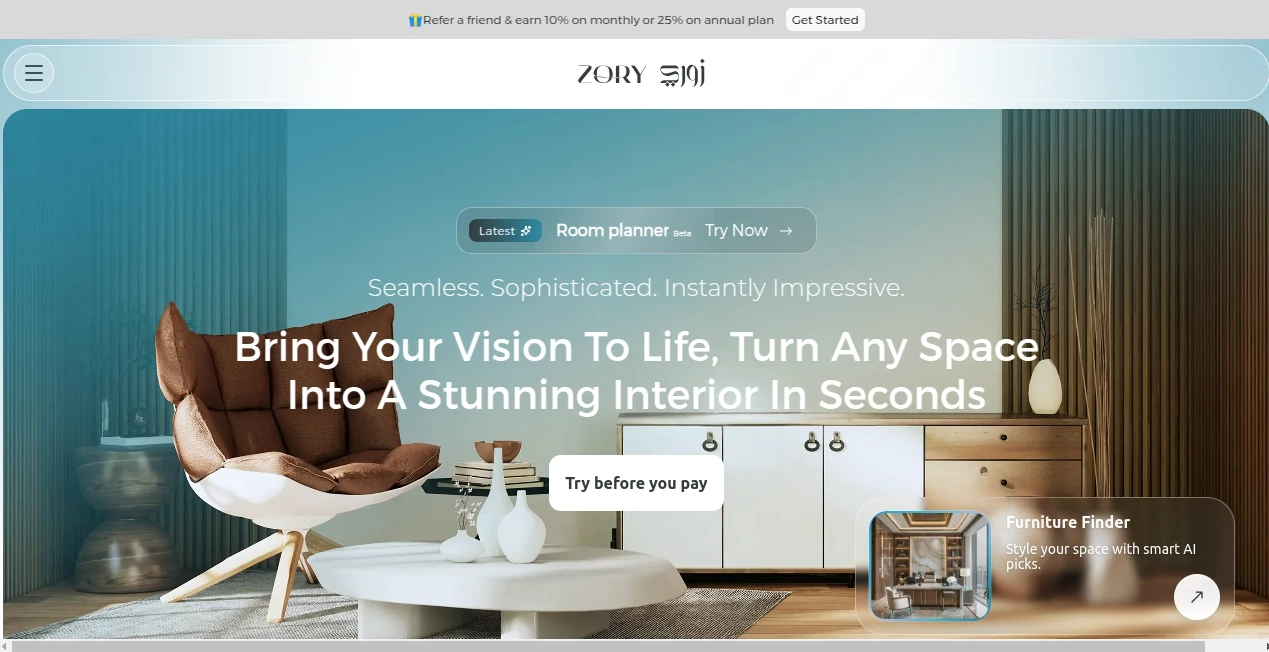
What is Zory AI?
Creating a beautiful interior often requires time, inspiration, and countless hours searching for the right furniture. This intelligent platform transforms that experience by combining artificial intelligence with practical interior design tools that help users visualize, redesign, and furnish their spaces within minutes. Whether you are renovating a living room, planning a new office, or experimenting with different decoration styles, the platform makes professional-quality design accessible to everyone.
Instead of simply generating attractive images, it bridges the gap between visualization and real-world shopping. Users can upload room photos, sketches, or floor plans, generate realistic interior concepts, edit existing spaces, and even receive recommendations for furniture that matches the generated designs. This seamless workflow makes design decisions faster, easier, and far more enjoyable for homeowners, interior designers, furniture retailers, and property developers alike.
Key Features
User Interface
The interface is clean, modern, and welcoming even for beginners. Most tools require only a few clicks, allowing users to upload an image, describe their dream room, or sketch a layout before receiving highly realistic design concepts. Navigation is intuitive, making the creative process feel natural instead of technical.
Accuracy & Performance
The AI produces realistic room visualizations with impressive attention to furniture placement, color harmony, lighting, and decorative styles. Generated concepts appear within seconds, enabling users to compare multiple design ideas quickly before making purchasing or renovation decisions.
Capabilities
- Generate interior designs from text descriptions.
- Convert hand-drawn sketches into realistic room concepts.
- Redesign existing rooms with different decoration styles.
- Edit furniture, colors, and decorative objects using AI.
- Remove furniture automatically for empty room visualization.
- Receive intelligent furniture recommendations.
- Explore a gallery of professionally generated room inspirations.
- Support residential and commercial interior projects.
- Create multiple design variations within minutes.
- Assist furniture retailers by connecting products with customer designs.
Security & Privacy
User-generated content is processed through secure accounts with dedicated dashboards for managing projects. Uploaded room images, sketches, and design files remain associated with individual user accounts, providing an organized and reliable workspace for ongoing design projects.
Use Cases
- Homeowners planning room renovations.
- Interior designers presenting visual concepts to clients.
- Furniture retailers showcasing products inside realistic spaces.
- Real estate developers creating attractive property presentations.
- Architects visualizing early design ideas.
- Office managers redesigning workspaces.
- Students learning interior design concepts.
- Anyone seeking decorating inspiration before purchasing furniture.
Pros and Cons
Pros
- Very easy for beginners to use.
- Produces realistic interior visualizations.
- Multiple AI-powered design tools in one platform.
- Supports text, sketches, floor plans, and room photos.
- Smart furniture discovery simplifies shopping decisions.
- Fast image generation and editing.
- Useful for both personal and professional projects.
Cons
- Internet connection is required for AI processing.
- Some advanced features may require a subscription.
- Generated concepts may still benefit from professional review for large construction projects.
Pricing Plans
The platform offers free access for users who want to explore its capabilities before upgrading. Additional premium plans provide higher usage limits, advanced AI features, and expanded design capabilities for professionals and businesses.
How to Use Zory AI
Begin by creating an account and selecting one of the available design tools. Upload a room photo, floor plan, or sketch, or simply describe the space you want to create. Choose your preferred interior style, colors, or design preferences, then let the AI generate realistic concepts. Review multiple variations, edit furniture or decorative elements, and browse matching product recommendations to complete your project.
Comparison with Similar Tools
Many AI interior design platforms focus solely on image generation. This solution goes several steps further by combining room visualization, intelligent editing, furniture discovery, product recommendations, and shopping integration within a single workflow. The result is a practical ecosystem that supports both creative inspiration and real purchasing decisions, making it valuable for homeowners as well as commercial furniture businesses.
Conclusion
Modern interior design should be inspiring rather than overwhelming. This AI-powered platform delivers exactly that by simplifying visualization, accelerating creative exploration, and helping users confidently transform empty rooms, existing spaces, or rough sketches into realistic interiors. The combination of intelligent design generation, practical editing tools, and furniture recommendations creates a complete experience that saves time while encouraging creativity. Whether designing a dream home or helping clients visualize renovation ideas, it offers an impressive balance of innovation and usability.
Frequently Asked Questions (FAQ)
Can beginners use this platform?
Yes. The interface is designed for users with no previous interior design experience.
Can I upload my own room photos?
Yes. Existing room photos, sketches, and floor plans can all be uploaded for AI-powered redesign.
Does it recommend furniture?
Yes. The platform can suggest furniture and décor items that match generated interior designs.
Is it suitable for professional designers?
Absolutely. Interior designers, retailers, architects, and real estate professionals can all benefit from its visualization tools.
Can I generate multiple design styles?
Yes. Users can experiment with different layouts, colors, furniture arrangements, and decorative themes to compare ideas before making decisions.
AI Photo & Image Generator , AI Design Assistant , AI Design Generator , AI Interior & Room Design .
These classifications represent its core capabilities and areas of application. For related tools, explore the linked categories above.

Zory AI Alternatives Product

Seedream 5.0

Image Text E…

Image By Qwen

ChatGPT Imag…

NanoBanana P…

seedream 6

Album Cover …

SciDraw AI

QR Menu Gene…