3DGenerator.io
What is 3DGenerator.io?
3D Generator is an advanced AI-powered platform that helps creators transform text prompts, images, and multiple reference views into downloadable 3D models. Designed for designers, developers, artists, educators, and businesses, it provides a simple way to create usable 3D assets without spending hours on traditional modeling workflows.
The platform makes 3D creation more accessible by allowing users to start with an idea instead of complex software skills. Whether you want to build game assets, product concepts, printable objects, AR experiences, or creative prototypes, this tool provides a practical workflow from concept to finished 3D model.
With browser-based generation, online preview capabilities, and support for popular 3D formats, it offers a convenient solution for anyone looking to explore AI-assisted 3D design.
Key Features
User Interface
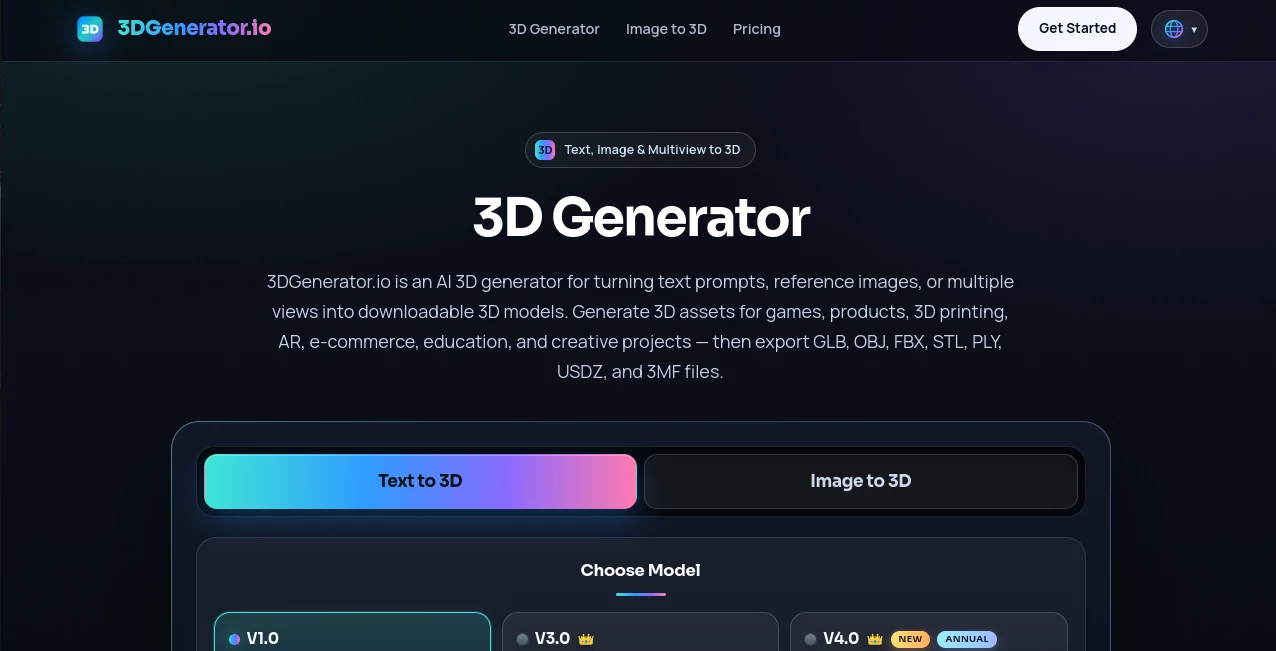
The platform focuses on simplicity and ease of use. The clean browser-based interface allows users to select their preferred creation method, enter a description, upload an image, or provide multiple views of an object.
Users do not need previous experience with professional 3D software. The straightforward workflow helps beginners quickly experiment with ideas while still providing useful features for experienced creators.
Accuracy & Performance
The AI generation system is designed to understand different types of inputs and create 3D models with recognizable shapes, textures, and details. Using multiple views can improve consistency when creating more complex objects.
The online processing approach removes the need for expensive hardware or local rendering setups. Users can generate models directly from their browser and review the results before exporting.
Capabilities
The platform supports several methods for creating 3D content, giving users flexibility depending on their workflow:
- Text to 3D Generation: Create models by describing objects, characters, products, environments, or creative ideas with natural language.
- Image to 3D Generation: Convert reference images, product photos, sketches, or artwork into 3D models.
- Multiview 3D Generation: Use multiple perspectives to achieve better shape understanding and consistency.
- 3D Asset Creation: Generate models suitable for games, product visualization, printing, AR projects, and creative applications.
- Multiple Export Formats: Download models in formats including GLB, OBJ, FBX, STL, PLY, USDZ, and 3MF.
Security & Privacy
The platform provides a controlled online environment where users can manage their generated creations through their account. Uploaded materials and generated assets are processed through the service workflow, helping users organize their projects efficiently.
Users working on commercial projects should review the available licensing options and usage rights based on their subscription plan.
Use Cases
AI-based 3D generation can support many creative and professional workflows. Some common applications include:
- Game Development: Create characters, props, objects, and environment assets for prototypes or production workflows.
- 3D Printing: Generate printable concepts, toys, collectibles, educational models, and prototypes.
- Product Design: Turn early ideas into visual 3D concepts for presentations and design discussions.
- E-commerce: Build interactive product models and engaging visual experiences for online stores.
- AR and VR Projects: Create digital objects for immersive experiences and interactive applications.
- Education: Develop visual learning materials and 3D examples for classrooms and training.
Pros and Cons
Pros
- Creates 3D models from text, images, and multiple views.
- No advanced 3D modeling knowledge required.
- Works directly in the browser without complicated installation.
- Supports widely used 3D export formats.
- Useful for creative, commercial, educational, and development projects.
- Speeds up the early stages of 3D design and prototyping.
Cons
- Complex professional models may still require additional editing.
- Generation quality can depend on the quality of the input prompt or reference images.
- Advanced features may require a paid subscription.
Pricing Plans
The platform offers access through a credit-based system with free usage options and paid plans for users who need more advanced generation features. New users can explore the service with available free credits, while subscription plans provide additional capabilities, higher-quality generation options, and commercial usage benefits.
Pricing availability and included credits may change over time, so users should check the latest plan details before starting larger projects.
How to Use 3D Generator
Creating a 3D model follows a simple process:
- Step 1: Choose your preferred input method: text prompt, image upload, or multiple reference views.
- Step 2: Describe your object or provide the necessary visual references.
- Step 3: Generate the model and wait for the AI processing to complete.
- Step 4: Preview the result online and export it in the format required for your workflow.
Comparison with Similar Tools
Many AI 3D platforms focus on only one generation method, such as text-based creation or image conversion. This platform stands out by combining multiple input options in one workflow.
For creators who frequently switch between ideas, reference images, and existing concepts, having text-to-3D, image-to-3D, and multiview generation together can reduce the need to use several different services.
Compared with traditional modeling software, it provides a faster starting point for creating assets. Professional artists may still refine generated models manually, but beginners and small teams can use it to quickly move from imagination to a usable 3D object.
Conclusion
AI-powered 3D creation is changing how designers, developers, and creators approach digital modeling. This platform provides an approachable way to generate 3D assets from simple descriptions and visual references while supporting practical export options for real projects.
Whether you are building a game prototype, preparing a product concept, exploring 3D printing ideas, or experimenting with creative designs, this tool offers a fast and flexible approach to bringing ideas into three dimensions.
Frequently Asked Questions (FAQ)
Can I create a 3D model from text?
Yes. Users can describe an object, character, product, or environment using text prompts and generate a corresponding 3D model.
Can I convert an image into a 3D model?
Yes. The image-to-3D feature allows users to upload visual references and create a 3D version of the main subject.
What file formats are supported?
Generated models can be exported in formats such as GLB, OBJ, FBX, STL, PLY, USDZ, and 3MF.
Is this tool suitable for beginners?
Yes. The platform is designed for users who want to create 3D models without needing advanced modeling skills.
Can generated models be used commercially?
Commercial usage depends on the user's plan and licensing terms. Paid plans generally provide broader usage rights for eligible generated assets.
AI 3D Model Generator , AI Text to 3D , AI Image to 3D Model .
These classifications represent its core capabilities and areas of application. For related tools, explore the linked categories above.

3DGenerator.io Alternatives Product
AI 3D World

Tripo 3D

ModelsLab
Trilo 3D

Image to Thr…

Meshy AI

The CAD Hub
Luma AI

Happy Oyster