
Adalo AI App Builder
What is Adalo AI App Builder?
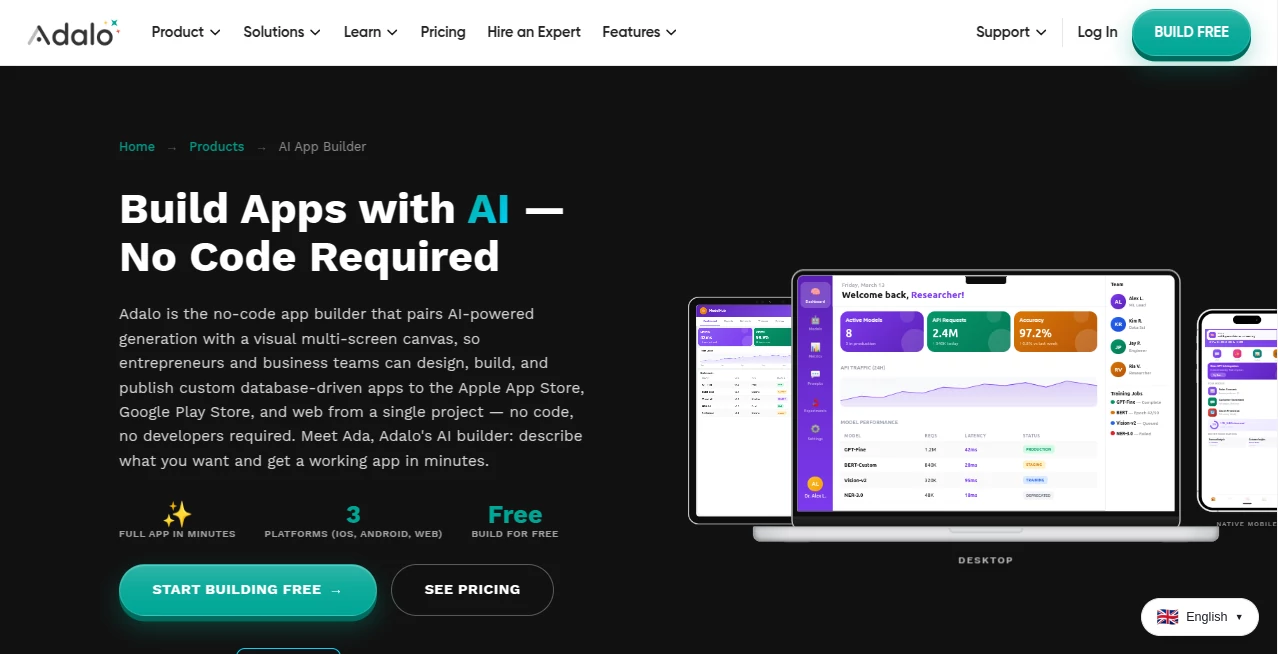
Creating a mobile or web application no longer has to involve months of development, expensive engineering teams, or a steep learning curve. This platform brings together artificial intelligence and a visual no-code builder, allowing entrepreneurs, startups, educators, and businesses to transform an idea into a working application within minutes. By describing an app in plain English, users receive a complete project that includes screens, navigation, database structure, and essential workflows.
Instead of generating code that requires manual maintenance, the platform focuses on visual development. Every screen can be refined through an intuitive editor while AI accelerates repetitive tasks and project setup. Whether the goal is launching an internal business tool, a customer marketplace, a booking platform, or a productivity application, the development experience feels approachable without sacrificing flexibility.
One of the strongest aspects is its ability to publish a single project across web, iOS, and Android. This dramatically reduces development time while helping founders validate ideas faster. For many creators, seeing a fully functional prototype appear after only a few prompts feels surprisingly rewarding and removes much of the frustration normally associated with software development.
Key Features
User Interface
The visual builder is clean, organized, and designed for both beginners and experienced creators. Multiple application screens can be viewed simultaneously, making navigation between pages simple. Drag-and-drop editing allows users to modify layouts visually while AI-generated elements remain fully editable.
- Visual multi-screen canvas
- Drag-and-drop interface
- Natural language app generation
- Easy screen navigation
- Responsive preview for multiple devices
Accuracy & Performance
Artificial intelligence creates complete application structures instead of isolated components. Database relationships, navigation paths, authentication, and common workflows are generated together, reducing manual configuration. Recent platform improvements have also increased performance and scalability for larger applications.
- Fast application generation
- Automatic database creation
- Built-in navigation logic
- Native deployment support
- Optimized infrastructure for growing projects
Capabilities
The platform supports a wide range of business and consumer applications. Users can build CRM systems, marketplaces, booking platforms, fitness apps, educational products, delivery services, community apps, internal business tools, and much more without writing code.
- AI-powered app creation
- Visual editing after generation
- Built-in relational database
- User authentication
- Role-based permissions
- Publishing for iOS, Android, and Web
- API integrations
- Business workflow automation
Security & Privacy
The platform includes secure authentication, permission management, and managed infrastructure that removes much of the operational burden from creators. Organizations building customer-facing or internal applications benefit from centralized data management and controlled user access.
Use Cases
- Launching startup MVPs quickly.
- Creating internal business management systems.
- Building customer portals.
- Developing marketplace applications.
- Creating booking and scheduling platforms.
- Designing educational apps.
- Building fitness and wellness products.
- Rapid prototyping before full-scale development.
- Creating mobile apps for existing spreadsheets or databases.
Pros and Cons
Pros
- Very beginner-friendly interface.
- AI dramatically reduces development time.
- No programming knowledge required.
- Single project supports web and native mobile apps.
- Built-in database and authentication.
- Visual editing provides excellent flexibility.
- Suitable for startups and business teams.
Cons
- Highly specialized applications may still require custom development.
- Complex game development is outside its primary focus.
- Some advanced hardware integrations may require additional solutions.
Pricing Plans
The platform offers a free plan that allows users to begin building applications without payment. Premium plans unlock publishing capabilities, higher resource limits, additional collaboration features, and advanced options suitable for professional teams and businesses.
How to Use Adalo
Start by creating a new project and describing the application you want in natural language. The AI generates screens, navigation, and a database automatically. Review the generated layout, customize components using the visual editor, connect data sources if needed, test the application, and publish it to web, Android, or iOS from the same project.
Comparison with Similar Tools
Unlike many AI-powered app generators that mainly produce code, this platform combines intelligent generation with a complete visual editing experience. Users maintain full control over layouts, workflows, and application logic without managing source code manually. Compared with traditional no-code builders, AI significantly reduces setup time by automatically creating screens, navigation, and databases from simple descriptions, making the overall experience faster and more approachable.
Conclusion
This solution represents an impressive step forward for no-code development. By combining artificial intelligence with an intuitive visual builder, it lowers the barrier to application development while still providing enough flexibility for real business projects. Entrepreneurs can validate ideas faster, companies can build internal tools more efficiently, and creators can focus on solving problems instead of learning programming languages. For anyone looking to build modern web and mobile applications with minimal technical complexity, it offers a practical and enjoyable experience.
Frequently Asked Questions (FAQ)
Can beginners build applications without coding?
Yes. The platform is specifically designed for users with little or no programming experience.
Can applications be published to both Android and iPhone?
Yes. Projects can be published to Android, iOS, and the web from a single development environment.
Does it include a database?
Yes. A built-in relational database is generated automatically and supports user authentication and data management.
Is there a free plan?
Yes. Users can start building applications with the free plan before upgrading for publishing and additional features.
Who benefits the most from this platform?
Startups, entrepreneurs, educators, small businesses, agencies, and teams that want to build applications quickly without traditional software development.
AI App Builder , AI No-Code & Low-Code .
These classifications represent its core capabilities and areas of application. For related tools, explore the linked categories above.
Adalo AI App Builder details
Website unavailable — View Alternatives
Pricing
- Free
Apps
- Web App
Categories

Adalo AI App Builder Alternatives Product

BuildrShip

CatDoes

freellm.net

Verne

Fillout.com

KaneAI

Ultralytics

Emergent

Bolt AI