
ADHD Reading
What is ADHD Reading?
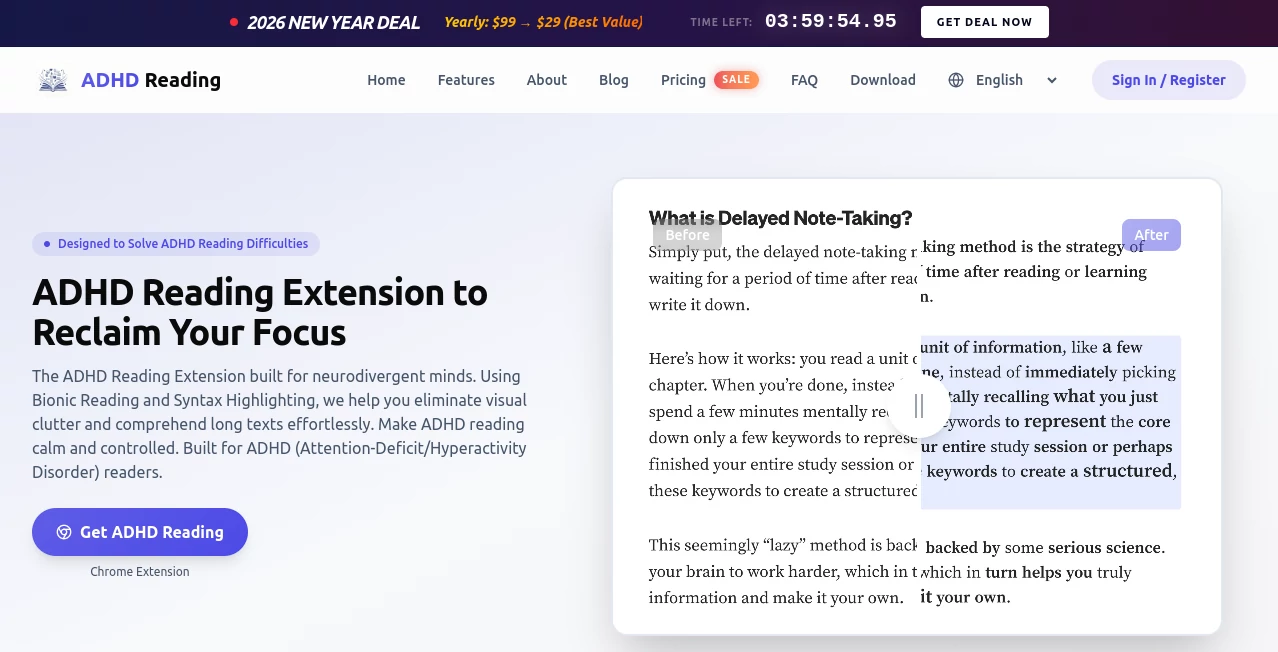
Reading long articles online can feel like trying to drink from a firehose when your brain is wired differently. This Chrome extension changes that experience in a gentle, practical way. It uses smart emphasis techniques and clean typography tweaks to cut through visual noise, helping your eyes and mind stay on the same page. Many people with ADHD describe it as finally being able to read without their thoughts constantly drifting off after every paragraph. It's not a cure, but it feels like a reliable pair of reading glasses for the chaotic modern web.
Introduction
For neurodivergent readers, standard websites are often overwhelming walls of text, ads, and distractions that make focus feel impossible. This extension was built specifically for that reality. It combines proven techniques like Bionic Reading (bolding the start of words to guide eye movement) with semantic highlighting and customizable typography to create a calmer, more controlled reading environment. What makes it special is how natural the adjustments feel—nothing flashy or gimmicky, just thoughtful changes that help you enter a flow state more easily. Users often say it's the first tool that actually makes long-form content on the internet feel manageable again.
Key Features
User Interface
The extension is wonderfully unobtrusive. Click the icon and a clean panel slides out with simple toggles and presets. You can switch between Light, Medium, or Heavy emphasis modes instantly, or dive into fine controls for font size, line spacing, and paragraph width. Everything is designed so you can make quick adjustments without losing your place in the text. It's one of those rare tools that disappears when you don't need it and appears exactly when you do.
Accuracy & Performance
The emphasis algorithms are tuned specifically for ADHD brains—they guide your eyes without overwhelming them. Bionic Reading mode helps you process words faster while reducing backtracking, and semantic highlighting makes key phrases pop without turning the page into a rainbow. It works smoothly across most websites, with minimal impact on browser speed. The presets feel scientifically calibrated; many users report being able to read for much longer stretches before mental fatigue sets in.
Capabilities
It offers multiple emphasis styles (Bionic Reading, Semantic Bold, Semantic Highlight), full typography customization, focus line/paragraph highlighting to block distractions, and support for over 13 languages. You can save custom settings per website so your favorite news site or research platform always looks just right. There's even built-in text-to-speech for when your eyes need a break. It turns chaotic web pages into focused, readable experiences without changing the content itself.
Security & Privacy
Everything runs locally on your device—no data is sent to servers, no reading history is tracked. You don't even need an account to use the core features. That privacy-first approach is especially important for people who value control over their focus tools and personal data.
Use Cases
Students use it to power through dense research papers without constant distractions. Professionals read long reports or contracts with better retention. Researchers tackle academic articles that used to feel impossible. Even casual readers enjoy longer sessions on news sites or blogs without their mind wandering. One user mentioned finally being able to enjoy novels on their browser after years of giving up halfway through chapters.
Pros and Cons
Pros:
- Noticeably reduces visual overwhelm on text-heavy pages.
- Multiple modes and presets let you find what works best for your brain.
- Local processing keeps everything private and fast.
- Works across almost any website with readable text.
- Free core features are genuinely useful.
Cons:
- Some highly dynamic or image-heavy sites may need manual toggling.
- Pro features (advanced customization and per-site memory) require payment.
- Still primarily a desktop Chrome/Edge experience.
Pricing Plans
The free version gives you solid core modes and basic presets—enough for many users to see real improvement. The Pro plan unlocks full typography sliders, per-site settings, focus overlay controls, and priority updates. There's also a generous yearly deal during promotions that makes the upgrade feel like a smart investment for daily readers.
How to Use ADHD Reading
Install the extension from the Chrome Web Store. Once active, click the icon on any article or long text page. Choose a mode (Bionic, Semantic Bold, or Highlight) or start with one of the preset intensities. Fine-tune spacing and font if needed, then enable focus highlighting if distractions are high. The changes happen instantly. You can save settings for that specific site so it automatically looks perfect next time you visit. It's quick to learn and even quicker to benefit from.
Comparison with Similar Tools
Generic readability extensions often just change fonts or add dark mode. This one goes deeper with ADHD-specific emphasis techniques and semantic understanding that actually guide attention rather than just decluttering. While some tools feel gimmicky, the adjustments here feel thoughtful and grounded in how neurodivergent brains process information. It's less about making text "pretty" and more about making it readable for longer periods.
Conclusion
For anyone whose brain fights them when reading online, this extension is a meaningful ally. It doesn't magically fix everything, but it removes enough friction that reading becomes enjoyable again instead of exhausting. In a world full of endless content, having a tool that helps you actually absorb and enjoy it is incredibly valuable. If long articles usually leave you drained or distracted, give it a try—you might finally feel like the web was built for your way of thinking.
Frequently Asked Questions (FAQ)
Does it work on every website?
It works on almost any site with readable text. Highly dynamic or protected pages may need manual toggling.
Is an account required?
No. You can use the core features completely anonymously.
Can I customize it heavily?
Yes—Pro users get full control over typography, colors, and per-site preferences.
Does it collect my reading data?
No. Everything runs locally on your device with zero tracking.
Is there a mobile version?
Currently focused on desktop browsers, with mobile in the roadmap.
AI Productivity Tools , AI Notes Assistant .
These classifications represent its core capabilities and areas of application. For related tools, explore the linked categories above.

ADHD Reading Alternatives Product

broop

Presenti AI

Grok 4

IdeaHunter
gemini omni …

Caspian

Fina Money

Enji

Meet-Ting