


















AgentDesk
What is AgentDesk?
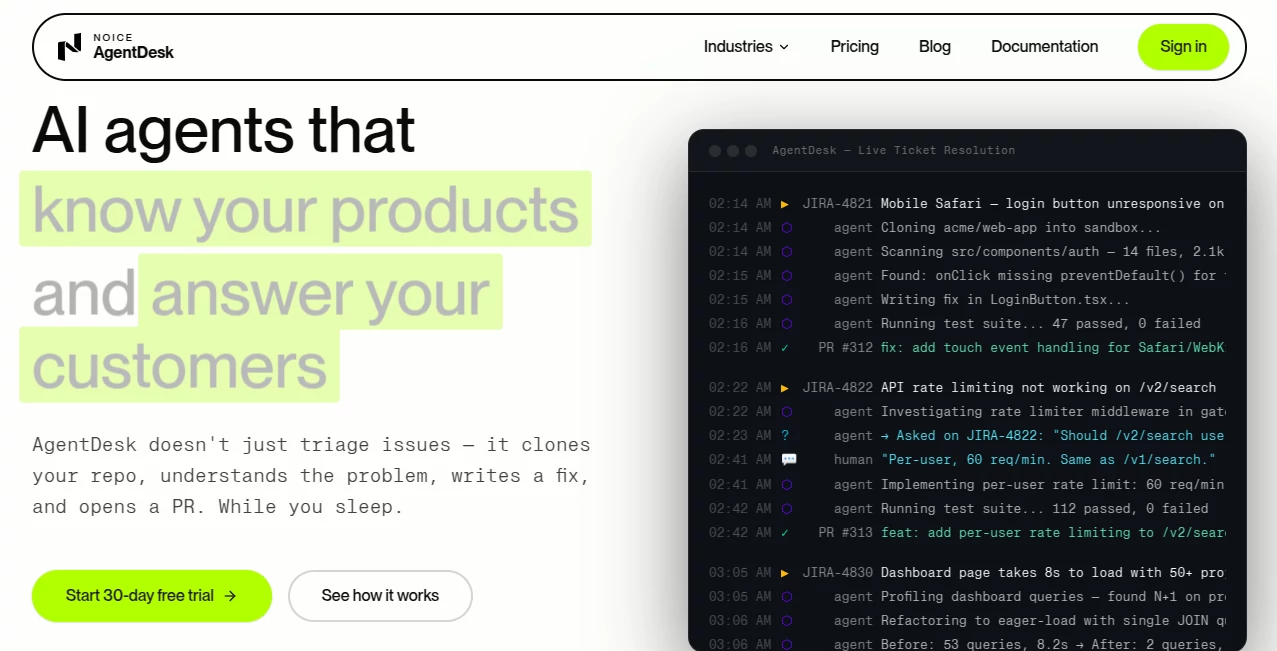
Modern software teams face an endless stream of bug reports, feature requests, and support tickets. Managing that workload manually often slows development and keeps engineers focused on repetitive maintenance instead of building new products. This platform approaches the problem differently by transforming incoming tickets into actionable development tasks that can be investigated, coded, tested, and prepared for review automatically.
Rather than acting as another chatbot that simply suggests possible fixes, the platform works directly with existing development workflows. It connects to repositories, understands project context, investigates issues, generates production-ready code, runs automated tests, and prepares pull requests for developer review. The result is a workflow that helps engineering teams reduce repetitive work while maintaining full control over every code change.
Designed for software companies, digital agencies, DevOps teams, and IT service providers, the solution integrates naturally with popular development tools and allows organizations to automate routine engineering work without replacing existing processes.
Key Features
User Interface
The dashboard is designed around real engineering workflows instead of generic AI conversations. Tickets, repositories, workflows, audit logs, approvals, and integrations are organized into dedicated sections, making navigation straightforward for both developers and engineering managers. Configuration requires minimal effort, allowing teams to connect repositories, ticket systems, cloud environments, and AI providers within minutes.
Accuracy & Performance
Instead of producing speculative answers, the platform investigates the actual codebase inside isolated environments. It clones repositories, analyzes source code, examines logs, executes test suites, and validates fixes before generating pull requests. This practical workflow significantly improves reliability compared to tools that only generate code snippets without verification.
Capabilities
- Automatically analyzes incoming development tickets.
- Connects directly with Git repositories.
- Reads source code to understand project context.
- Investigates bugs before proposing solutions.
- Generates production-ready code changes.
- Runs automated tests before submitting fixes.
- Creates pull requests for developer review.
- Posts updates directly inside ticket systems.
- Supports multiple cloud and deployment environments.
- Works with existing CI/CD pipelines.
- Allows custom workflow routing.
- Supports multiple AI model providers using customer-owned API keys.
Security & Privacy
Security is a major strength of the platform. Every task runs inside isolated sandbox environments that are destroyed after execution. Sensitive credentials are stored securely and only injected during runtime when required. Every action is recorded through detailed audit logs, providing complete transparency for compliance and internal review. Human approval remains available before code reaches production, ensuring organizations maintain full control over deployment decisions.
Use Cases
- Automating repetitive bug fixing.
- Reducing software support backlogs.
- Handling Jira ticket investigations.
- Generating pull requests automatically.
- Supporting DevOps incident response.
- Managing engineering workflows for digital agencies.
- Improving developer productivity.
- Accelerating software maintenance.
- Assisting internal IT support teams.
- Scaling engineering operations without increasing headcount.
Pros and Cons
Pros
- Works directly with existing development workflows.
- Generates verified pull requests instead of simple suggestions.
- Strong integration ecosystem.
- Secure sandbox execution.
- Complete audit trail for every action.
- Flexible approval workflows.
- Supports customer-owned AI API keys.
- Reduces engineering workload significantly.
Cons
- Designed primarily for software engineering teams.
- Requires repository and ticket system integration.
- AI model usage requires external API costs.
- Complex architectural decisions still require human expertise.
Pricing Plans
A 30-day free trial is available without requiring a credit card. Paid plans start with an affordable option for individual developers and scale through Team and Business tiers to enterprise-level deployments. Subscription pricing covers the platform itself, while AI model usage is billed separately through the customer's own API provider, giving organizations complete visibility and control over AI expenses.
How to Use AgentDesk
Begin by connecting your preferred source code repository and ticket management platform. Configure your AI provider credentials, set up project integrations, and define approval rules. Once connected, new tickets can be analyzed automatically. The system investigates the issue, generates a code fix, executes tests, and prepares a pull request for developer review. After validation, engineers simply approve and merge the changes into the main branch.
Comparison with Similar Tools
Many AI coding assistants focus on helping developers write code inside an editor by offering autocomplete suggestions or answering programming questions. This platform goes much further by operating across the complete software support lifecycle. Instead of waiting for developers to request assistance, it actively processes tickets, investigates problems, validates fixes, and prepares review-ready pull requests. That broader automation makes it particularly valuable for organizations managing large engineering backlogs and recurring maintenance tasks.
Conclusion
This solution represents a practical evolution of AI-assisted software development. By combining intelligent ticket analysis, repository awareness, automated testing, secure execution environments, and seamless integration with established engineering tools, it removes much of the repetitive work that slows development teams. Organizations looking to increase engineering efficiency while preserving review processes and security standards will find it a compelling addition to their workflow.
Frequently Asked Questions (FAQ)
Can it work with existing development tools?
Yes. It integrates with popular source control platforms, ticket management systems, cloud services, and deployment environments.
Does it automatically merge code into production?
No. Generated fixes are submitted as pull requests for human review before they can be merged.
Is my source code protected?
Yes. Code is processed inside isolated sandbox environments with detailed audit logging and secure credential management.
Can I use my preferred AI provider?
Yes. Customers can supply their own supported AI API keys, giving them full control over model selection and usage costs.
Who benefits the most from this platform?
Software development teams, SaaS companies, DevOps engineers, managed service providers, and digital agencies handling recurring engineering tickets can gain the greatest productivity improvements.
AI Workflow Management , AI Code Assistant , AI Developer Tools , AI DevOps Assistant .
These classifications represent its core capabilities and areas of application. For related tools, explore the linked categories above.

AgentDesk Alternatives Product

Ito AI

Kimi K2.5

RepoClip

ChatFlowchart

Project Mela

Jujutsu Zero…
Layven

tanship

Somnio
