
AI Dubbing
What is AI Dubbing?
AI Dubbing is a browser-based video localization tool designed to help creators turn spoken video content into other languages without rebuilding the original edit. It combines speech recognition, translation, and generated voice audio in one workflow, making it practical for short videos, tutorials, product demonstrations, interviews, lessons, and social media content.
The platform supports more than 20 languages, including English, Spanish, Hindi, French, German, Japanese, Korean, Arabic, and Portuguese. It can automatically detect the source language, translate the spoken dialogue, and create a new voice track while following the pace and structure of the original recording.
For someone who has ever created a useful video and then realized that a large part of the audience could not understand it, the appeal is obvious. Instead of opening a separate transcription service, translation tool, and audio editor, the complete dubbing process can be handled from the browser.
Key Features
- AI video dubbing in 20+ languages
- Automatic source-language detection
- Speech transcription and translation
- Generated voice audio for translated dialogue
- Source-aware timing for more natural pacing
- Voice-aware dubbing designed to retain recognizable speaker characteristics
- Browser-based video preview
- Downloadable dubbed videos
- Support for MP4, WebM, and MOV files
- Shared credits across dubbing, translation, and voice-generation tools
User Interface
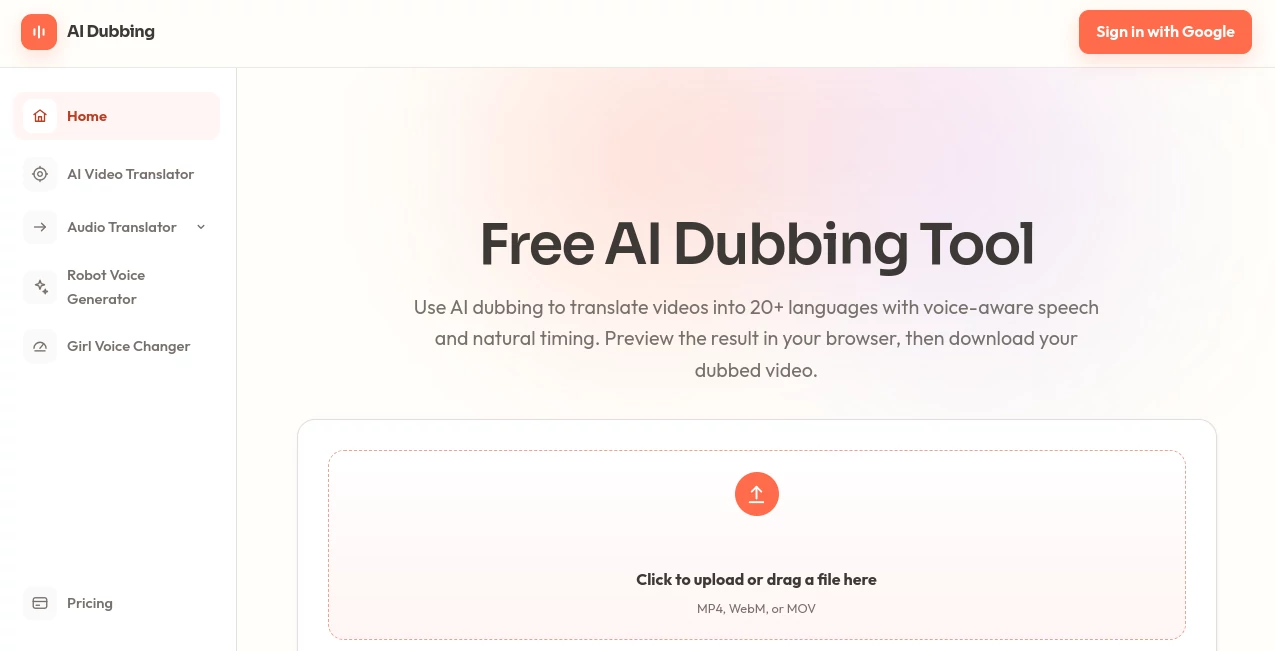
The interface is deliberately straightforward. There is no complicated timeline to learn and no requirement to install desktop editing software. Users can upload a supported video, select the target language, generate the dubbed version, and preview the finished result directly in the browser.
The upload widget accepts MP4, WebM, and MOV files up to 10MB. That makes the service particularly convenient for short-form content where speed matters more than advanced post-production controls. The result can be reviewed before downloading, which is useful when checking pronunciation, pacing, or the way a translated sentence fits a particular scene.
Accuracy & Performance
The quality of an AI dub depends heavily on the original recording, but the workflow is designed to keep translated speech aligned with the source material. Rather than simply producing a translated voice track, the system considers the pace and structure of the original recording.
Clear recordings generally provide better results. Videos with clean speech and limited background noise are especially suitable because the system has an easier time identifying the speaker and separating spoken content from distracting audio.
One practical advantage is the browser preview. Instead of downloading every generated version to discover a problem later, users can listen to and watch the completed dub first. For creators working through several language versions, that small step can save a surprising amount of time.
Capabilities
The core capability is multilingual video localization. A single source video can be used to create versions for different audiences, making the tool useful for creators who want to expand internationally without recording the same message repeatedly.
It is also part of a broader collection of voice and translation utilities. The same credit balance can be used for video dubbing, video translation, audio translation, and AI voice generation, allowing users to move between related media tasks without maintaining separate balances for each workflow.
The service charges 4 credits per second of uploaded video for the dubbing workflow. New accounts receive 20 one-time credits, providing a way to test the process before committing to a paid subscription.
Security & Privacy
Uploaded files are associated with the authenticated user account and stored using unique asset paths. The service also makes an important point about usage rights: users should only upload content they are authorized to process.
For businesses, educators, and creators working with original material, this is an important consideration. Before processing commercially sensitive footage or third-party material, users should review the applicable privacy and terms documentation and make sure they have the necessary rights to use the content.
Use Cases
Social media creators: A creator can take a short English video and prepare a Spanish, Hindi, Portuguese, or other language version for a different audience. This can be especially useful for TikTok-style clips, short educational videos, and promotional posts.
Marketing teams: Product demonstrations and video advertisements can be localized for international campaigns without recording every message from scratch. This is a practical option when a campaign needs several language versions on a tight schedule.
Education and training: Teachers, course creators, and training managers can make lessons available to students or employees who speak different languages while keeping the translated video connected to the original presentation.
Businesses: Internal announcements, presentations, interviews, and training updates can be adapted for multilingual teams. Short video messages are often easier to localize than entire production projects.
Independent filmmakers: Short scenes, interviews, and experimental projects can be tested with audiences in other languages without rebuilding the entire video timeline.
Pros and Cons
Pros
- Supports more than 20 target languages
- Simple upload-to-download workflow
- Automatic source-language detection
- Voice-aware dubbing helps retain speaker characteristics
- Timing follows the structure of the original recording
- Results can be previewed before downloading
- Free credits are available for new accounts
- Credits can be shared across related audio and video tools
Cons
- The upload widget currently limits videos to 10MB
- The best results depend on clear source audio
- Unused monthly subscription credits do not roll over
- Advanced professional video-editing controls are outside the main workflow
- Long-form production projects may require a larger credit allowance
Pricing Plans
The pricing system uses monthly credits rather than a traditional unlimited subscription. The Standard plan costs $9 per month and includes 400 credits. The Pro plan costs $29 per month and provides 1,500 credits, while the Premium plan costs $99 per month with 5,000 credits.
All three plans use the same shared credit balance across AI dubbing, video translation, audio translation, and AI voice generation. This is useful for users who need several related tools rather than dubbing alone.
- Standard: $9/month with 400 credits
- Pro: $29/month with 1,500 credits
- Premium: $99/month with 5,000 credits
Subscriptions are billed monthly, and the credit allowance refreshes at the next billing renewal. Unused monthly credits do not carry over into the following billing period.
How to Use the Tool
Getting started is relatively simple and does not require a separate video editor.
- Upload a short MP4, WebM, or MOV video up to 10MB.
- Allow the system to detect the original language or select the appropriate source language.
- Choose the language for the new audience.
- Start the dubbing process.
- Wait for the translated voice track and video to be generated.
- Preview the completed version in the browser.
- Download the dubbed video when the result looks right.
A useful approach is to test a short, clean clip first. This gives you a quick idea of how the translated speech sounds before using more credits on a larger batch of content.
Comparison with Similar Tools
Many AI video localization services focus on a broad collection of editing and production features. This platform takes a more focused approach: upload a clip, select a language, generate the dub, review it, and download the result.
That simplicity can be an advantage for users who do not need a complete professional video-editing suite. Its combination of video dubbing, automatic language detection, source-aware timing, and voice-aware generation makes it particularly suitable for creators and teams whose main objective is multilingual speech rather than complex visual editing.
The credit model also provides flexibility for users who need more than one type of audio workflow. Instead of keeping separate balances for video translation, audio translation, and voice generation, the available credits can be used across these related tools.
Conclusion
For creators and organizations trying to reach audiences in different languages, AI dubbing can remove one of the most time-consuming parts of video localization. The workflow here keeps things focused: upload a short video, select the target language, generate the translated speech, review the result, and download the finished version.
Support for 20+ languages, source-aware timing, voice-aware generation, browser previews, and a straightforward credit system make it a compelling option for short-form localization. It is especially well suited to social videos, product demonstrations, educational material, interviews, and internal communications where producing separate recordings for every language would be impractical.
The 20 free one-time credits available to new accounts also make experimentation easy. For users who regularly produce multilingual content, the paid plans provide progressively larger monthly credit allowances and access to the wider collection of related voice and translation workflows.
Frequently Asked Questions (FAQ)
What is AI video dubbing?
AI video dubbing uses speech recognition, translation, and synthesized speech to replace or recreate spoken dialogue in another language while attempting to preserve the timing and characteristics of the original speaker.
How many languages are supported?
The service supports more than 20 languages, including English, Spanish, Hindi, French, German, Japanese, Korean, Arabic, and Portuguese.
Can I try the dubbing workflow for free?
Yes. New accounts receive 20 one-time credits, allowing users to test the workflow before purchasing a monthly credit plan.
What video formats are supported?
The upload widget accepts MP4, WebM, and MOV files, with a current upload limit of 10MB.
Does the translated version keep the original speaker's voice?
The dubbing system is designed to preserve recognizable characteristics of the source speaker rather than simply replacing the dialogue with one generic narrator. The final result can vary depending on recording quality, background noise, and the original speech.
How much does video dubbing cost?
The dubbing workflow uses 4 credits per second of uploaded video. Monthly plans start at $9 for 400 credits, with larger Pro and Premium options available.
Can I preview the dubbed video before downloading it?
Yes. Once generation is complete, the result can be previewed directly in the browser before downloading the finished video.
Do monthly credits roll over?
No. Subscription credits reset at each monthly billing renewal, and unused credits do not roll over to the next billing period.
Can the same credits be used for other tools?
Yes. The monthly credit balance can also be used for video translation, audio translation, and AI voice generation available through the platform.
What type of videos work best?
Short videos with clear speech and limited background noise are a strong fit. Clean source audio gives the speech-recognition and voice-generation systems better material to work with.
AI Video to Video , AI Translate , AI Speech Recognition , AI Speech Synthesis .
These classifications represent its core capabilities and areas of application. For related tools, explore the linked categories above.

AI Dubbing Alternatives Product

Speechara

Maestra
Artaivo

Translators …

Gpt Realtime…

minimax H3

Qwen3 TTS

ModelsLab

AI page tran…