


















Aificient Studio
What is Aificient Studio?
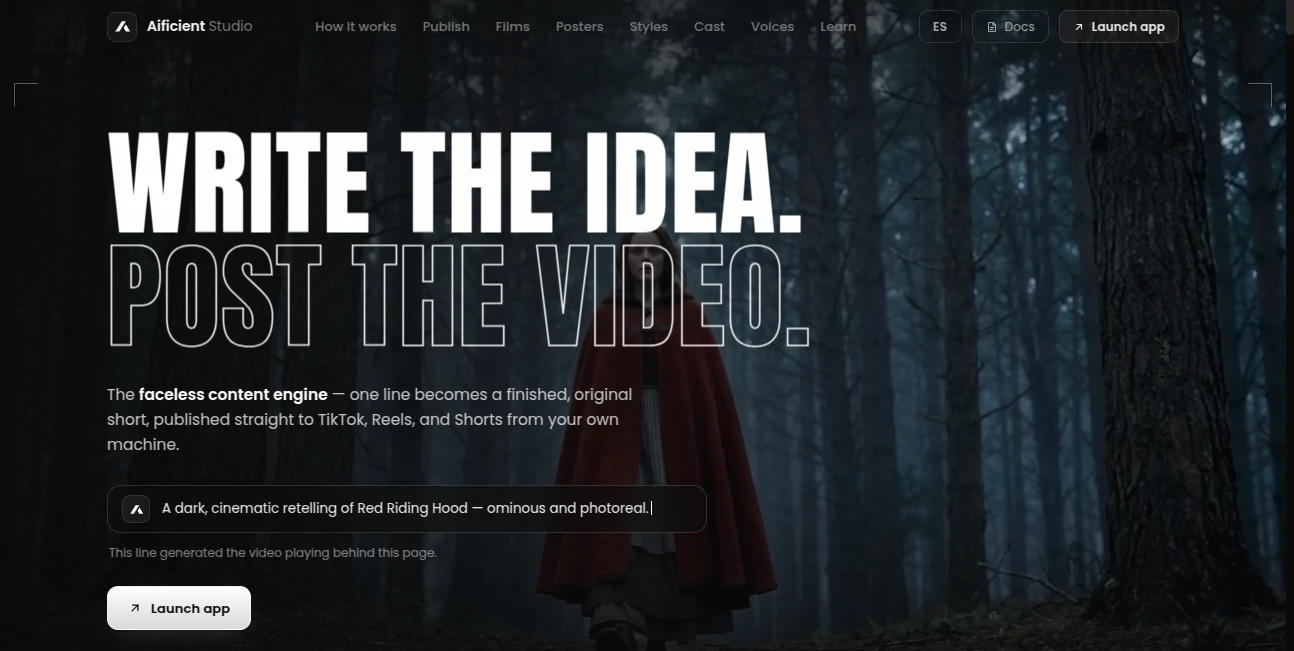
Aificient Studio is a faceless video creation engine that turns a simple written idea into a finished short-form video. Instead of jumping between a script writer, image generator, voice tool, video editor, captioning software, and social media scheduler, creators can handle the entire process in one place.
The workflow starts with a single line of text. The system develops it into a structured concept and script, divides the story into scenes, generates visuals and reusable characters, adds narration and sound effects, creates styled captions, and assembles everything into a finished video.
It is particularly interesting for creators who want to build faceless channels for TikTok, Instagram Reels, or YouTube Shorts without spending hours manually assembling every post.
Key Features
- Turns a written idea into a complete short-form video.
- Automatically structures concepts and scripts into cinematic scenes.
- Generates scene images and reusable characters.
- Adds narration, sound effects, and word-level styled captions.
- Supports direct publishing to TikTok, Instagram Reels, and YouTube Shorts.
- Allows multiple TikTok accounts to be connected.
- Supports scheduled publishing as well as immediate posting.
- Offers nine visual styles for transforming the same scene.
- Allows users to turn a real person's photo into a reusable stylized character.
- Can render using the user's own GPU or an on-demand NVIDIA H100.
User Interface
The experience is built around a straightforward creative workflow rather than a collection of disconnected tools. Users can choose between Concept mode when they already know what they want to create and Brainstorm mode when they want ideas generated before production begins.
The process remains visual as the project develops. A creator can start with one sentence, review the resulting concept and scenes, and then move toward the finished video without having to manually construct every production stage.
For someone producing several short videos a week, this approach can remove a surprising amount of repetitive work. The desktop versions for Windows and macOS also make the workflow practical for creators who prefer working outside a browser.
Accuracy & Performance
The platform is designed around automated production rather than simple text-to-video generation. The AI first creates a structured concept and breaks it into scenes before those scenes are rendered. This gives creators more control over the progression of a story and helps turn a short idea into something that feels like an actual production.
Rendering can take place on a local GPU or through an on-demand NVIDIA H100 for demanding scenes. Compute is billed by the second, while multiple renders can be processed in parallel. The platform states that a minute of generated video can cost around $0.18 when using its GPU-based workflow, although the final cost depends on the resources used.
Capabilities
The visual flexibility is one of the strongest parts of the platform. A single scene can be reimagined using nine different styles, including 3D animation, classic cartoon, Japanese anime and Ghibli-inspired visuals, retro pixel art, cinematic realism, comic and manga, watercolor, low-poly graphics, and isometric animation.
Character consistency is another useful feature. Users can upload a photo and turn the person into a stylized recurring character. That character can then appear across multiple videos with different costumes, settings, or visual worlds. For a faceless channel, this provides a recognizable identity without requiring the creator to appear on camera.
Voice narration is generated for individual scenes, with male and female voice options available. Word-level captions are also incorporated directly into the final video, making the finished content better suited to short-form social platforms.
Security & Privacy
The publishing workflow takes an unusual approach to account privacy. Social publishing operates through the creator's own signed-in session, meaning platform passwords and login credentials are not sent to the service's servers.
This is particularly relevant for creators managing multiple social accounts. Videos can be published to connected accounts while the actual platform session remains on the user's own machine.
As with any service handling connected social accounts or uploaded media, creators should still review the current privacy and terms documentation before using the platform for sensitive or confidential material.
Use Cases
Faceless content channels: Creators can produce recurring video series without recording themselves on camera. Reusable characters and consistent visual styles can help give a channel its own identity.
TikTok content: The built-in publishing workflow is well suited to creators who want to generate, caption, schedule, and publish short videos without constantly switching between applications.
Instagram Reels and YouTube Shorts: The same production workflow can be used to create vertical short-form content for multiple platforms, making it easier to repurpose an idea across different audiences.
Storytelling: The scene-based workflow works particularly well for fictional stories, animated concepts, mini thrillers, visual narratives, and other formats where a sequence of scenes matters.
Social media experimentation: The low rendering cost can make it practical to test different concepts, hooks, visual styles, and characters before investing heavily in a particular content direction.
Pros and Cons
Pros:
- Converts a simple idea into a complete video production workflow.
- Combines scripting, visuals, narration, sound, captions, and assembly.
- Strong support for faceless content creation.
- Reusable characters can help maintain visual identity between videos.
- Nine distinct visual styles provide plenty of room for experimentation.
- Direct publishing supports TikTok, Instagram Reels, and YouTube Shorts.
- Multiple TikTok accounts can be managed from the same composer.
- Local GPU rendering is available for users who have suitable hardware.
- The platform is free to try.
Cons:
- Users looking for highly detailed manual video editing may still want a traditional editor alongside it.
- Advanced rendering depends on available GPU resources.
- Automated creative decisions may require review and adjustment for brand-sensitive content.
- Costs can vary depending on rendering time and hardware usage.
Pricing Plans
The platform is free to try, while video generation uses compute resources that are billed according to usage. The service states that a minute of generated video can cost less than $0.20, with an example cost of approximately $0.18 when using its GPU workflow.
Users do not necessarily need to own a graphics card. Production can run on a local GPU or through an on-demand NVIDIA H100 for heavier scenes, with compute charged by the second.
How to Use Aificient Studio
Start by entering a single idea for the video you want to create. If the concept is already clear, use the Concept workflow. If you are still exploring possibilities, Brainstorm can generate options before production begins.
The system then develops the idea into a structured concept and script, splitting it into individual cinematic scenes. Those scenes are rendered with generated visuals, while narration, sound effects, and styled captions are added during production.
Once the final video is ready, you can choose where to publish it. TikTok users can select connected accounts, create a caption or generate one based on a saved tone, add a trending sound when appropriate, choose the cover frame, and publish immediately or schedule the post.
For creators working across multiple channels, the ability to keep several accounts connected can make the publishing stage considerably more convenient.
Comparison with Similar Tools
Many AI video platforms focus primarily on generating footage from a text prompt. This platform takes a broader approach by treating video creation as a complete content pipeline.
Its main distinction is the combination of concept development, scene generation, recurring characters, narration, sound effects, captions, rendering, and social publishing. That makes it particularly appealing for creators who care about producing a steady stream of short-form posts rather than generating an isolated AI clip.
The local rendering option is also notable. Instead of making every user dependent on a cloud-only workflow, creators with suitable hardware can use their own GPU, while users without one can rent GPU capacity when needed.
Conclusion
For creators building faceless social media channels, the biggest challenge is often not coming up with one good video. It is producing the next twenty without turning the process into a full-time editing job. This platform is designed around that exact problem.
Its strongest advantage is the way several normally separate production steps are connected. A short idea can become a structured story, a collection of scenes, a narrated video with captions, and eventually a published social post. Reusable characters and multiple visual styles add another layer of consistency that can be valuable for channels built around recurring formats.
The result is a practical option for creators who want to experiment with AI-generated short-form content while keeping production costs and repetitive editing under control.
Frequently Asked Questions (FAQ)
What does this AI video tool do?
It transforms a written idea into a finished video by generating the concept and script, creating scenes and characters, adding narration and sound effects, applying captions, and assembling the final cut.
Can I create faceless videos?
Yes. The platform is specifically designed for faceless content production and includes reusable characters that can appear across multiple videos.
Which social platforms are supported?
Videos can be published to TikTok, Instagram Reels, and YouTube Shorts.
Can I schedule TikTok posts?
Yes. Users can connect multiple TikTok accounts and schedule posts for later publication.
Do I need an NVIDIA GPU?
No. You can render using your own GPU or use an on-demand NVIDIA H100 for heavier scenes.
How much does AI video generation cost?
The service is free to try. The platform states that a minute of generated video can cost about $0.18 under its GPU-based workflow, with compute billed by the second.
How many visual styles are available?
There are nine one-click styles, including 3D animation, classic cartoon, anime and Ghibli-inspired visuals, pixel art, cinematic realism, comic and manga, watercolor, low-poly, and isometric animation.
Can I use a real person as a recurring character?
Yes. You can upload a photo and turn the person into a stylized reusable character that can be included in subsequent videos.
Does the platform store my TikTok password?
The publishing system operates through the user's own signed-in session on their machine, so platform passwords and login credentials are not sent to the service's servers.
Is it available on desktop?
Yes. In addition to the browser-based experience, desktop applications are available for Windows and macOS.
AI Animated Video , AI Tiktok Assistant , AI Video Generator , AI Short Clips Generator .
These classifications represent its core capabilities and areas of application. For related tools, explore the linked categories above.
Aificient Studio details
Website unavailable — View Alternatives
Pricing
- Freemium
Apps
- Web App
Categories

Aificient Studio Alternatives Product

MaxArt AI

Faceless Ree…

ltx 2.3

veo 4

ViewMax Stud…

Veo 3

Motion Contr…

AiSora

Image 2 AI
