
Garden AI
What is Garden AI?
Planning a garden can be surprisingly difficult. You may have a clear idea of the atmosphere you want, yet still struggle to picture how different plants, paths, patios, or decorative elements will work together in the actual space. AI Garden Design takes a more visual approach by turning a photo of your yard into a range of possible landscape concepts.
The process is straightforward: upload a photo of your outdoor space, choose a preferred garden style, add any special requirements, and let the system create a new visual concept. This makes it useful for homeowners who want inspiration before spending money on landscaping, as well as designers and property professionals who need quick concepts to present.
What makes the experience particularly appealing is the variety of styles available. A small urban backyard can be explored as a Japanese Zen garden, while a plain suburban space can be reimagined as an English cottage garden or a clean modern outdoor area. The result is less about guessing what a finished project might look like and more about seeing several possibilities before making a decision.
Key Features
- Upload existing garden photos in JPG, PNG, or WEBP format.
- Generate landscape concepts based on the uploaded space.
- Explore a wide selection of garden and landscape styles.
- Create realistic visualizations before beginning physical work.
- Get plant identification and complementary plant recommendations.
- Receive plant lists and placement guidance with generated designs.
- Explore designs from different viewing perspectives.
- Refine concepts by providing feedback and requesting changes.
- Generate designs for different types of outdoor spaces, including patios and urban backyards.
- Use generated designs for commercial purposes under the available credit plans.
User Interface
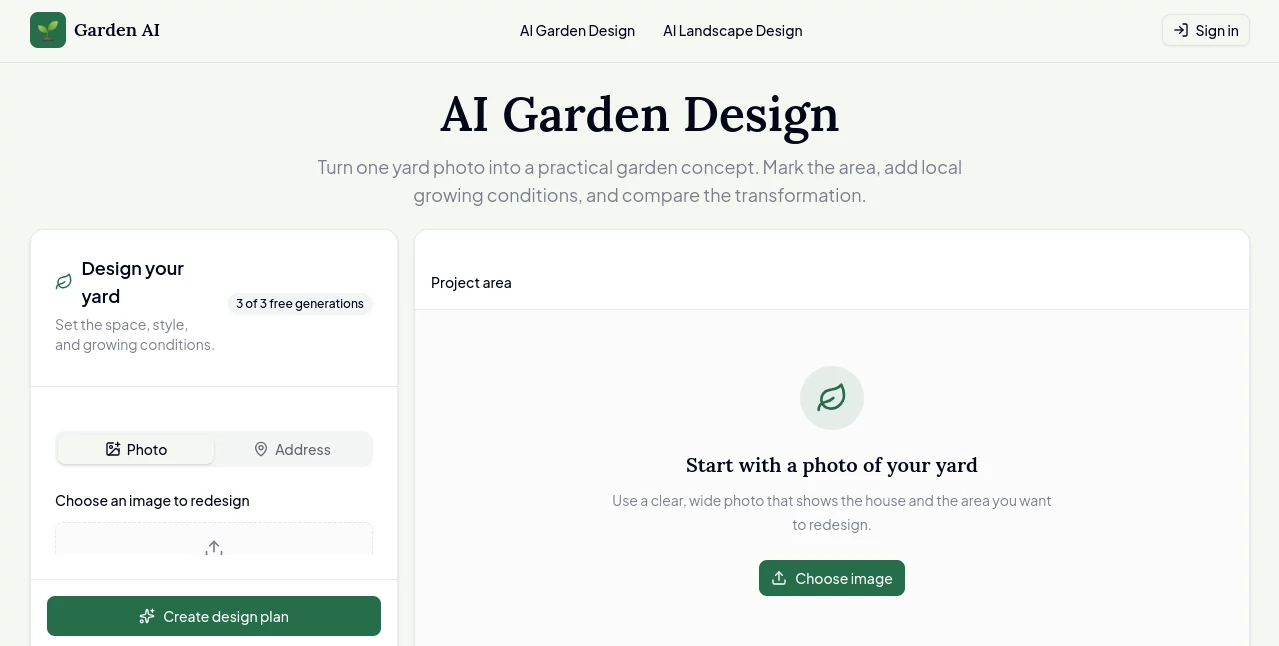
The interface keeps the main workflow pleasantly simple. Instead of navigating through a complicated collection of landscape-design controls, users start with the most important part of the project: their own garden photo. The upload area supports JPG, PNG, and WEBP images up to 5MB.
After uploading an image, users can select a garden style and describe special elements they would like to see. This approach is particularly friendly to people who have never used professional landscape software. You do not need to understand CAD tools or complicated landscaping terminology to get started.
The before-and-after examples on the platform also make the concept easy to understand. Seeing an ordinary patio or backyard transformed into a styled outdoor environment gives users a useful reference for what they can achieve.
Accuracy & Performance
The system is designed to produce a visual interpretation of an existing outdoor area rather than a construction-ready architectural plan. Its strength is therefore in visualization and concept development. The generated images can help users understand proportions, atmosphere, planting ideas, and the overall direction of a project before committing to changes.
The platform states that designs can be generated in around two minutes, making it practical for exploring several ideas during one planning session. For the best results, users are encouraged to provide clear photos in good lighting, ideally from several angles. The service recommends three to five photos when possible, although one suitable image can also be used.
It is worth remembering that an AI visualization is still a concept. Actual plant growth, soil conditions, drainage, local regulations, construction requirements, and seasonal changes should be considered separately before carrying out major landscaping work.
Capabilities
One of the strongest aspects of the platform is its range of design directions. Users can experiment with styles such as English Cottage, Modern Minimalist, Mediterranean, Japanese Zen, Tropical Paradise, French Formal, Coastal, Woodland, Desert/Xeriscape, Prairie, Italian Renaissance, Courtyard, Rock Garden, Scandinavian, and several other approaches.
The system can also work beyond simple decorative changes. Its features include plant identification and recommendations, plant lists, placement guidance, and multiple viewpoints such as ground-level and bird's-eye perspectives. This can make the generated concept more useful when discussing ideas with a landscaper or comparing several possible layouts.
Customization is another practical feature. If the first result is close but not quite right, users can give feedback such as requesting additional color or removing an unwanted element and then generate another version. That iterative process feels much more useful than accepting a single automatically generated image.
Security & Privacy
Because the service works with uploaded photographs, users should consider the type of information visible in their garden images. A good practice is to avoid including unnecessary personal documents, identifying information, or other sensitive material in photographs uploaded for design purposes.
The platform provides dedicated privacy and terms pages, but users should review those documents for the latest information about image handling, account data, and other privacy practices before uploading material they consider sensitive.
Use Cases
For homeowners, the most obvious use is planning a backyard makeover. Instead of trying to imagine a new layout from a blank page, they can start with the space they already have and explore several visual directions.
It is also useful for people preparing to renovate a patio. A cluttered outdoor area can be visualized as a modern living space, helping homeowners decide whether they prefer a minimalist arrangement or something warmer and more decorative.
Garden enthusiasts can use it for style exploration. Someone considering a Japanese-inspired garden, for example, can see how that aesthetic might translate to their own yard before buying plants or materials.
Professional garden designers and property developers can benefit from the speed as well. Early-stage concepts can be prepared quickly for client discussions, property presentations, or internal planning. A developer could show prospective buyers what an unfinished outdoor area might look like after landscaping, while a designer could use generated concepts as a starting point for a more detailed project.
Pros and Cons
Pros
- Very simple photo-based workflow.
- Fast generation of garden concepts.
- Large selection of landscape styles.
- Useful before-and-after visualization.
- Plant recommendations and placement guidance add practical value.
- Multiple perspectives can make concepts easier to evaluate.
- Generated images are provided without watermarks under the listed credit plans.
- Commercial usage rights are included with the available plans.
Cons
- AI visualizations should not be treated as engineering or construction plans.
- Results can vary depending on the quality and angle of the uploaded photos.
- Major landscaping projects may still require a professional designer or contractor.
- Purchased credits expire, so users need to use them within the applicable validity period.
- Unused purchased credits are not eligible for refunds according to the pricing information.
Pricing Plans
The service uses one-time credit packs rather than requiring a recurring subscription. The Basic package costs $9.90 and includes 100 credits, enough for approximately 50 garden generations, with credits valid for three months.
The Standard package is listed at $16.90 during the current offer, reduced from $19.90. It provides 600 credits, allowing approximately 300 garden generations, with a 12-month validity period and priority customer support.
The Professional package costs $29.90 and includes 1,800 credits, enough for approximately 900 generations. These credits are valid for 12 months and the plan includes priority support.
All listed credit packages provide high-quality images without watermarks. The pricing page also states that the packages are one-time purchases with no recurring fees. New users can also try the service with free designs before purchasing a credit package.
How to Use It
- Take one or more clear photographs of the garden or outdoor space you want to redesign.
- Upload the image in JPG, PNG, or WEBP format.
- Select a garden style that matches the look you want to explore.
- Add special requirements or elements you would like included in the concept.
- Generate the design and review the resulting visualization.
- Compare different styles or provide feedback when you want to explore another direction.
- Use the preferred concept as inspiration for your gardening or landscaping project.
For better results, take several photographs from different angles and use natural lighting where possible. A wide photograph that shows most of the garden can be particularly helpful because it gives the system more context about the available space.
Comparison with Similar Tools
Traditional landscape design software generally gives professionals much more control over measurements, layouts, technical drawings, and construction details. That makes it appropriate for detailed planning, but it can also create a steeper learning curve.
AI-based garden visualization takes a different route. Instead of building an entire landscape manually, the user starts with a photograph and explores possible transformations. This makes it particularly attractive during the inspiration and decision-making stage.
Compared with generic AI image generators, a dedicated garden design service has a more focused workflow. Garden styles, plant suggestions, outdoor-space examples, and landscaping-oriented features are built around the specific problem of redesigning an exterior space. For someone who simply wants to experiment with how their backyard might look, that focused experience can save considerable time.
Conclusion
Good garden design often begins with being able to see the possibilities. This platform makes that first step considerably easier by allowing users to transform photographs of their existing outdoor spaces into visual landscaping concepts.
Its combination of photo-based generation, numerous garden styles, plant recommendations, multiple viewpoints, and quick iterations makes it useful for both casual homeowners and professionals looking for rapid inspiration. The credit-based pricing is also straightforward for people who prefer paying for usage rather than maintaining another monthly subscription.
It is not a replacement for professional planning when a project involves complex construction, drainage, electrical work, or other technical requirements. As a visualization and idea-generation tool, however, it offers a practical way to move from “I want to change my garden” to a much clearer picture of what that change could look like.
Frequently Asked Questions (FAQ)
What type of photos can I upload?
The platform supports JPG, PNG, and WEBP images up to 5MB. Clear photographs taken in good lighting generally provide better material for generating a garden concept.
How many photos should I upload?
Three to five photos from different angles are recommended for the best understanding of the space. However, one good photograph can also be used when additional images are not available.
What garden styles are available?
There are many options, including Japanese Zen, English Cottage, Modern Minimalist, Mediterranean, Tropical Paradise, French Formal, Coastal, Woodland, Desert/Xeriscape, Scandinavian, Courtyard, Rock Garden, and several other styles.
Can I use the generated designs commercially?
Yes. The listed credit packages include commercial usage rights, allowing generated designs to be used for purposes such as landscaping businesses, client presentations, and property marketing.
Can I change a generated design?
Yes. Users can provide feedback about desired changes and generate revised concepts. For example, you can request more colorful flowers, remove an element, or adjust the overall direction of the design.
Is the result a professional landscaping plan?
The generated result is primarily a visual design concept. For projects involving structural work, electrical systems, drainage, major hardscaping, or other technical requirements, professional advice and detailed planning may still be necessary.
Design & Art , AI Design Generator , AI Image to Image , AI Interior & Room Design .
These classifications represent its core capabilities and areas of application. For related tools, explore the linked categories above.

Garden AI Alternatives Product

Blur & Unblu…

ComicsMaker

Pygmalion Pr…

seedream 6

Z-Image Free

Caricature G…

Z-Image

NanoBanana2F…

Claude Desig…