AI Image
What is AI Image?
Creating a polished image no longer has to mean switching between several AI platforms, learning different interfaces, or paying for separate subscriptions. AI Image brings a collection of leading image-generation models into one browser-based workspace, making it easier to create, edit, compare, and refine visuals from a single place.
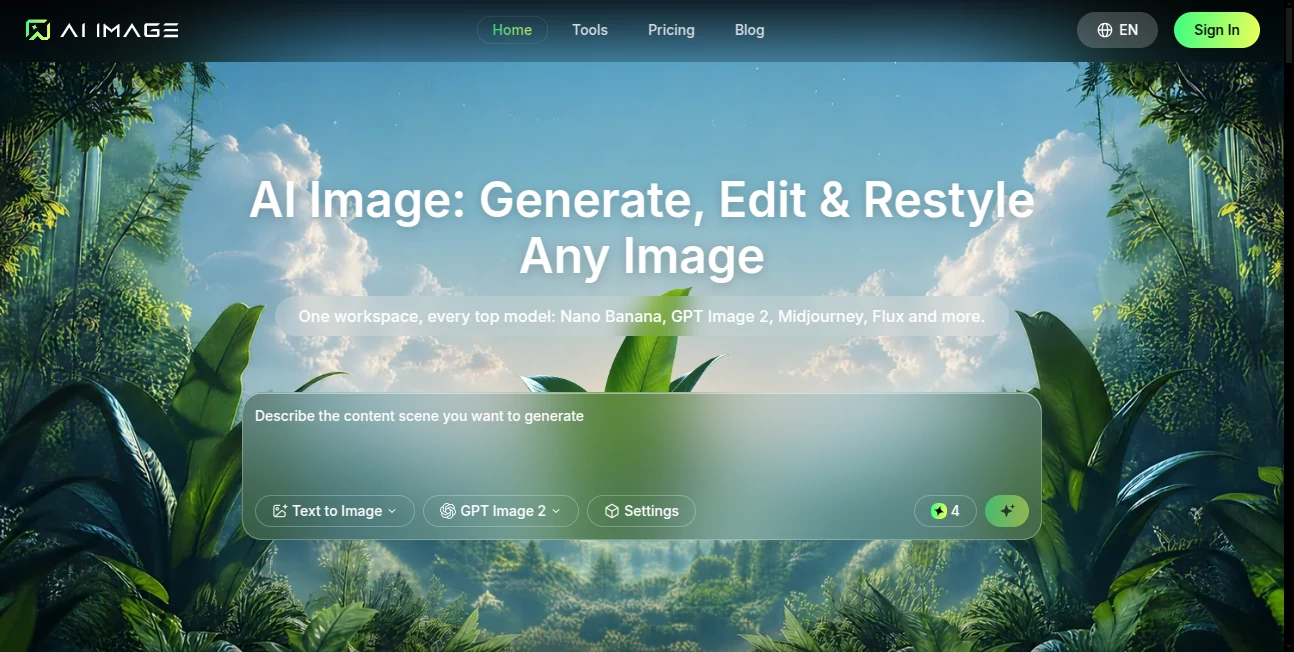
The platform supports models such as Nano Banana, GPT Image 2, Midjourney, Flux, Seedream, Qwen, Ideogram, and others. Instead of being tied to one generation engine, users can choose the model that fits the visual task they have in mind. This makes the service particularly useful for marketers, creators, entrepreneurs, educators, developers, and anyone who needs original visuals regularly.
A useful touch is that generated work remains available in the user's account and can be searched by prompt, model, or date. That turns the platform into more than a simple image generator; it can also serve as a practical visual workspace for ongoing projects.
Key Features
- Text-to-image generation from natural-language prompts
- Image-to-image creation using reference images
- Access to multiple leading image-generation models
- Reference-guided generation for more consistent subjects and styles
- Image editing and restyling capabilities
- Object removal and background changes
- Color correction, re-framing, and image extension
- Photo restoration and enhancement workflows
- Product-focused image creation for e-commerce
- Multiple aspect ratios, resolutions, and output formats
- Cloud-based creation without installing desktop software
- Searchable creation history for previously generated work
User Interface
The interface is designed around a straightforward prompt-based workflow. Users can select a model, adjust settings such as aspect ratio and resolution, describe the desired image, and start generation without dealing with complicated technical controls.
Reference images can also be uploaded when a prompt alone is not enough. Supported reference formats include JPEG, PNG, and WebP, with individual uploads supporting files up to 10MB. The number of reference images available can depend on the selected model.
For someone creating several versions of the same campaign visual, the workflow feels especially practical. You can keep the general idea, change the model or prompt, and compare the results without moving your project to another service.
Accuracy & Performance
Image generation speed depends on the selected model, resolution, batch size, and editing requirements. Lightweight generations can arrive within seconds, while larger or more detailed requests may take longer.
The platform is particularly useful when visual accuracy depends on maintaining a recognizable subject or overall visual direction. Reference-guided generation helps users keep elements such as identity, lighting, and mood closer to the original concept.
Performance also benefits from the ability to run multiple tasks depending on the subscription tier. This can make a noticeable difference for users producing batches of advertising creatives, product images, social media visuals, or other repeated content.
Capabilities
The service covers a broad range of visual workflows. A user can start with a written description, provide a reference image, experiment with different generation models, and then refine the result through editing tools.
Its capabilities extend beyond creating a single picture. Users can prepare visual variations for landing pages, advertisements, social campaigns, product listings, pitch decks, educational materials, documentation, and brand assets. The multi-size workflow is also useful when one concept needs to be adapted for several publishing channels.
For example, an online store could create a product scene without arranging a physical studio shoot, while a marketing team could generate several campaign concepts before selecting the strongest visual for an advertisement.
Security & Privacy
Generated images are stored in the user's account, allowing previous work to remain accessible through the creation history. Paid plans also provide private generation, while the service handles image creation through its cloud-based infrastructure.
Users working with commercial projects should still review the current terms and licensing conditions for their specific use case. Paid subscriptions and credit packs include a commercial-use license according to the platform's published information.
Use Cases
Marketing and Advertising: Create campaign concepts, advertising visuals, social media graphics, and alternative compositions without waiting for a complete design cycle.
E-commerce: Produce product scenes and promotional imagery that can be used for online stores, product pages, and marketing campaigns.
Content Creation: Bloggers, social media creators, and publishers can turn ideas into original illustrations, portraits, thumbnails, and editorial visuals.
Brand Development: Teams can explore different visual directions for banners, presentation artwork, campaign assets, and other branded materials.
Education: Teachers and course creators can generate diagrams, lesson visuals, course covers, worksheets, and explanatory graphics.
Product Development: Developers and startup teams can create UI concepts, product scenes, presentation graphics, and visual material for demos or fundraising.
Pros and Cons
Pros:
- Multiple major image models available from one workspace
- Simple browser-based workflow
- Text-to-image and reference-based generation
- Useful editing and restyling tools
- Commercial-use licensing on paid plans
- No-watermark downloads on paid tiers
- Creation history can be searched by prompt, model, or date
- Useful for both individual creators and professional teams
Cons:
- Credit consumption varies according to the generation and selected model
- Some advanced models and capabilities can require higher-tier plans or additional credits
- Generation time can vary considerably depending on image complexity and model selection
- Users who only create images occasionally may not need the larger subscription tiers
Pricing Plans
The platform uses a credit-based pricing system, with monthly, annual, and one-time credit options. New accounts receive starter credits, allowing users to test the service before committing to a paid subscription.
The Lite plan costs $9.90 per month and includes 1,000 credits, support for up to 500 images per month, two parallel tasks, standard generation speed, commercial use, and watermark-free downloads.
The Pro plan costs $27.90 per month and provides 5,000 credits, up to 2,500 images per month, five parallel tasks, and priority generation speed. It is positioned for users with a more regular creative workload.
The Max plan costs $49.90 per month and includes 10,000 credits, support for up to 5,000 images per month, ten parallel tasks, and the fastest generation speed.
For larger teams, agencies, and businesses, the Enterprise plan costs $139.90 per month and includes 36,000 credits, up to 18,000 images per month, and up to 20 parallel tasks. Annual billing offers savings compared with monthly pricing, while add-on credit packs are available for users who need additional capacity.
How to Use AI Image
Getting started is straightforward. Create a free account and open the image creation workspace. New accounts receive starter credits, so you can test real prompts before choosing a paid plan.
First, select the image model, aspect ratio, resolution, and output settings that match your project. Next, describe the desired scene in natural language. If you already have a visual reference, upload it and use it to guide the generation.
Finally, start the generation and review the result. Completed images are saved in the creation library, where they can be downloaded, refined, or regenerated with another model. For more demanding projects, trying the same concept across several models can be a quick way to find the visual direction that works best.
Comparison with Similar Tools
Many AI image platforms concentrate on a single generation model or specialize in one particular visual style. This service takes a broader approach by placing multiple image engines inside the same workspace.
That difference matters for users who do not want to maintain several accounts simply to compare generation quality. A marketer, for instance, can experiment with different models for an advertising concept while keeping prompts, settings, and previous creations in one environment.
It is also more than a basic text-to-image generator because the workflow includes reference-guided creation, image editing, restyling, background work, photo restoration, product imagery, and multi-size delivery. For users who regularly move from an initial concept to several finished assets, having these capabilities together can save considerable time.
Conclusion
AI Image is a strong option for anyone who wants a flexible visual creation workspace without being locked into a single image-generation model. Its biggest advantage is the combination of multiple leading models with generation, editing, reference-based workflows, and organized cloud storage.
Casual creators can start with the free credits and see whether the workflow fits their needs, while professionals can take advantage of larger credit allowances, faster processing, batch-oriented workflows, and commercial licensing. Whether the goal is an e-commerce product shot, a social campaign, a pitch deck, or simply an image that is difficult to create with traditional tools, the platform offers a practical way to move from an idea to a finished visual.
Frequently Asked Questions (FAQ)
What is this AI image platform used for?
It is an online workspace for generating, editing, and restyling images using text prompts, reference images, and multiple AI image models.
Can I try it for free?
Yes. New accounts receive starter credits, allowing users to generate images before selecting a paid subscription.
Does it support image-to-image generation?
Yes. Users can upload reference images and use them to guide new creations, edits, and visual variations.
Which AI models are available?
The available lineup includes models such as Nano Banana, GPT Image 2, Midjourney, Flux, Seedream, Qwen, Ideogram, Grok, and other image-generation models. Availability can vary as the platform updates its model selection.
Are generated images free of watermarks?
Paid plans provide watermark-free downloads. Free-tier behavior can depend on the current plan rules.
Can I use generated images commercially?
Yes. Paid subscriptions and credit packs include a commercial-use license according to the published service terms.
What image formats can I upload?
Reference images can be uploaded in JPEG, PNG, or WebP format, with individual reference files supporting sizes up to 10MB.
Can I use it for product images?
Yes. Product shots are one of the supported workflows, making the platform useful for e-commerce listings, advertising creatives, and product-focused campaigns.
Do I need technical skills?
No. The basic workflow only requires describing the desired image in natural language. More advanced settings such as resolution, aspect ratio, and batch generation are available when needed.
Can I compare different AI image models?
Yes. Since multiple generation engines are available inside the same workspace, users can test similar prompts with different models and choose the result that best fits their project.
AI Photo & Image Generator , AI Photography , AI Image to Image , AI Text to Image .
These classifications represent its core capabilities and areas of application. For related tools, explore the linked categories above.

AI Image Alternatives Product
Forge GUI
GPT Image 1.5

Nano Banana …

Muse AI

GrokImagineAI

VoooAI
Image Text E…

Face Symmetr…

claude image