AI Image Text Editor
What is AI Image Text Editor?
Editing text inside an image has traditionally required advanced design software, careful layer management, and a lot of manual adjustments. This AI-powered image editing solution makes the process much easier by allowing users to replace existing text while keeping the original visual style, layout, and appearance intact.
Whether you need to update a product label, fix a spelling mistake on a poster, refresh marketing graphics, or modify text in a screenshot, this tool provides a fast and practical way to make professional-looking changes without complicated editing workflows. It is designed for creators, marketers, business owners, and anyone who needs quick image text updates.
Key Features
User Interface
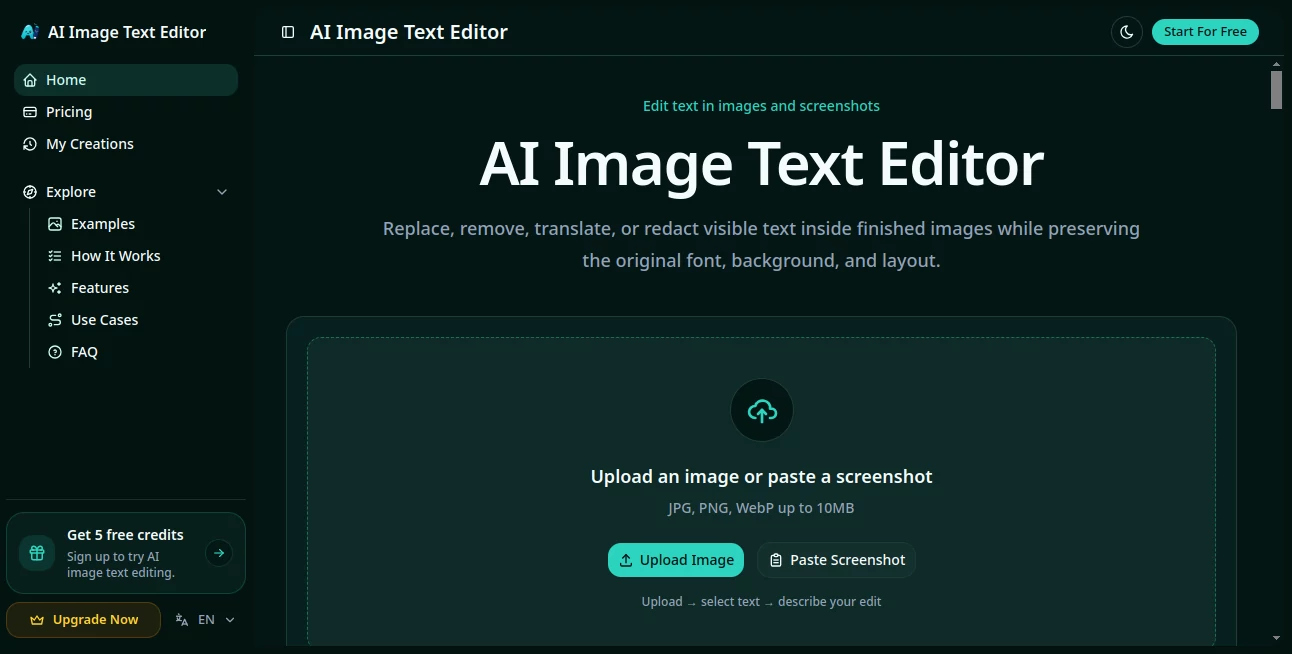
The platform offers a simple browser-based workflow that focuses on speed and convenience. Users can upload an image, identify the text they want to change, enter the replacement text, and generate the updated version with minimal effort.
The clean interface removes unnecessary complexity, making it accessible for beginners while still being useful for professionals who need quick edits during their daily creative tasks.
Accuracy & Performance
The AI technology analyzes the surrounding image details to create natural text replacements. It works to preserve important visual elements such as font style, color, positioning, shadows, and background textures so the final result blends smoothly with the original design.
The processing speed allows users to complete image updates within seconds instead of spending time rebuilding designs manually. It is especially helpful for short text changes where maintaining the original appearance is important.
Capabilities
- AI Text Replacement: Replace words, numbers, labels, and short headlines directly inside images.
- Style Preservation: Maintain the original look by matching font characteristics, colors, and positioning.
- Multiple Text Changes: Update several text areas in a single editing session.
- Multi-Format Support: Work with popular image formats including JPG, PNG, and WEBP.
- Smart Text Recognition: Detect text even when images contain complex backgrounds.
- Background Reconstruction: Restore surrounding areas naturally after removing old text.
- Fast Image Export: Download completed edits quickly for personal or commercial projects.
Security & Privacy
The tool is designed for creative image editing workflows where users upload visuals they own or have permission to modify. Users should always ensure that edited images are used responsibly, especially when working with sensitive or official materials.
The service focuses on processing images for requested edits and provides a straightforward experience without requiring complicated software installations.
Use Cases
This AI image editing solution can be useful in many everyday creative situations. Online sellers can update product prices, packaging text, or promotional messages without recreating entire designs. Marketing teams can quickly adjust campaign graphics when details change.
Social media creators can fix mistakes in posts, update announcements, or localize visual content for different audiences. Designers can also use it to repair AI-generated images where text appears incorrect or needs refinement.
- Updating product photos and eCommerce visuals
- Fixing typos in posters and advertisements
- Editing screenshots and presentation images
- Changing dates, prices, and promotional messages
- Localizing graphics for different languages
- Improving AI-generated artwork with incorrect text
Pros and Cons
Pros
- Easy-to-use interface with no advanced design skills required
- Maintains the original image style during text replacement
- Works directly in the browser
- Saves time compared with traditional editing software
- Useful for marketing, eCommerce, and creative projects
Cons
- Results can depend on image quality and text clarity
- Very complex typography may require additional adjustments
- Best results are achieved with images that contain clear readable text
Pricing Plans
The platform follows a credit-based usage model, allowing users to access image editing features without committing to traditional subscription plans. Users can start with available credits and purchase additional usage when more generations are needed.
This flexible approach is suitable for occasional users who only need a few edits as well as creators who regularly update visual content.
How to Use AI Image Text Editor
- Upload an image containing the text you want to modify.
- Select or identify the text area that needs editing.
- Enter the new replacement text.
- Generate the updated image and review the result.
- Download the finished image for your project.
Comparison with Similar Tools
Traditional photo editing applications offer powerful features but often require technical knowledge and manual work. Standard image generators can create new visuals but may struggle when users only want to change specific text inside an existing image.
This solution focuses on one important task: making accurate text changes while keeping the rest of the image consistent. That specialized approach makes it a practical choice for users who need quick, targeted edits rather than complete image redesigns.
Conclusion
For anyone who frequently works with digital images, updating text should not require rebuilding an entire design from scratch. This AI-powered editor provides a convenient way to correct mistakes, refresh outdated information, and customize visuals while preserving their original appearance.
With its simple workflow, intelligent text replacement, and focus on natural-looking results, it is a valuable tool for creators, marketers, online businesses, and everyday users who want faster image editing without complicated software.
Frequently Asked Questions (FAQ)
What can this AI image editing tool do?
It allows users to replace text inside images while attempting to preserve the original font style, color, placement, and background appearance.
What image formats are supported?
The tool supports commonly used formats such as JPG, PNG, and WEBP, making it compatible with most digital images.
Can it edit multiple text areas in one image?
Yes, users can update multiple text elements depending on their editing requirements.
Is it suitable for beginners?
Yes. The simple upload-and-edit workflow makes it accessible for users without professional design experience.
What types of images work best?
Images with clear text, good quality, and visible backgrounds usually produce the best editing results.
AI Photo & Image Generator , Photo & Image Editor , AI Background Remover , AI Image to Image .
These classifications represent its core capabilities and areas of application. For related tools, explore the linked categories above.
AI Image Text Editor details
Website unavailable — View Alternatives
Pricing
- Free
Apps
- Web App
Categories

AI Image Text Editor Alternatives Product

ModelsLab

Better Datin…

AIImageEdit

GPT Imagine

Uni-1

Best AI SVG …

Nano Banana …

Kirkify
Ernie Image