
Airo Mail
What is Airo Mail?
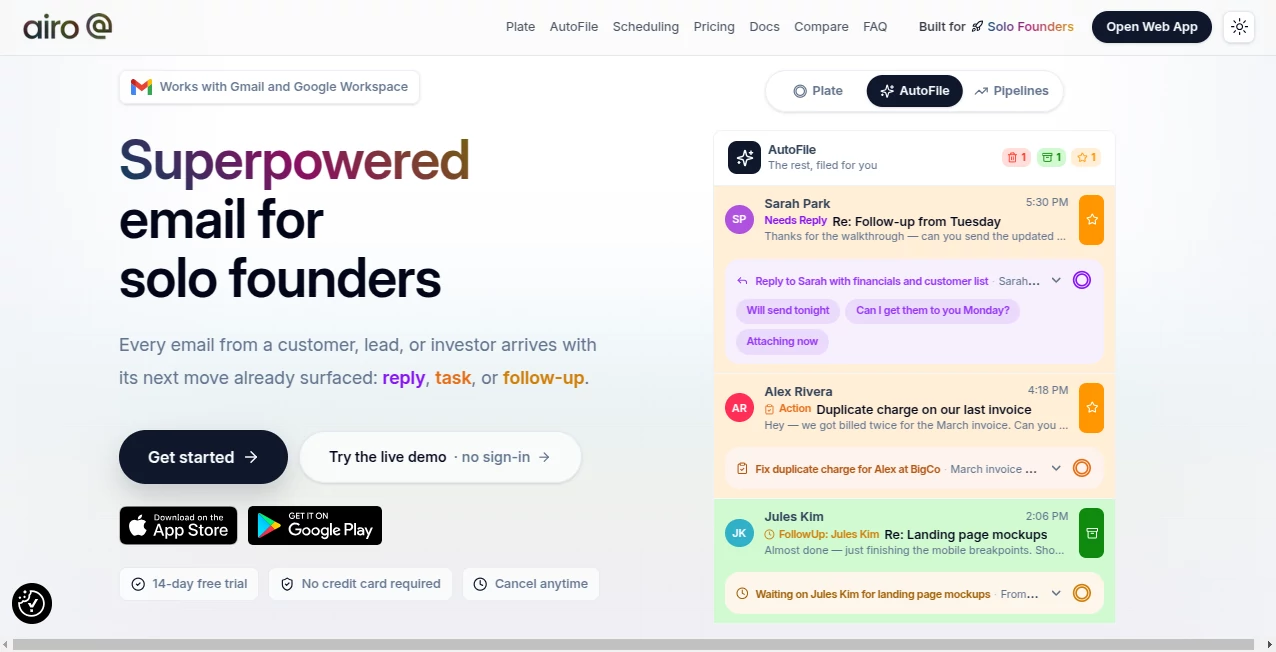
Email should help you move work forward, not slow you down. This intelligent inbox transforms everyday communication into an organized workspace where important conversations are always easy to find. Instead of spending valuable time sorting newsletters, searching for customer messages, or remembering who still needs a reply, the platform automatically highlights what deserves attention and quietly organizes everything else.
Built with founders, freelancers, and busy professionals in mind, the experience feels less like a traditional email client and more like a personal productivity assistant. Every incoming conversation is analyzed to identify action items, suggested replies, follow-up reminders, travel details, package tracking information, and other useful insights. The result is a cleaner inbox and significantly less time spent managing email.
Key Features
User Interface
The interface is clean, modern, and intentionally distraction-free. Important emails are separated from routine notifications, making it simple to focus on conversations that require immediate attention. Multiple Gmail and Google Workspace accounts can be viewed together in one unified inbox, reducing the need to constantly switch between accounts throughout the day.
Accuracy & Performance
The platform uses intelligent email analysis to identify messages that require replies, highlight pending tasks, suggest follow-ups, and categorize routine communications automatically. Suggested actions remain under user control before anything changes, providing confidence while dramatically reducing inbox management time.
Capabilities
- Automatically categorize incoming emails.
- Generate AI-powered reply suggestions.
- Extract actionable tasks from conversations.
- Track unanswered outgoing emails.
- Provide intelligent follow-up reminders.
- Offer natural language email search.
- Organize travel reservations into complete trips.
- Track package deliveries from major carriers.
- Bulk unsubscribe from unwanted newsletters.
- Support multiple Gmail and Google Workspace accounts.
- Build lightweight CRM pipelines from email conversations.
- Detect calendar scheduling conflicts.
Security & Privacy
Privacy is treated as a core feature rather than an afterthought. Data is encrypted during transmission and while stored, advertising is completely absent, and user information is not sold for marketing purposes. The service also states that AI providers do not train models using customer email content, giving professionals additional confidence when managing sensitive business conversations.
Use Cases
- Managing customer support emails.
- Following up with sales prospects.
- Keeping investor conversations organized.
- Handling startup operations from a single inbox.
- Tracking online purchases and deliveries.
- Organizing business travel automatically.
- Reducing newsletter and promotional email clutter.
- Managing multiple Gmail accounts efficiently.
- Improving personal productivity with AI assistance.
Pros and Cons
- Pros
- Excellent automatic inbox organization.
- Helpful AI-generated reply suggestions.
- Smart task and follow-up extraction.
- Unified inbox for multiple accounts.
- Integrated package and travel tracking.
- Strong focus on privacy and security.
- Modern interface designed for productivity.
- Cons
- Primarily focused on Gmail and Google Workspace users.
- Some advanced CRM functionality is still being introduced.
- Advanced features require a paid subscription after the trial period.
Pricing Plans
A free 14-day trial is available without requiring a credit card. Paid subscriptions unlock advanced AI features, inbox automation, multiple account support, intelligent search, unified inbox functionality, and higher usage limits for professionals with heavier email workloads.
How to Use Airo Mail
Sign in with your Gmail or Google Workspace account and allow the application to organize your inbox. Review the automatically suggested actions, approve or modify them, and begin using AI-generated replies, task extraction, package tracking, follow-up reminders, and intelligent search. As more conversations arrive, the inbox becomes increasingly organized while keeping you in full control of every decision.
Comparison with Similar Tools
Many email applications focus primarily on sending and receiving messages. This platform goes further by transforming email into an intelligent productivity system. Instead of only filtering spam or providing basic folders, it identifies actionable work, tracks conversations, organizes travel, monitors deliveries, and surfaces follow-ups automatically. Professionals who rely heavily on email will appreciate having multiple productivity features integrated into a single workspace rather than scattered across several separate applications.
Conclusion
For anyone overwhelmed by a busy inbox, this solution offers a practical way to spend less time organizing email and more time getting meaningful work done. Intelligent automation, thoughtful design, strong privacy practices, and productivity-focused features make it an excellent choice for founders, entrepreneurs, consultants, and professionals who depend on email every day. Instead of simply managing messages, it helps transform communication into organized, actionable work.
Frequently Asked Questions (FAQ)
Can it work with Gmail?
Yes. It is designed to work with Gmail and Google Workspace accounts.
Does it automatically organize incoming emails?
Yes. Emails are categorized automatically, while users approve suggested actions before changes are applied.
Can it help with email replies?
Yes. AI-generated reply suggestions help users respond more quickly while remaining editable before sending.
Does it support multiple email accounts?
Yes. Multiple Gmail accounts can be combined into a single unified inbox.
Is user data protected?
Yes. The service emphasizes encryption, subscription-based revenue instead of advertising, and states that customer email content is not used to train AI models.
AI Email Assistant , AI Email Generator , AI Productivity Tools , AI Task Management .
These classifications represent its core capabilities and areas of application. For related tools, explore the linked categories above.
Airo Mail details
Website unavailable — View Alternatives
Pricing
- Free
Apps
- Web App
- iOS App
- Android App
Categories

Airo Mail Alternatives Product

Claude and C…

MyMap.AI

WhispriNote

Jasper

Skywork Supe…

GPT Image 2 …

ForthWrite

Trimless for…

KronoPrompt