
Apiframe
What is Apiframe?
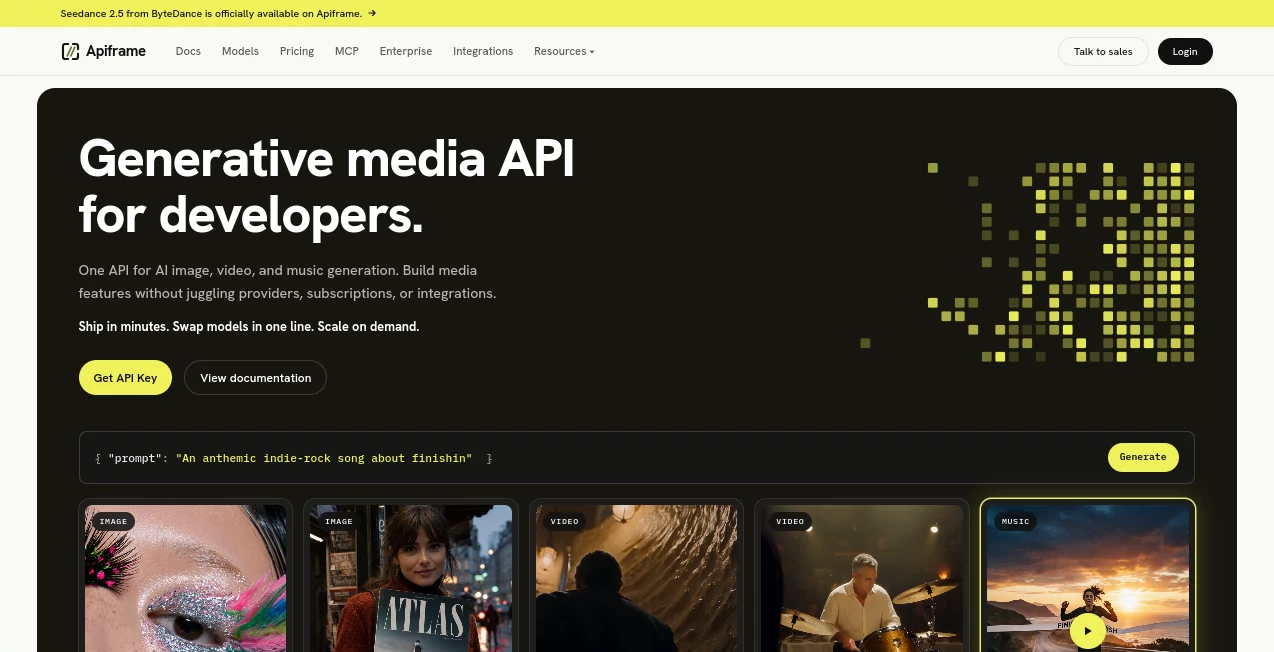
Building AI-powered image, video, and music features can become complicated surprisingly quickly. Developers often have to work with different providers, authentication systems, APIs, pricing structures, response formats, and limitations. Apiframe brings these pieces together behind a single REST API, giving developers one integration for a broad collection of generative media models.
The platform is designed around a simple idea: send a generation request, wait for the job to complete, and receive the resulting media. Instead of rebuilding an integration whenever a new model becomes popular, developers can switch models through an API parameter while keeping the overall workflow largely the same.
Its current catalog includes more than 70 models covering image, video, music, and media editing. The selection includes well-known options such as Midjourney, GPT Image, Kling, Seedance, Veo, Sora, Suno, Udio, and several other providers. This makes the service particularly interesting for SaaS products, creative applications, automation platforms, and developers who want to add generative media without maintaining a collection of separate provider integrations.
Key Features
- Unified REST API for AI image, video, and music generation
- Access to 70+ generative media models through one integration
- Model switching through a single API parameter
- Asynchronous generation jobs with job status tracking
- Webhook support for completed, failed, and progress events
- REST API access with API-key authentication
- Support for image-to-video and text-to-video workflows
- AI music generation through multiple supported models
- Video editing and upscaling capabilities
- Usage-based credit billing with different concurrency limits
- Developer-friendly examples for Python, Node.js, Go, and cURL
User Interface
The service is primarily built for developers rather than casual users, so the dashboard and documentation are more important than a traditional consumer-style AI editor. The console provides access to API keys, account information, credits, and usage-related details, while the documentation explains endpoints, request parameters, model options, and job handling.
That developer-first approach is useful when the goal is to put AI generation inside another product. A developer can create a key, make an API request, receive a job ID, and then either poll for the result or use a webhook. The workflow feels closer to adding a payment or analytics API to an application than using a conventional standalone AI generator.
Accuracy & Performance
Performance depends heavily on the selected underlying model and the type of generation being requested. The platform does not attempt to make every model behave identically; instead, it exposes the capabilities and parameters of the individual models through a common infrastructure.
The asynchronous job architecture is a practical choice for media generation. Requests can enter a queue and move through processing before the final asset becomes available. Developers can monitor progress or receive a webhook when a job finishes. This is much more convenient for applications where users should not have to keep an HTTP request open while a longer video or music generation task completes.
For higher-volume applications, concurrency also matters. Current plans range from two simultaneous generations on the free tier to substantially higher limits on paid and enterprise offerings. This allows teams to choose infrastructure according to their expected workload rather than paying for a large capacity from the beginning.
Capabilities
The strongest part of the platform is the breadth of its model catalog. Image generation can be handled through models such as Midjourney, GPT Image, Flux, Ideogram, Stable Diffusion, and other options. Video workflows include models such as Kling, Seedance, Veo, Sora, Runway, Luma, and Wan, while music generation includes services such as Suno, Udio, Mureka, and other specialized models.
Video functionality goes beyond basic text-to-video generation. Depending on the model, developers can work with image-to-video generation, reference inputs, synchronized audio, different resolutions, and editing workflows. This makes the API suitable for applications ranging from automated social media content to creative production tools.
Another useful capability is model portability. If an application initially uses one image or video model and the development team later wants to test another, the underlying integration can remain largely the same. This can save considerable development time compared with maintaining separate SDKs and authentication systems for every provider.
Security & Privacy
API access is protected through API keys, which are passed through the request headers. Developers can create separate keys for different environments or integrations and revoke keys when necessary. The documentation also recommends keeping keys out of client-side code and public repositories.
The service states that connections are protected using TLS and that stored data is encrypted with AES-256. Its security documentation also describes access controls, key management, authentication protections, and optional IP allowlisting.
Privacy is particularly important for applications processing user-generated media. According to the published privacy information, generated content is not retained by default unless optional storage is enabled. API logs are retained for a limited period, while generated files delivered through the CDN are currently available for three months according to the FAQ. Developers who need long-term access should therefore download and store important outputs in their own infrastructure.
Use Cases
AI SaaS Products: Startups can add image, video, or music generation to their applications without building a separate integration for every model they want to support.
Creative Platforms: Design and content applications can provide users with multiple generation models while keeping the technical implementation behind one API.
Marketing Automation: Teams can create systems that automatically generate advertising visuals, short videos, social media assets, or promotional music.
Video Applications: Developers can build products around text-to-video, image-to-video, video editing, upscaling, and models that support synchronized audio.
Content Automation: A workflow can generate an image, create a video from that image, and produce accompanying music without requiring separate provider integrations.
AI Model Testing: Developers who want to compare different models can experiment with multiple providers through a common API structure instead of implementing each service from scratch.
No-Code and Automation Workflows: API-based workflows can connect media generation with existing backend systems, automation tools, and custom applications.
Pros and Cons
Pros
- One API for a large selection of image, video, and music models
- Easy model switching without rebuilding an entire provider integration
- Supports asynchronous jobs and webhooks
- Useful documentation with practical code examples
- Flexible credit-based pricing
- Good fit for SaaS products and production applications
- Free plan available for initial experimentation
- Multiple concurrency levels for different workloads
Cons
- The platform is primarily aimed at developers and may feel technical to non-technical users
- Media generation costs vary considerably between models
- Higher-quality video models can consume credits quickly
- Developers still need to understand the limitations and behavior of individual underlying models
- Generated files are not intended to remain permanently available through the platform's CDN
Pricing Plans
The pricing system is based on monthly credits and concurrency rather than charging a separate subscription for every individual AI model. The current Free plan costs $0 and includes 50 credits with two concurrent generations.
The Hobby plan costs $19 per month and includes 2,000 credits with five concurrent generations. The Standard plan costs $99 per month and includes 12,000 credits with ten concurrent generations. The Growth plan costs $399 per month and includes 52,000 credits with up to 50 concurrent generations.
All listed plans provide access to the available AI models, REST API and webhooks, as well as the platform's studio environment. Annual billing is also available at a discounted rate.
Credit consumption depends on the model and operation. Image generations generally have a fixed credit cost, while many video models are billed according to the number of seconds generated and the selected quality or variant. Failed jobs are automatically refunded according to the published credit policy, which is a useful detail for production applications.
How to Use the Platform
Getting started is straightforward if you already have basic knowledge of REST APIs.
- Create an account and open the developer console.
- Create an API key and keep it securely on your server.
- Select an image, video, or music model from the available catalog.
- Send a generation request with the required prompt and model parameters.
- Save the returned job ID.
- Poll the job endpoint for its status or configure a webhook to receive updates automatically.
- When the job reaches the completed state, retrieve the resulting media from the response.
- Download important files to your own storage if they need to remain available long term.
For example, a developer building a social media application could let a user enter a short creative brief, send that prompt to an image model, and then use a video model to animate the resulting image. The application can handle the entire process in the background while webhooks notify the server when each stage has finished.
Comparison with Similar Tools
Compared with a single-model API, the biggest advantage here is choice. A specialized provider may offer deeper access to one particular model, but a unified media API can be more convenient when an application needs several models or expects its model selection to change over time.
Compared with building direct integrations with numerous providers, the development overhead is considerably lower. Authentication, job management, webhooks, credit handling, and result delivery follow a more consistent pattern. This is especially valuable for smaller development teams that would rather spend their engineering time improving their product than maintaining a collection of AI provider connections.
The trade-off is that developers give up some direct control over individual provider relationships. For applications that depend heavily on one specific model's unique features, a direct integration may still be preferable. For products that value flexibility and a broad model catalog, however, the unified approach is compelling.
Conclusion
For developers building AI-powered media products, the real appeal of this platform is not simply the number of models available. It is the ability to work with a large and changing AI ecosystem through a consistent developer workflow.
Instead of managing separate credentials, integrations, job systems, and billing arrangements for every media provider, teams can work through one API and choose the model that best fits a particular task. The combination of image, video, music, asynchronous jobs, webhooks, and usage-based pricing makes it a practical option for startups, SaaS builders, automation developers, and teams experimenting with generative media at scale.
It is not necessarily the right choice for someone looking for a simple consumer image generator. Its strengths become much clearer when the goal is to put generative media inside another application and keep the underlying infrastructure manageable as the product grows.
Frequently Asked Questions (FAQ)
What does this platform provide?
It provides a unified API for generating AI images, videos, and music through a large catalog of models from different providers.
Do I need programming knowledge?
Yes. The service is primarily designed for developers who are comfortable working with REST APIs, API keys, HTTP requests, and asynchronous jobs.
Can I use multiple AI models?
Yes. The platform provides access to many image, video, and music models, allowing developers to select different models according to their application's requirements.
Does it support webhooks?
Yes. Developers can configure webhooks for progress, completed, and failed events, which can be more efficient than repeatedly polling the job endpoint.
Is there a free plan?
Yes. The current free plan includes 50 credits and supports two concurrent generations.
How does the credit system work?
Credits are consumed when generation jobs are submitted. The amount depends on the selected model and operation. Many video models use per-second pricing, while image and music models generally have defined credit costs per generation.
Are generated files stored permanently?
No. The published FAQ states that generated files are stored on the CDN for three months. Developers who need long-term availability should download the results and store them on their own infrastructure.
Is the API suitable for SaaS applications?
Yes. The unified API, model selection, asynchronous jobs, webhooks, usage-based billing, and scalable concurrency options make it particularly suitable for applications that want to integrate generative media features.
How should API keys be protected?
API keys should remain on the server and should never be exposed in browser-side code or public repositories. Separate keys can also be used for different development and production environments.
AI Photo & Image Generator , AI Video Generator , AI Music Generator , AI Developer Tools .
These classifications represent its core capabilities and areas of application. For related tools, explore the linked categories above.

Apiframe Alternatives Product

See dance 2.…

Aura AI

Seedance

AI Baby Video

veo 4

AIGAZOU

AI Makes Song

Seedance 2.0…

GPT Image 2