Cliprise AI
What is Cliprise AI?
There’s something powerful about having dozens of top AI models in one place on your phone, ready whenever inspiration strikes. Cliprise turns that idea into reality. You can generate videos from text or images, create striking visuals, and experiment with different creative directions without jumping between apps. I’ve watched content creators go from scattered ideas to polished social media assets in minutes, and marketers test multiple ad concepts in the time it used to take to schedule one meeting. It feels like carrying a full creative studio in your pocket.
Introduction
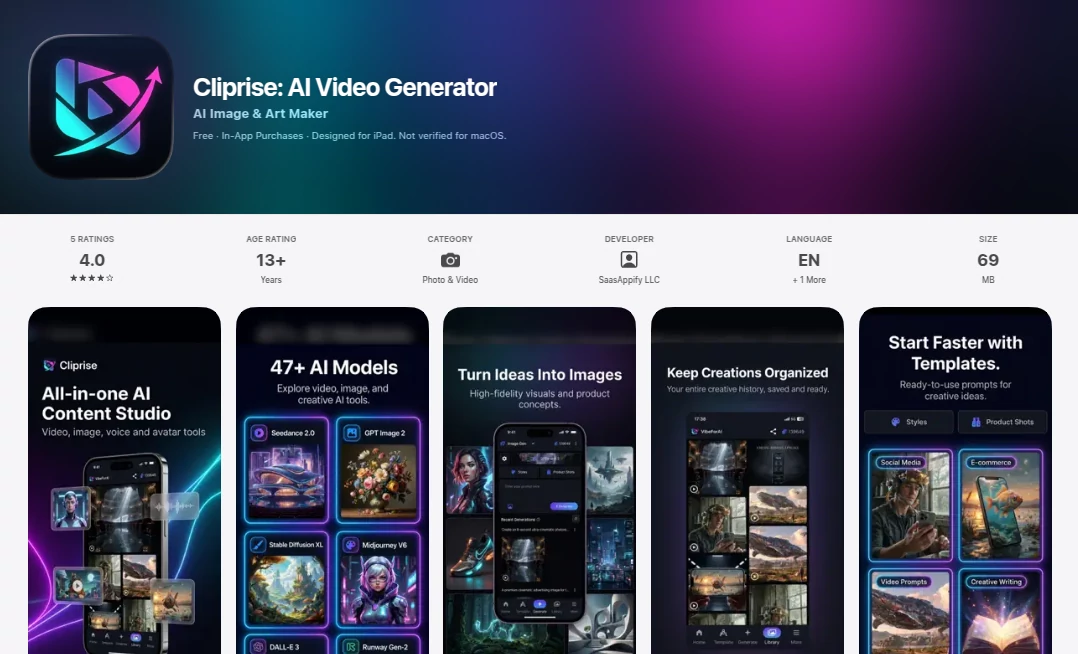
Modern creators, marketers, and online businesses need speed and variety. One day you want a cinematic product video, the next you need eye-catching thumbnails or social reels. Instead of managing multiple subscriptions and tools, Cliprise brings everything together in a single, well-designed iOS app. With access to over 47 AI models — including heavy hitters like Sora, Veo, Kling, and more — it lets you choose the right model for each task. The result is a flexible workspace that adapts to your needs, whether you’re building a brand, running ads, or just having fun with visual ideas. It’s practical, fast, and built for people who actually ship content every day.
Key Features
User Interface
The app feels clean and intentional. A central prompt area, easy model selection, template gallery, and quick access to image or video modes make it simple to start creating. Switching between models or workflows is seamless, and previews load fast enough to keep momentum going. It’s designed so you spend time being creative rather than figuring out where things are. Even on mobile, the experience feels powerful without being overwhelming.
Accuracy & Performance
The generations are impressively coherent. Text-to-video and image-to-video results show good motion quality, while image generation delivers detailed, style-consistent visuals. The app handles different models intelligently, so you can test the same idea across several engines and pick the best output. Speed is solid for mobile, with many generations completing in seconds to under a minute, letting you iterate quickly.
Capabilities
You get strong text-to-video and image-to-video creation, high-quality AI image generation, product visuals, ad creatives, thumbnails, and social content. Templates help you start faster, and the multi-model approach means you can compare outputs from different engines side by side. It’s particularly useful for e-commerce sellers who need consistent product shots and short promotional videos, and for creators who want to experiment with styles without learning new tools.
Security & Privacy
Your creations and prompts stay private by default. The app follows standard iOS privacy practices, and you control what you generate and share. For business users working on campaigns or client projects, this respectful approach provides confidence to create freely.
Use Cases
Content creators generate daily Reels and eye-catching thumbnails in one session. E-commerce sellers create professional product visuals and short promotional videos without hiring photographers or videographers. Marketers test multiple ad concepts quickly by comparing outputs from different models. Social media managers build consistent brand content across platforms. Even casual users enjoy turning personal photos into fun videos or artistic pieces. It fits anywhere visual content needs to be created fast and look good.
Pros and Cons
Pros:
- All-in-one workspace with 47+ powerful AI models.
- Fast generation and easy switching between video and image creation.
- Templates and guided workflows speed up common tasks.
- Great for both professional and personal creative projects.
- Convenient mobile experience that travels with you.
Cons:
- Credit-based system means heavy users will need to purchase more.
- Some advanced models may have higher credit costs or wait times.
- Best results still come from well-written prompts.
Pricing Plans
The app is free to download and includes a starter amount of credits so you can try the quality immediately. Additional credits and Pro subscriptions unlock higher daily limits, priority access, and more generous usage for serious creators. The pricing is flexible — you can buy what you need when you need it, making it accessible whether you create occasionally or every day.
How to Use Cliprise
Open the app, choose whether you want to create a video or image, and type your prompt. For better results, add details about style, mood, or composition. Upload a reference image if you want to guide the look or motion. Select a model that fits your goal, then generate. Review the outputs, regenerate variations if needed, and download your favorites. Use templates for common formats like social reels or product ads to save even more time. The workflow is intuitive enough that you’ll be creating confidently after just one or two tries.
Comparison with Similar Tools
Many AI creative tools force you to choose between strong video or strong image capabilities, or require switching between separate apps. Cliprise brings both together with a wide selection of models in one place, making experimentation and workflow much smoother. While some competitors focus on a single engine, the multi-model approach here gives you more creative options and better chances of getting the exact result you want. For mobile creators who value convenience and quality, it stands out as a practical all-rounder.
Conclusion
Cliprise turns your iPhone or iPad into a powerful creative studio that travels with you. It removes the usual barriers between idea and finished visual, letting you focus on storytelling and branding instead of technical hurdles. Whether you create for business, content, or pure enjoyment, it delivers fast, high-quality results with enough control to feel like your own work. In a world that moves quickly, having a tool that keeps up with your ideas is genuinely valuable. If you create visuals regularly, this is one worth having on your home screen.
Frequently Asked Questions (FAQ)
How fast can I generate content?
Most generations complete in seconds to under a minute, depending on the model and complexity.
Do I need to write long prompts?
Clear, descriptive prompts work best, but templates help you get great results even with shorter input.
Can I use it for commercial projects?
Yes — many creators and businesses use it successfully for ads, social content, and product visuals.
Is it only for video?
No — it’s equally strong for AI image generation, art, and product visuals.
What if I run out of credits?
You can purchase more at any time or upgrade to a plan that better fits your usage.
AI Photo & Image Generator , AI Image to Video , AI Video Generator , AI Text to Video .
These classifications represent its core capabilities and areas of application. For related tools, explore the linked categories above.

Cliprise AI Alternatives Product

Happy Horse

Fine Image
animearc

Seedance 2.5…

VidiOne
Seedance Pro…

Overlap

kling 5.0
JoyFlix AI