
Audio To Text Converter
What is Audio To Text Converter?
Turning a recording into useful written content should not require hours of manual typing. Audio To Text Converter makes that process straightforward by transforming spoken audio into editable, searchable text. It is designed for people who work with interviews, meetings, lectures, podcasts, voice notes, research recordings, and other speech-heavy content.
The service supports a wide range of audio and media formats and offers transcription across 63 languages. Once a recording has been processed, the resulting transcript can be exported in several practical formats, making it easier to move from a spoken recording to documentation, captions, notes, or published content.
One particularly useful aspect is that transcription is not treated as the final destination. Long recordings can also be turned into summaries, key points, and visual mind maps. For someone reviewing a lengthy interview or lecture, that can save a considerable amount of time.
Key Features
- AI-powered audio transcription
- Support for 63 languages
- Wide format compatibility including MP3, WAV, M4A, AAC, FLAC, OGG, OPUS, WEBM, WMA, and more
- Export transcripts as TXT, PDF, DOCX, SRT, VTT, and CSV
- Subtitle-ready SRT and VTT exports
- Summaries and key-point generation
- Mind map generation for longer recordings
- Support for interviews, meetings, lectures, podcasts, and voice recordings
- Free credits for getting started
- Options for larger workloads and longer transcription requirements
User Interface
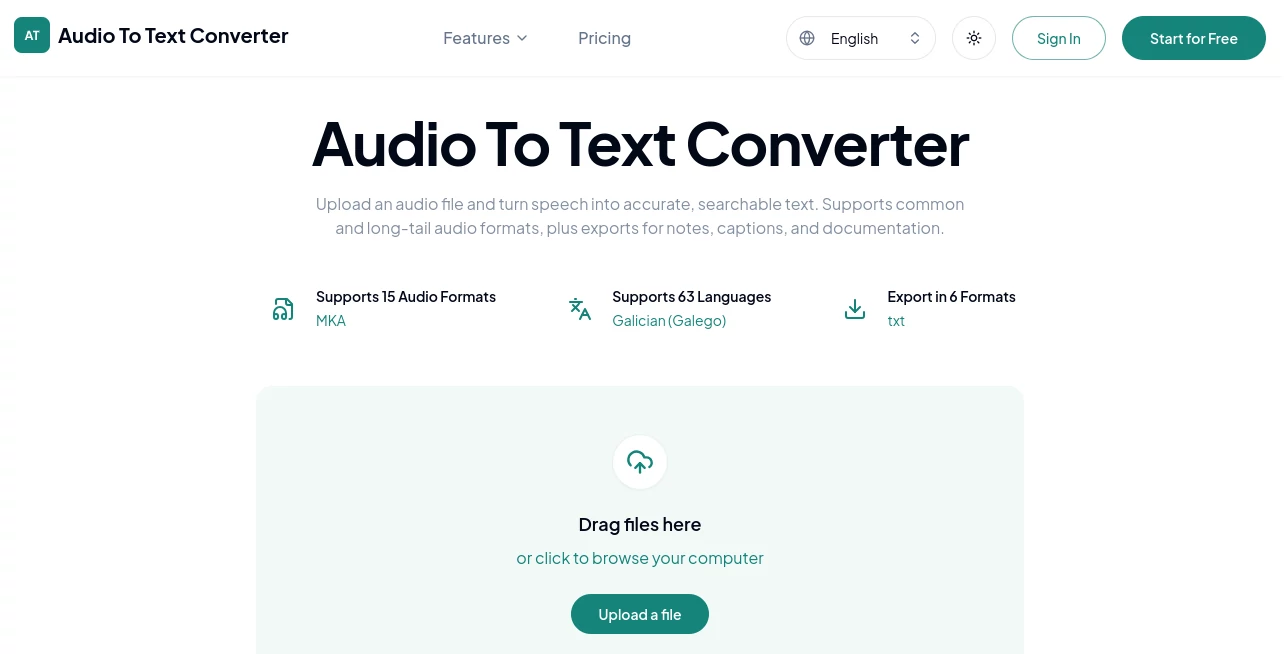
The interface keeps the main task easy to understand. Users can drag an audio file onto the upload area or browse their device to select one. After uploading, the workflow follows a simple sequence: provide the recording, start transcription, and export the finished text.
This simplicity is useful when the goal is to process a recording rather than learn another complicated editing application. Someone transcribing a weekly meeting, for example, can upload the recording and move directly toward a searchable document without dealing with unnecessary settings.
Accuracy & Performance
Transcription quality naturally depends on the recording itself. Clear speech, a good microphone, limited background noise, and distinct speakers give an AI transcription system better material to work with. Recordings containing overlapping conversations, heavy background noise, or missing audio may still require manual review.
The platform is built to turn spoken words into readable text and supports a broad selection of audio formats, which reduces the need to prepare files before transcription. It also provides a practical workflow for longer recordings by allowing users to extract summaries and key points instead of relying only on a full transcript.
Capabilities
The range of supported formats is one of the strongest practical advantages. Common choices such as MP3, M4A, WAV, AAC, and FLAC are supported alongside less frequently encountered formats such as AMR, AWB, MKA, OGA, OPUS, WEBA, and WMA.
The export options are equally useful. TXT works well for plain notes and archives, DOCX is convenient for editing, PDF is suitable for sharing and documentation, while SRT and VTT are better choices when the transcript is going into a caption workflow. CSV can also be useful when the resulting information needs to fit into a structured workflow.
The additional summary and mind-map features make the service more than a basic speech-to-text converter. A long two-hour discussion, for instance, can be converted into a transcript first and then reduced to the points that actually matter.
Security & Privacy
Audio recordings can contain sensitive conversations, interviews, business discussions, or personal information, so privacy should always be considered before uploading a file to any online transcription service. Users should review the provider's privacy policy and terms before processing confidential recordings.
For ordinary recordings, the ability to move quickly from an audio file to an editable document is convenient. For confidential material, it is sensible to check the applicable data-handling policies and make sure the service meets the requirements of the particular project or organization.
Use Cases
- Meetings: Convert recorded discussions into searchable documentation, follow-up notes, and references for future decisions.
- Interviews: Turn recorded conversations into editable text that can be reviewed, quoted, and organized without repeatedly listening to the entire recording.
- Lectures: Create written study material from classes, seminars, and educational recordings.
- Research: Transcribe research interviews and field recordings so important phrases and recurring subjects are easier to locate.
- Podcasts: Create a written source for show notes, articles, newsletters, quotations, and social media content.
- Content Creation: Repurpose spoken material into written content and generate subtitle files for video publishing.
- Voice Notes: Turn spoken ideas and personal recordings into editable notes, outlines, or task lists.
- Business Updates: Convert recorded team updates into documents that can be reviewed and shared with colleagues.
Pros and Cons
- Pros: Supports 63 languages, accepts a broad selection of audio formats, provides six export formats, offers summaries and mind maps, and includes free credits to get started.
- Pros: The workflow is simple enough for occasional users while still offering useful features for people who regularly work with recorded speech.
- Pros: SRT and VTT exports are particularly useful for users who need transcripts for subtitles and captions.
- Cons: Transcription quality can be affected by poor audio, background noise, unclear speech, and speakers talking over one another.
- Cons: Users working with highly confidential recordings should review the provider's privacy and data-handling terms before uploading sensitive material.
Pricing Plans
The service offers free credits, allowing new users to start transcribing without immediately committing to a paid plan. This is useful for testing the workflow with a real recording and deciding whether the results fit a particular project.
For users who need longer recordings, larger workloads, or more monthly transcription time, paid upgrades are available. The pricing structure is designed around transcription usage, with additional capacity available when the free allowance is no longer sufficient.
Because transcription requirements vary considerably between an occasional voice-note user and someone processing recordings every day, checking the current pricing page before subscribing is recommended.
How to Use the Converter
Using the service is a straightforward three-step process.
- Upload an audio file: Select a supported recording from your device or provide a supported link when available.
- Start transcription: Begin the AI transcription process and allow the system to convert the spoken content into readable text.
- Export the result: Download the finished transcript as TXT, PDF, DOCX, SRT, VTT, or CSV depending on how you plan to use it.
For the best possible result, it is worth listening to difficult sections of the original recording before processing it. Clear speech and a good-quality source recording can make the final transcript easier to review. Keeping the original audio is also recommended when names, numbers, quotations, or other important details need to be verified.
Comparison with Similar Tools
Many transcription services focus primarily on converting speech into text. This solution takes a broader approach by combining transcription with several practical output options and additional ways to understand long recordings.
Its format support is another notable advantage. Users are not limited to a handful of common extensions, which can be especially helpful when recordings come from different phones, browsers, communication applications, or older media collections.
The export selection also gives it flexibility beyond ordinary transcription. Someone preparing subtitles can use SRT or VTT, while a researcher may prefer DOCX or PDF, and a user building a structured workflow may find CSV more appropriate.
For people who regularly work with long recordings, the ability to create summaries, key points, and mind maps adds another layer of usefulness. Instead of treating a transcript as the end product, it can become the starting point for reviewing and reusing the information inside the recording.
Conclusion
For anyone who regularly deals with spoken information, converting audio into searchable text can remove one of the most time-consuming parts of the workflow. This service combines broad format support, multilingual transcription, flexible exports, and useful tools for summarizing longer recordings in one place.
It is a strong fit for students, researchers, content creators, journalists, professionals, and teams that need to turn recorded speech into material they can actually search, edit, share, and reuse. The free credits also make it easy to test the experience before deciding whether additional transcription capacity is necessary.
Frequently Asked Questions (FAQ)
Can I use the audio transcription service for free?
Yes. Free credits are available for getting started, allowing users to test the transcription workflow before upgrading for additional usage.
Which audio formats are supported?
The service supports many common and less common formats, including MP3, WAV, M4A, AAC, FLAC, OGG, OPUS, WEBM, WMA, AMR, AWB, MKA, OGA, and several others.
Can I create subtitles from a transcript?
Yes. SRT and VTT export options are available, making the resulting transcript suitable for many subtitle and caption workflows.
Can long recordings be summarized?
Yes. In addition to producing a transcript, the service can generate summaries, key points, and mind maps to make lengthy recordings easier to review.
What export formats are available?
Transcripts can be exported as TXT, PDF, DOCX, SRT, VTT, and CSV, giving users several options for documents, captions, notes, and structured workflows.
AI Speech Recognition , AI Productivity Tools , AI Transcription , AI Speech to Text .
These classifications represent its core capabilities and areas of application. For related tools, explore the linked categories above.
Audio To Text Converter details
Website unavailable — View Alternatives
Pricing
- Free
Apps
- Web App
Categories

Audio To Text Converter Alternatives Product

Slackactivity
YT Video Sum…
TranscribeYT

bridger west…

Skygen AI

CodeProt

Kaamfu

Monkey Eatin…

YTVidHub-you…