BeatMotion.io
What is BeatMotion.io?
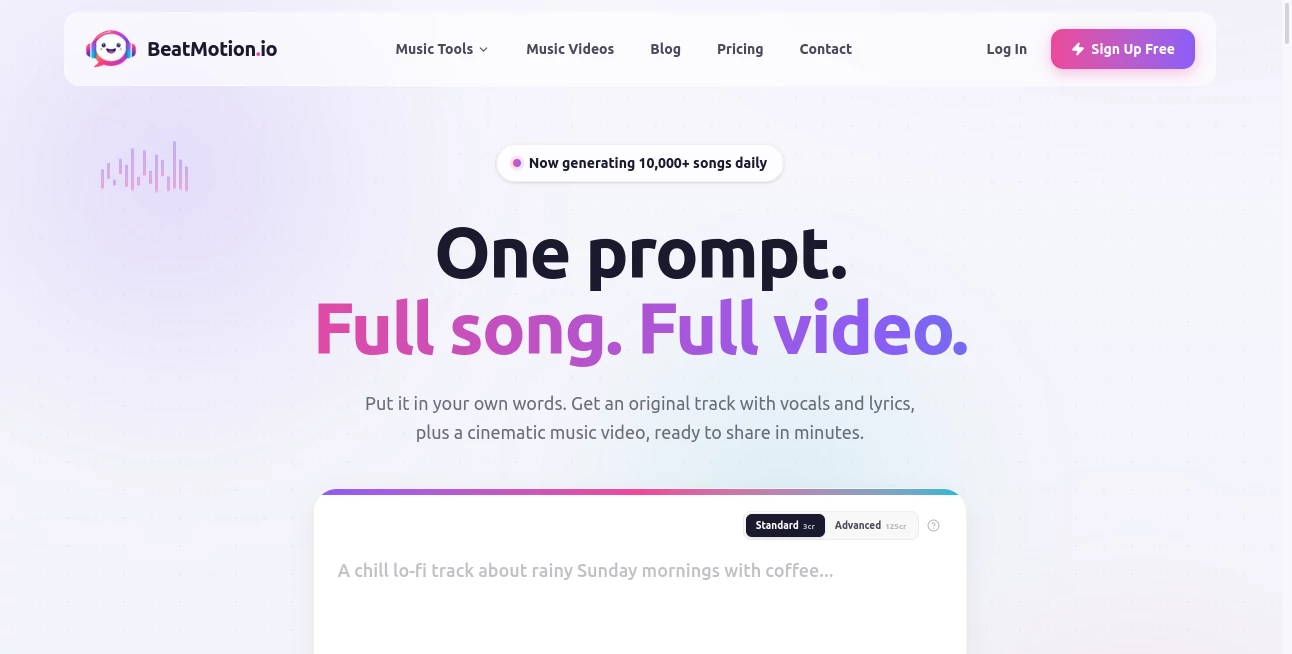
Creating a complete song and turning it into an engaging music video has traditionally meant using several different tools. One handles the music, another helps with lyrics, and a video editor is needed to bring everything together. BeatMotion takes a much simpler approach: describe what you want, and the platform can turn that idea into an original song with vocals, lyrics, melody, and a cinematic music video.
The experience is designed for creators who may have an idea for a song but do not necessarily have music production or video editing experience. You can start with a text prompt, provide your own lyrics, upload a photo, or bring in an existing audio track. From there, the AI handles much of the creative production and prepares a video that can be downloaded and shared.
It is particularly interesting for musicians, independent artists, content creators, and social media users who want to turn music into visual content without spending hours working on a traditional editing timeline.
Key Features
- Text-to-music generation with melodies, vocals, lyrics, and arrangements.
- AI-generated cinematic music videos built around the song.
- Support for custom lyrics and original song concepts.
- Image-to-music generation that uses an uploaded image as creative inspiration.
- Music-to-video conversion for existing songs and audio files.
- Automatic lyric transcription with word-level timing.
- Beat-synchronized visuals and animated captions.
- Multiple visual styles, including cinematic, photorealistic, anime, cyberpunk, watercolor, and retro-inspired looks.
- Vertical video output suitable for TikTok, Instagram Reels, and YouTube Shorts.
- HD export for finished projects.
User Interface
The workflow is deliberately straightforward. Instead of presenting users with a complicated production timeline, the platform starts with the creative idea. You can describe the mood, genre, story, or overall vibe of the track and let the system handle the initial production.
There are also more flexible starting points. Creators can paste custom lyrics, upload an image, or provide their own audio. This makes the interface useful for both experimentation and more developed projects. Someone testing a song idea can start from a sentence, while an artist with a finished recording can move directly into video creation.
The browser-based approach is another practical advantage. There is no need to install traditional music-production or video-editing software just to create a first version.
Accuracy & Performance
One of the strongest aspects of the workflow is its attention to the relationship between audio and visuals. When an existing song is uploaded, the system can transcribe vocals at word level and use the timing of the lyrics to build scenes and captions around the track.
This matters because a music video feels much more intentional when visual changes follow the song instead of appearing as unrelated clips. Beat-synchronized cuts, lyric animations, and scene changes can give a short video considerably more energy, especially when it is intended for fast-moving social feeds.
According to the platform, song generation typically takes around 30 to 60 seconds, while video creation can take an additional five to seven minutes depending on the length and complexity of the project. Advanced generation options use more credits in exchange for higher-fidelity results.
Capabilities
The platform covers several stages of the creative process in one place. With text-to-music generation, a simple description can become a complete musical arrangement. Users can also supply their own lyrics and allow the AI to develop a melody around them.
For visual creation, an uploaded song can be transformed into a music video with scenes designed around the lyrics and musical energy. The available visual direction ranges from realistic and cinematic imagery to anime, cyberpunk, watercolor, and other distinctive aesthetics.
The platform also supports a practical workflow for artists who already create music elsewhere. An existing recording can be uploaded and converted into a visual piece, making it possible to repurpose finished audio into content for YouTube, TikTok, Instagram, and other channels.
Security & Privacy
For creators, ownership and commercial usage are important considerations when working with generated music. The platform states that content created with a paid plan can be used commercially and that creators retain ownership and rights to their generated songs and music videos.
Users should still pay attention to the licensing terms of music they upload from other services. Creating a video from your own recording is different from uploading a track whose rights are controlled by another platform, artist, label, or rights holder.
For professional use, it is sensible to review the current privacy policy, terms, and licensing conditions before uploading sensitive or commercially important material.
Use Cases
Independent musicians: Artists can turn finished songs into visual releases without hiring a separate video production team. This is especially useful for musicians who need regular content for social media.
AI music creators: Someone who creates songs with generative music platforms can take the finished audio and turn it into a more complete visual experience instead of publishing a static cover image.
Social media creators: Short-form creators can generate vertical music content designed around the rhythm and lyrics of a track. This makes the same song more useful across Reels, Shorts, and TikTok.
Songwriters: A songwriter with lyrics but no finished arrangement can use a text prompt or custom lyrics as the starting point and explore different musical directions.
Content marketers: Brands and creators can experiment with original music and visual concepts for campaigns, announcements, product videos, or promotional content.
Visual storytellers: An image can serve as the starting point for a musical concept, making the platform useful for creators who think visually before they think musically.
Pros and Cons
- Pros: Combines music and video generation in one workflow.
- Pros: Supports text prompts, custom lyrics, images, and uploaded audio.
- Pros: Automatic lyric synchronization makes videos feel connected to the song.
- Pros: Multiple visual styles give creators room to experiment.
- Pros: Social-friendly formats make finished videos easier to repurpose.
- Pros: A free option is available without requiring a credit card to get started.
- Cons: Video generation consumes additional credits beyond the initial music generation.
- Cons: Advanced models require considerably more credits than the standard generation option.
- Cons: Creators looking for detailed manual control over every frame may still prefer a conventional video editor.
Pricing Plans
The pricing system is based on credits, allowing users to start without immediately committing to a subscription. The Free plan costs $0 and includes 3 credits, enough for one song generation. It also includes AI music videos, advanced models, no-watermark downloads, and commercial use.
The Starter plan costs $29 per month and provides 800 credits. It is positioned for casual creators who need considerably more generation capacity than the free tier.
The Pro plan costs $49 per month and includes 1,800 credits. It is aimed at more active creators and is presented as the most popular paid option.
The Ultra plan costs $129 per month and provides 5,000 credits for studios and power users who generate content frequently.
Credit usage varies depending on the model, song length, and video generation settings. Standard music generation costs 3 credits per song, while Advanced music generation costs 125 credits per song. Video generation requires additional credits, with Advanced video generation using roughly twice the credits of the standard option.
How to Use the Tool
- Start by describing the song you want to create, including its genre, mood, story, energy, or general direction.
- Alternatively, paste your own lyrics or upload an image to provide a different creative starting point.
- Choose the appropriate generation option and let the AI create the song.
- If you already have music, upload the audio file and use it as the foundation for the video.
- Select a visual direction and describe the look you want, such as cinematic, anime, photorealistic, cyberpunk, or another style.
- Let the system analyze the audio and create scenes, lyric captions, and visual changes around the music.
- Preview the finished result and make any available adjustments.
- Download the final video in HD and adapt it for platforms such as YouTube, TikTok, or Instagram.
Comparison with Similar Tools
Many AI music platforms concentrate primarily on generating songs, while general-purpose AI video tools tend to focus on visual generation without deeply understanding the structure of a finished track. This platform sits between those two categories by combining music creation and music-video production.
Another useful distinction is the treatment of lyrics. Rather than simply placing generic visuals over an audio file, the system can transcribe vocals, identify individual lyric timing, and use those lines as the basis for visual scenes. That approach is particularly valuable when the words of a song are an important part of its story.
It also differs from traditional music visualizers. A visualizer might react to volume or frequency with animated shapes, while this workflow is designed to create narrative scenes and cinematic imagery around the actual song.
For a creator who wants maximum manual control over editing, color grading, transitions, and individual frames, a professional editor remains more flexible. For someone who wants to move from a musical idea to a shareable music video quickly, however, an automated workflow can save a substantial amount of production time.
Conclusion
Turning a musical idea into a finished release usually involves more work than simply generating the audio. The visual side matters too, particularly now that artists are expected to produce content for several social platforms at once.
This platform makes that process considerably more approachable by bringing song creation, lyric handling, visual generation, synchronization, and export into a single browser-based workflow. The ability to start from a prompt, custom lyrics, an image, or an existing recording gives it enough flexibility for both experimentation and practical content production.
Its strongest appeal is probably the connection between the music and the visuals. Instead of treating a song as background audio for unrelated footage, the system attempts to build scenes and captions around the actual lyrics, rhythm, and mood of the track.
For independent musicians, AI music creators, and social media-focused artists who want to turn songs into polished visual content without learning a full video-production workflow, it is a compelling option to explore.
Frequently Asked Questions (FAQ)
Can I create a complete song from a text prompt?
Yes. You can describe a song idea, mood, story, or genre, and the AI can generate an original track with melody, vocals, lyrics, and arrangement.
Can I use my own lyrics?
Yes. Custom lyrics can be provided as the starting point for music generation.
Can I upload an existing song?
Yes. Existing audio can be uploaded and used as the foundation for an AI-generated music video. The system can analyze the vocals and timing to create synchronized visuals and captions.
What visual styles are available?
The platform supports a range of styles, including cinematic, photorealistic, anime, cyberpunk, watercolor, retro, and custom visual directions described in plain language.
Can I create videos for TikTok and Instagram?
Yes. The workflow supports vertical video formats designed for short-form platforms such as TikTok, Instagram Reels, and YouTube Shorts, alongside wider formats for platforms such as YouTube.
Is there a free plan?
Yes. The Free plan costs $0 and includes 3 credits, which are enough for one song generation. No credit card is required to start.
Can I use generated content commercially?
The platform states that content created with a paid plan can be used commercially and that creators retain ownership and rights to their generated songs and music videos. When using music created elsewhere, users should also verify the licensing terms of the original source.
How long does generation take?
Song generation typically takes around 30 to 60 seconds. Music video generation can take an additional five to seven minutes, depending on the project's length and complexity.
Do unused credits roll over?
No. Credits reset at the beginning of each billing period and unused credits do not roll over.
Can I change my subscription plan?
Yes. Users can upgrade or downgrade their plan. Upgrades are charged based on the prorated difference for the remaining billing period, while downgrades take effect at the beginning of the next billing period.
AI Text to Music , AI Music Video Generator , AI Music Generator .
These classifications represent its core capabilities and areas of application. For related tools, explore the linked categories above.
BeatMotion.io details
Website unavailable — View Alternatives
Pricing
- Freemium
Apps
- Web App
Categories

BeatMotion.io Alternatives Product

Leonardo.ai
gemini music
Soniq Chat

MakeBestMusic
AI Music Gen…
HypeClip
MeloLab AI M…
Solmi AI
AI Music Gen…