BizMuse AI
What is BizMuse AI?
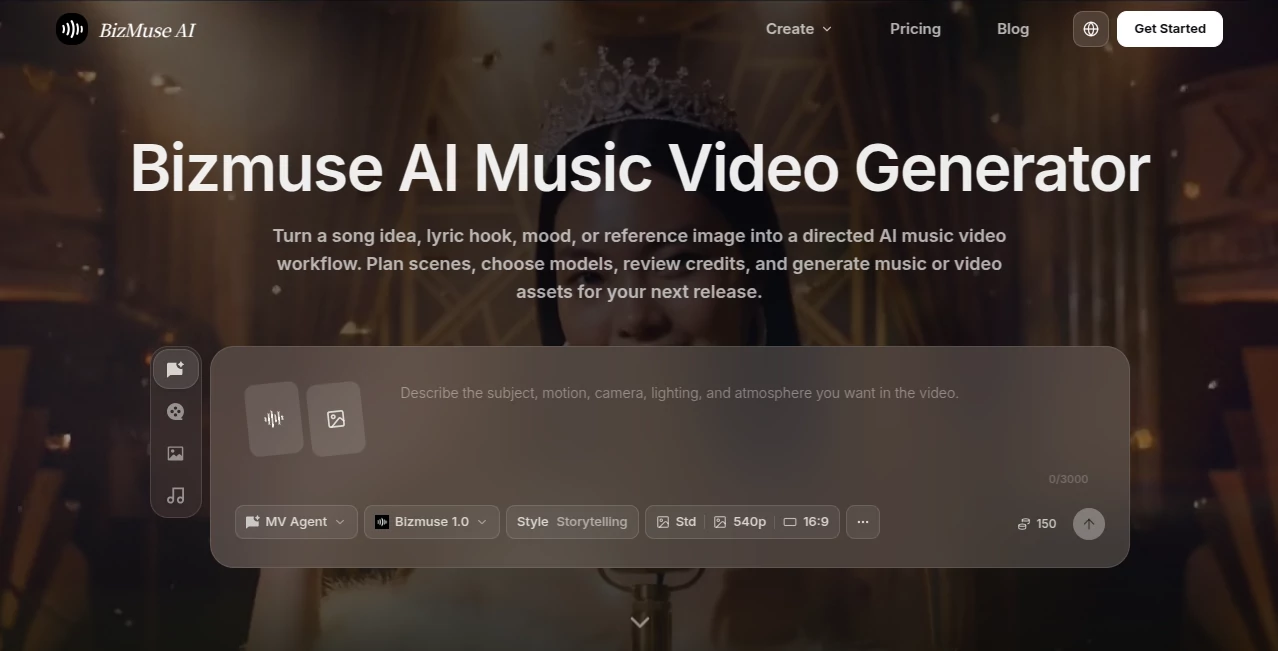
Creating a music video usually means juggling a song, visual references, story ideas, editing decisions, and a long list of production details. This AI-powered creative workspace takes a different approach by putting the music at the center of the process. A song idea, lyric hook, mood, or reference image can become the starting point for a structured visual workflow.
The platform is designed for musicians, independent artists, creators, marketing teams, and editors who want to develop music-video concepts without beginning with an empty editing timeline. It combines AI music, image, and video generation with scene planning, model selection, credit estimates, and refinement tools.
One particularly useful detail is the distinction between Agent and Workflow modes. Agent mode can produce a directed first cut, while Workflow mode gives creators more control over individual shots. That makes the experience useful both for people who want a fast starting point and for creators who prefer to make decisions scene by scene.
Key Features
- AI music video creation from songs, lyrics, moods, prompts, and reference images.
- Support for full-song music videos of up to five minutes.
- Agent mode for a more automated first direction.
- Workflow mode for editing, replacing, and composing individual shots.
- Reference-image support for maintaining a desired artist, character, product, or visual identity.
- Multiple AI models for music, images, and video generation.
- Scene-level regeneration instead of rebuilding an entire project.
- Resolution options including 540p, 720p, and 1080p.
- Standard and High quality generation modes.
- Lip-sync controls for suitable projects.
- 16:9, 9:16, and 1:1 video formats.
- Visible credit estimates before generation.
User Interface
The interface is organized around the actual creative process rather than a traditional video-editing workflow. Creators can choose a generation mode, upload music or reference assets, write shot prompts, select models, adjust quality settings, and review the resulting scenes.
The Workflow mode is especially practical when a project contains several different visual moments. Instead of accepting an entire generated sequence, you can select the shots that work, replace weaker ones, and compose the strongest material into a final cut.
Accuracy & Performance
For generative video, performance is not simply about producing attractive individual clips. Consistency between scenes, visual direction, timing, and the relationship between the music and imagery matter just as much. The platform addresses this by keeping prompts, references, model choices, and scene information together during production.
Creators can also review estimated credit usage before committing to longer generations. This is a useful practical feature when experimenting with several visual directions, since unsuccessful scenes can consume significant generation resources.
The ability to regenerate selected scenes is another advantage. If one shot feels out of place, there is no need to discard the entire sequence and start again.
Capabilities
The creative workflow can begin with a complete track or a simple concept such as a lyric hook, mood, or visual reference. From there, users can develop scenes around the music and select different models depending on the desired result.
The available model choices include dedicated music-video generation alongside cinematic video, native-audio video, image generation, reference-image generation, motion control, and multimodal video creation. This gives creators considerably more flexibility than a tool focused on a single generation model.
Projects can be prepared for different publishing formats, including landscape videos for YouTube and vertical content for TikTok, Instagram Reels, and YouTube Shorts. The same creative idea can therefore be adapted for both a full release and short promotional clips.
Security & Privacy
As with any generative-media service, creators should pay attention to the rights associated with uploaded music, lyrics, photographs, voices, videos, and brand materials. The platform states that users should only process material they own, have created, licensed, or have permission to use.
Commercial usage can also depend on the selected model, account plan, source material, output terms, and publishing platform. For professional releases, it is sensible to review the applicable terms before using generated material commercially, especially when working with recognizable people, copyrighted music, or client assets.
Use Cases
Independent music releases: Artists can turn a finished song into a visual concept without arranging a conventional video shoot. This can be particularly useful for independent musicians working with limited production budgets.
Short-form promotion: A longer music project can provide material for TikTok, Reels, and Shorts. Vertical compositions make it easier to create promotional clips around hooks, choruses, or memorable moments.
Lyric-led visuals: Musicians can build scenes around lyrics and the emotional direction of a song rather than relying on unrelated stock footage.
Artist branding: Reference images can help establish a consistent visual direction for an artist, character, cover-art concept, or campaign.
Marketing campaigns: Agencies and brands can use music-driven visuals for campaign concepts, product mood videos, client presentations, and creative proofs before committing to a larger production.
Creative experimentation: Producers can test different visual styles, models, scene ideas, and directions before deciding which concept deserves a more polished final production.
Pros and Cons
- Pros: Built specifically around music-video creation rather than generic video generation.
- Pros: Supports songs up to five minutes in the main music-video workflow.
- Pros: Agent and Workflow modes provide different levels of creative control.
- Pros: Reference images help guide visual consistency.
- Pros: Individual scenes can be regenerated without rebuilding the entire project.
- Pros: Multiple AI music, image, and video models are available in one workspace.
- Pros: Credit estimates are visible before generation.
- Cons: Generation credits can add up quickly when experimenting with multiple scenes or high-quality models.
- Cons: Final commercial rights depend on the selected model, plan, source material, and applicable terms.
- Cons: Creators who need highly precise professional editing may still want a dedicated video editor for the final production stage.
Pricing Plans
A free option provides 5 daily login credits, giving newcomers a way to explore the workflow before paying. The Weekly plan is listed at $4.99 per week when discounted and includes 600 credits per week, with 720p watermark-free exports and commercial licensing.
The Pro plan is listed at $31 per month on annual billing and includes 5,000 monthly credits, 1080p watermark-free exports, full-song music-video creation, and two concurrent tasks. The Ultimate plan costs $74 per month on annual billing and provides 13,000 credits, priority rendering, four concurrent tasks, advanced models, and additional brand-kit capacity.
For studios, agencies, and creators producing videos at higher volume, the Creator plan is listed at $139 per month on annual billing with 27,000 monthly credits, up to ten concurrent tasks, the highest rendering priority, batch-oriented production capabilities, and the lowest unit price among the listed plans.
Credit consumption varies according to the model, duration, resolution, and generation settings, so the practical cost of a project depends on how much experimentation and refinement it requires.
How to Use It
Start by defining the song or creative direction. Consider the genre, mood, lyrics, tempo, audience, and visual world you want to establish.
Next, choose between Agent mode for a more automated direction or Workflow mode when you want control over individual shots. Upload the song, reference portraits, images, or other relevant creative assets and add prompts describing the desired scenes.
Choose the appropriate model and configure the resolution, quality, and lip-sync settings when available. Review the estimated credit requirement before starting a generation.
Once the scenes are produced, inspect them individually. Keep the strongest shots, regenerate sections that do not work, and arrange the selected material into the final sequence. For a finished release, you can then download the result and prepare it for YouTube, TikTok, Reels, Shorts, or another publishing channel.
Comparison with Similar Tools
Many AI video generators are excellent at producing individual cinematic clips, but this platform takes a more music-centered approach. The key difference is the emphasis on building scenes around a track rather than treating every generation as an isolated video prompt.
It also sits somewhere between an automated generator and a conventional editing workflow. Agent mode makes it possible to get a first direction quickly, while Workflow mode gives creators the ability to replace individual shots and assemble a stronger sequence.
For someone who only needs a short experimental video clip, a general-purpose AI video generator may be sufficient. For an artist who wants to develop a song into a series of connected scenes, the music-first workflow is considerably more relevant.
Conclusion
This is a compelling option for creators who want to connect music and visual storytelling in the same creative workspace. Its strongest quality is not simply that it generates AI video; it is the way the workflow treats the song, scenes, references, model choices, and credit usage as parts of one project.
The combination of full-song support, scene-level refinement, reference images, multiple generation models, and flexible aspect ratios makes it useful for everything from an independent artist's release to short-form social content and campaign concepts.
It is not intended to eliminate every stage of professional post-production, and experienced editors may still want dedicated software for final timing, captions, color grading, audio mastering, and delivery. But as a starting point for turning a musical idea into a coherent visual direction, it offers a practical and creative workflow.
Frequently Asked Questions (FAQ)
What can I create with this AI music-video workflow?
You can create full music videos, song teasers, lyric-driven visuals, short-form music clips, artist promotional content, visualizers, campaign mood pieces, and other music-related video concepts.
Can it create a video from a complete song?
Yes. The main workflow supports songs of up to five minutes, allowing longer projects to cover verses, choruses, bridges, and other sections of a track.
Can I control individual scenes?
Yes. Workflow mode allows creators to work with individual shots, replace weaker generations, and compose the preferred scenes into a final sequence.
Does it support reference images?
Yes. Reference portraits and other visual references can be uploaded to help guide artist appearance, character direction, product identity, cover-art style, or the overall visual mood.
What video resolutions are available?
The creation workflow provides 540p, 720p, and 1080p options, depending on the selected model and account configuration.
Can I make vertical videos for social media?
Yes. The supported aspect ratios include 16:9, 9:16, and 1:1, making the workflow suitable for platforms such as YouTube, TikTok, Instagram Reels, and YouTube Shorts.
Is there a free plan?
Yes. The free option currently provides 5 daily login credits, allowing users to test the platform before choosing a paid plan.
Can I use the generated content commercially?
Commercial use depends on the selected plan, generation model, source materials, and applicable output terms. Users should make sure they have the necessary rights to any music, images, voices, videos, or other assets they provide.
Do I need professional video-editing experience?
No. The workflow is designed around prompts, references, model selection, credit review, and generated scenes. However, professional editors can still use dedicated editing software afterward for detailed finishing and delivery.
Does it automatically create a complete music video from beginning to end?
Not as a completely hands-off process. Agent mode can create a directed first result, while Workflow mode gives users more control over individual scenes. The current system brings music generation, video generation, planning, model selection, and credit visibility together without removing the need for creative review.
AI Photo & Image Generator , AI Music Video Generator , AI Video Generator , AI Music Generator .
These classifications represent its core capabilities and areas of application. For related tools, explore the linked categories above.

BizMuse AI Alternatives Product

Nano Banana …
z image

Chainsaw Man…
RenderQuill

Wurt.app

Happy Horse …

VideoLens

Seedance 2.0…

grok images