
BulkBGRemove
What is BulkBGRemove?
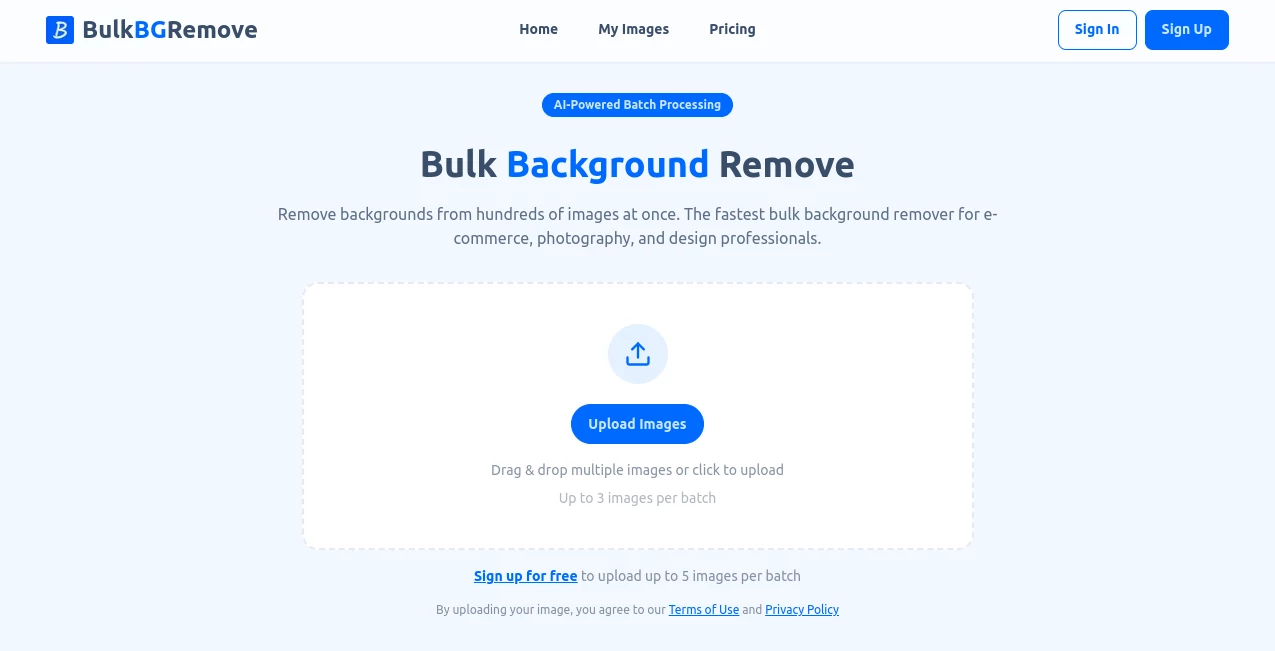
Anyone who’s ever had to edit product photos, headshots, or old family pictures knows the pain — opening each image one by one, carefully selecting the subject, and hoping the edges don’t look jagged. It’s tedious and time-consuming. This tool changes that completely. You upload dozens or even hundreds of images at once, and it returns clean, professional cutouts with transparent backgrounds in moments. I’ve seen e-commerce sellers cut their photo editing time from days to hours, and photographers use it to quickly prepare client galleries. The results look natural, not robotic, which makes all the difference when quality matters.
Introduction
Bulk background removal used to be a luxury only big companies with dedicated designers could afford. This platform brings that power to everyone — freelancers, small business owners, content creators, and even regular people cleaning up personal photos. It uses smart AI that understands subjects, hair strands, and fine details better than most manual tools, while processing everything in bulk so you don’t lose an entire afternoon. The best part? It’s fast, accurate, and doesn’t require any technical skills. You upload, it works, you download — simple as that.
Key Features
User Interface
The design is wonderfully straightforward. Drag and drop as many images as you want, or select them from your folders. A clean progress bar shows how many are done, and you can preview any image instantly. No complicated settings or hidden menus — just a few quality options if you want more control. It feels built by people who actually edit photos every day and got tired of slow, clunky tools.
Accuracy & Performance
The AI handles tricky edges like flyaway hair, transparent objects, and complex clothing surprisingly well. It rarely leaves halos or eats into the subject. Processing speed is impressive even with large batches — hundreds of images can be done while you make a coffee. The output quality is consistent across different photo types, whether you’re working with product shots on white backgrounds or outdoor portraits.
Capabilities
It supports all common image formats and works beautifully with batches of any size. You can choose between different processing modes depending on your needs — faster for simple images or more precise for detailed ones. Results come with transparent backgrounds ready for immediate use in designs, websites, or print. It also preserves original resolution so you’re not sacrificing quality for speed.
Security & Privacy
Your images are processed securely and automatically deleted after download. No accounts are forced for basic use, and there’s no long-term storage of your photos. For businesses handling client work or creators protecting original content, that respectful approach to privacy is a big plus.
Use Cases
An online store owner uploads an entire catalog of product photos and gets clean cutouts ready for their website in one batch. A photographer quickly prepares client headshots for delivery without spending hours in Photoshop. A social media manager creates consistent visuals for multiple campaigns by removing distracting backgrounds from event photos. Even families use it to clean up old scanned pictures for digital albums. It saves time anywhere repetitive background removal is needed.
Pros and Cons
Pros:
- Handles large batches quickly without quality drop-off.
- Excellent edge detection on tricky subjects like hair and fur.
- Simple workflow that anyone can use immediately.
- High-resolution outputs perfect for professional use.
- Generous free tier for testing and smaller jobs.
Cons:
- Extremely complex or very low-quality images may need minor manual touch-ups.
- Heavy daily usage benefits from a paid plan for unlimited processing.
Pricing Plans
The free plan gives you a solid number of images per month — enough for personal projects or testing. Paid plans remove limits, offer faster processing during peak times, and unlock priority support. Pricing is reasonable and scales with your needs, making it accessible for both occasional users and professionals who process hundreds of images weekly.
How to Use BulkBGRemove
Go to the main page and either drag your photos into the upload area or click to select them from your computer. You can upload dozens at once. Once uploaded, choose your preferred quality level and hit process. Watch the progress bar as images are completed, then review and download the transparent versions individually or as a zip file. The entire process is fast enough that you can prepare a full product catalog during a single work session.
Comparison with Similar Tools
Many background removers work well on single images but slow down or lose quality with batches. This one is built specifically for volume while maintaining high accuracy and natural edges. It’s simpler than desktop software like Photoshop and more powerful than basic free online tools, striking a sweet spot that most people actually need.
Conclusion
Background removal doesn’t have to be a time-consuming chore anymore. This tool makes it fast, reliable, and accessible to everyone who needs clean cutouts — whether for business or personal projects. The combination of speed, quality, and ease of use makes it one of those rare tools that quickly becomes part of your regular workflow. If you work with images regularly, giving it a try might just save you more time than you expect.
Frequently Asked Questions (FAQ)
How many images can I process at once?
You can upload and process large batches — dozens or even hundreds depending on your plan.
Does it work with product photos?
Yes — it’s especially strong with e-commerce and product imagery.
Are the results high resolution?
Yes, it preserves original quality and outputs clean, high-res transparent images.
Is there a free way to try it?
Absolutely — the free tier lets you test with real images and see the quality for yourself.
AI Background Remover , Photo & Image Editor , AI Photo Enhancer , AI Image to Image .
These classifications represent its core capabilities and areas of application. For related tools, explore the linked categories above.

BulkBGRemove Alternatives Product

Make Image C…

RGB to CMYK …

BatchRemover

FitHairAI

Image to Ima…

Sketch To

Image Text E…

Image to Pro…
Grayscale Im…