
CastReader
What is CastReader?
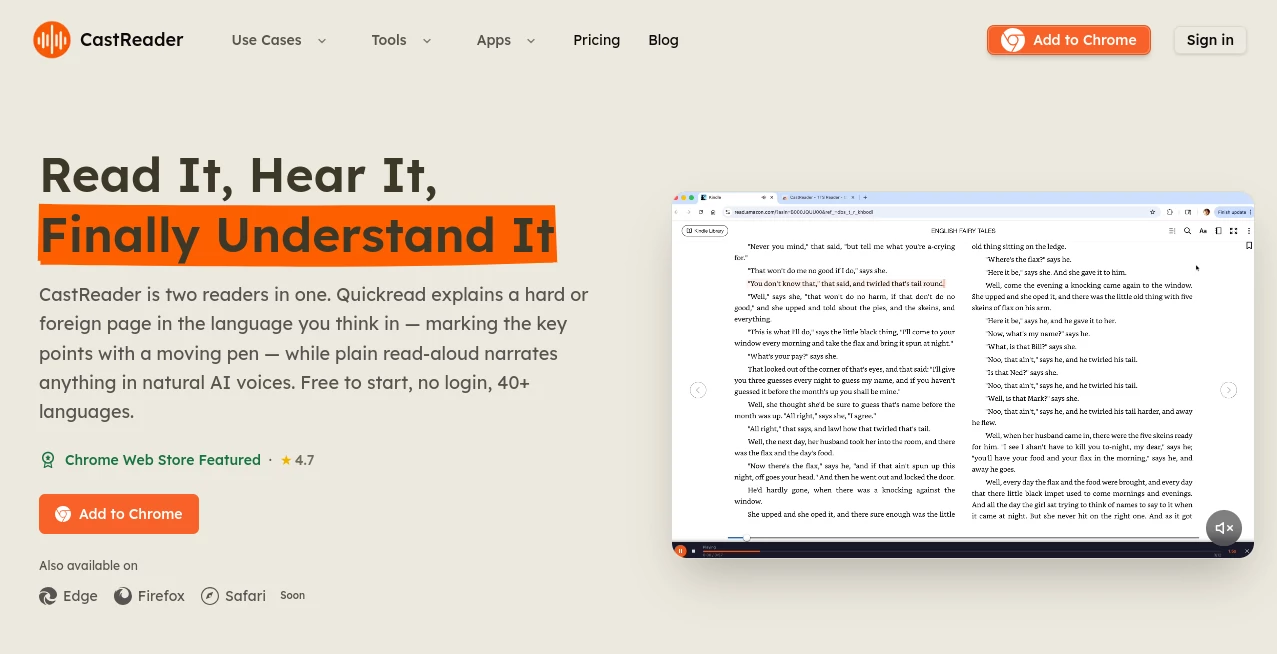
Reading and listening are no longer separate experiences. This innovative AI-powered platform bridges the gap by transforming books, articles, PDFs, ebooks, and web content into engaging audio experiences. Whether you are exploring a classic novel, reviewing a lengthy research paper, or catching up on online articles, the platform delivers natural-sounding narration that feels remarkably human.
What makes it particularly appealing is the way it enhances traditional text-to-speech technology. Instead of simply reading words aloud, it analyzes content, identifies speakers in stories, assigns distinct voices to characters, and creates a more immersive listening environment. For readers who spend hours with digital documents, students managing heavy workloads, or professionals consuming information on the go, it offers a refreshing and highly practical solution.
Key Features
User Interface
The interface is clean, modern, and easy to navigate. Users can upload documents, open web pages, or access supported platforms without dealing with unnecessary complexity. Playback controls are intuitive, and synchronized paragraph highlighting helps listeners follow along effortlessly.
The platform also supports seamless transitions between devices, allowing users to continue listening wherever they left off. This convenience makes it suitable for both casual readers and productivity-focused professionals.
Accuracy & Performance
One of the strongest aspects of the platform is its processing speed. Large PDFs, ebooks, and lengthy reports can be converted into audio quickly, minimizing waiting time. The AI accurately detects text structure, dialogue sections, and language variations to produce smooth narration.
Support for dozens of languages further expands accessibility, making it useful for international users and language learners who want reliable pronunciation and consistent audio quality.
Capabilities
The platform offers much more than traditional text-to-speech functionality.
- Convert articles, PDFs, EPUB files, DOCX documents, and ebooks into audio.
- Generate unique voices for different story characters.
- Create audiobook-style listening experiences from novels.
- Provide paragraph-level highlighting during playback.
- Support voice cloning for personalized narration.
- Read content from websites, productivity platforms, and AI chat interfaces.
- Enable mobile listening with synchronized access across devices.
- Handle multilingual content with natural voice rendering.
Security & Privacy
Privacy-conscious users will appreciate the straightforward experience. Many features can be used without complicated registration requirements, reducing friction while maintaining accessibility. Document processing is designed to focus on delivering audio output efficiently without requiring extensive personal information.
For users handling sensitive reports, educational materials, or business documents, this approach provides an additional layer of confidence while enjoying AI-powered assistance.
Use Cases
- Students listening to academic papers during commutes.
- Professionals reviewing lengthy reports while multitasking.
- Book lovers transforming novels into immersive audio experiences.
- Language learners improving pronunciation and listening comprehension.
- Researchers consuming large volumes of information more efficiently.
- Users with visual fatigue, dyslexia, or reading accessibility needs.
- Content consumers who prefer audio over traditional reading.
Pros and Cons
Pros
- Natural and realistic AI voices.
- Character-specific narration for storytelling content.
- Supports multiple document formats.
- Cross-device synchronization.
- Fast processing of long documents.
- Paragraph highlighting improves focus.
- Wide language support.
- Free options available for new users.
Cons
- Advanced voice features may require premium access.
- Some users may prefer additional customization options.
- Audio quality can vary depending on source document formatting.
Pricing Plans
The platform offers a free entry point that allows users to experience core listening features without significant limitations. Premium options are available for users who need extended listening hours, advanced voices, voice cloning functionality, and enhanced AI-powered features. This flexible structure makes it suitable for both casual listeners and power users.
How to Use CastReader
Getting started is straightforward.
- Install the browser extension or access the platform through supported applications.
- Open a webpage, ebook, PDF, or document.
- Start playback with a single click.
- Follow synchronized highlighting while listening.
- Adjust playback settings based on personal preference.
- Continue listening across devices whenever needed.
The entire process takes only a few moments and requires minimal setup.
Comparison with Similar Tools
Many text-to-speech platforms focus primarily on converting text into audio. This platform goes further by creating richer listening experiences through character analysis, multi-voice narration, relationship mapping for stories, synchronized highlighting, and personalized voice options.
Compared with conventional audiobook generators, it provides greater flexibility because users can upload their own documents and instantly transform them into listenable content. Compared with standard reading assistants, it delivers a more engaging and immersive experience, particularly for fiction and long-form reading.
Conclusion
This platform successfully reimagines how people consume written content. By combining advanced text-to-speech technology, intelligent character recognition, multilingual support, and user-friendly design, it creates a listening experience that feels significantly more engaging than traditional reading tools.
Whether you want to transform novels into audio dramas, listen to business reports during travel, or simply reduce screen fatigue, it offers a versatile solution that adapts to different reading habits. Its blend of accessibility, productivity, and entertainment makes it a compelling choice for modern readers.
Frequently Asked Questions (FAQ)
Can it convert PDFs into audio?
Yes. PDF files can be uploaded and converted into natural-sounding audio for convenient listening.
Does it support multiple languages?
Yes. The platform supports a large selection of languages and automatically adapts narration accordingly.
Can it create different voices for story characters?
Yes. AI-powered character analysis allows different voices to be assigned to individual characters in novels and stories.
Is it suitable for students?
Absolutely. Students can listen to research papers, course materials, and educational documents while studying or commuting.
Does it work with online articles?
Yes. Users can listen to articles, blogs, web pages, and various forms of online content directly through supported integrations.
AI Productivity Tools , AI Text to Speech , AI Speech Synthesis , AI Voice Assistants .
These classifications represent its core capabilities and areas of application. For related tools, explore the linked categories above.

CastReader Alternatives Product

AI2AI project

VoiceAILabs

Skygen AI

Nova AI

HTMLSlides

Keepmind

Create Filla…
Online White…

Debate Tello…