
ClipLumi
What is ClipLumi?
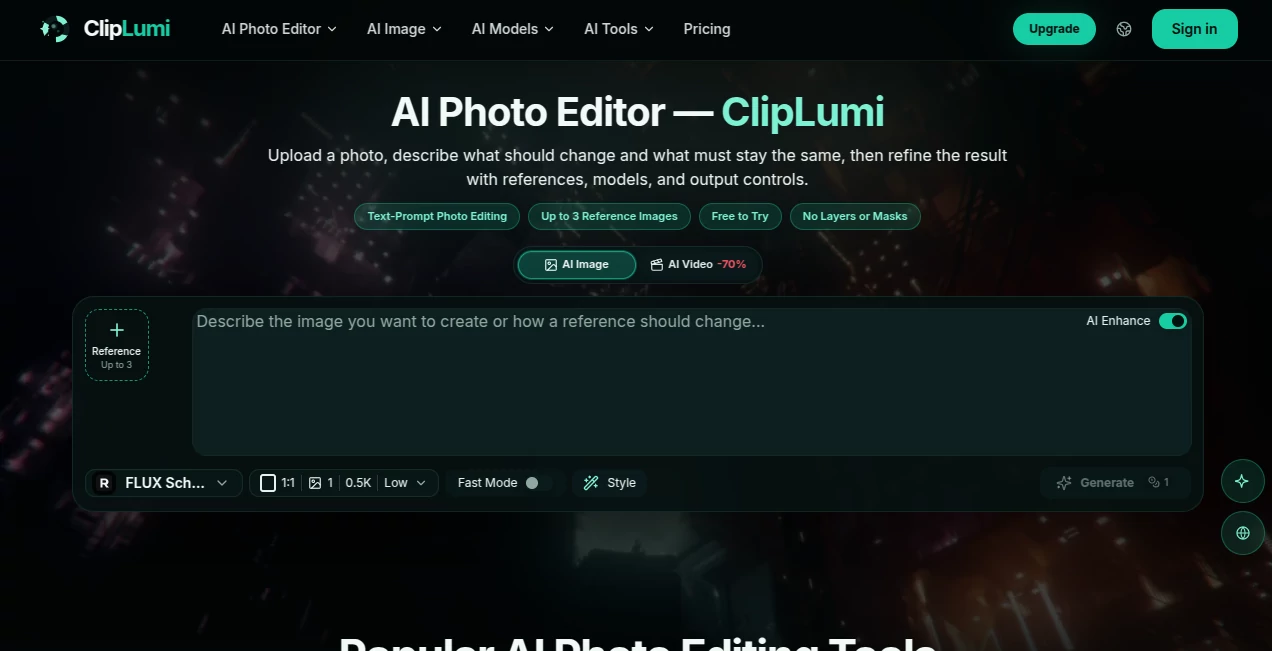
Editing a photo no longer has to mean opening a complicated editor, searching through layers, masks, adjustment panels, and dozens of controls. ClipLumi takes a much simpler approach: upload an image, describe the change you want in plain language, and let AI handle the visual edit while keeping the important parts of the original picture intact.
The platform is built around practical image editing rather than simple text-to-image generation. You can tell it what to change and, just as importantly, what should remain unchanged. This makes it useful when the original subject, product, composition, pose, or visual identity still matters.
It also brings image creation and editing into the same workspace. Users can work from an existing photo, start with a text prompt, add reference images, select an AI model, and adjust output settings before generating a result.
Key Features
- Text-guided photo editing using natural-language instructions
- Support for up to three reference images
- Object removal and background replacement
- Image-to-image editing and visual restyling
- Photo enhancement and detail refinement
- Composition and aspect-ratio changes
- Multiple AI image models in one workspace
- Adjustable aspect ratio, resolution, quality, style, and output count
- Generation history for signed-in users
- Support for both image generation and photo editing
User Interface
The interface is refreshingly straightforward. Instead of presenting users with a traditional professional editing suite, it centers the workflow around an image, a prompt, references, and a small collection of useful controls.
You can upload a source image, explain the desired change, select references if necessary, and then choose settings such as aspect ratio and output count. The approach should feel comfortable even for someone who has never worked seriously with Photoshop or another layer-based editor.
One particularly useful idea is the ability to describe both the modification and the details that should be preserved. For example, a user can request a new background while asking the system to retain the person's pose, appearance, lighting, and natural edges.
Accuracy & Performance
The quality of an AI image edit depends heavily on the underlying model and the clarity of the instruction. The platform addresses this by providing access to several image models rather than forcing every project through a single generation system.
Available options include models such as FLUX Schnell, GPT Image 2, Nano Banana 2, and several Seedream variants. This gives users room to experiment when one model produces a result that is not quite right for a particular image.
The workflow is also designed for refinement. Instead of treating the first generation as the final answer, you can adjust the prompt, references, model, aspect ratio, or quality and generate another version. That makes the process much more practical for creative work where small visual differences matter.
Capabilities
The platform covers a surprisingly broad range of everyday image-editing tasks. You can remove unwanted objects, replace distracting backgrounds, enhance an existing photograph, change its composition, restyle a scene, or create a new visual from a prompt.
Reference images add another layer of control. Up to three references can be supplied to guide elements such as a subject, product, background, composition, or visual style. This is particularly useful when a generic text prompt is not enough to describe the desired result.
There are also dedicated creative directions for portraits, product imagery, room redesigns, professional headshots, old-photo restoration, album covers, outfit concepts, and other visual projects. These starting points can help users move from a blank canvas to a workable idea more quickly.
Security & Privacy
Privacy becomes important whenever personal photographs or commercial assets are uploaded to an AI service. The platform provides private generation history on its higher plans and keeps saved work connected to the user's account.
Users should still review the service's current privacy terms before uploading confidential business material, sensitive personal photographs, or images containing information that should not be processed by a third-party service.
The service also makes clear that it is an independent interface for third-party AI models and is not affiliated with or endorsed by the providers of those models. It additionally prohibits face-swap, deepfake, and identity-replacement requests.
Use Cases
Product Photography: Ecommerce sellers can turn ordinary product photographs into cleaner marketing visuals, replace backgrounds, improve presentation, or create variations for different campaigns.
Social Media Content: Creators can adapt images for portrait, square, landscape, and other formats without rebuilding the original composition from scratch.
Portrait Editing: A portrait can be refined, restyled, enhanced, or placed in a different environment while preserving important characteristics of the original subject.
Marketing Campaigns: Small businesses can experiment with advertising concepts, product visuals, social posts, and promotional artwork without needing a dedicated design workflow for every variation.
Background Replacement: Busy or unsuitable backgrounds can be replaced while asking the AI to preserve the subject and natural edges.
Creative Experiments: Artists and creators can combine prompts with reference images to explore new visual directions, styles, compositions, and concepts.
Old Photo Improvement: Existing photographs can be enhanced and restored to produce a cleaner, more modern-looking result while keeping the original moment recognizable.
Pros and Cons
- Pros: Simple prompt-based workflow, support for multiple reference images, several AI models, useful editing controls, image generation and editing in one place, and a free credit for new accounts.
- Pros: Good fit for users who want practical image editing without learning traditional layers and masks.
- Pros: Useful for ecommerce, marketing, portraits, social media, and general creative projects.
- Cons: More advanced professional editors may still prefer traditional software when they need precise manual control over every element.
- Cons: AI generation uses credits, and more sophisticated editing models require more credits per output.
Pricing Plans
New accounts receive one free credit, which provides an easy way to test the service before committing to a paid plan. Image generation starts at one credit, while photo editing models currently start at four credits per output.
The paid plans are structured around monthly credit allowances. The Pro plan provides 2,000 credits with monthly billing or 24,000 credits when billed annually. The Ultimate plan increases the allowance to 5,000 credits monthly or 60,000 annually, while the Max plan provides 10,000 credits monthly or 120,000 annually.
Annual pricing is currently promoted at a substantial discount. Paid plans also include features such as watermark-free downloads and priority processing, while the higher tiers provide private generation history and additional privacy controls.
How to Use It
Start by uploading the image you want to edit. Depending on the project, you can also add up to three reference images to guide the subject, product, background, composition, or visual style.
Next, write a clear instruction describing what you want to change. It is helpful to mention what should remain untouched as well. For example, instead of simply asking for a new background, specify that the person, pose, clothing, lighting direction, and natural edges should stay consistent.
Choose the AI model and adjust the available output settings, such as aspect ratio, resolution, quality, style, and number of outputs. Then generate the result and compare it with the original.
If the first version is close but not perfect, refine one part of the instruction rather than rewriting everything. Changing a single variable at a time can make it easier to understand which prompt or setting improves the result.
Comparison with Similar Tools
Traditional photo editors remain stronger when the goal is pixel-level manual control. They provide extensive tools for layers, selections, masks, brushes, color correction, and detailed retouching. The trade-off is a steeper learning curve and a slower workflow for simple changes.
General-purpose AI image generators, on the other hand, are excellent when the user wants to create something completely new from a description. They are less focused on preserving a specific existing photograph.
This platform sits between those two approaches. It combines generative AI with source-image editing, allowing users to begin with an actual photograph and describe the desired modification. The addition of reference images and multiple models makes the workflow more flexible than a basic one-prompt image generator.
Conclusion
For anyone who frequently needs to change photographs but does not want to spend time learning complex editing software, this platform offers a compelling alternative. Its biggest strength is the simple idea behind the workflow: explain the change, specify what should stay, and let the AI handle the difficult visual work.
The combination of prompt-based editing, reference images, multiple models, adjustable output settings, and saved generation history makes it suitable for everything from quick social media edits to product imagery and more ambitious creative projects.
It will not replace every professional image-editing application, particularly for users who need precise manual control. But for fast, instruction-based edits and creative image variations, it provides a practical and approachable workflow worth exploring.
Frequently Asked Questions (FAQ)
What is this AI photo editor used for?
It can be used to edit existing photographs with text prompts, remove unwanted objects, replace backgrounds, enhance images, change compositions, restyle visuals, and create new images from prompts.
Can I edit an existing photograph?
Yes. The workflow is specifically designed around editing source images. You can upload a photograph and describe the changes you want while specifying important details that should remain consistent.
How many reference images can I use?
You can add up to three reference images to help guide the subject, product, background, composition, or visual style.
Does it support text-to-image generation?
Yes. The workspace supports both text-based image creation and editing from existing images, allowing users to switch between the two approaches depending on the project.
Can I remove objects from a photo?
Yes. Object removal is one of the supported editing workflows, allowing unwanted elements to be removed while the AI reconstructs the affected area.
Can I replace an image background?
Yes. Background replacement is supported, and prompts can be used to describe the new environment while asking the system to preserve the main subject and natural edges.
Is there a free option?
New accounts receive one free credit valid for 30 days. This provides an opportunity to test the generation workflow before purchasing additional credits.
Which image models are available?
The available model selection includes options such as FLUX Schnell, GPT Image 2, Nano Banana variants, and Seedream models. The exact selection may change as new models are added or updated.
Can I use it on mobile?
Yes. The interface adapts its upload, prompt, model, aspect ratio, quality, style, and generation controls for touch-friendly mobile use.
Who can benefit most from this tool?
Content creators, ecommerce sellers, marketers, social media managers, designers, photographers, and everyday users who want quick AI-assisted image edits can all find practical uses for it.
AI Photo & Image Generator , Photo & Image Editor , AI Background Remover , AI Image to Image .
These classifications represent its core capabilities and areas of application. For related tools, explore the linked categories above.

ClipLumi Alternatives Product

Text Remover…

Seedream Ima…
PostPlus AI

Picnana

Nano Banana …

Artguru

Image to Ima…

DaVinci AI

Pixora