
CPages
What is CPages?
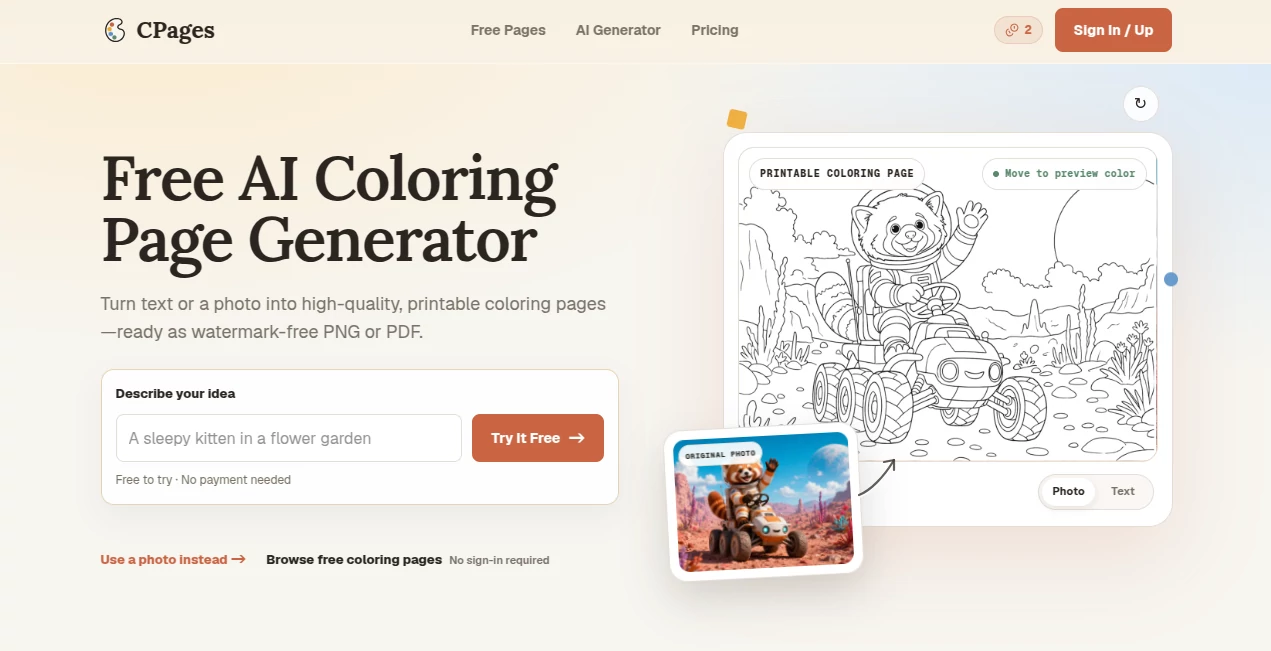
CPages is a free AI coloring page generator designed for people who want to turn simple ideas or existing photos into clean, printable line art. Instead of spending time searching for the right worksheet or manually tracing an image, users can describe a scene, upload a photo, and let the generator create a coloring page that is ready to download as a PNG or printable PDF.
The idea is particularly useful for parents, teachers, and coloring enthusiasts. A parent could create a page featuring a child's favorite animal, while a teacher could make a custom activity around a classroom topic. Adults can also use it for mandalas, floral designs, pet portraits, or relaxing coloring projects.
The experience keeps the creative process fairly focused. There are separate text and photo workflows, so users are not confronted with a long list of unrelated controls before they even know what they want to create.
Key Features
- Generate printable coloring pages from text descriptions.
- Convert an existing photo into line-art suitable for coloring.
- Choose different levels of detail and visual styles.
- Text generation includes age and page-shape options.
- Photo generation provides controls for line detail and background treatment.
- Download successful creations as PNG or printable PDF files.
- Generation costs are displayed before an image is submitted.
- Failed or timed-out generations return the reserved credits.
- Generated pages are unlisted by default rather than automatically placed in a public gallery.
- Paid subscribers can select private output.
User Interface
The interface is built around a simple choice: start with words or start with a photo. That makes the first step easy to understand, even for someone who has never used an AI image tool before.
For text-based creations, users describe a subject, scene, or activity and can select options such as age range and page shape. The photo workflow takes a different approach, offering controls for line detail and the background. This separation is a nice touch because a teacher creating a worksheet and someone converting a family photograph have very different requirements.
Accuracy & Performance
The generator is focused on producing coloring-page line art rather than a conventional finished illustration. That distinction matters. The goal is to simplify the subject into recognizable outlines that can actually be printed and colored.
For example, a prompt describing a sleeping fox in a forest can become a page with clear outlines around the animal and surrounding elements. Users can also select simpler styles for younger children or more detailed patterns for older children and adults.
The service also shows the credit cost before generation, which makes the workflow more predictable. If a generation fails, times out, or cannot be delivered, the reserved credits are released rather than simply being consumed.
Capabilities
The text-to-coloring workflow is useful when the user has an idea but no source image. A description such as a dinosaur, birthday bouquet, vehicle, fantasy scene, or animal can serve as the starting point.
The photo workflow is useful for personalization. A pet photograph, family image, or another picture can be transformed into simplified line art. This gives users a way to create coloring material around subjects that would be difficult to find in a conventional coloring-book collection.
There are also several style directions available, including simple pages for younger children, cartoon artwork, detailed designs, mandalas, pet portraits, doodles, vehicle illustrations, and floral line art.
Security & Privacy
Privacy is addressed directly in the product's workflow. Uploaded source photos remain private, while standard generated results are unlisted by default. They are not automatically added to public galleries, SEO pages, or the site's sitemap.
Paid subscribers can additionally choose private output before generating a page. This is useful when the material contains a personal photograph or when a creator simply does not want their work discoverable through public links.
Use Cases
Parents: Create personalized coloring activities for weekends, birthdays, holidays, travel, or quiet screen-free time. A child's favorite animal or hobby can become the subject of a custom page.
Teachers: Produce classroom activity sheets, visual material for lessons, seasonal crafts, and reward pages without relying entirely on generic worksheets.
Coloring enthusiasts: Experiment with custom subjects, mandalas, flowers, pets, and different levels of detail for relaxation or creative practice.
Personalized gifts: Turning a pet or memorable photograph into printable line art can make a simple coloring page feel considerably more personal.
Printable creators: The higher-tier plans are aimed at users who want commercial rights, including eligible products sold through platforms such as Etsy and Amazon KDP.
Pros and Cons
- Pros: Simple text and photo workflows, printable PNG and PDF output, free signup credits, multiple styles, useful controls for different age groups, private source photos, and commercial licensing on qualifying higher-tier plans.
- Pros: The generator clearly shows the credit cost before creation, and failed generations return reserved credits.
- Pros: The combination of AI-generated pages and curated free coloring resources makes the service useful even when users are not ready to generate something themselves.
- Cons: The free account is limited by credits and is intended for personal use.
- Cons: Commercial use and Etsy/Amazon KDP selling rights are restricted to the Pro and Business plans.
- Cons: Some additional features, including AI coloring and manual coloring, are currently listed as coming soon rather than being available now.
Pricing Plans
The service uses a credit-based subscription model. New accounts receive 10 free credits, giving users a way to test the workflow without entering a payment card.
- Free: $0 with 10 signup credits and personal-use rights.
- Starter: $9.99 per month for 200 credits, with PNG/PDF downloads, private output, and generation history.
- Creator: $17.99 per month for 500 credits, aimed at families and regular users.
- Pro: $26.99 per month for 1,000 credits, including commercial use and eligible Etsy/Amazon KDP selling rights.
- Business: $79.99 per month for 3,000 credits, designed for higher-volume commercial creation.
Annual billing is also available, with plans ranging from $99 per year for Starter to $799 per year for Business. The current credit cost is displayed before each generation, and text and photo generations currently use 2 credits per generation.
How to Use It
- Open the AI coloring page generator and create an account to receive the available starter credits.
- Choose whether you want to begin with a text description or an existing photo.
- If using text, describe the subject, setting, or activity you want to turn into line art.
- Select the available options such as age range and page shape.
- If using a photo, upload an image and adjust the available line-detail and background controls.
- Review the displayed generation cost before submitting.
- Generate the coloring page and review the result.
- Download the finished page as a PNG or printable PDF.
Comparison with Similar Tools
Many AI image generators are designed to produce polished, full-color artwork. This service takes a more specific approach by focusing on printable coloring pages. That makes it less of a general-purpose image creation platform and more of a dedicated solution for turning ideas and photographs into line art.
Compared with traditional coloring-page websites, the major advantage is personalization. Instead of choosing only from an existing catalog, users can describe what they want or provide their own image. Compared with broad AI art platforms, the workflow is more focused on outlines, printing, age-appropriate complexity, and practical coloring use.
The result is a particularly useful middle ground for users who want something more personal than a downloadable stock coloring page but do not want to learn a complicated image-editing application.
Conclusion
This is a practical choice for anyone who wants to create personalized coloring pages without drawing them from scratch. Its strongest feature is not simply AI image generation; it is the way the technology has been narrowed down to a clear purpose: producing printable line art from an idea or an existing photograph.
The separate text and photo workflows make the experience approachable, while options for age, detail, styles, PNG and PDF downloads give users enough flexibility for everything from a quick children's activity to a more detailed adult coloring project.
Parents and teachers can use it for everyday activities, coloring fans can explore custom designs, and commercial creators can move to the appropriate paid plans when they need eligible commercial rights. For a specialized coloring-page workflow, it offers a straightforward and useful alternative to general AI art generators.
Frequently Asked Questions (FAQ)
Can I create a coloring page from text?
Yes. You can describe a subject, scene, or activity and use the text generation workflow to create printable line art. Age and page-shape options are available in this mode.
Can I turn a photo into a coloring page?
Yes. The photo workflow allows you to upload an image and adjust controls such as line detail and background before generating the coloring page.
Can I download the generated pages?
Yes. Successful generations can be downloaded as PNG or printable PDF files.
Are uploaded photos public?
No. Source photos remain private. Generated pages are also unlisted by default and are not automatically added to public galleries, search pages, or the sitemap.
Is there a free plan?
Yes. New accounts receive 10 free credits, allowing users to try the creation workflow before subscribing.
Can I use the generated pages commercially?
Commercial use is included with the Pro and Business plans for eligible results generated while the applicable plan is active. These plans also include rights for eligible products sold on Etsy and Amazon KDP, subject to the service's terms. Commercial licensing does not grant rights to third-party characters, trademarks, brands, likenesses, or source material.
What happens if a generation fails?
If a generation fails, times out, or cannot be delivered, the reserved credits are returned to the account. This is a credit release rather than a cash payment refund.
Are there different coloring styles?
Yes. Available examples include simple designs for younger children, cartoon styles, detailed pages, mandalas, pet portraits, doodles, vehicle line art, and floral designs.
Does it require a complicated design process?
No. The workflow is intentionally focused. Users can either describe what they want or provide a photo, adjust the relevant controls, generate the page, and download the result.
AI Photo & Image Generator , AI Illustration Generator , AI Image to Image , AI Text to Image .
These classifications represent its core capabilities and areas of application. For related tools, explore the linked categories above.

CPages Alternatives Product

whisk ai

Image to Pro…

Consistent C…

AIGPTImage

Z Image

Imagine2

meigen ai

ColorChanger

Genmi AI