CueCue - Google Pics
What is CueCue - Google Pics?
There’s a frustrating moment every creator knows: you generate an image with AI, it’s almost perfect… except for one small detail. Changing it used to mean starting over from scratch. Google Pics changes that experience. It lets you generate visuals and then edit specific objects, text, or areas without ruining the rest of the composition. It feels less like rolling the dice and more like working with a smart, responsive design partner. I’ve watched designers and marketers go from “close enough” to genuinely proud of their visuals in just a few refinements.
Introduction
Google Pics is built for people who need practical, editable visuals—not just impressive one-shot generations. Whether you're making presentation slides, social media graphics, event flyers, or campaign assets, it gives you the power to generate first and refine with precision afterward. The big leap is moving from “prompt and pray” to “generate, select, and improve.” It integrates naturally with Google Workspace, so your finished images can flow straight into Slides or Drive. For teams and solo creators who value speed and control, it’s a refreshing step forward in AI image tools.
Key Features
User Interface
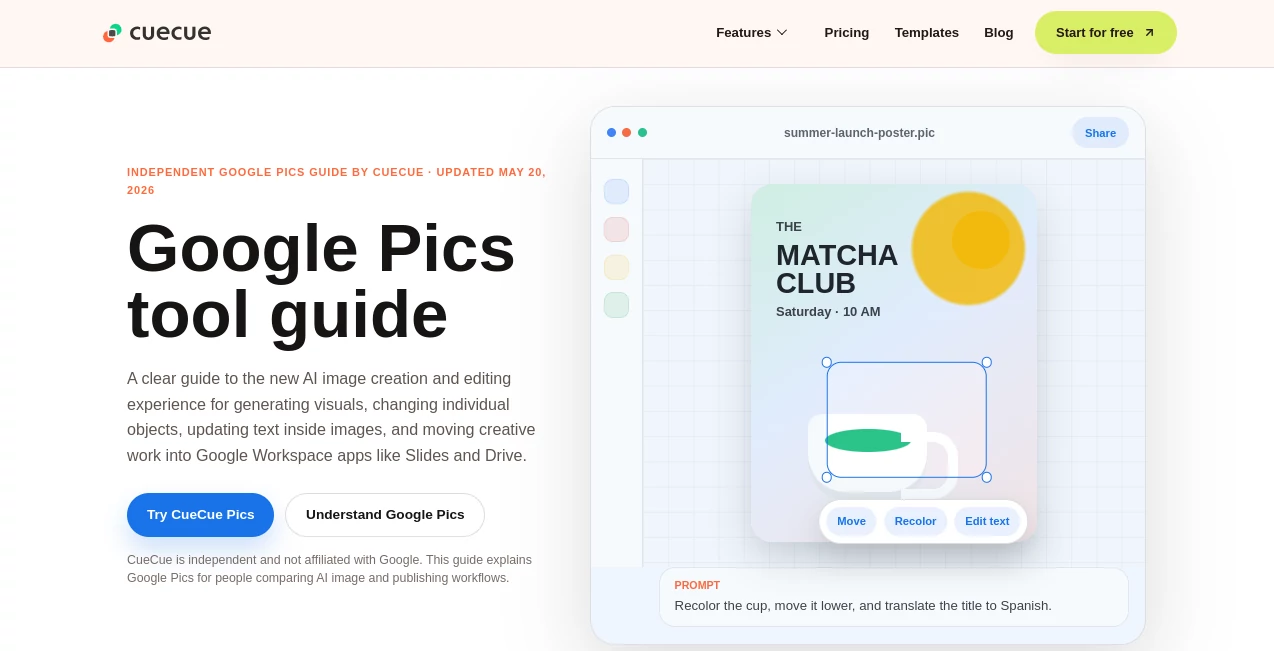
The interface feels clean and intentional. You start with a prompt or upload a base image, then work directly on the canvas. Select any object, text block, or region and describe the exact change you want. No complex layers or hidden menus—just point, describe, and see the update. The workflow encourages iteration rather than perfection on the first try, which matches how most real projects actually happen.
Accuracy & Performance
It shines at understanding context. When you ask to move an object, recolor something, or translate text inside the image, it usually respects lighting, perspective, and overall composition. Changes happen quickly, and the results stay coherent instead of introducing random artifacts. For practical creative work, that reliability matters more than raw wow-factor on the first generation.
Capabilities
You can generate images from text, edit existing ones with object-level precision, change colors, move elements, update or translate text inside the image, and maintain visual consistency across refinements. It’s particularly strong for presentation assets, marketing graphics, and quick social content where you need several small adjustments before the final version. The integration with Google Workspace makes exporting and using the images in real projects seamless.
Security & Privacy
As part of the Google ecosystem, it benefits from strong enterprise-grade security standards. Your prompts and generated images stay within your Google account environment, with the usual Workspace controls around sharing and access. For teams working on client projects or internal materials, that familiar trust level is reassuring.
Use Cases
A marketer generates a campaign hero image and then tweaks product placement and text for different audiences without regenerating everything. A teacher creates custom illustrations for slides and adjusts elements based on class feedback in real time. A small business owner makes social media graphics and quickly localizes text for different regions. Teams using Google Slides can create visuals and drop them straight into presentations with minimal friction. It’s especially useful when you need fast, iterative design rather than perfect first drafts.
Pros and Cons
Pros:
- Object-level editing saves enormous time compared to regenerating whole images.
- Text editing and translation inside images is surprisingly effective.
- Clean integration with Google Workspace tools most people already use.
- Practical focus on editable assets rather than just flashy generations.
Cons:
- Still rolling out—availability depends on your Google plan and region.
- Best results come from clear, specific prompts and good base images.
- Complex artistic styles may still need human finishing touches.
Pricing Plans
Access is tied to Google AI Pro / Ultra subscriptions and eligible Google Workspace plans. There’s no standalone public free tier yet, but trusted testers and Workspace users are getting early access. For teams already in the Google ecosystem, it feels like a natural addition rather than a big extra expense.
How to Use Google Pics
Start a new project with a text prompt or upload a base image. Once the initial visual appears, click on any element you want to change—person, object, text, background—and describe what you want (“make the cup red”, “move the title lower”, “translate text to Spanish”). Review the update, make additional refinements, and export when it’s ready. The iterative loop is fast enough that you can go from rough idea to polished asset in minutes.
Comparison with Similar Tools
Many AI image generators force you to start over for every small change. Google Pics stands out by treating the image as an editable canvas rather than a fixed output. While some tools offer stronger artistic styles, few match the practical object-level control and Workspace integration that make it genuinely useful for everyday creative and business work.
Conclusion
Google Pics brings a much-needed dose of practicality to AI image creation. It respects the reality that most visuals need refinement, not just regeneration. For anyone who creates graphics as part of their job or passion, having the ability to generate and then precisely edit opens up faster, more confident workflows. It’s not trying to replace designers—it’s giving them (and everyone else) a smarter starting point and better tools to finish the job.
Frequently Asked Questions (FAQ)
Is Google Pics free?
Access is currently rolling out to Google AI Pro/Ultra users and eligible Workspace customers. Check your account for availability.
Can I edit text inside generated images?
Yes, one of its strongest features is the ability to change or translate text while keeping the rest of the design intact.
How does it compare to other AI image tools?
It prioritizes editable, practical outputs over single perfect generations, which makes it more useful for real workflows.
Does it integrate with Google Slides and Drive?
Yes, seamless export and integration is one of the main advantages for Workspace users.
What kinds of projects is it best for?
Presentations, marketing assets, social graphics, event materials, and any visual that needs quick iterations.
Photo & Image Editor , AI Graphic Design , AI Design Generator , AI Image to Image .
These classifications represent its core capabilities and areas of application. For related tools, explore the linked categories above.
CueCue - Google Pics details
Website unavailable — View Alternatives
Pricing
- Free
Apps
- Web App
Categories

CueCue - Google Pics Alternatives Product

AI Thumbnail…

Fahhh Meme

Medical Illu…

Image to Thr…

LongCat Image

Image3

Nano Banana …

Banana 2

BatchRemover