
DecorAI
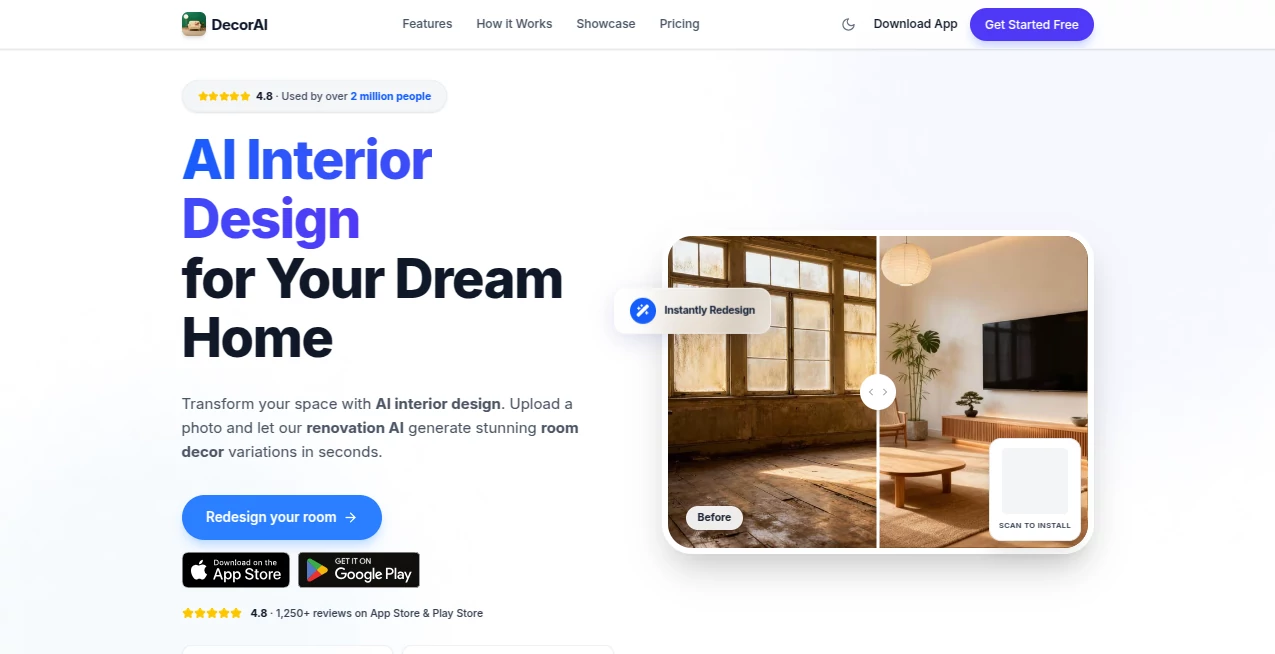
What is DecorAI?
I’ve tried a few AI design tools over the years, and most of them left me disappointed — either the results looked fake or they completely ignored the actual layout of my room. Then I used this one. I uploaded a photo of my tired living room, picked a style, and suddenly I was looking at a version of my space that felt warm, intentional, and surprisingly realistic. The furniture placement made sense, the lighting felt natural, and the overall vibe matched what I’d been imagining but couldn’t quite describe. It’s the kind of tool that makes you excited to reimagine your home instead of overwhelmed by the process.
Introduction
Renovating or decorating a home is exciting, but also expensive and full of guesswork. Traditional interior design takes weeks and costs thousands. This platform cuts through all that by letting you upload a photo of any room and instantly see photorealistic redesigns in dozens of styles. From Scandinavian minimalism to cozy modern farmhouse, it visualizes changes so clearly that you can make confident decisions before spending a dime. Over two million people have already used it to plan renovations, stage properties, or simply play with ideas for their space. It’s become a favorite for homeowners, real estate agents, and designers who want fast, trustworthy visuals.
Key Features
User Interface
The experience is delightfully straightforward. You upload a photo of your room, choose a style from a well-organized gallery, and within seconds you’re looking at multiple variations. The before-and-after slider lets you compare instantly, and you can tweak prompts or try different styles without starting over. It works beautifully on mobile too, so you can stand in your actual living room, snap a picture, and see possibilities right away. No complicated menus or steep learning curve — just pure inspiration.
Accuracy & Performance
What sets it apart is how well it understands your actual space. It keeps the room’s proportions, windows, and architectural details intact while intelligently replacing furniture, colors, and decor. The renders look like professional photography rather than obvious AI output. Generation is fast, and the consistency across multiple styles on the same room is impressive. Many users report that the visualizations helped them avoid costly mistakes during real renovations.
Capabilities
It supports a wide range of rooms — living rooms, kitchens, bedrooms, bathrooms, home offices, and even exteriors. You can choose from 20+ styles including Japandi, Bohemian, Mid-Century Modern, Coastal, and more. Features include virtual staging for empty rooms, renovation visualization, and the ability to experiment with different materials and layouts. Real estate agents particularly love how it helps properties sell faster by showing buyers furnished versions of vacant listings.
Security & Privacy
Your photos are processed securely and not used for training without permission. The platform focuses on delivering value while respecting user data. For professionals handling client properties or homeowners sharing personal spaces, that care around privacy builds real trust.
Use Cases
A couple planning a kitchen remodel uploaded their current space and tested dozens of cabinet colors and layouts before committing — saving them from an expensive mistake. A real estate agent stages multiple vacant listings in different styles to appeal to various buyer types, helping properties move faster. A young homeowner experiments with bedroom designs on a budget, confident in her choices before buying furniture. Interior designers use it to quickly show clients multiple concepts, speeding up the approval process dramatically.
Pros and Cons
Pros:
- Photorealistic results that actually look like real rooms, not cartoonish renders.
- Fast generation lets you explore many ideas in one sitting.
- Understands real room architecture and keeps proportions accurate.
- Great for both personal use and professional client presentations.
- Generous free tier to try before upgrading.
Cons:
- Very cluttered or dark photos can sometimes reduce quality.
- Advanced batch processing and priority features are on paid plans.
Pricing Plans
You can start for free with several high-quality generations per day — enough to test ideas on a few rooms. Paid plans unlock unlimited designs, higher resolution, faster processing, and additional styles. Pricing is reasonable for the time and potential savings it offers during real renovations or staging projects. Many users find the upgrade pays for itself quickly through better decisions and faster sales.
How to Use DecorAI
Take a clear, well-lit photo of your room. Upload it on the site or app. Browse the style gallery and pick one (or generate several at once). Use the before-and-after view to compare, then download your favorites. For best results, take photos from a few different angles and during daytime. Experiment freely — the more you play with styles and prompts, the better your final vision becomes.
Comparison with Similar Tools
Many AI design tools produce generic or unrealistic results that don’t match your actual space. This one stands out for its architectural understanding and photorealistic quality. While some focus only on fun experiments, this platform delivers practical visualizations you can actually use for renovations, staging, or client presentations. The balance of speed, realism, and ease of use makes it a favorite among both casual users and professionals.
Conclusion
Decorating or renovating should be exciting, not stressful. This tool removes the guesswork and replaces it with clear, beautiful possibilities you can trust. Whether you’re dreaming up your perfect home, helping clients visualize changes, or simply having fun reimagining a space, it delivers results that feel personal and achievable. In a world where good design can feel out of reach, this brings it closer than ever — one photo at a time.
Frequently Asked Questions (FAQ)
How long does it take to generate a design?
Usually just a few seconds per variation, so you can explore many options quickly.
Can I use it for professional client work?
Yes — many designers and real estate agents use it daily for presentations and staging.
Do I need perfect lighting in my photo?
Better lighting gives better results, but it handles average phone photos remarkably well.
Is there a free version?
Yes, you can try multiple generations for free before deciding on a paid plan.
Which rooms work best?
It works great on living rooms, kitchens, bedrooms, bathrooms, offices, and even exteriors.
AI Design Assistant , AI Design Generator , AI Graphic Design , AI Interior & Room Design .
These classifications represent its core capabilities and areas of application. For related tools, explore the linked categories above.
DecorAI details
Website unavailable — View Alternatives
Pricing
- Free
Apps
- Web App
- iOS App
- Android App
Categories

DecorAI Alternatives Product

AIGPTImage

Ernie Image

genie3

Fiddl.art

Invitation M…

Lexica AI

Uni-1

Free AI Kiss…

SciDraw AI