
DSH Plugins
What is DSH Plugins?
DeepSeek Harness Plugins is a community directory built for people who want to explore and extend DeepSeek Harness through plugins. Instead of searching through scattered repositories, developers can use the directory to browse, search, and discover plugins covering tools, workflows, agents, interface enhancements, research utilities, developer resources, and more.
The catalog is designed around a simple idea: everything in the harness can be treated as a plugin. At the time of review, the directory lists 5,922 plugins, with 1,864 marked as human-curated. The catalog was updated on August 17, 2026, giving users a relatively current place to explore the growing ecosystem.
For developers working with DeepSeek Harness, this approach can save a considerable amount of time. Rather than starting from an empty setup, users can find existing projects, inspect their repositories, and follow the installation instructions provided by each plugin.
Key Features
- Searchable directory for DeepSeek Harness plugins
- Thousands of indexed plugins from the community
- Human-curated selections for easier discovery
- Categories covering workflows, developer tools, UI, research, media, desktop applications, and other plugin types
- Trending plugins ranked using stars, forks, and recent activity
- Direct access to plugin repositories for installation and technical details
- Guides explaining the DeepSeek Harness ecosystem and plugin development
- Community submission system for developers who want to list their own plugins
User Interface
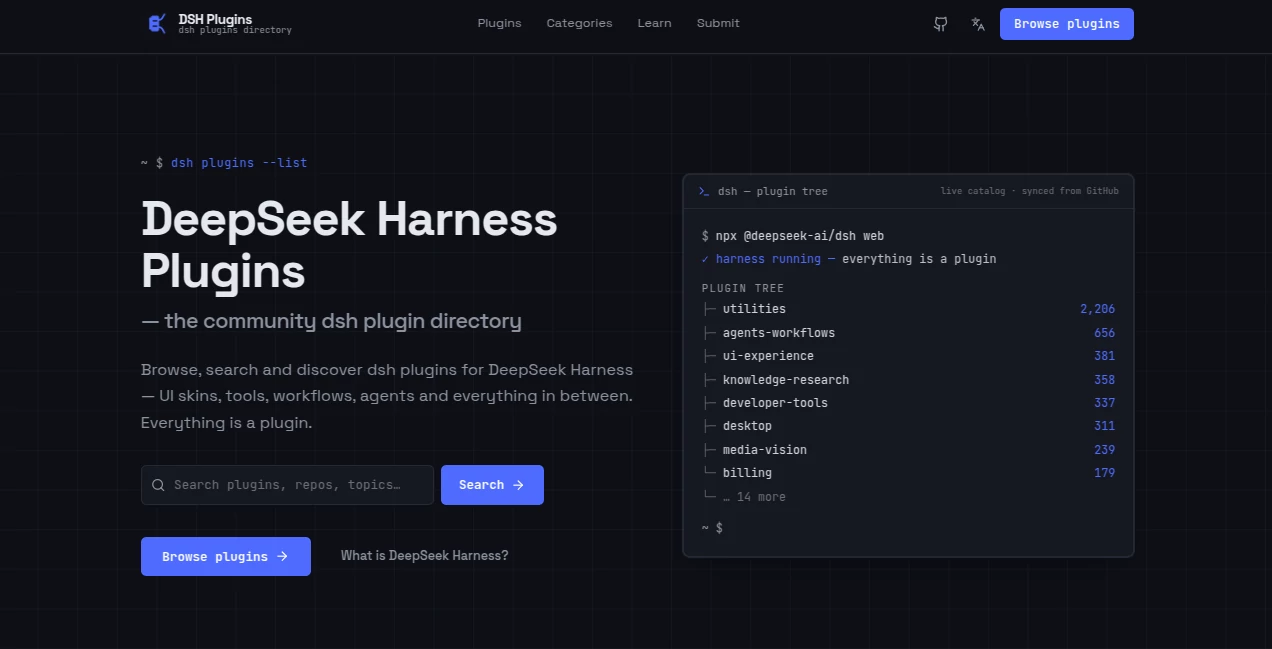
The interface has a practical developer-focused layout rather than trying to overwhelm visitors with unnecessary visual elements. A prominent search field lets users look for plugins, repositories, or topics, while category navigation provides another way to explore the catalog.
The homepage also highlights trending projects and editor selections. Each listing gives useful information at a glance, including its description, category, programming language, and community activity. This makes it easier to decide which projects deserve a closer look before opening the repository.
Accuracy & Performance
The directory is synchronized with GitHub-based community sources, helping keep its plugin catalog connected to active open-source projects. The homepage states that its rankings use a blend of stars, forks, and recent activity, while curated selections are presented separately.
This distinction is useful because popularity and editorial selection are not necessarily the same thing. A developer can browse popular projects while also checking the manually curated list for projects that have received additional attention from the directory.
As with any community-maintained software directory, users should still inspect a plugin's repository and documentation before installing it. The directory itself clearly notes that third-party plugins are not security-audited.
Capabilities
The catalog covers a surprisingly broad range of extensions. Its plugin tree includes utilities, agents and workflows, UI experiences, knowledge and research tools, developer tools, desktop applications, media and vision projects, billing-related plugins, and additional categories.
For example, users can find projects designed around AI agents, task automation, visual interfaces, knowledge retrieval, coding workflows, and other parts of a modern AI development environment. The directory therefore works less like a conventional software list and more like an ecosystem map for DeepSeek Harness.
The installation process is also kept straightforward. Users first install the harness, select a plugin from the directory, open its associated repository, and then follow the README supplied by the plugin author. Many projects use profiles or patches, although the exact installation process depends on the individual repository.
Security & Privacy
Security should be considered on a plugin-by-plugin basis. The directory explicitly explains that community plugins have not been security-audited. That is an important warning for developers, particularly when a plugin can interact with local files, applications, APIs, repositories, or other system resources.
A sensible approach is to review the source code, repository activity, documentation, permissions, dependencies, and installation instructions before adding a third-party extension to a development environment. The directory provides links to the underlying projects, making that verification process easier.
Use Cases
The directory is particularly useful for developers who already work with DeepSeek Harness and want to expand what it can do without building every extension themselves.
- AI development: Discover extensions that can support coding, agents, research, and development workflows.
- Automation: Find plugins focused on agents, workflows, task handling, and process automation.
- Interface customization: Explore UI plugins, themes, skins, sidebars, and alternative interfaces.
- Research and knowledge work: Locate tools related to knowledge management, retrieval, and research workflows.
- Open-source exploration: Discover community projects and inspect their GitHub repositories before installation.
- Plugin development: Learn how plugins are structured and how developers can submit their own projects to the ecosystem.
Pros and Cons
- Pros: Large plugin catalog, searchable interface, curated selections, useful categories, GitHub integration, trending projects, ecosystem guides, and a clear path for community submissions.
- Pros: The directory makes it much easier to discover projects that might otherwise be buried among individual GitHub repositories.
- Cons: Plugin quality can vary because the catalog contains community-created projects.
- Cons: Third-party plugins are not security-audited, so users need to perform their own checks before installation.
- Cons: Some listings may require technical knowledge because installation instructions and configuration are maintained by individual plugin authors.
Pricing Plans
The directory does not present conventional paid subscription plans on its homepage. Its main purpose is to provide free access to a catalog of DeepSeek Harness plugins and their related repositories. Users should check individual plugin repositories for any licensing requirements, paid services, or external costs associated with a particular project.
How to Use the Directory
Getting started is relatively simple. First, install DeepSeek Harness using the command provided by the project. Next, browse or search the plugin catalog to find an extension that matches your needs. Open the associated repository and read its documentation carefully. Finally, follow the installation instructions supplied by the plugin author, which may involve adding a profile, applying a patch, or configuring another supported integration.
For someone building an AI development environment, a good workflow is to start with one plugin that solves a specific problem rather than installing several extensions at once. This makes it easier to understand what each addition changes and to troubleshoot problems if they appear.
Comparison with Similar Tools
Traditional software directories generally focus on finished applications and SaaS products. This directory serves a different purpose: it organizes extensions for a specific AI harness and connects discovery directly with open-source repositories.
Compared with searching GitHub manually, the advantage is organization. Categories, trending rankings, curated selections, descriptions, and ecosystem guides provide additional context before a developer commits time to investigating a repository.
It is also more specialized than a general AI tools directory. Someone looking for a broad collection of consumer AI applications may prefer a general-purpose directory, while a developer specifically exploring DeepSeek Harness plugins can benefit from this narrower focus.
Conclusion
DeepSeek Harness Plugins offers a useful starting point for developers who want to explore the expanding plugin ecosystem around DeepSeek Harness. Its combination of search, categorization, trending projects, curated selections, GitHub repositories, and developer guides makes plugin discovery considerably more convenient than relying on scattered searches.
The strongest part of the experience is its focus. Instead of attempting to catalog every type of AI application, the directory concentrates on extensions that can change, enhance, or expand a particular harness environment. With thousands of indexed projects and an active community-driven approach, it can be a valuable reference for developers experimenting with new AI workflows.
The main caveat is equally clear: community plugins should not automatically be treated as trusted software. Reviewing the source and documentation remains an important step. Used with that level of care, the directory provides a practical way to discover new capabilities and keep up with the rapidly developing DeepSeek Harness ecosystem.
Frequently Asked Questions (FAQ)
What is DeepSeek Harness?
DeepSeek Harness is an AI development environment built around a model and a harness layer, with profiles, patches, presets, and different operating modes. The directory provides guides for people who are new to the ecosystem.
How many plugins are available?
The catalog currently lists 5,922 indexed plugins, including 1,864 that are identified as human-curated on the homepage.
Are all plugins officially created by DeepSeek?
No. The directory describes itself as an independent community directory and states that it is not affiliated with or endorsed by DeepSeek. Many listings are community projects hosted in external repositories.
Are the plugins security-audited?
No. The directory explicitly warns that third-party plugins are not security-audited. Users should review the source code and repository documentation before installing them.
How are plugins discovered?
Users can search the catalog by plugin, repository, or topic, browse categories, explore trending projects, or look through the editor's curated selections.
Can developers submit their own plugins?
Yes. Developers can submit a plugin for consideration by tagging their repository with the appropriate dsh-plugin topic and following the submission process described by the directory.
Do all plugins use the same installation method?
No. Installation depends on the individual project. The directory recommends opening the plugin's repository and following the README supplied by its author. Some plugins use profiles or patches.
AI Workflow Management , AI Knowledge Management , AI Developer Tools .
These classifications represent its core capabilities and areas of application. For related tools, explore the linked categories above.

DSH Plugins Alternatives Product

Lime Social

4ga Boards

volume shade…

globalize.now

Mage Flow AI…

MyToolster W…

Toonifyit

CtrlOps

ukamiru