


















DesignGPT
What is DesignGPT?
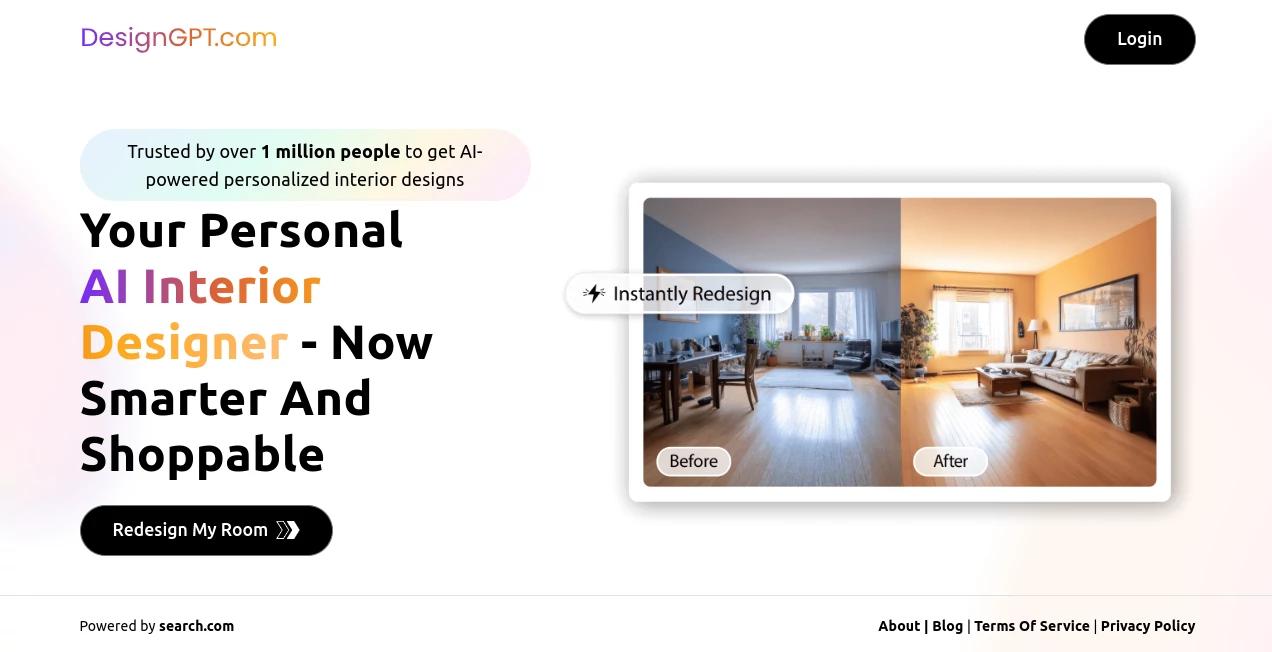
Walking into a room and imagining how it could look completely different used to require hiring a designer, endless mood boards, or expensive software. This tool changes that completely. You upload a photo of your space, tell it what style or feeling you want, and it shows you realistic redesigns complete with shoppable product recommendations. I’ve watched people transform their living rooms, bedrooms, and even tiny apartments in minutes, then actually buy pieces that match the vision. The results feel thoughtful and livable, not like generic renderings, which is why so many keep coming back for new rooms.
Introduction
Most of us have an idea of how we want our home to feel, but turning that vision into reality is hard. DesignGPT acts like having an experienced interior designer in your pocket—available anytime, without the consultation fees or waiting lists. Upload one photo of your current room, describe the vibe (modern minimalist, cozy Scandinavian, bold maximalist, etc.), and it generates multiple high-quality concepts tailored to your space. What makes it stand out is the combination of beautiful visuals and practical shopping links, so you can go from inspiration to real changes without starting from scratch. It’s become a favorite for renters testing ideas before committing, homeowners planning renovations, and anyone who wants their space to finally feel right.
Key Features
User Interface
The experience is delightfully straightforward. You upload a clear photo of your room, choose or describe a style, and the options appear quickly in a clean gallery. You can swipe through variations, zoom in on details, and see recommended products right alongside each design. No complicated menus or technical jargon—just a smooth flow that lets you focus on what you like. Even first-time users get strong results because the interface guides you gently without overwhelming you with choices.
Accuracy & Performance
It reads your existing room layout intelligently—recognizing walls, furniture placement, lighting, and proportions—so the redesigns feel realistic rather than impossible fantasies. The AI preserves architectural elements while transforming the aesthetic, which means suggestions actually work in your space. Generation is fast, and the quality holds up well for both subtle refreshes and dramatic makeovers. The attention to lighting and scale makes the mockups feel like real photographs of the finished room.
Capabilities
From a single photo, it creates full room redesigns across dozens of styles, suggests coordinated furniture and décor with direct shopping links, and offers multiple variations so you can compare options side-by-side. You can refine prompts for more specific requests (e.g., “add more plants” or “make it warmer”), regenerate specific elements, and even get shopping lists that match the design. It works beautifully for living rooms, bedrooms, kitchens, home offices, and more—turning inspiration into actionable plans.
Security & Privacy
Your room photos are processed securely and not stored long-term unless you choose to save designs. The platform respects your space and privacy, especially important when sharing images of your home. This careful approach lets you experiment freely without worrying about where your personal photos end up.
Use Cases
A young couple redesigns their first apartment on a budget and finds affordable pieces that match the AI concepts perfectly. A homeowner tests three different kitchen layouts before committing to renovation plans. A renter experiments with bold colors and styles without risking a security deposit. An interior designer uses it to quickly show clients multiple directions during early consultations. Anyone stuck on how to refresh a space finds clarity and confidence through visual options they can actually shop.
Pros and Cons
Pros:
- Realistic redesigns that respect your room’s actual layout and lighting.
- Shoppable recommendations turn inspiration into immediate action.
- Multiple style variations help you explore options quickly.
- Fast results that make the process feel fun rather than overwhelming.
- Free access lets you try before committing to bigger changes.
Cons:
- Best results come from clear, well-lit room photos.
- Very customized or highly architectural changes may need professional follow-up.
- Advanced or unlimited use requires a paid plan.
Pricing Plans
The free tier offers generous generations so you can test ideas and see the quality firsthand. Paid plans unlock unlimited designs, higher resolution outputs, advanced style controls, and priority processing. The pricing feels reasonable for the time and indecision it saves—many users say seeing realistic options in their own space is worth the upgrade when they’re serious about making changes.
How to Use DesignGPT
Take a clear, well-lit photo of your room from a good angle. Upload it on the platform, describe the style or mood you want (or choose from popular presets), and generate. Browse the different concepts, zoom in to check details, and explore the shoppable product lists. Refine your prompt if needed and generate more options. Once you find a design you love, save it or start shopping the recommended pieces. The whole process from photo to plan can happen in minutes.
Comparison with Similar Tools
Many interior AI tools produce pretty but unrealistic concepts that ignore your room’s actual constraints. This one stands out by working with your existing space and providing shoppable links that make implementation practical. While some focus only on visuals, the combination of accurate redesigns and direct purchasing paths makes the entire journey from idea to finished room much smoother.
Conclusion
Redesigning your home should feel exciting, not stressful. This tool removes the biggest barriers—uncertainty, cost, and time—while delivering beautiful, realistic possibilities you can actually act on. It empowers you to experiment boldly and make confident decisions about your space. Whether you’re refreshing one room or planning a full home update, having an AI designer that understands both aesthetics and practicality is a genuine advantage. Your dream home might be closer than you think—one photo and a few prompts away.
Frequently Asked Questions (FAQ)
How good do my room photos need to be?
Clear, well-lit photos from a decent angle work best. The clearer the input, the more accurate and useful the designs become.
Can I use it for rental spaces?
Absolutely—many renters use it to visualize temporary changes like paint colors, furniture arrangements, and décor without permanent alterations.
Are the product recommendations affordable?
They span different price points so you can find options that match your budget while staying true to the overall design.
How many designs can I generate?
The free tier gives you several generations to explore; paid plans remove limits for bigger projects.
Is it only for whole rooms?
It works best on full rooms but can also help with specific areas like accent walls, corners, or furniture arrangements.
AI Design Assistant , AI Design Generator , AI Image to Image , AI Interior & Room Design .
These classifications represent its core capabilities and areas of application. For related tools, explore the linked categories above.

DesignGPT Alternatives Product

String Art G…

Just Christm…

Z-Image

Curved Text …

UndressMe AI

svgstud.io

z image

textile gen

Nano Banana 2
