


















Dim0
What is Dim0?
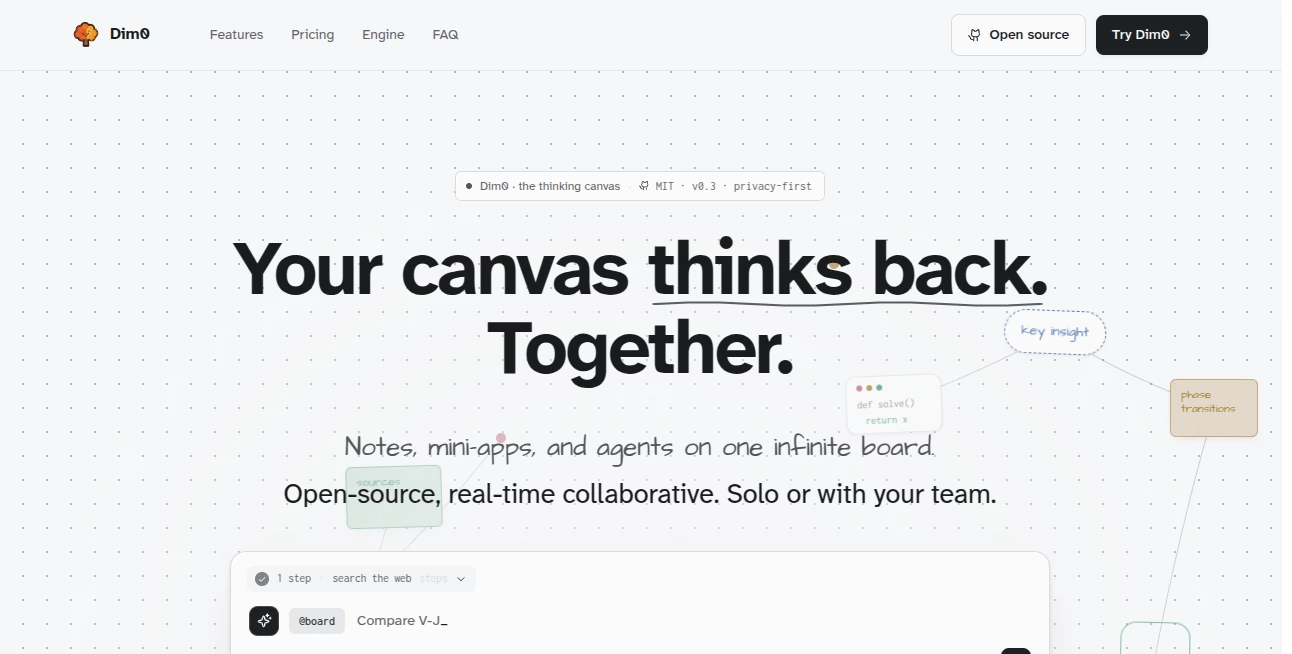
Dim0 is an open-source AI canvas designed to bring notes, diagrams, code, documents, and intelligent assistance together in one visual workspace. Instead of switching between multiple applications for research, planning, writing, and brainstorming, users can organize their thoughts on a single infinite canvas where AI works alongside their ideas.
The platform creates a more natural way to think and build projects by combining the flexibility of a digital whiteboard with the power of modern AI models. Whether you are researching a topic, creating technical documentation, organizing business ideas, or collaborating with a team, this workspace helps keep information connected and easy to explore.
Key Features
- Infinite AI Canvas: Create notes, diagrams, sketches, documents, and interactive elements on a flexible workspace without being limited by traditional page layouts.
- AI-Powered Board Understanding: The built-in AI assistant can understand the context of your canvas and help generate useful results directly inside your workspace.
- Rich Notes: Write structured notes with formatting options, mathematical expressions, code blocks, tags, and connected pages.
- Interactive Mini Apps: Generate simple interactive tools such as calculators, charts, quizzes, and visual components directly on your board.
- Real-Time Collaboration: Work together with teammates using shared boards, live updates, and collaborative editing.
- Mind Maps and Diagrams: Transform ideas into visual structures, diagrams, and organized knowledge maps.
- Multiple AI Models: Connect with different AI providers and choose the model that fits your workflow.
- Open Source: The platform provides transparency and allows users to self-host their own version.
User Interface
The interface is built around a clean infinite canvas where every piece of information becomes part of a larger visual workspace. Users can place notes, drawings, documents, charts, and code elements wherever they need them, making complex projects easier to understand.
The canvas-first approach feels natural for people who prefer visual thinking. Researchers, designers, developers, and creative professionals can organize information spatially instead of searching through endless folders and documents.
Accuracy & Performance
The AI assistant focuses on understanding the information already placed on the board before generating responses. This contextual approach helps produce more relevant outputs because the AI works with existing ideas rather than starting from an empty conversation.
The platform supports advanced workflows such as research assistance, content organization, code execution, and data visualization, making it useful for both creative and technical projects.
Capabilities
This tool combines several productivity experiences into one environment. Users can create knowledge maps, write long-form content, analyze information, generate diagrams, build simple applications, and manage collaborative projects.
Developers can use it for technical planning, architecture diagrams, and code-related tasks, while students and researchers can use it for learning, organizing resources, and exploring complex subjects visually.
Security & Privacy
Privacy is an important part of the platform design. User-created content is not used for AI training, and the service focuses on protecting personal workspaces. Data is encrypted during transfer and storage, while self-hosting options provide additional control for teams and organizations that need full ownership of their data.
Use Cases
- Research and Learning: Create visual research maps, organize references, and explore complex topics in a connected workspace.
- Business Planning: Build strategies, organize ideas, and collaborate with teams on projects.
- Software Development: Create system diagrams, document technical concepts, and work with code directly inside a visual environment.
- Content Creation: Plan articles, organize ideas, and develop structured content workflows.
- Education: Create interactive lessons, visual explanations, and knowledge structures for better learning.
- Team Collaboration: Share ideas with colleagues and work together on the same digital board.
Pros and Cons
Pros
- Combines AI assistance, notes, diagrams, and collaboration in one workspace.
- Open-source and suitable for users who value transparency.
- Supports visual thinking and complex project organization.
- Works with multiple AI models.
- Provides self-hosting capabilities for advanced users.
Cons
- New users may need time to learn the canvas-based workflow.
- Some advanced features may require technical knowledge.
- Mobile experience is more limited compared with desktop usage.
Pricing Plans
The platform offers a free option for users who want to explore its features. Paid plans provide additional AI usage limits, more collaboration capacity, and access to advanced models.
For organizations that prefer complete control, a self-hosted option is available, allowing teams to run the platform on their own infrastructure.
How to Use Dim0
- Create an account and open a new workspace.
- Add notes, documents, drawings, or ideas to your canvas.
- Use AI assistance to organize information, generate content, or analyze your project.
- Create diagrams, mini applications, or visual structures based on your needs.
- Invite collaborators and continue building together in real time.
Comparison with Similar Tools
Traditional note-taking applications are excellent for storing information, while whiteboard platforms are useful for visual collaboration. This platform combines both experiences with AI capabilities, creating a workspace where information is not only stored but actively developed.
Compared with standard chat-based AI assistants, the canvas approach keeps ideas visible and connected. Users can see relationships between different pieces of information instead of losing important context inside long conversations.
Conclusion
Dim0 offers a fresh approach to productivity by turning AI assistance into part of the workspace itself. Its combination of visual organization, collaboration, open-source technology, and intelligent features makes it a valuable option for creators, researchers, developers, and teams looking for a more connected way to work.
For anyone who prefers building ideas visually instead of managing scattered documents and conversations, this AI-powered canvas provides a flexible environment where creativity and productivity can grow together.
Frequently Asked Questions (FAQ)
What is Dim0 used for?
It is used for visual thinking, research, note-taking, collaboration, diagrams, coding workflows, and organizing complex ideas with AI assistance.
Is it free to use?
Yes, there is a free plan available, along with paid options that provide additional features and higher usage limits.
Can teams collaborate together?
Yes, users can collaborate on shared boards with real-time updates and teamwork features.
Is it open source?
Yes, the platform is open source and supports self-hosting for users who want more control over their data.
Which category does this tool belong to?
This tool is mainly designed for productivity, knowledge management, and AI-assisted collaboration workflows.
AI Productivity Tools , AI Mind Mapping , AI Team Collaboration , AI Notes Assistant .
These classifications represent its core capabilities and areas of application. For related tools, explore the linked categories above.

Dim0 Alternatives Product

Skywork Supe…

ForthWrite

CodeProt

Meet-Ting

VercelAPP

Manus

PDFgear
Thinkesta

KronoPrompt
