


















Doclingo Ai
What is Doclingo Ai?
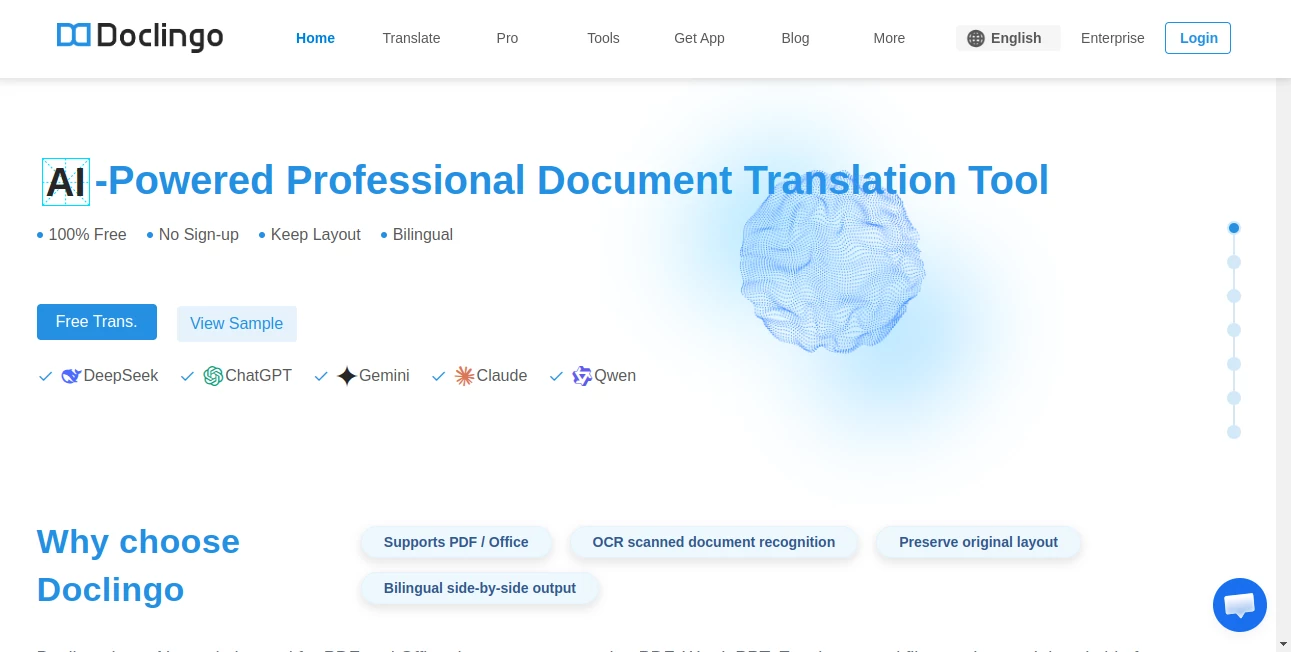
Working with multilingual documents can be frustrating, especially when formatting breaks, tables shift, and images lose their context after translation. This platform was designed to solve exactly that problem. It offers a modern approach to document translation by combining advanced AI models, OCR technology, and intelligent layout preservation into a single workflow.
Whether you are translating academic papers, business contracts, technical manuals, reports, presentations, or scanned documents, the experience feels remarkably smooth. Instead of simply converting text from one language to another, it recreates documents with impressive formatting accuracy while maintaining readability and structure. For professionals, students, researchers, and global teams, this creates a much more efficient translation process.
Supporting more than 90 languages and multiple file formats, the platform has become a practical solution for anyone who regularly handles multilingual content and values both speed and quality.
Key Features
User Interface
The interface is clean, intuitive, and designed for productivity. Uploading files takes only a few seconds, and users can quickly choose source and target languages before starting the translation process. The side-by-side bilingual view makes reviewing translated content much easier than traditional translation software.
Online editing tools allow users to refine translations directly within the browser, reducing the need for external editing software. Navigation remains simple even when working with large and complex documents.
Accuracy & Performance
One of the strongest aspects of the platform is its use of multiple advanced AI engines. Rather than relying on a single translation model, users can benefit from different language models optimized for business content, academic materials, technical documentation, and general communication.
The translation quality is particularly impressive when handling specialized terminology, long-form content, and context-dependent text. OCR capabilities also enable accurate extraction and translation of text embedded inside images and scanned files.
Capabilities
The platform goes far beyond standard document translation. It supports PDF files, Word documents, Excel spreadsheets, PowerPoint presentations, and image-based content. Advanced features include bilingual output, terminology management, online editing, document conversations, highlight-to-translate functionality, and batch processing.
Users can interact with selected sections of translated documents to receive explanations, insights, summaries, or additional translations. This makes the platform especially useful for research, education, and professional documentation workflows.
Security & Privacy
Security remains a major consideration when dealing with sensitive documents. Enterprise-focused options include secure file management, collaboration controls, data protection measures, and business-grade document processing. These features make the platform suitable for organizations handling confidential reports, legal documents, and internal communications.
Use Cases
- Translating academic research papers and journals.
- Converting business contracts into multiple languages.
- Localizing technical manuals and product documentation.
- Translating PowerPoint presentations for international meetings.
- Processing scanned documents with OCR-powered translation.
- Managing multilingual content for global teams.
- Translating reports, proposals, and compliance documents.
Pros and Cons
Pros
- Excellent document layout preservation.
- Supports PDF, Word, Excel, PowerPoint, and image files.
- OCR recognition for scanned documents.
- Bilingual document output improves review workflows.
- Online editing and document interaction features.
- Supports over 90 languages.
- Multiple AI engines available for enhanced translation quality.
Cons
- Advanced capabilities require premium plans.
- Large document processing may take longer depending on complexity.
- Professional users may need higher-tier subscriptions for heavy workloads.
Pricing Plans
The platform offers a free option for users who want to experience AI-powered document translation without an initial investment. For professionals and organizations, premium plans unlock advanced features such as higher translation limits, OCR capabilities, batch uploads, online editing, glossary tools, document conversations, and access to multiple AI engines.
Enterprise solutions are also available for organizations requiring collaboration features, large-scale document processing, API integration, and enhanced security controls.
How to Use Doclingo
Getting started is straightforward:
- Upload a document such as PDF, Word, Excel, PowerPoint, or image files.
- Select the source and target languages.
- Start the translation process.
- Review the bilingual output generated by the system.
- Edit translated content directly online if needed.
- Use highlight-based AI tools to explain or analyze specific sections.
- Download the final translated document while preserving the original layout.
Comparison with Similar Tools
Many translation platforms focus primarily on text conversion, often sacrificing formatting and document structure during the process. In contrast, this solution places significant emphasis on preserving layouts, tables, images, and visual consistency.
Compared with traditional translation software, it delivers a more complete document workflow that includes OCR processing, online editing, bilingual comparison, terminology management, and AI-powered document interaction. This makes it particularly attractive for users who work with professional documents where presentation quality matters just as much as translation accuracy.
Conclusion
For anyone dealing with multilingual documents on a regular basis, this platform offers a compelling combination of translation quality, formatting accuracy, and workflow efficiency. Its ability to handle complex documents while preserving their original appearance significantly reduces manual editing work after translation.
From researchers and students to businesses and enterprise teams, users can benefit from a modern document translation experience that goes beyond basic language conversion. The combination of AI-powered translation, OCR technology, online editing, and multilingual support makes it a valuable tool for global communication and document management.
Frequently Asked Questions (FAQ)
What file formats are supported?
The platform supports PDF, Word, Excel, PowerPoint, image files, and several other commonly used document formats.
Can scanned documents be translated?
Yes. OCR technology can recognize text within scanned documents and images before translating the content.
How many languages are available?
More than 90 languages are supported for document translation.
Does it preserve document formatting?
Yes. One of its strongest advantages is maintaining layouts, tables, images, and overall document structure during translation.
Is there a free version available?
Yes. Users can access document translation features through a free plan, while premium subscriptions provide additional capabilities and higher usage limits.
AI Translate , AI PDF , AI Document Extraction , AI Documents Assistant .
These classifications represent its core capabilities and areas of application. For related tools, explore the linked categories above.

Doclingo Ai Alternatives Product

WonderShare …

UPDF AI

Remove My Me…

DocReplacer

globalize.now

Docubix

ModelsLab
Fill PDF fro…
BookTranslat…
