Doc Translator
What is Doc Translator?
Working with multilingual documents often means more than translating words. Layouts, tables, images, and formatting are just as important as the text itself. This platform was created to solve that challenge by delivering fast document translation while preserving the original appearance of every file.
Whether you need to localize a business proposal, convert an academic paper, translate legal paperwork, or prepare marketing materials for international audiences, the service provides an efficient workflow that requires only a few clicks. It supports dozens of popular document formats and combines advanced AI translation with optical character recognition for scanned files, making it suitable for both personal and professional projects.
One of its strongest advantages is the ability to maintain fonts, page structure, tables, charts, and images, eliminating the tedious formatting work that usually follows traditional translation methods. For businesses, freelancers, educators, and global teams, this can save hours of manual editing while improving productivity.
Key Features
User Interface
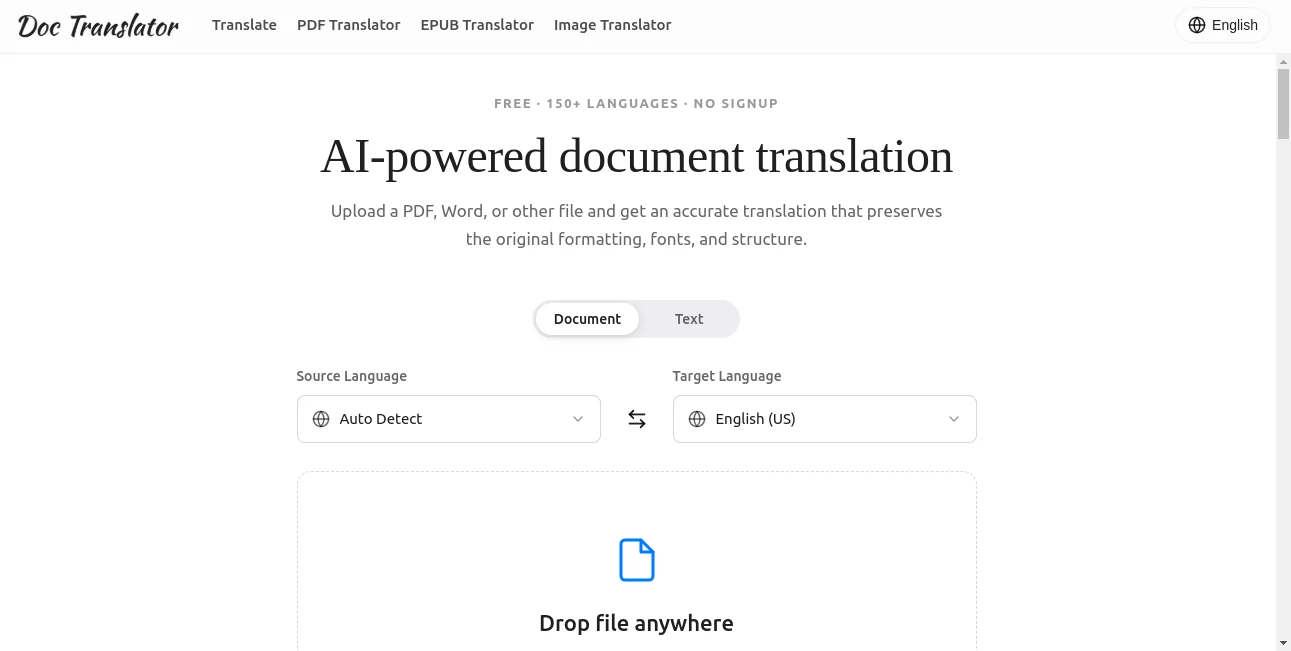
The interface is clean, intuitive, and designed for users of every experience level. Simply upload a document, choose the source and target languages, and download the translated version once processing is complete. The straightforward workflow makes document translation accessible without requiring specialized software or technical knowledge.
Accuracy & Performance
The translation engine combines modern AI technologies with context-aware language processing to produce natural results instead of literal word-for-word translations. Support for more than 120 languages allows users to communicate across international markets while preserving document structure. Large files, including documents up to 1 GB and thousands of pages on supported plans, can be processed efficiently.
Capabilities
- Translate documents into more than 120 languages.
- Preserve formatting, fonts, tables, images, and layouts.
- Support PDF, DOCX, XLSX, PPTX, IDML, HTML, EPUB, TXT, CSV, JSON, JPG, PNG, and more.
- OCR technology for scanned PDFs and image-based documents.
- Automatic language detection.
- Large document processing.
- Preview translated PDF pages before purchasing.
- Human-certified translation services for official documents.
- Team collaboration features for business users.
- Fast online processing without installing software.
Security & Privacy
Privacy is treated as a priority. Uploaded files are encrypted during transfer and storage, documents are not used for AI model training, and files are removed after processing. These protections make the service suitable for confidential business reports, contracts, legal paperwork, and sensitive personal documents.
Use Cases
- Translate legal contracts while preserving formatting.
- Localize academic research papers.
- Convert multilingual business reports.
- Translate immigration and personal documents.
- Prepare multilingual presentations.
- Translate product catalogs for international markets.
- Localize eBooks and digital publications.
- Process scanned PDFs using OCR.
- Translate Excel spreadsheets without breaking formulas.
- Create multilingual documentation for global teams.
Pros and Cons
Pros
- Excellent formatting preservation.
- Supports over 120 languages.
- Wide compatibility with document formats.
- OCR for scanned files.
- Handles very large documents.
- Simple and beginner-friendly interface.
- Secure document processing.
- Human translation available when certification is required.
Cons
- Premium features require a paid subscription.
- Machine translation may still require human review for highly specialized content.
- Certified translations involve additional services.
Pricing Plans
The platform offers a free starting option for basic usage, allowing new users to test document translation before committing to a subscription. Paid plans provide higher document limits, larger file support, team collaboration features, priority processing, and additional translation capacity. Subscription options are available for both individuals and businesses with scalable pricing based on translation needs.
How to Use DocTranslator
Begin by uploading your document from your computer. Select the original language or allow automatic language detection, then choose your desired output language. Start the translation process and wait while the document is processed. Once complete, download the translated file with its original formatting, tables, images, and layout preserved. If an official translation is required, certified human translation can also be requested.
Comparison with Similar Tools
Unlike basic online translators that focus only on plain text, this solution specializes in complete document translation. It preserves complex layouts, supports significantly more professional document formats, processes scanned files with OCR, and offers large file handling that many general-purpose translation services cannot match. The addition of certified human translation and enterprise collaboration tools also makes it suitable for business environments where accuracy and document integrity matter.
Conclusion
For anyone who regularly works with multilingual documents, this platform provides an impressive combination of speed, convenience, and formatting accuracy. Instead of spending hours fixing layouts after translation, users receive documents that are ready for immediate review or sharing. Its extensive language support, broad file compatibility, strong privacy practices, and AI-powered workflow make it a dependable choice for professionals, organizations, students, and international businesses seeking efficient document translation.
Frequently Asked Questions (FAQ)
Can scanned PDF files be translated?
Yes. Built-in OCR technology extracts text from scanned documents before translating it while preserving the original layout.
Which document formats are supported?
The platform supports PDF, Word, Excel, PowerPoint, HTML, EPUB, JSON, TXT, CSV, images, InDesign files, and several other popular formats.
Does the formatting remain unchanged?
Yes. Fonts, tables, images, page layouts, and document structure are preserved whenever possible.
Is my uploaded document secure?
Yes. Files are encrypted during upload and storage, are not used for AI training, and are deleted after processing according to the platform's privacy practices.
Can it translate official documents?
Yes. In addition to AI translation, certified human translation services are available for immigration, legal, and official documentation.
AI Documents Assistant , AI Document Extraction , AI Translate , AI Productivity Tools .
These classifications represent its core capabilities and areas of application. For related tools, explore the linked categories above.

Doc Translator Alternatives Product

Meet Submind

Nimbalyst

Nifty

Claude and C…

fasturl
Duct Tape AI…

WonderShare …

AI Fruit
KronoPrompt