


















Draw 3D
What is Draw 3D?
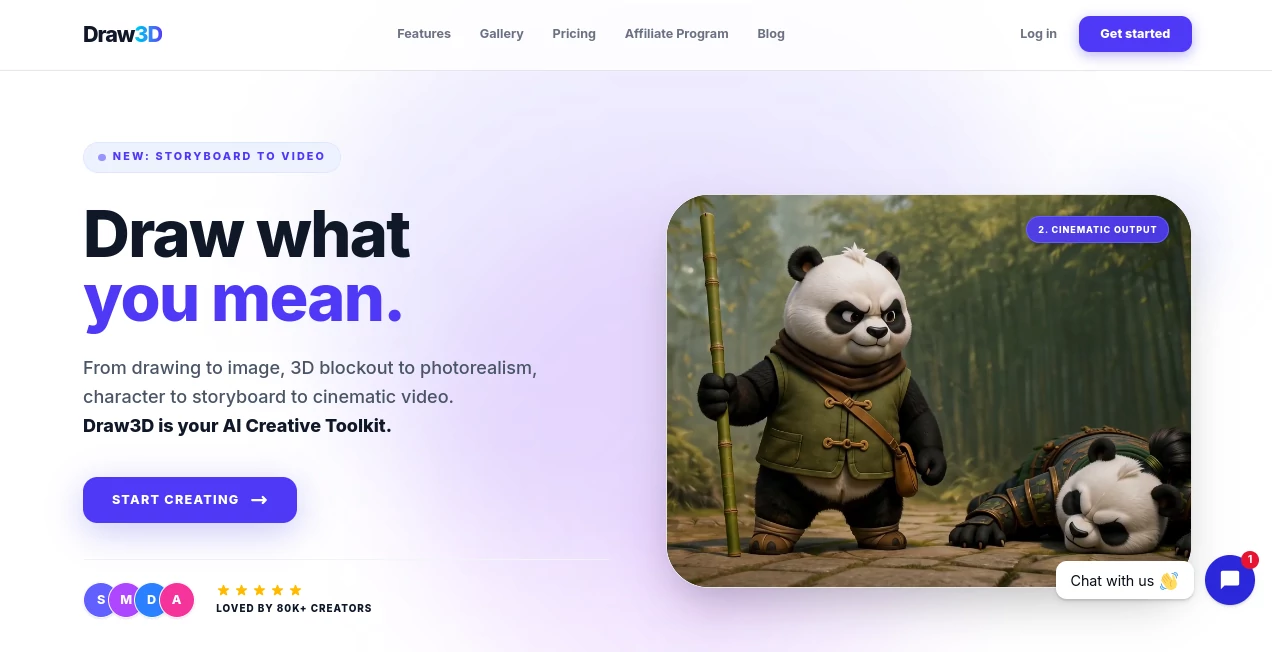
Creating high-quality visuals with artificial intelligence often begins with writing long prompts and hoping the result matches your imagination. This creative platform takes a different approach by letting artists, designers, architects, and content creators start with what they already know best—a simple drawing. Instead of guessing how an AI interprets text, users sketch their idea, define the composition, and let the system transform it into polished, photorealistic artwork or cinematic visuals. This workflow offers far more creative control than traditional text-first generators. :contentReference[oaicite:0]{index=0}
Whether you're developing product concepts, designing interiors, planning film storyboards, or exploring digital art, the platform bridges the gap between imagination and production. With support for sketch-to-image generation, 3D scene composition, image enhancement, video animation, and professional exports, it becomes much more than a simple AI image generator. It is a complete creative workspace built for modern visual storytelling. :contentReference[oaicite:1]{index=1}
Key Features
User Interface
The workspace is designed for creativity rather than complexity. Users can sketch directly on a digital canvas or arrange basic 3D objects to establish perspective before generating images. The interface is clean, responsive, and optimized for both desktop devices and tablets with stylus support, making it comfortable for professionals and beginners alike. :contentReference[oaicite:2]{index=2}
Accuracy & Performance
Instead of relying entirely on text prompts, the AI respects the composition created by the user. Lines, perspective, object placement, and depth are preserved during rendering, resulting in visuals that closely follow the original concept. Image generation is fast, while built-in upscaling produces production-ready assets suitable for presentations, marketing materials, and commercial projects. :contentReference[oaicite:3]{index=3}
Capabilities
- Transform rough sketches into photorealistic images.
- Create and compose scenes using a 3D workspace.
- Generate cinematic videos from storyboards.
- Animate still images with AI-powered motion.
- Enhance image quality with AI upscaling.
- Edit images using intelligent inpainting tools.
- Create realistic architectural and interior visualizations.
- Produce concept art for products, games, and films.
- Export high-resolution images and MP4 videos.
- Support commercial creative workflows.
Security & Privacy
Creative ownership remains in the hands of users, with generated assets belonging to their creators. Premium subscriptions provide a private mode that keeps projects out of the public gallery. The platform also explains how personal information is collected and protected while using industry-standard security practices. Commercial licenses are available through paid plans, making it suitable for professional work. :contentReference[oaicite:4]{index=4}
Use Cases
- Architects visualizing building concepts from quick sketches.
- Interior designers presenting realistic room layouts.
- Product designers creating concept renders before manufacturing.
- Game artists producing environment concepts.
- Storyboard artists generating cinematic scenes.
- Marketing teams creating unique promotional visuals.
- Content creators producing engaging social media graphics.
- Freelance designers accelerating client presentations.
- Educators demonstrating visual concepts.
- Creative agencies shortening design iteration cycles.
Pros and Cons
Pros
- Excellent control through drawing instead of relying only on prompts.
- Supports both image and video generation.
- Integrated 3D scene composition tools.
- High-quality rendering with realistic results.
- Commercial usage rights available on paid plans.
- Works well for architecture, product design, and storytelling.
- Touchscreen and stylus-friendly interface.
Cons
- Some advanced privacy features require premium plans.
- Commercial rights are limited on free usage.
- Artists unfamiliar with sketching may need time to adapt.
Pricing Plans
The platform offers a trial experience so new users can evaluate its capabilities before subscribing. Paid plans unlock additional creative resources, private mode, commercial licensing, higher-quality exports, and more advanced production features suitable for professional creators and businesses. :contentReference[oaicite:5]{index=5}
How to Use Draw3D
- Create an account.
- Open the creative workspace.
- Sketch your concept or arrange objects in the 3D composer.
- Select the preferred rendering style.
- Generate the AI image.
- Optionally animate the result into a cinematic video.
- Edit or upscale the output if needed.
- Export the finished project for personal or commercial use.
Comparison with Similar Tools
Many AI image generators begin with text prompts, leaving composition largely to chance. This platform stands apart by placing creative direction in the user's hands. Instead of describing perspective, camera angles, or object placement, creators define these visually before generation. This approach significantly reduces prompt experimentation while delivering more predictable and production-ready results. The addition of integrated 3D composition, storyboard animation, and cinematic video generation also creates a broader creative workflow than many conventional AI art generators. :contentReference[oaicite:6]{index=6}
Conclusion
For creators who value precision as much as creativity, this platform delivers an impressive balance between artistic freedom and AI automation. Its drawing-first workflow removes much of the uncertainty associated with prompt-based image generation while offering professional-quality rendering, video creation, and advanced editing capabilities. Whether the goal is visual storytelling, product visualization, architectural presentation, or digital art production, it provides an efficient environment where ideas move naturally from sketch to polished result.
Frequently Asked Questions (FAQ)
Can beginners use this platform?
Yes. Even simple sketches are enough to generate detailed and realistic images, making it accessible for users with different artistic skill levels.
Does it support video generation?
Yes. Storyboards and generated images can be transformed into cinematic videos with AI-powered animation features. :contentReference[oaicite:7]{index=7}
Can generated content be used commercially?
Paid subscriptions include commercial usage rights for generated assets, making the platform suitable for client work and business projects. :contentReference[oaicite:8]{index=8}
Is tablet support available?
Yes. The workspace is optimized for touch input and works well with stylus devices for sketching and creative workflows. :contentReference[oaicite:9]{index=9}
Who benefits most from this platform?
Architects, product designers, digital artists, filmmakers, content creators, creative agencies, and anyone who prefers drawing over writing complex AI prompts.
AI Video Generator , AI Design Generator , AI Image to Image , AI Image to 3D Model .
These classifications represent its core capabilities and areas of application. For related tools, explore the linked categories above.

Draw 3D Alternatives Product

MeltFlex AI

gemini video
Ai Home Desi…
Blur & Unblu…

lyric video …

Banana Promp…

chibi genera…
veo 4

Seedance2 Vi…
