Dubly.AI
What is Dubly.AI?
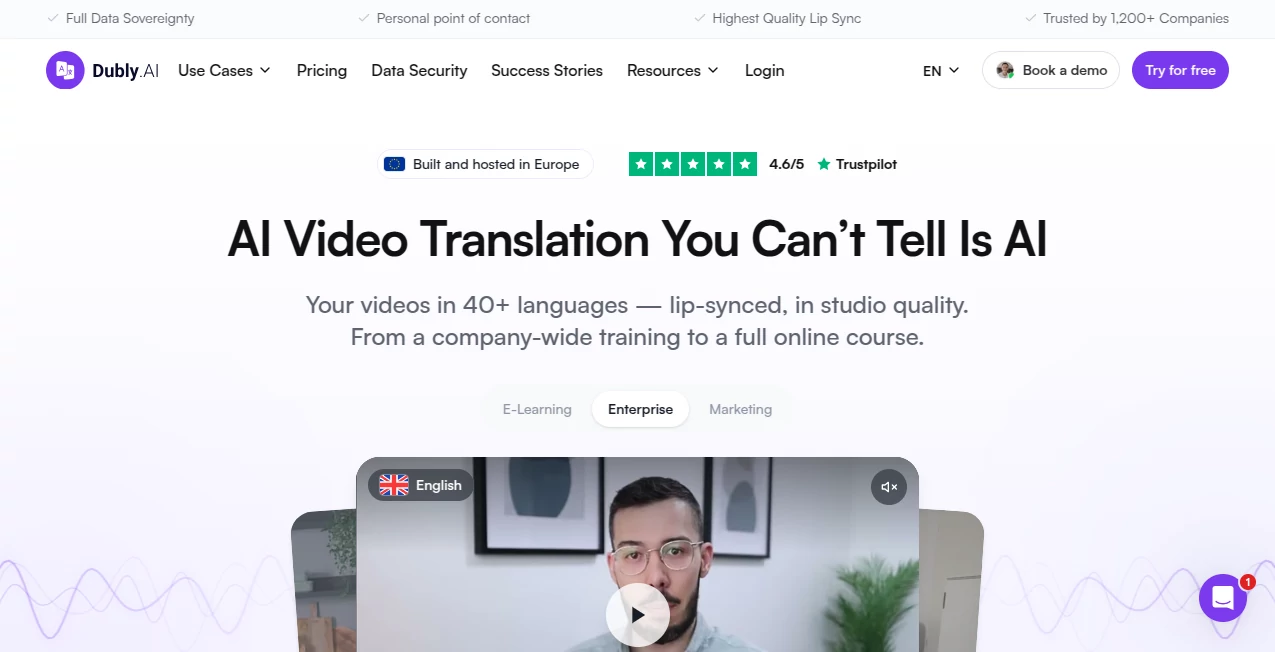
Taking video content to an international audience usually means more than translating a script. The voice has to feel natural, timing needs to work, subtitles must match the dialogue, and in many cases the speaker’s mouth should move naturally with the new language. Dubly.AI brings these pieces together in a single video localization platform designed for companies, educators, marketers, and professional content teams.
The platform can translate videos into more than 40 languages while preserving the original speaker's voice through voice cloning and matching mouth movements with the translated audio. It is already used by more than 1,200 companies and has processed over 40,000 hours of video, giving it a strong focus on real-world professional localization rather than simple automatic subtitles.
Key Features
- AI-powered video translation into 40+ languages and dialects.
- Voice cloning that preserves the recognizable character of the original speaker.
- Advanced lip synchronization for translated dialogue.
- Automatic multi-speaker detection and speaker assignment.
- Segment-by-segment translation editing.
- Custom terminology and brand-specific glossary support.
- Pronunciation, tone, formality, and writing-style controls.
- Translated subtitles and SRT export.
- MP4 video and MP3 audio exports.
- API access for automated localization workflows.
- Team collaboration with roles and external reviewers.
- Unlimited video length according to the platform's feature set.
User Interface
The workflow is intentionally straightforward. Users upload a video or import one from YouTube, choose the target language, review the generated translation, make any necessary corrections, and then create the final localized version.
The translation editor is particularly useful when a literal translation does not fit the context. Individual segments can be adjusted, terms can be replaced, and changes can be applied across multiple languages. This gives content teams considerably more control than a simple upload-and-download translator.
Accuracy & Performance
Translation quality is supported by several layers of control rather than relying entirely on the first generated result. Users can modify individual words, pronunciation, tone, formality, and terminology before producing the final voice track.
The lip-sync system is designed to handle challenging situations such as dynamic movements, multiple speakers, side profiles, and partially covered faces. Good source footage still matters: clear lighting, visible faces, natural speech, and clean audio can improve the final synchronization considerably.
For businesses producing large amounts of educational, marketing, or corporate video, this approach can remove a significant amount of manual localization work. One customer case presented on the site reports 578 localized cooking-course videos and a 60% reduction in production time per course.
Capabilities
The platform goes beyond basic dubbing. A video can be translated, voiced with a cloned speaker identity, synchronized to the new language, and accompanied by translated subtitles. Background music can be preserved while original voice volume can be adjusted.
Professional users can also maintain a glossary for company-specific terminology. This is valuable for brands, technical companies, training providers, and organizations where product names or specialized terms need to remain consistent across every language.
For teams handling large volumes, the API provides another option. Instead of processing every video manually, organizations can connect translation to their existing systems and automate multilingual production at scale.
Security & Privacy
Data protection is one of the platform's strongest business-oriented features. Customer videos are hosted on servers in Germany, and the service states that uploaded video and audio are not used to train AI models.
The platform also states that customer data is isolated in a secure environment and that it follows GDPR requirements. Its security information includes AES-256 encryption, GDPR-compliant deletion procedures, an EU AI Act compliance claim, and penetration testing by TÜV SÜD.
Businesses retain the rights to their translated videos, while a Data Processing Agreement is available for customers that require additional documentation.
Use Cases
One of the most obvious applications is e-learning. Training providers can turn an existing course into several language versions without recording every lesson again. This can be especially useful for courses that contain hours of spoken instruction.
Marketing teams can also localize product demonstrations, advertisements, tutorials, and social media videos. Instead of creating completely separate productions for every market, the same source video can be adapted for different audiences.
Corporate communication is another strong use case. Companies with international employees can translate internal training, onboarding material, presentations, and educational content while retaining the original speaker's voice.
Content creators and publishers can use the same workflow to expand their audience beyond their native language. A creator who has already invested in high-quality video production can reuse that content in additional markets without rebuilding the entire production from scratch.
Pros and Cons
Pros
- Supports 40+ target languages and dialects.
- Voice cloning keeps the speaker recognizable.
- Advanced lip synchronization is available.
- Translation can be edited before final dubbing.
- Custom terminology and pronunciation controls are available.
- Supports multi-speaker videos.
- API access is included.
- Unlimited team users are supported.
- Data is hosted in Germany.
- Uploaded content is not used for AI training.
Cons
- High-quality lip synchronization depends on the quality of the original footage.
- Lip sync consumes more credits than standard translation.
- The service is primarily designed for professional video localization rather than casual editing.
- High-volume organizations may need a customized enterprise arrangement.
Pricing Plans
The pricing model is based on credits rather than separate feature tiers. This means customers do not need to purchase a higher plan simply to unlock features such as voice cloning, lip sync, translation editing, or API access.
The monthly plan currently starts at €89 per month for 25 credits after the listed discount. One credit represents one minute of standard audio translation, while lip synchronization uses two credits per minute. Annual subscriptions provide a lower effective price per credit, and one-time credit purchases are also available for projects that do not require a recurring subscription.
Credits purchased through one-time purchases do not expire, while organizations with larger localization requirements can discuss custom enterprise arrangements. The platform also offers special conditions for educational institutions and non-profit organizations.
How to Use Dubly.AI
- Upload a video file or import a video through a YouTube link.
- Select the language you want to translate the video into.
- Let the platform generate the translated audio and initial localization.
- Review the generated translation segment by segment.
- Correct terminology, wording, pronunciation, tone, or other details where necessary.
- Enable lip synchronization when you want the speaker's mouth movements to match the translated audio.
- Generate and download the completed video or the available audio and subtitle files.
For larger organizations, the API can be used to automate the same type of workflow and process large batches of videos without manually uploading every file.
Comparison with Similar Tools
Many AI video platforms offer translation as one feature among many. This service takes a more specialized approach by focusing heavily on professional video localization, particularly voice cloning, translation control, and lip synchronization.
Its emphasis on editable translations is also important. If an automatically generated phrase does not match a company's preferred wording, users can change it rather than accepting the first result. The glossary feature adds another layer of consistency for organizations working with specialized terminology.
Security is another point of distinction for business users. German hosting, GDPR-oriented infrastructure, data isolation, and a stated policy against using customer uploads for AI training can make the platform more attractive to organizations that have stricter data requirements.
Conclusion
For organizations that already have valuable video content but need to make it accessible to international audiences, this platform offers a practical localization workflow. It combines translation, voice cloning, lip synchronization, subtitles, editing controls, and team collaboration without separating these tasks across several different services.
The strongest advantage is the amount of control available after the initial translation. Teams can refine terminology, pronunciation, tone, and individual segments before creating the final version. Combined with German hosting, API access, and support for large-scale workflows, that makes it particularly suitable for professional video production rather than occasional personal projects.
Frequently Asked Questions (FAQ)
How many languages are supported?
The platform supports more than 40 target languages and dialects, with more than 100 source languages available according to its feature information.
Can it clone the original speaker's voice?
Yes. Voice cloning is included, allowing the translated version to retain the recognizable qualities of the original speaker. Users can alternatively select a replacement voice or upload their own voice.
Does it support lip synchronization?
Yes. Lip synchronization can adjust the speaker's mouth movements to match the translated audio. It is optional and consumes two credits per minute rather than one.
Can I edit the translation?
Yes. The translation editor allows users to make changes at the segment level. Terminology, pronunciation, tone, formality, and writing style can also be controlled.
Is my uploaded content used to train AI models?
No. The service states that uploaded video and audio are not used to train its AI models and that customer data is handled separately in a secure environment.
Where is customer data hosted?
Customer videos are hosted on servers in Germany. The platform states that it is GDPR compliant and provides additional data-processing documentation for business customers.
Does it offer an API?
Yes. API access is included and can be used to automate video translation workflows, which is particularly useful for companies processing large numbers of videos.
Can multiple people work on a project?
Yes. Teams can invite unlimited users and assign roles such as Owner, Admin, Member, and external Reviewer. Projects, folders, workspaces, and protected sharing links are also supported.
What video formats are supported?
The platform supports MP4 and MOV uploads up to 5 GB. Completed videos can be exported as MP4, while audio can be exported as MP3 and subtitles as SRT.
Is there a free trial?
Yes. The service offers a way to try the technology through a personal demo, where users can see a video translated and lip-synced using their own footage.
AI Video Generator , AI Video Editor .
These classifications represent its core capabilities and areas of application. For related tools, explore the linked categories above.

Dubly.AI Alternatives Product

seedance2
Artaivo

FinalLayer
Meigen AI

See dance 2.…

Sora 2 AI

vei4 ai

Seedance 2.0

AI Motion Co…