

















DznrAI
What is DznrAI?
Planning a home makeover is exciting, but turning ideas into a realistic design often requires time, experience, and a considerable budget. This platform simplifies that process by allowing anyone to upload a room photo and receive a professionally styled redesign in seconds. Whether the space is empty, fully furnished, or somewhere in between, it transforms the existing layout into a polished concept while preserving the room's real structure.
Unlike many image generators that invent completely new interiors, this solution keeps important architectural elements such as walls, windows, and room proportions intact. The result feels practical instead of imaginary, making it useful for homeowners, renters, interior designers, decorators, architects, and real estate professionals looking to visualize ideas before making expensive decisions.
The experience is surprisingly approachable. Upload a picture, choose a room type, select a favorite design style, and let the platform create multiple photorealistic concepts. From modern and Scandinavian to Japandi, industrial, bohemian, and dozens of other styles, exploring different aesthetics becomes fast, affordable, and genuinely enjoyable.
Key Features
- Generate realistic interior redesigns from a single room photo.
- Preserve the original room layout instead of creating fictional spaces.
- Choose from more than 80 professional interior design styles.
- Support for living rooms, bedrooms, kitchens, offices, bathrooms, dining rooms, gardens, and exterior spaces.
- AI-powered editing through natural language instructions.
- Object detection for selective modifications.
- Create high-resolution and 4K quality renders.
- Generate immersive 360° panorama experiences.
- Create walkthrough videos from finished designs.
- Suitable for homeowners, designers, agencies, and real estate professionals.
- Private image uploads with secure processing.
- Free credits available for new users.
User Interface
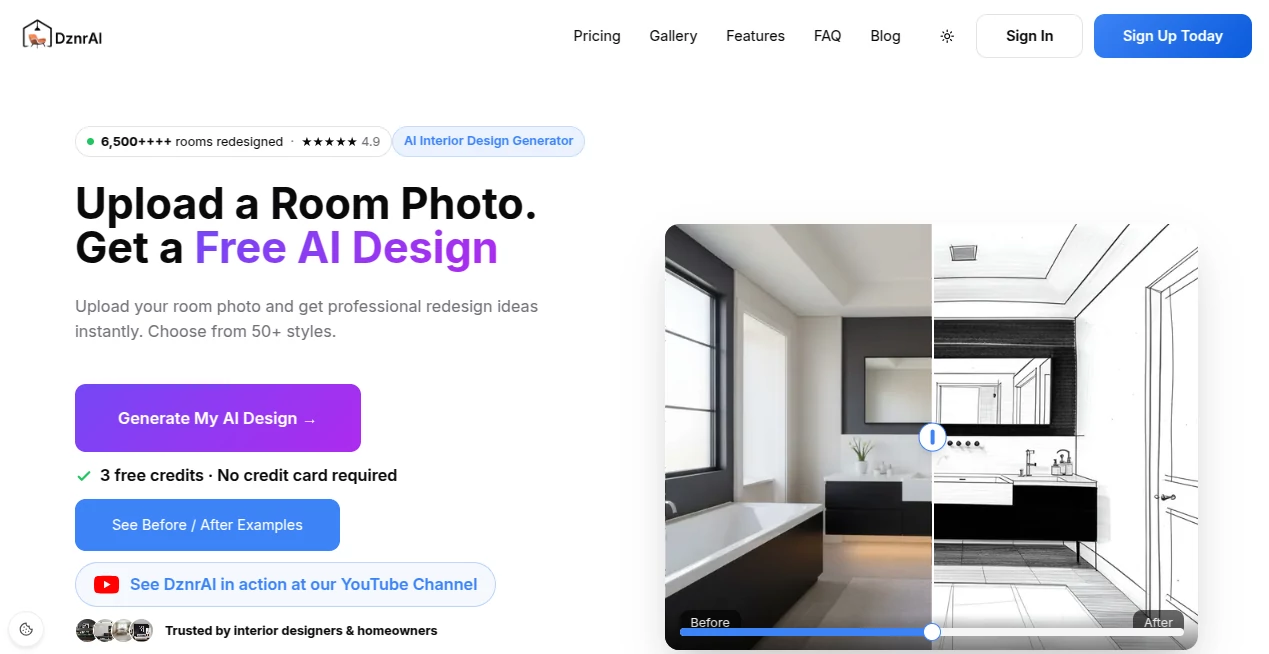
The interface is clean, welcoming, and designed for people without technical knowledge. Every step follows a natural workflow: upload a photo, choose the room type, select a preferred style, and generate a redesign. Navigation remains intuitive throughout the project, while the integrated AI chat editor makes refinements feel like having a conversation with an experienced designer rather than learning complicated software.
Accuracy & Performance
One of the strongest aspects of the platform is its ability to maintain the physical characteristics of the original room. Doors, windows, walls, and overall proportions are respected, producing concepts that are easier to translate into real renovation projects. Most renders are completed in roughly thirty seconds, allowing users to compare multiple design directions without lengthy waiting times.
Capabilities
Beyond simple room visualization, the platform offers a complete design workflow. Users can redesign interiors, virtually stage empty properties, generate premium-resolution renders, create panoramic views, produce walkthrough videos, and refine every detail through conversational editing. The flexibility makes it suitable for everything from personal inspiration to professional client presentations.
Security & Privacy
Privacy receives clear attention throughout the experience. Uploaded room photos remain private, and the service states that images are not shared or sold. Secure payment processing and encrypted connections provide additional confidence for both casual users and professional teams handling client projects.
Use Cases
- Visualize home renovations before purchasing furniture.
- Explore multiple decorating styles without physical remodeling.
- Create virtual staging for empty real estate listings.
- Present design concepts to clients more efficiently.
- Generate inspiration for rental property improvements.
- Compare color palettes, furniture arrangements, and lighting ideas.
- Develop presentation materials for architects and interior designers.
- Produce marketing visuals for residential properties.
Pros and Cons
Pros
- Produces highly realistic interior concepts.
- Maintains the actual room layout.
- Large collection of design styles.
- Fast rendering speed.
- Natural language editing through AI chat.
- High-resolution exports available.
- Useful for both individuals and professionals.
- Free credits for first-time users.
Cons
- Premium rendering features consume additional credits.
- Professional projects may require purchasing larger credit packages.
- Final renovation costs still need independent planning.
Pricing Plans
New users receive free credits to explore the platform without providing a credit card. Additional usage is based on credit packages instead of mandatory subscriptions, allowing users to purchase only what they need. Larger plans are available for professionals, agencies, and enterprise teams that require high-volume rendering capabilities.
How to Use DznrAI
- Create a free account.
- Upload a photo of your room.
- Select the appropriate room category.
- Choose an interior design style.
- Generate photorealistic design concepts.
- Edit colors, furniture, or materials using conversational AI.
- Download high-quality images or create panoramic and video presentations.
Comparison with Similar Tools
Many AI image generators create attractive interiors but often replace the original architecture with completely different spaces. This platform takes a more practical approach by preserving the existing room layout while applying realistic design improvements. Combined with conversational editing, object detection, virtual staging, panoramic viewing, and video generation, it offers a more comprehensive workflow than many general-purpose image generation tools.
Conclusion
For anyone planning a renovation, preparing a property for sale, or simply experimenting with new interior styles, this platform delivers an impressive balance between creativity and practicality. Fast rendering, realistic spatial preservation, flexible editing, and professional-quality outputs make it valuable for beginners and experienced designers alike. Instead of imagining how a room could look, users can see convincing visual concepts within minutes and make design decisions with far greater confidence.
Frequently Asked Questions (FAQ)
Can beginners use this platform?
Yes. The workflow is designed for users without design experience, requiring only a room photo and a style selection.
Does it preserve the existing room layout?
Yes. The generated concepts are designed to keep the original walls, windows, and overall room structure intact.
Is there a free version?
Yes. New users receive free credits that can be used to generate their first interior designs.
Can professionals use it for client work?
Yes. Interior designers, architects, decorators, and real estate professionals can use it for presentations, virtual staging, and concept development.
Can generated designs be edited?
Yes. Users can refine results by chatting with the integrated AI editor and requesting specific changes to furniture, colors, finishes, and other design elements.
AI Design Assistant , AI Design Generator , AI Image to Image , AI Interior & Room Design .
These classifications represent its core capabilities and areas of application. For related tools, explore the linked categories above.

DznrAI Alternatives Product

Consistent C…

Createimg.ai

Circle Crop …

PatentFig AI

HD Photo Con…

MuseArt AI

Seedream 5.0
image2ai.art

OutfitSwap S…
