


















Embed-bot
What is Embed-bot?
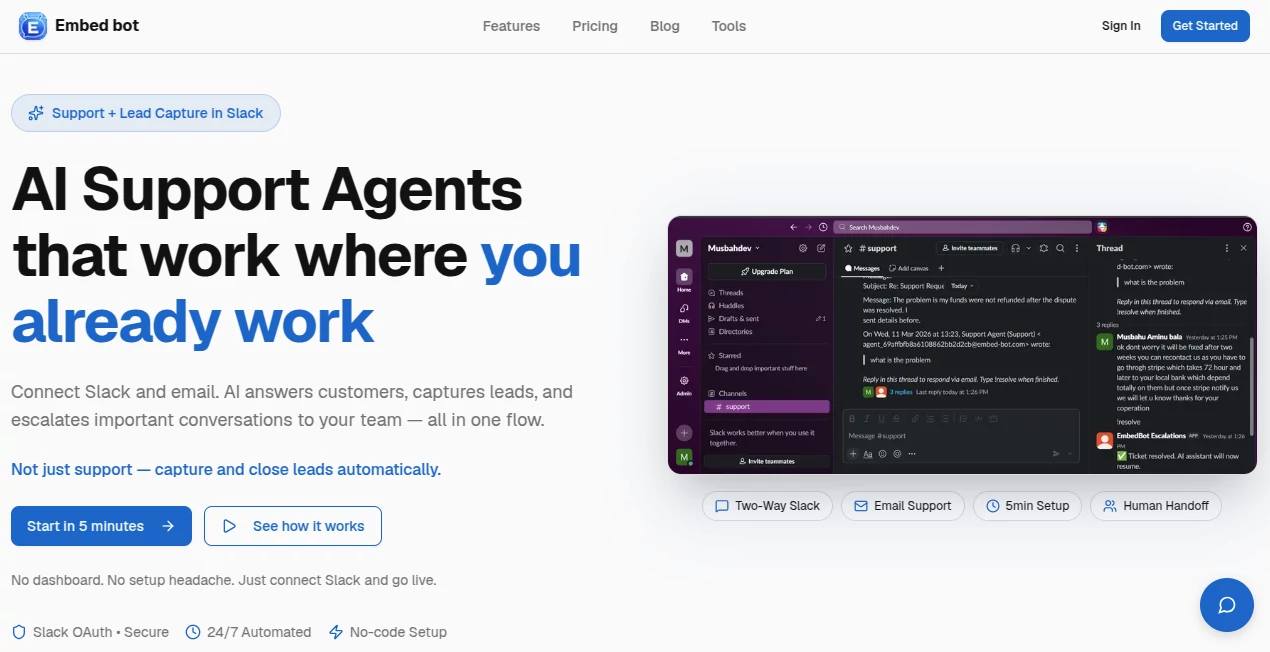
Customer questions come in at all hours, and most teams are stuck switching between dashboards, email threads, and Slack. This tool changes that. It brings intelligent AI support directly into Slack, so your team can stay in the flow while customers get fast, accurate answers. No more context-switching or missed messages. The AI handles the routine stuff, qualifies leads, and smoothly hands off the important conversations to your team — all without leaving Slack. Founders and support leads who’ve tried it often say it feels like finally having an extra team member who never sleeps and actually knows your product inside out.
Introduction
Support tools usually force you into yet another dashboard. Embed Bot takes the opposite approach: it meets you where you already work. Connect your Slack workspace, point it at your knowledge base (Notion, PDFs, website, etc.), and suddenly you have an AI that answers customer questions via website widget or email, escalates smartly, and lets your team reply directly from Slack threads. It’s built for fast-moving teams who want professional support without the overhead of complex systems. The best part? Setup takes minutes, not days, and the results show up almost immediately in faster response times and happier customers.
Key Features
User Interface
The beauty is in how invisible it feels once set up. Customers interact through a clean website widget or email, but everything surfaces in familiar Slack channels. Your team sees full context, replies naturally, and uses simple commands like “!resolve” when done. No new dashboard to learn, no constant tab-switching. It’s designed so support feels like a natural extension of your existing conversations rather than a separate chore.
Accuracy & Performance
The AI is trained on your own materials, so answers stay on-brand and accurate. It handles common questions instantly while knowing exactly when to escalate complex or high-intent conversations. Response times drop dramatically — often under two minutes — and the escalation system ensures nothing important slips through. Teams consistently report fewer repeat questions and higher first-contact resolution rates after implementing it.
Capabilities
It supports two-way Slack conversations, full email thread management, automatic lead qualification and capture, smart human handoff, customizable website widgets, and training on almost anything (PDFs, websites, Notion pages). You get analytics on resolution rates, conversation volume, and team performance. The system can run 24/7, scaling from small startups to growing teams without breaking a sweat.
Security & Privacy
Everything uses secure Slack OAuth. Your data stays protected, and conversations are handled with enterprise-grade care. No unnecessary data sharing or training on your customer messages. For teams handling sensitive support or sales conversations, that peace of mind is a big reason they choose it.
Use Cases
A SaaS startup handles all tier-1 support through the AI and only gets involved for complex issues, freeing engineers to build instead of answer tickets. An e-commerce brand uses it to qualify leads from website chat and pass hot prospects straight to sales in Slack. A small agency manages client questions across email and chat without losing context or dropping balls. It shines anywhere customer communication volume is growing but headcount isn’t.
Pros and Cons
Pros:
- Stays inside Slack — no new tools or context switching for the team.
- Fast setup and immediate results, often within the same day.
- Smart escalation means AI handles routine work and humans focus on what matters.
- Excellent lead capture that turns support chats into sales opportunities.
- Trains easily on your existing docs and knowledge base.
Cons:
- Best results come after training on good documentation.
- Very niche or highly technical questions may still need human input.
- Advanced analytics and higher volume plans are paid.
Pricing Plans
It starts with a free tier generous enough to test with real conversations. Paid plans scale with message volume and add priority support, advanced analytics, and higher limits. Many teams find the ROI clear after just a couple weeks of reduced support time and increased qualified leads.
How to Use Embed Bot
Connect your Slack workspace with a quick OAuth flow. Upload or link your knowledge base (Notion, PDFs, website URLs). Customize your widget if using it on your site. That’s basically it. The AI starts answering immediately. When escalation is needed, your team gets notified in Slack with full context and can reply directly. Use simple commands to resolve tickets or mark leads. Monitor performance in the built-in analytics. Most teams are fully operational in under 30 minutes.
Comparison with Similar Tools
Traditional helpdesks force everyone into yet another platform. Pure AI chatbots often feel generic and lack seamless human handoff. This one combines the best of both: powerful AI that knows your business plus natural escalation inside the tool your team already lives in. It’s less about replacing support staff and more about making them dramatically more effective.
Conclusion
Great support doesn’t have to mean more tools or more stress. Embed Bot brings intelligence and efficiency directly into your existing workflow, letting AI handle the volume while your team focuses on what humans do best. For growing teams who want professional support without the usual headaches, it’s one of the smartest moves you can make. Your customers get fast answers, your team stays in flow, and your business keeps moving forward.
Frequently Asked Questions (FAQ)
How long does setup take?
Most teams are live in under 30 minutes.
Does the AI need training?
Yes, but it’s simple — just point it at your docs, Notion, or website.
Can my team reply from Slack?
Yes — full two-way conversations with seamless handoff.
Is it suitable for small teams?
Absolutely. Many early-stage startups use it successfully.
What about data privacy?
Secure Slack OAuth and enterprise-grade protections are standard.
AI Workflow Management , AI Chatbot , AI Customer Service Assistant , AI Productivity Tools .
These classifications represent its core capabilities and areas of application. For related tools, explore the linked categories above.

Embed-bot Alternatives Product

Agent Grid
Automaited

Liftburst
Xvibe

Rabu AI

Discord Time…

VoiceFlow Te…

VideoLens

Friendify
