
erase.tools
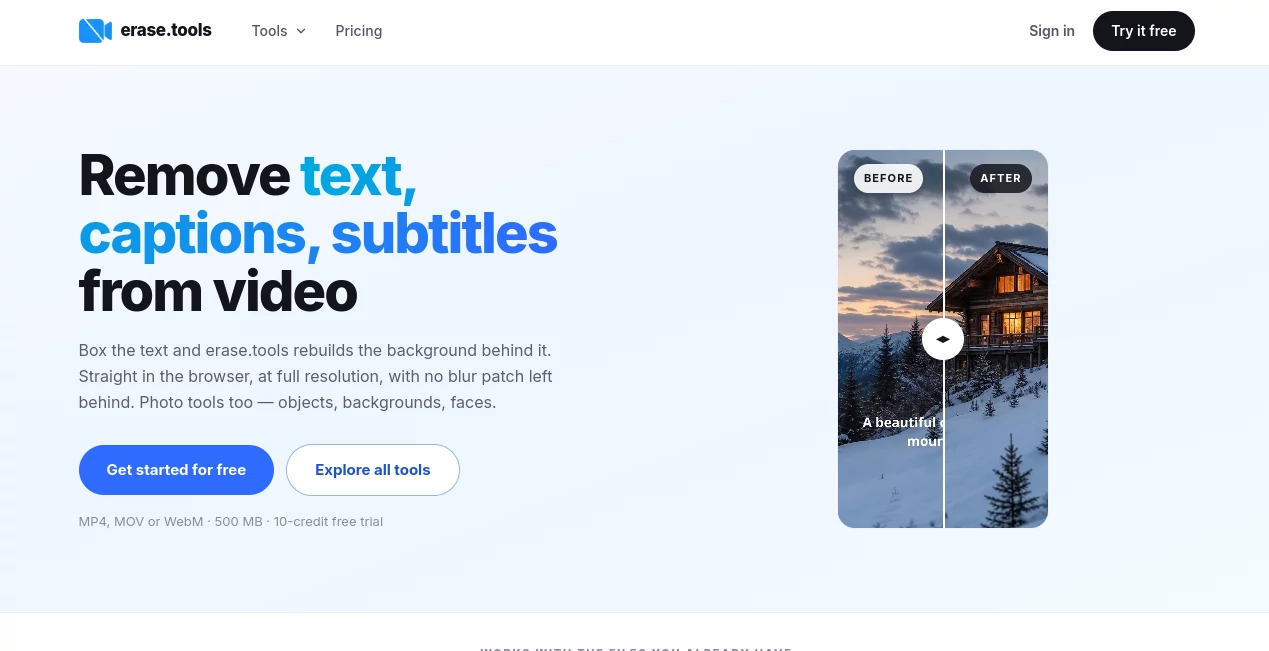
What is erase.tools?
Removing something from a photo or video sounds simple until you actually try it. A person walks through the background, a subtitle is burned into a clip, a watermark sits over an important detail, or an unwanted object ruins an otherwise good photograph. Traditional editing software can handle these jobs, but often requires layers, masks, tracking, and a fair amount of patience.
erase.tools takes a much more direct approach. It brings photo and video cleanup into the browser, allowing users to mark what they want removed and let the surrounding visual information rebuild the missing area. There is no desktop application to install and no complicated editing workflow to learn.
The platform supports both image and video tasks, including object removal, background removal, text and caption removal, watermark cleanup, blurring, pixelation, and several image conversion tools. For someone who simply wants to clean up a file without opening a full editing suite, that focused workflow can be a real time saver.
Key Features
- Remove unwanted objects and people from photographs.
- Remove text, captions, subtitles, and titles from video.
- Track moving watermarks and logos across a video.
- Remove or replace image backgrounds.
- Blur faces, text, license plates, names, and other sensitive details.
- Pixelate selected areas with a block-style mosaic effect.
- Convert HEIC, WebP, JPG, and PNG files through browser-based tools.
- Process selected video files at their original resolution without adding another watermark.
- Support batch processing for repeated cleanup tasks.
- Provide API access with JavaScript and Python SDK support for developers.
User Interface
The interface is built around a simple idea: select the file, mark the area, and process it. For video cleanup, users can upload MP4, MOV, or WebM files and draw a box around text or another unwanted element. For photographs, a brush-based selection makes it possible to paint over an object, person, or other distraction.
This simplicity is one of the strongest parts of the experience. Someone who has never worked with masks in professional editing software can understand the basic workflow almost immediately. There is also no need to install a separate application, which makes the tools convenient on both desktop and mobile browsers.
Accuracy & Performance
The platform rebuilds the selected area rather than simply placing a blur or solid patch over it. In video, surrounding frames can provide useful information about what should appear behind removed text or watermarks. Moving marks can also be tracked, meaning the same selection does not necessarily need to be repeated throughout the entire clip.
Results naturally depend on the footage. Simple backgrounds such as walls, skies, floors, water, and other consistent textures tend to be easier to reconstruct than highly detailed scenes. In photographs, large objects, faces partly covered by the selected area, dense text, and hard geometric patterns can require more careful masking.
One particularly useful detail is that the video workflow is designed to preserve the source resolution, bitrate, and container rather than automatically reducing the quality of the finished file.
Capabilities
The platform goes beyond a single eraser. Its photo tools cover object removal, background removal, transparent backgrounds, white backgrounds, blur, pixelation, face blurring, and image censoring. The video section focuses on text, watermarks, and burned-in captions.
There are also browser-based conversion utilities for formats such as HEIC and WebP. Some of these conversion and privacy-oriented image operations run directly on the user's device, which can be useful when the file contains information that should not be uploaded to a remote service.
For developers and teams, API access adds another layer of flexibility. A file and selection region can be submitted programmatically, with a signed result URL returned afterward. This makes the technology more interesting for applications that need automated visual cleanup rather than occasional manual editing.
Security & Privacy
Privacy depends on the particular tool being used. Several browser-based image operations are designed to run locally, meaning the image does not need to be uploaded for processing. This is especially useful for tasks such as blurring private information or converting an image format.
For cloud-based processing, users should still consider the sensitivity of the files they upload and review the platform's privacy terms before processing confidential material. The distinction between local browser tools and server-side processing is worth keeping in mind when working with personal documents, private photographs, or business files.
Use Cases
There are plenty of everyday situations where a focused removal tool is more convenient than a complete editor. A property photographer can clean distracting objects from a room photo. An online seller can tidy a product image before publishing it. A traveler can remove an unexpected person from the background of a photograph.
Video creators can use the workflow to clean burned-in subtitles, lower thirds, timestamps, or unwanted platform marks from footage they have the rights to edit. Marketing teams may also find it useful when preparing existing visual material for a new campaign or localized version.
Another practical use is privacy. A face, license plate, house number, name, or other identifying detail can be blurred or pixelated without affecting the rest of the image.
For example, imagine finding an otherwise perfect photograph of a storefront with a parked car covering part of the entrance. Instead of opening a professional editor, creating a mask, and manually rebuilding the scene, you can brush over the car and let the surrounding background do most of the work.
Pros and Cons
Pros
- Works directly in the browser with no installation.
- Supports both photo and video cleanup.
- Uses reconstruction rather than simply blurring removed areas.
- Video exports can retain the original resolution and bitrate.
- No additional watermark is placed on exported results.
- Moving video watermarks can be tracked.
- Batch processing is available for repeated jobs.
- API access is useful for developers and automated workflows.
Cons
- Complex backgrounds can produce less convincing results.
- Large objects occupying a substantial part of an image can be difficult to reconstruct.
- Video processing has file-size, duration, and credit limits.
- Some advanced image tools are available only with a Pro plan.
- Professional editors still offer considerably more manual control for demanding projects.
Pricing Plans
A free option is available for trying the video removal workflow. The current free allowance includes a 10-credit video trial, with supported clips up to 500 MB and 90 seconds. The exported result does not receive an additional platform watermark.
The Pro subscription uses a credit system. The monthly plan costs $14.99 and includes 600 credits per month. The six-month option costs $74.99 in total and provides 750 credits per month, while the yearly plan costs $59.99 and provides 900 credits per month.
Video processing uses one credit per second, with a 10-credit minimum for each video. Pro plans also include the broader collection of image and browser tools, full source resolution, and watermark-free results.
How to Use It
- Choose the photo or video you want to edit.
- Upload the supported file through the appropriate browser tool.
- Use the brush or selection box to mark the unwanted object, text, caption, watermark, or other area.
- For video, allow the system to reconstruct the selected area across the relevant frames.
- Review the result and make another selection if additional cleanup is needed.
- Export the finished file at the available quality and resolution.
Comparison with Similar Tools
Professional applications such as Adobe Premiere Pro and After Effects can perform many of the same tasks, but they are designed for much broader editing workflows. That additional flexibility is valuable for experienced editors, yet it can feel excessive when the job is simply removing one unwanted element.
Basic online tools often take an easier route by blurring, pixelating, cropping, or covering the unwanted area. That can work for privacy, but it does not necessarily make the original scene look untouched. A reconstruction-based workflow has a different goal: replace the selected pixels with an approximation of what should have been there.
The biggest advantage here is therefore not that it replaces every professional editing application. It is that it reduces a specific editing task to a much smaller number of steps. For quick cleanup jobs, that can be considerably more practical.
Conclusion
erase.tools is a strong choice for people who want to remove unwanted elements from photos and videos without dealing with a complicated editing environment. Its browser-first workflow, reconstruction-based removal, video tracking, full-resolution approach, and collection of related image tools make it useful for creators, marketers, photographers, online sellers, and everyday users.
It is not intended to replace every feature found in a professional editing suite, and difficult images can still require human judgment and repeated masking. For straightforward cleanup, however, the appeal is clear: mark what should disappear and let the software handle the tedious reconstruction work.
Frequently Asked Questions (FAQ)
Can unwanted text be removed from a video?
Yes. Text, burned-in subtitles, titles, lower thirds, and similar elements can be selected and reconstructed from surrounding video frames.
Can moving watermarks be removed?
Yes. The video workflow can track a moving watermark, allowing the user to mark it once rather than manually selecting it throughout the entire timeline.
Does the video lose its original quality?
The service states that it rebuilds only the selected pixels while passing the remaining frame through untouched. Its video workflow is designed to preserve the source resolution, bitrate, and container.
Can objects be removed from photographs?
Yes. Users can brush over unwanted objects, people, signs, cars, clutter, and similar elements. The selected region is reconstructed using information from the surrounding image.
Is there a free option?
Yes. A free video trial is available, including a 10-credit allowance. Free processing has limits, while the Pro plans provide recurring monthly credits and access to the complete tool collection.
Does the exported file contain a new watermark?
No. The platform states that it does not add its own watermark to exported results, including the free video trial.
Is there an API for developers?
Yes. API access is available with JavaScript and Python SDK support, allowing visual removal workflows to be incorporated into other applications.
What video formats are supported?
Video uploads can use MP4, MOV, or WebM files. The video workflow supports files up to 500 MB and 90 seconds.
What image formats can be used?
The image tools support formats including JPEG, PNG, WebP, and HEIC, depending on the specific operation. Individual tools may have different file-size and resolution limits.
Is this a replacement for professional photo or video editing software?
Not completely. Professional editors provide much deeper control over layers, masks, color, timing, effects, and manual retouching. This platform is better suited to focused removal, cleanup, privacy, and conversion tasks where speed and simplicity matter more than a complete editing workspace.
AI Background Remover , Photo & Image Editor , AI Video Editor , AI Image Scanning .
These classifications represent its core capabilities and areas of application. For related tools, explore the linked categories above.
erase.tools details
Website unavailable — View Alternatives
Pricing
- Freemium
Apps
- Web App
Categories

erase.tools Alternatives Product

Sketch To

Nano Banana …

Circle Crop …

Fast Wan

JFIF to JPG …

GPT Image 2

lyric video …

AI Motion Co…

CapCut