
FacelessReels
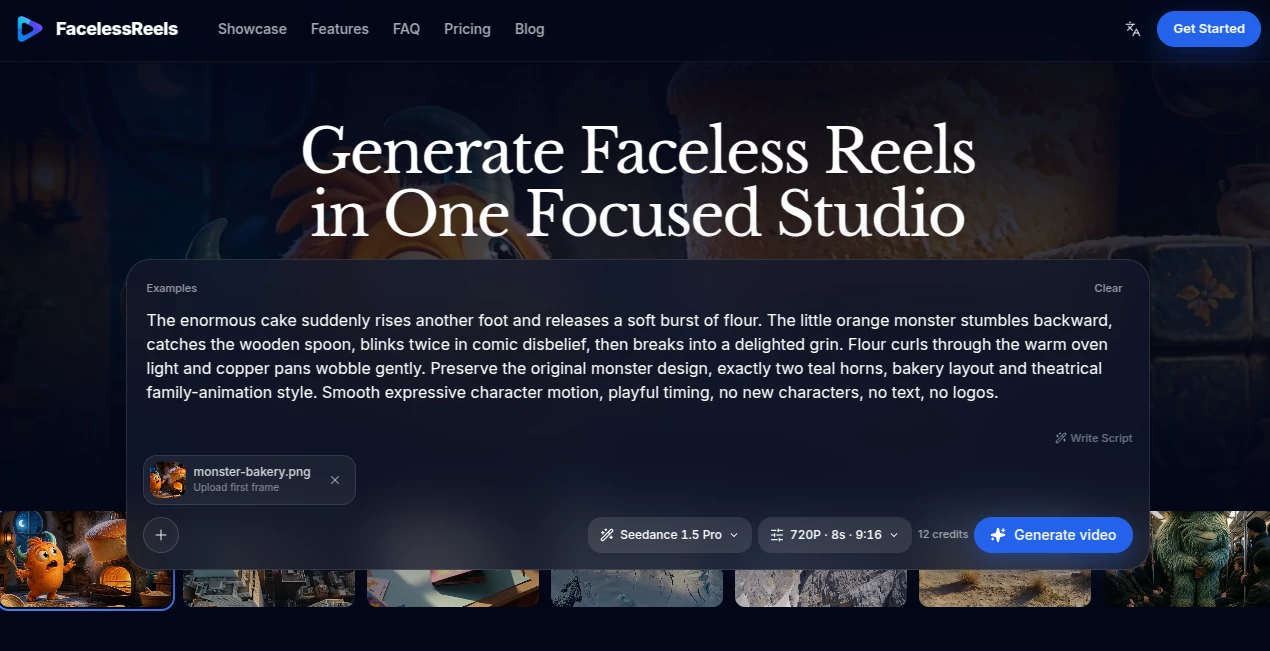
What is FacelessReels?
Creating short-form videos without appearing on camera sounds simple until the work starts piling up. A good idea needs a hook, a script, visual direction, scene prompts, and finally a video that actually feels ready for TikTok, Instagram Reels, or YouTube Shorts. FacelessReels brings those steps into one focused workspace, helping creators move from an initial topic to a finished faceless reel without constantly jumping between unrelated tools.
The platform combines AI-assisted script planning, scene prompts, text-to-video generation, image-to-video creation, reusable workflows, and a private video library. It is particularly useful for creators who want to build a repeatable publishing process rather than generate a single clip and start over from scratch every time.
Key Features
- AI Script Planning: Turn a topic into a structured short-form concept with a hook, body, and call to action.
- Text-to-Video: Transform creative ideas and scene prompts into short video assets using supported AI video models.
- Image-to-Video: Upload a storyboard frame or reference image and use it as a starting point for animation and motion.
- Multiple AI Video Models: Compare different models according to factors such as motion, realism, audio support, and character performance.
- Scene Planning: Break a script into visual beats and create prompts that describe framing, lighting, movement, and mood.
- Reusable Templates: Save time by adapting proven faceless video formats and prompt structures for future content.
- Resolution and Duration Controls: Available video settings adapt to the selected model, giving creators control over the output.
- Private Video Library: Keep generated videos together with their prompts and settings for later review, downloading, or reuse.
- Social Publishing: Creator and Studio plans support connected channels and publishing workflows for supported social platforms.
- Watermark-Free Downloads: Paid plans include watermark-free downloads and commercial use, subject to the selected model provider's terms.
User Interface
The interface is built around a straightforward production sequence rather than a collection of disconnected AI features. A creator can start with an idea, work on the hook and script, plan individual scenes, choose a video model, and then generate the required footage.
The workflow also makes it easy to return to previous creations. Prompts, settings, and successful generations can remain in the private video library, which is useful when a particular visual direction works well and needs to be adapted for another video.
Accuracy & Performance
Video generation is naturally dependent on the underlying AI model, so output quality can vary according to the model, prompt, reference material, duration, and type of scene being created. The advantage here is the ability to experiment with different supported models without rebuilding the entire creative workflow.
The platform states that most video renders take several minutes and are processed in the background. Generation status is updated while the job is being completed. If a generation fails, the credits used for that generation are automatically returned to the account balance.
Capabilities
The strongest part of the platform is the connection between planning and production. Instead of treating video generation as an isolated prompt box, it lets creators develop the creative direction first and then turn that direction into visual scenes.
For example, a creator working on a short educational video could begin with a topic, develop a stronger opening hook, divide the idea into several scenes, add reference imagery where necessary, select a suitable video model, and generate the clips. The same process can then be reused for the next video.
Image-to-video support is another practical option. A storyboard frame or reference image can guide composition, subject appearance, visual style, and movement, giving creators more control than starting every generation from text alone.
Security & Privacy
The platform provides a private creation history where generated videos, prompts, and settings can be retained for later use. This is useful for creators who are developing a consistent visual style and do not want to lose previous creative directions.
Commercial usage is available with the paid plans, but the platform notes that commercial rights can depend on the selected model provider as well as the applicable plan and terms. Anyone producing paid client work should therefore check the relevant provider terms before publishing.
Use Cases
- Faceless YouTube Channels: Build short-form visual content without appearing on camera.
- TikTok Creators: Develop quick visual concepts designed around hooks, scenes, and short-form storytelling.
- Instagram Reels: Produce vertical video assets for regular social publishing.
- Educational Content: Turn explanations, facts, tutorials, and concepts into visually structured short videos.
- Product Content: Create product-focused scenes, demonstrations, and promotional clips without traditional filming.
- Content Marketing: Produce repeatable short-form assets for campaigns and social channels.
- Creative Experiments: Test different visual styles and AI video models without rebuilding the workflow each time.
- Small Teams: Establish a repeatable process for planning, generating, reviewing, and publishing short videos.
Pros and Cons
Pros
- Combines planning and video generation in one workflow.
- Supports both text-to-video and image-to-video creation.
- Provides access to multiple AI video models.
- Useful controls for resolution and clip duration.
- Reusable prompts and video examples can speed up production.
- Private creation history makes successful concepts easier to revisit.
- Paid plans offer watermark-free downloads and commercial use, subject to applicable model terms.
- Designed specifically around short-form faceless content.
Cons
- Video generation can take several minutes depending on the job and selected model.
- Output quality varies between AI video models and individual prompts.
- Higher-volume production requires a larger credit allowance.
- Commercial rights may differ depending on the underlying model provider.
- Social publishing features are limited on the entry-level plan.
Pricing Plans
The pricing structure is based on monthly video-generation credits. The Starter plan costs $19 per month and includes 120 credits, text-to-video and image-to-video generation, multiple AI video models, private creation history, downloads, and watermark-free commercial-use downloads subject to the applicable terms. Social publishing requires a higher plan.
The Creator plan costs $49 per month and provides 360 credits, along with two connected channels and up to 20 publishes per month. It retains the core video generation and workflow features of the Starter plan while providing more capacity for creators publishing regularly.
The Studio plan costs $99 per month and includes 750 credits, six connected channels, and up to 90 publishes per month. This option is aimed at higher-volume creators, teams, and businesses managing several content channels.
Credits in the monthly plans are valid for one month. The site also offers credit-based purchasing options for users who prefer flexible rendering capacity rather than relying entirely on a recurring subscription.
How to Use FacelessReels
- Start with a topic or content idea that fits your intended audience.
- Develop the hook, script structure, and call to action for the short video.
- Break the concept into individual scenes and define the visual direction for each one.
- Add a reference image or storyboard frame when you need more control over the composition or subject.
- Select an AI video model based on the visual style, motion, realism, audio, and character requirements of the scene.
- Choose the available resolution and clip duration settings.
- Generate the video and wait for the background rendering process to finish.
- Preview the result, refine the prompt if necessary, and download the finished clip.
- Reuse successful prompts and creative directions when producing the next reel.
- Connect supported social channels on eligible plans when you are ready to publish or schedule content.
Comparison with Similar Tools
Many AI video platforms focus primarily on generating a clip from a prompt. This platform takes a somewhat different approach by placing the generation step inside a broader faceless-content workflow.
That distinction matters for creators producing content repeatedly. Instead of opening one application for scripts, another for scene planning, another for video generation, and another place to keep previous prompts, the workflow brings these stages closer together. Multiple video models also give users room to experiment with different visual results while keeping the same overall production process.
It is not necessarily the right choice for every type of video production. A filmmaker looking for advanced traditional editing controls may still need a dedicated video editor. However, for creators whose main goal is producing repeatable faceless short-form videos, the focused workflow is a meaningful advantage.
Conclusion
For creators building a faceless content channel, the hardest part is often not generating one video. It is creating the tenth, twentieth, or hundredth video without the production process becoming exhausting. This platform addresses that problem by connecting idea development, scripting, scene planning, AI video generation, asset management, and publishing into a more repeatable workflow.
The combination of text-to-video, image-to-video, multiple models, reusable creative directions, and private video history makes it especially appealing to creators who want to turn short-form video production into a consistent routine. Whether the goal is experimenting with a new channel or maintaining several publishing streams, the credit-based plans provide different levels of production capacity.
For someone who wants to create faceless Reels, TikTok videos, or YouTube Shorts without rebuilding the entire workflow for every idea, this is a practical platform worth considering.
Frequently Asked Questions (FAQ)
What type of videos can I create?
The platform is designed for faceless short-form videos for channels such as TikTok, Instagram Reels, and YouTube Shorts. It can be used for product clips, explainers, social hooks, creative scenes, and other short-form concepts.
Can I create a video from text?
Yes. The text-to-video workflow turns topics, hooks, and scene prompts into video assets using supported AI video models.
Can I animate an existing image?
Yes. Image-to-video generation allows you to upload a first frame or use reference images to guide the composition, subject, style, and movement of a scene.
How long does video generation take?
Most generations take several minutes. Jobs are processed in the background and the platform updates the generation status until the video is ready.
What happens if a video generation fails?
If a generation fails, the credits used for that generation are automatically returned to your balance.
Can I use the generated videos commercially?
Paid plans support commercial use, but commercial rights can depend on the selected AI model provider and its terms. It is important to review those terms before using a generated video in paid work.
Does it support multiple AI video models?
Yes. Users can choose between supported AI video models according to the requirements of the shot, including factors such as motion, realism, audio, and character performance.
Is there a private video library?
Yes. Successful generations can be kept with their prompts and settings so they can be previewed, downloaded, reused, or refined later.
Which plan is suitable for regular creators?
The Creator plan is designed for more consistent weekly production and includes 360 monthly credits, two connected channels, and up to 20 publishes per month. Higher-volume users can move to the Studio plan for 750 credits and six connected channels.
Can I publish directly to social platforms?
Social publishing is available on eligible plans. The current workflow supports connected channels for supported platforms, while platform availability can change as new integrations are added.
AI Image to Video , AI Video Generator , AI Short Clips Generator , AI Text to Video .
These classifications represent its core capabilities and areas of application. For related tools, explore the linked categories above.
FacelessReels details
Website unavailable — View Alternatives
Pricing
- Freemium
Apps
- Web App
Categories

FacelessReels Alternatives Product

sulphur 2

Seedance 2.0

Gemini Omni

Seedance 2.0…

Seedance 2.0…

VidiOne

RunwayAI

Yevideo

Seedance 2.0…