


















Free AI Tools
What is Free AI Tools?
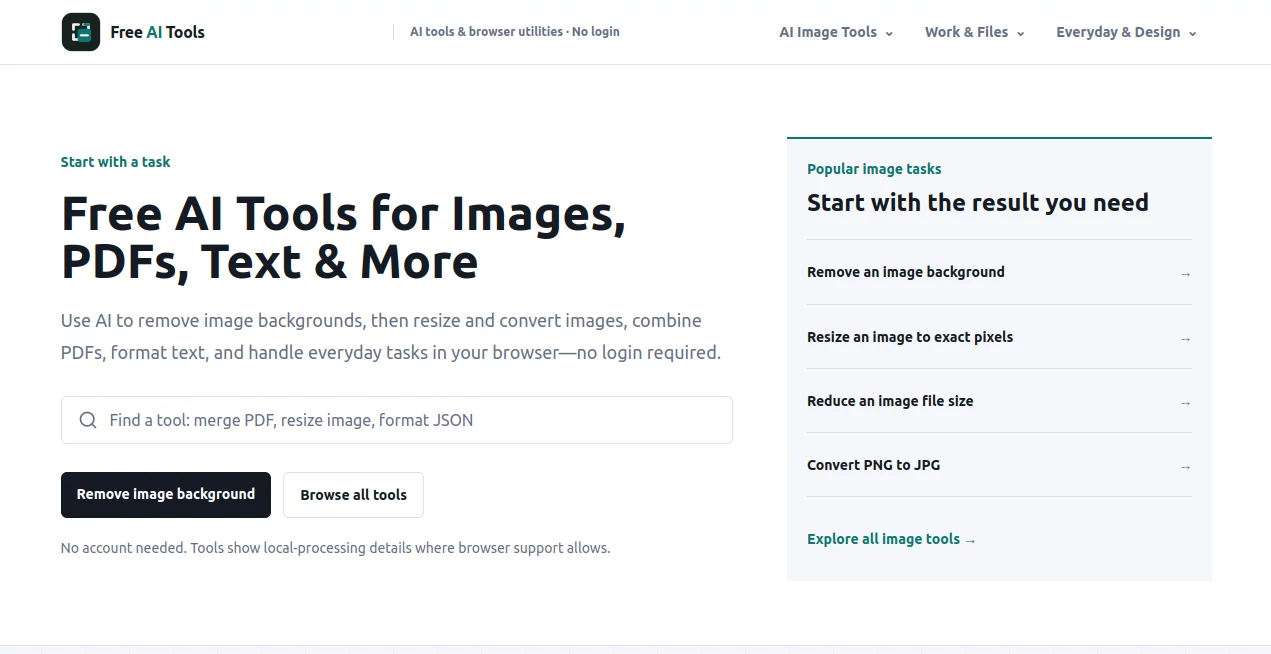
Free AI Tools is a practical collection of browser-based utilities designed for people who want to get everyday digital tasks done without creating an account or installing software. The platform brings together 35 tools across six practical areas, including images, developer utilities, calculators, PDF and file processing, text, and design.
What makes the collection particularly appealing is its straightforward approach. Instead of asking users to register before trying a simple utility, the tools are available directly in the browser. Many tasks can be completed in seconds, whether you need to resize an image, merge PDFs, validate JSON, count words, convert units, or generate a CSS gradient.
The platform is also built around browser-side processing for supported tools. That means files can remain in the user's browser instead of being unnecessarily uploaded to a remote service. For quick jobs where simplicity matters more than a large account-based workflow, this is a refreshing approach.
Key Features
- 35 free browser-based tools across six practical categories
- No account or login required to start using the tools
- Local browser processing for supported files and operations
- Image resizing, compression, and format conversion
- Developer utilities for JSON, Base64, URLs, regular expressions, JWTs, and timestamps
- PDF merging, splitting, compression, and conversion tools
- Text utilities for counting, formatting, comparing, and editing content
- Calculators for percentages, dates, time zones, and unit conversions
- Design utilities for colors, gradients, contrast, SVG optimization, and CSS effects
- Options to copy or download results directly from the browser
User Interface
The interface focuses on getting users to the right tool quickly. Categories are clearly separated, making it easy to move from image utilities to developer tools, calculators, PDF and file utilities, text tools, or design resources.
Individual tools are designed around the task rather than surrounding the user with unnecessary menus. For example, someone working with an image can select an output format and adjust the relevant settings without having to navigate through a complicated dashboard.
This simplicity is one of the collection's strongest qualities. If you have ever opened a supposedly simple online utility only to encounter registration screens and distracting upsells, the difference is immediately noticeable.
Accuracy & Performance
Performance naturally depends on the individual tool and the browser being used, but the collection is designed for quick, focused operations. Calculators provide immediate results, text utilities process content as it is entered, and supported file operations are performed directly in the browser.
Several tools also provide useful feedback instead of simply producing an unexplained result. The image utilities can show dimensions and file sizes, while developer tools can expose parser errors, matches, capture groups, or other relevant information.
For everyday tasks such as checking a JSON document, converting a measurement, calculating a percentage, resizing an image, or comparing text, the workflow is pleasantly direct.
Capabilities
The range of capabilities is broader than the site's name might initially suggest. The image section includes tools for resizing, compression, and converting formats such as HEIC, PNG, JPG, and WebP. The PDF and file section handles tasks such as merging, splitting, compression, and image-to-PDF conversion.
Developers can use utilities for JSON formatting and validation, Base64 encoding and decoding, URL encoding, regular-expression testing, JWT inspection, and Unix timestamp conversion. Writers and editors can count words and characters, convert text cases, work with Markdown, and compare two versions of text.
Designers also get useful browser utilities, including a color picker, WCAG contrast checker, CSS gradient generator, SVG optimizer, and box-shadow generator. This makes the collection useful well beyond a single type of user.
Security & Privacy
Privacy is an important part of the platform's design. The website states that supported files are processed in the browser, which can be particularly useful when working with documents, images, or other files that users would rather not upload to a third-party server.
The no-login approach also keeps the barrier to entry low. Users can open a utility, complete their task, and leave without creating an account. As always, users should still review the individual tool's behavior before processing highly sensitive information, but browser-side processing is a valuable privacy-oriented feature.
Use Cases
- Resize or compress images before uploading them to a website
- Convert HEIC photos into JPG files for broader compatibility
- Convert PNG or WebP images when a different format is required
- Merge several PDF documents into a single file
- Split a large PDF into smaller sequential documents
- Convert images into PDF files for sharing or archiving
- Format and validate JSON during development
- Test regular expressions against sample text
- Decode JWT information while inspecting web applications
- Convert Unix timestamps into readable dates
- Count words, characters, sentences, and paragraphs
- Compare two versions of a document and identify changes
- Check color contrast for accessible web designs
- Generate CSS gradients and box shadows without writing them manually
- Optimize SVG files before using them on a website
Pros and Cons
Pros:
- Completely free collection of practical browser utilities
- No registration required
- Wide variety of everyday tools
- Browser-side processing for supported operations
- Useful for developers, designers, writers, students, and general users
- Simple task-focused experience
- Many results can be copied or downloaded immediately
Cons:
- The collection is focused on practical utilities rather than advanced AI workflows
- Some tools naturally have more specialized functionality than others
- Browser performance can vary depending on the device and size of the file being processed
- Users looking for a full project-management or generative AI platform may need a different type of service
Pricing Plans
The entire collection is presented as free online browser tools. There is no account requirement to start using the available utilities, and the platform does not position its tools around a conventional subscription-based pricing model.
This makes the service particularly useful for occasional tasks. Someone who needs to compress a single image, merge a few PDFs, check JSON, or calculate a value does not have to commit to a paid plan simply to complete a small job.
How to Use Free AI Tools
- Open the website and browse the available tool categories.
- Select the utility that matches the task you need to complete.
- Enter your text, numbers, code, or add a supported local file when required.
- Adjust the available options for the selected tool.
- Review the result directly in your browser.
- Copy or download the finished result when the tool provides that option.
No account creation is required for the basic workflow, so users can move directly from the problem they are trying to solve to the appropriate utility.
Comparison with Similar Tools
Many online utility platforms concentrate on one narrow category, such as PDF conversion, image compression, developer utilities, or text processing. This collection takes a broader route by bringing several of these everyday functions together in one place.
It also differs from large AI platforms that require users to interact through a conversational interface. Here, the emphasis is on purpose-built utilities. If you know exactly what you need, a dedicated calculator, converter, formatter, compressor, or checker can often be faster than explaining the task to a general-purpose assistant.
The no-login workflow is another practical advantage. For a quick one-off task, being able to open a browser tool and immediately work on it can save more time than creating an account and navigating through a larger application.
Conclusion
Free AI Tools is a useful collection for anyone who regularly encounters small digital tasks that need a quick solution. Its strength is not trying to turn every problem into a complicated AI workflow. Instead, it provides a growing set of focused browser utilities covering images, files, PDFs, text, calculations, development, and design.
The combination of free access, no required login, and browser-based processing makes the collection especially convenient for one-off jobs. Whether you are a developer checking JSON, a designer working with colors, a writer checking text, or simply someone trying to convert a file, there is a good chance you can find a relevant utility without spending time setting up another account.
Frequently Asked Questions (FAQ)
Is the collection free to use?
Yes. The website presents its collection as free online browser tools, with no account required to start using the available utilities.
Do I need to create an account?
No. The platform is designed to let users start working with its tools without signing in or creating an account.
Are uploaded files processed in the browser?
Supported file tools are designed for browser-side processing, meaning the relevant operations can take place locally in the user's browser rather than requiring unnecessary server uploads.
What types of tools are available?
The collection covers image tools, developer utilities, calculators, PDF and file tools, text utilities, and design tools. Examples include image compressors, JSON validators, PDF mergers, word counters, unit converters, color tools, and SVG utilities.
Can developers use these tools?
Yes. The developer category includes utilities for JSON formatting and validation, regular expressions, Base64, Unix timestamps, URL encoding and decoding, and JWT inspection, making the collection useful for everyday development tasks.
AI PDF , Photo & Image Editor , AI Productivity Tools , AI Developer Tools .
These classifications represent its core capabilities and areas of application. For related tools, explore the linked categories above.

Free AI Tools Alternatives Product

Sendmux

Zush

Grayscale Im…

Vibe Coding …

KwaKwa Cours…

Make Image C…

KaneAI

VercelAPP

Nano Banana …
