

















FreeImageGeneratorAI
What is FreeImageGeneratorAI?
FreeImageGeneratorAI is a simple online image creation tool designed for people who want to turn written ideas into visuals without dealing with complicated design software. It lets users describe an image in a text prompt, choose a suitable aspect ratio, and generate an image within seconds.
One of its biggest advantages is the low barrier to entry. You can start generating without creating an account, entering payment information, or dealing with watermarks. The free experience is powered by FLUX.1 schnell, giving users a practical way to experiment with AI-generated artwork, social media graphics, blog imagery, concepts, avatars, wallpapers, and marketing visuals.
The interface feels particularly useful for quick creative work. Instead of opening a full design application every time you need an image, you can simply describe what you have in mind and let the generator handle the visual production.
Key Features
- Text-to-image generation from natural-language prompts
- FLUX.1 schnell model available for free generation
- No account required to start creating images
- No credit card required for the free experience
- No watermark on generated images
- Generation typically completed in under 10 seconds
- Support for multiple aspect ratios
- One-click image downloading
- Prompt input of up to 2,000 characters
- Image-to-image capabilities available with paid plans
- Multiple AI models available on upgraded plans
- Image history for registered users
User Interface
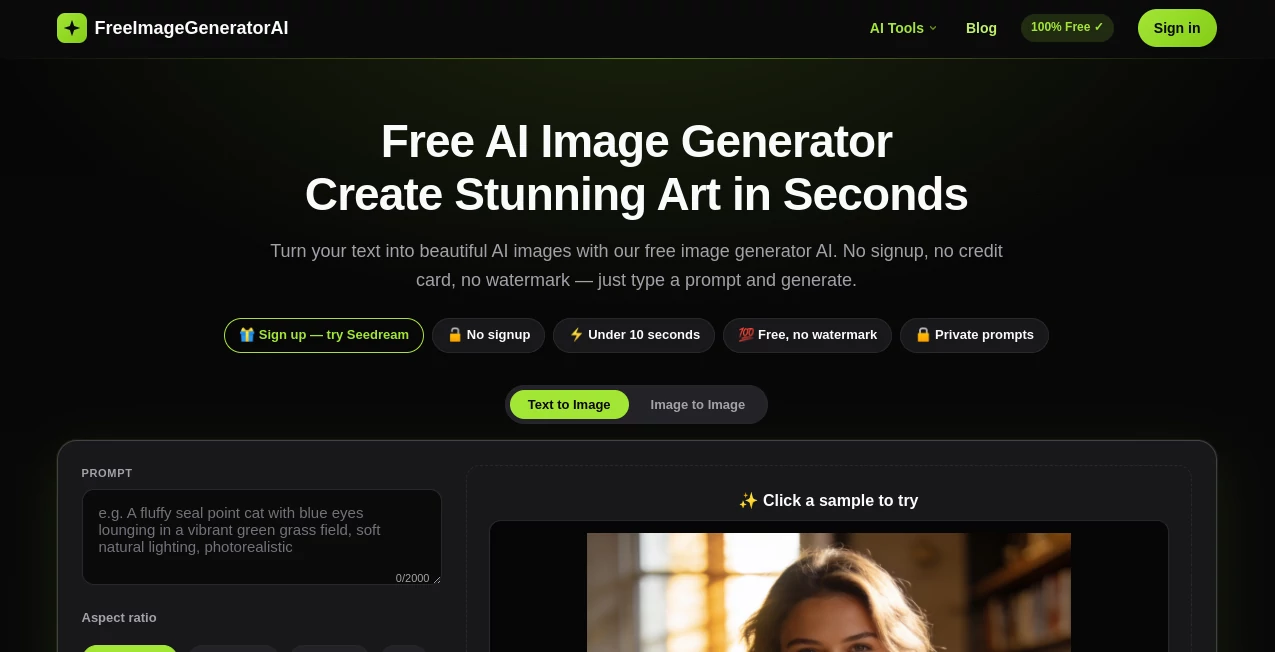
The interface keeps the main creative controls close together. Users can choose between text-to-image and image-to-image workflows, select an AI model, add a reference image when supported, write a prompt, and choose the desired aspect ratio before generating.
The aspect-ratio controls are especially handy for everyday content creation. Available choices include 1:1, 16:9, 9:16, 4:3, and 3:4. That makes it easier to prepare an image for a social post, a vertical mobile screen, a presentation, or a wider website graphic without manually cropping the result afterward.
There is also a straightforward download option after generation. For someone who simply wants to test an idea and get a usable visual, the lack of unnecessary steps makes the experience pleasantly direct.
Accuracy & Performance
Image generation is powered by FLUX.1 schnell, a model designed to balance speed and image quality. The platform states that typical generations take under 10 seconds, which makes it suitable for experimenting with several prompt variations instead of waiting through long rendering cycles.
Prompt adherence is another strong point. Detailed instructions can describe the subject, visual style, lighting, atmosphere, and composition, giving users more control over the direction of the final image. As with any generative image system, results can vary depending on the prompt, so adding concrete visual details generally produces more predictable results.
For everyday online content, the combination of quick generation and standard-resolution output makes the service particularly practical. It is less about replacing a professional art workflow and more about getting from an idea to a usable visual quickly.
Capabilities
The platform covers a broad range of visual projects. A blogger can create a custom featured image instead of searching through stock-photo libraries. A social media manager can produce graphics in different dimensions, while a game developer or illustrator can use the generator to explore early concepts and characters.
It can also be used for AI avatars, profile pictures, wallpapers, backgrounds, illustrations, marketing creatives, advertising visuals, and product mockups. The image-to-image workflow available with upgraded plans adds another layer of flexibility by allowing users to edit or restyle existing images.
For commercial projects, the platform states that FLUX.1 schnell is licensed under Apache 2.0 and that generated images can be used for personal and commercial projects, subject to the service's terms.
Security & Privacy
The service describes its approach as minimal-data focused. Prompts are processed to generate images, while generated images may be retained for security and abuse-prevention purposes. The platform also states that user data is not sold.
Registered users can manage and delete their generation history. For anyone working with sensitive or confidential material, it is still sensible to review the current terms and privacy information before uploading private images or entering confidential prompts.
Use Cases
- Blogging: Create original featured images and supporting visuals for articles.
- Social Media: Produce graphics for Instagram, Facebook, TikTok, and other platforms using the appropriate aspect ratio.
- Marketing: Generate advertising concepts, promotional graphics, and product mockups.
- Concept Art: Explore characters, environments, fantasy scenes, and creative directions before committing to a final design.
- Profile Pictures: Create personalized avatars and profile images for online accounts.
- Wallpapers: Generate custom backgrounds for phones, tablets, and desktop screens.
- Presentations: Produce visuals that help make slides more engaging without relying entirely on stock photography.
- Creative Experimentation: Quickly test different ideas, styles, compositions, and prompts.
Pros and Cons
- Pros: Free generation is available, no signup is required to get started, images have no watermark, generation is fast, several aspect ratios are supported, and the workflow is easy for beginners.
- Pros: The free tier provides up to 10 guest generations per day, while a free account can provide up to 20 daily generations along with saved history and access to additional models.
- Pros: Paid plans add image-to-image editing, additional models, higher credit allowances, and fewer usage restrictions.
- Cons: The free experience has daily generation limits.
- Cons: Advanced models and image-to-image functionality require an upgraded plan.
- Cons: Free images are delivered at standard resolution, so users needing specialized high-resolution production may need a different workflow.
Pricing Plans
The platform follows a freemium model. The Free plan costs $0 forever and provides up to 10 images per day for guests, with registered free users able to generate up to 20 images per day. Free generations include downloads without watermarks.
The Pro plan costs $9 per month and includes access to all five AI models, image-to-image functionality, no daily generation limit, image history, and 200 credits per month.
The Ultimate plan costs $19.90 per month and is aimed at heavier users. It includes all five AI models, image-to-image editing, no daily limits, generation history, and 500 credits per month.
For users who prefer one-time purchases, credit packs are also available. Pack S costs $29.90 for 700 credits, Pack M costs $49.90 for 1,300 credits, and Pack L costs $69.90 for 2,000 credits. These credit packs are presented as one-time purchases and their credits do not expire.
How to Use FreeImageGeneratorAI
Start by opening the image generator and selecting the text-to-image option. Write a clear description of the image you want to create. Including details such as the subject, visual style, lighting, environment, and mood can help guide the result.
Next, select an aspect ratio. A square format works well for many social profiles and posts, while 16:9 is useful for wider graphics and 9:16 is a natural choice for vertical content.
Complete the quick verification step and select Generate. The resulting image should appear within seconds. If the composition is not quite right, adjust the wording of the prompt and generate another version. Once you are happy with the result, use the download option to save the image.
For example, instead of asking for “a mountain,” a more useful prompt might describe snow-covered peaks, an aurora-filled night sky, cinematic lighting, realistic textures, and a wide composition. Specific visual instructions give the model more information to work with.
Comparison with Similar Tools
There are many AI image generators available today, but this service takes a particularly straightforward approach. Some platforms place the emphasis on extensive creative controls, professional editing environments, or large model libraries. Here, the focus is on getting a prompt-based image created quickly with as little friction as possible.
The free access is also a notable advantage for casual users. Being able to generate images without an account, credit card, or watermark makes it convenient for people who only need a handful of visuals occasionally. More demanding users can move to paid plans when they need additional models, image-to-image editing, generation history, or larger credit allowances.
In practical terms, it works best as a fast visual creation option rather than a replacement for a complete professional design suite. Someone preparing a blog post or social campaign can get useful visuals in moments, while a professional designer may still want dedicated software for detailed post-production.
Conclusion
For anyone who wants to turn an idea into an image without navigating a complicated creative workflow, this AI image generator offers a compelling starting point. Fast FLUX.1 schnell generation, multiple aspect ratios, watermark-free downloads, and a genuinely accessible free tier make it easy to experiment.
The service is particularly appealing for bloggers, creators, marketers, developers, and everyday users who need original visuals on demand. The paid options also provide a sensible path for people who outgrow the daily free limits and need more models or image-editing capabilities.
Its strongest quality is simplicity. Write the idea, choose the format, generate the image, and download it. For quick creative tasks, that straightforward workflow can save a surprising amount of time.
Frequently Asked Questions (FAQ)
Is the AI image generator free?
Yes. The free plan costs nothing and allows image generation without a signup or credit card. Guest users can generate up to 10 images per day, while free registered users can generate up to 20 images per day.
Do I need an account to generate images?
No. You can start generating images as a guest. Creating a free account provides additional benefits such as a higher daily limit, saved generation history, and access to additional models.
Does it add a watermark to generated images?
No. Images generated through the free experience are available for download without a watermark.
Which aspect ratios are available?
The generator supports 1:1, 16:9, 9:16, 4:3, and 3:4 aspect ratios, making it suitable for square, landscape, portrait, social media, wallpaper, and other visual formats.
Can the generated images be used commercially?
The platform states that FLUX.1 schnell is licensed under Apache 2.0 and that generated images can be used for personal and commercial projects. Users should review the current terms of service for the complete conditions.
How quickly are images generated?
The platform states that typical image generation takes under 10 seconds when using FLUX.1 schnell.
Does it support image-to-image generation?
Yes. Image-to-image editing and restyling are available with the paid plans, alongside access to additional AI models.
Is the generator suitable for mobile devices?
Yes. The interface is responsive and can be used through mobile browsers on phones and tablets.
AI Photo & Image Generator , AI Art Generator , Image , AI Text to Image .
These classifications represent its core capabilities and areas of application. For related tools, explore the linked categories above.
FreeImageGeneratorAI details
Website unavailable — View Alternatives
Pricing
- Free
Apps
- Web App
Categories

FreeImageGeneratorAI Alternatives Product

Modelfy
imagen 5
string art g…

nana banana …
GPT Image 2 …

Leonardo.ai
AI Consisten…

Nano Banana 2

Nano Banana 2
