

















TubeTube
What is TubeTube?
Creating a finished video from a song, story, or simple idea usually means jumping between several different tools. One handles music, another creates images, another animates them, and a video editor is needed to bring everything together. TubeTube takes a different approach by putting these stages into one automated production workflow.
The platform is designed for storytellers, music creators, children's content producers, and faceless channel owners who want to turn written lyrics or stories into complete videos without spending hours on a traditional editing timeline. Users can paste a script or lyrics, upload an MP3 for a cover project, choose a visual style, and let the system handle the production process from beginning to end.
What makes the concept particularly interesting is that the result is not simply a collection of disconnected AI clips. The workflow creates a storyboard, generates scenes, maintains visual consistency between them, synchronizes scenes with narration or lyrics, and assembles the final video automatically.
Key Features
- Automatic conversion of lyrics or stories into multi-scene videos.
- AI-generated music and narration workflows.
- Support for uploaded MP3 files and AI-generated covers.
- More than 100 visual styles, including animation, watercolor, claymation, pixel art, and photorealistic looks.
- Character consistency across multiple scenes.
- Automatic storyboarding and scene generation.
- AI-generated scene animation using different video models.
- Script-synchronized scenes based on the actual spoken or sung content.
- Automatic final editing and video assembly.
- High-resolution output, including 4K upscaling options.
- Per-scene asset downloads for creators who want additional control.
- Production reports showing generated assets, retries, warnings, and credit usage.
User Interface
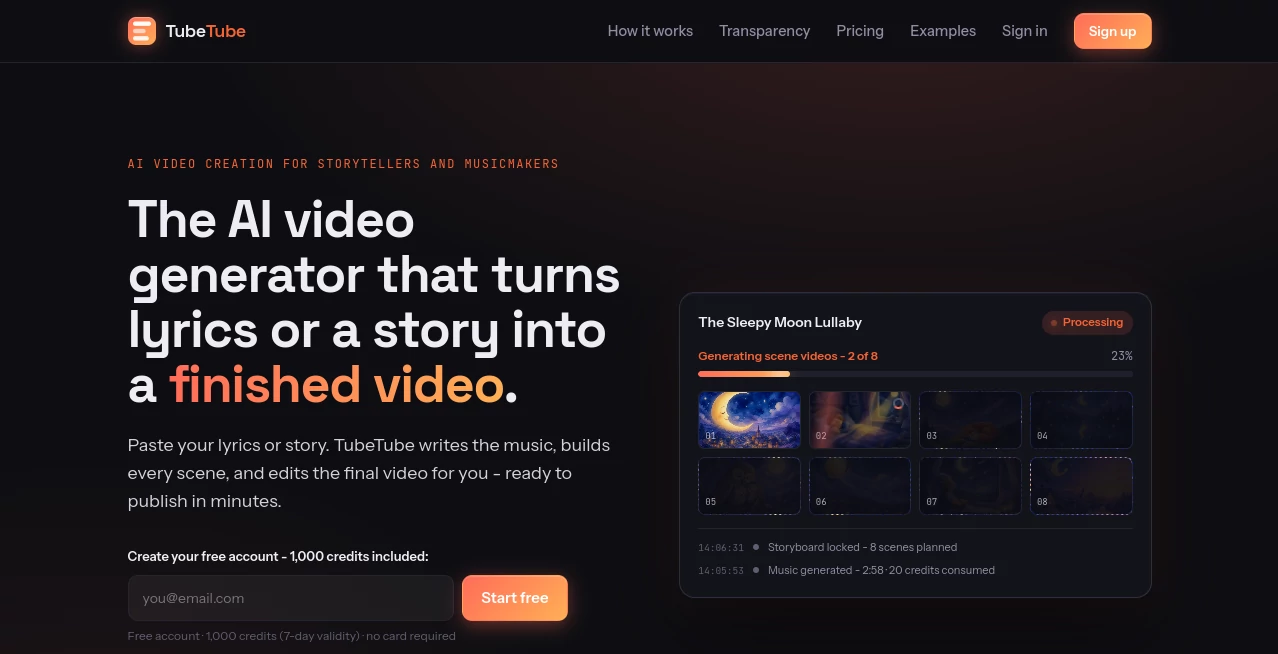
The interface is built around a straightforward production process rather than a traditional video-editing timeline. Instead of asking users to manually arrange dozens of clips, the platform guides them through the content, visual style, generation options, and final production.
The workflow is particularly approachable for creators who know what they want to say but do not necessarily want to learn professional editing software. A story or set of lyrics becomes the starting point, while visual direction can be selected from a large collection of styles or described with a custom style.
The live production information is another useful touch. Users can see what is happening during generation, including storyboard creation, scene production, retries, and other automated steps. That makes the process feel less like pressing a button and waiting blindly for a result.
Accuracy & Performance
Performance is helped by the platform's multi-stage workflow. Instead of treating the entire video as one generation request, the system breaks production into individual steps such as music, storyboarding, image generation, animation, and final assembly.
One of the stronger aspects is script synchronization. The system uses script-based transcription so that scenes can correspond to what is actually being said or sung at a particular moment. This is especially useful for narrated stories and music videos where visual timing matters.
Visual continuity is also addressed through sequential scene generation. Previous images are used as context so characters and the overall visual identity can remain more consistent throughout the video. For longer projects, this can make a noticeable difference compared with generating every image independently.
Capabilities
The platform covers several parts of the creative pipeline in one place. A creator can begin with an original story, lyrics, or an existing MP3 file and move toward a finished video without manually connecting separate applications.
For music projects, the workflow can generate a song with Suno, build a storyboard around the resulting audio, create scene imagery, animate those scenes, and assemble the final cut. For story projects, narration can be generated with an AI voice and synchronized with illustrated scenes.
There is also considerable freedom in visual direction. Available styles range from photorealistic film and 3D animation to watercolor storybooks, claymation, paper cutouts, anime-inspired visuals, vintage artwork, pixel art, and many other approaches. Creators can also define their own visual style instead of relying entirely on presets.
The system includes automatic recovery mechanisms as well. If a prompt is blocked or a scene generation fails, it can reword prompts and retry the operation rather than immediately stopping the entire project.
Security & Privacy
For creators, privacy and ownership considerations are important whenever scripts, songs, or original ideas are submitted to an online generation service. The platform provides production-level transparency around the processing workflow, including records of automated actions, generated assets, warnings, retries, and credit consumption.
However, creators should still review the current privacy policy and terms before uploading commercially sensitive material or unpublished intellectual property. The publicly available product information focuses heavily on the generation workflow and usage transparency, so specific security guarantees should not be assumed beyond what the service officially documents.
Use Cases
Faceless YouTube channels: Creators can turn stories, songs, educational scripts, or niche content into complete videos without recording themselves on camera.
Music creators: Original lyrics can become animated music videos, while an existing MP3 can be used as the foundation for a visual production or cover project.
Children's content: Nursery rhymes, counting songs, fairy tales, and bedtime stories are natural fits for the illustrated and animated workflow.
Storytelling channels: Writers can transform short stories into narrated videos with visual scenes that follow the story instead of manually searching for matching stock footage.
Multilingual content: Finished stories can be dubbed into multiple languages, making the same creative concept easier to adapt for different audiences.
Social video production: Shorter concepts, character-driven ideas, and visually unusual stories can be turned into ready-to-publish clips without a conventional editing workflow.
Creative experiments: The large selection of visual styles makes it practical to test the same idea as a watercolor storybook, clay animation, anime-style production, pixel-art video, or another visual direction.
Pros and Cons
- Pros: Complete video production in one workflow.
- Pros: Strong focus on multi-scene and long-form generation.
- Pros: Character and visual consistency between scenes.
- Pros: More than 100 visual styles with custom style support.
- Pros: Supports both stories and music-based projects.
- Pros: Automatic editing and final video assembly.
- Pros: Detailed production and credit usage reporting.
- Cons: Longer and more complex videos can consume a significant number of credits.
- Cons: Fully automated generation gives users less frame-by-frame control than professional editing software.
- Cons: Results can still depend on the quality and clarity of the original script, lyrics, and creative direction.
Pricing Plans
A free account includes 1,000 credits with a seven-day validity period, and no payment card is required to start. Paid plans use a monthly credit system, with additional credits available as top-ups.
- Starter: 1,000 credits per month for $11 per month or $119 per year.
- Creator: 5,000 credits per month for $49 per month or $529 per year, with additional benefits such as priority queue access and full source asset downloads.
- Studio: 15,000 credits per month for $129 per month or $1,393 per year, aimed at higher-volume production.
- Agency: 75,000 credits per month for $609 per month or $6,577 per year, designed for channels producing content at scale.
Annual billing provides an additional saving compared with monthly billing, while one-off credit top-ups can be purchased when needed. The actual credit requirement varies according to the production, since music, images, animation, resolution, and other operations have different costs.
How to Use It
- Start by entering a story, narrative, or set of song lyrics.
- For music projects, optionally upload an MP3 file when creating a cover-based video.
- Select a visual style from the available options or describe a custom style.
- Choose generation settings such as the image and video models, duration, and output definition.
- Review the estimated credit requirement before launching the project.
- Start the generation process and allow the automated workflow to create the music, storyboard, scenes, animation, and final edit.
- Monitor the production journal while the different stages are completed.
- Once finished, export the final video and access the available source assets.
Comparison with Similar Tools
Many AI video platforms concentrate on one specific part of the production process. Some are primarily designed for avatars, others assemble stock footage, while others focus on short AI-generated clips. This solution takes a more complete approach by connecting writing or lyrics, music or narration, visual generation, animation, and editing in a single workflow.
The biggest distinction is the emphasis on multi-scene production. Instead of generating a collection of unrelated short clips, the system attempts to preserve characters and visual direction from scene to scene while keeping the visuals connected to the underlying script or audio.
That makes it particularly appealing to creators who want repeatable storytelling workflows rather than simply experimenting with isolated AI video generations. Professional editors will still have reasons to use traditional software when they need precise timeline-level control, but creators focused on speed and automated production may find this approach much more convenient.
Conclusion
TubeTube stands out by treating AI video creation as a complete production pipeline rather than a single generation feature. A story or song can move through music or narration, storyboarding, visual creation, animation, synchronization, and final editing with very little manual intervention.
The combination of character consistency, script-aware scene timing, a large collection of visual styles, automatic recovery, and transparent credit tracking makes it especially interesting for faceless channels and creators producing content repeatedly.
It is not intended to replace every professional editing workflow. Instead, its strength is removing much of the repetitive work that normally sits between a creative idea and a finished video. For creators who value speed, consistency, and an automated production process, it offers a compelling way to turn written ideas and music into publishable visual content.
Frequently Asked Questions (FAQ)
Can I create a video from a written story?
Yes. A written story can be used as the starting point for a narrated video. The workflow can generate narration, divide the story into scenes, create matching visuals, animate them, and assemble the final result.
Can I create music videos from lyrics?
Yes. Lyrics can be used to create a complete music video, including AI-generated music, storyboarded scenes, visuals, animation, and final editing.
Can I upload my own music?
Yes. An MP3 file can be uploaded and used as the basis for a video or cover workflow.
How many visual styles are available?
The platform offers more than 100 visual styles, ranging from photorealistic and 3D looks to watercolor, claymation, anime, paper cutout, pixel art, vintage, and other artistic directions. Custom styles are also supported.
Does it keep characters consistent?
Character consistency is one of the core features. Scenes are generated sequentially and previous visual context is used to help maintain the appearance of characters throughout the project.
Can I create children's videos?
Yes. The workflow is well suited to nursery rhymes, children's songs, fairy tales, bedtime stories, and other illustrated storytelling formats.
Does it support high-resolution video?
Yes. Depending on the selected production options, videos can be generated at high resolutions, with 4K upscaling available for supported workflows.
Is there a free option?
Yes. New users can start with 1,000 free credits that are valid for seven days, and a payment card is not required to create the free account.
How does the credit system work?
Different production operations consume different amounts of credits. Music, storyboards, images, scene videos, and upscaling can each contribute to the final cost. An estimate is provided before production begins, and unused held credits can be returned when the final production requires less than initially estimated.
Is it suitable for professional content creators?
It can be a strong option for creators who produce content regularly, particularly faceless channels, music channels, storytelling projects, and agencies. Higher-tier plans provide substantially more monthly credits and features designed for larger production volumes.