
GeekArt Writing
What is GeekArt Writing?
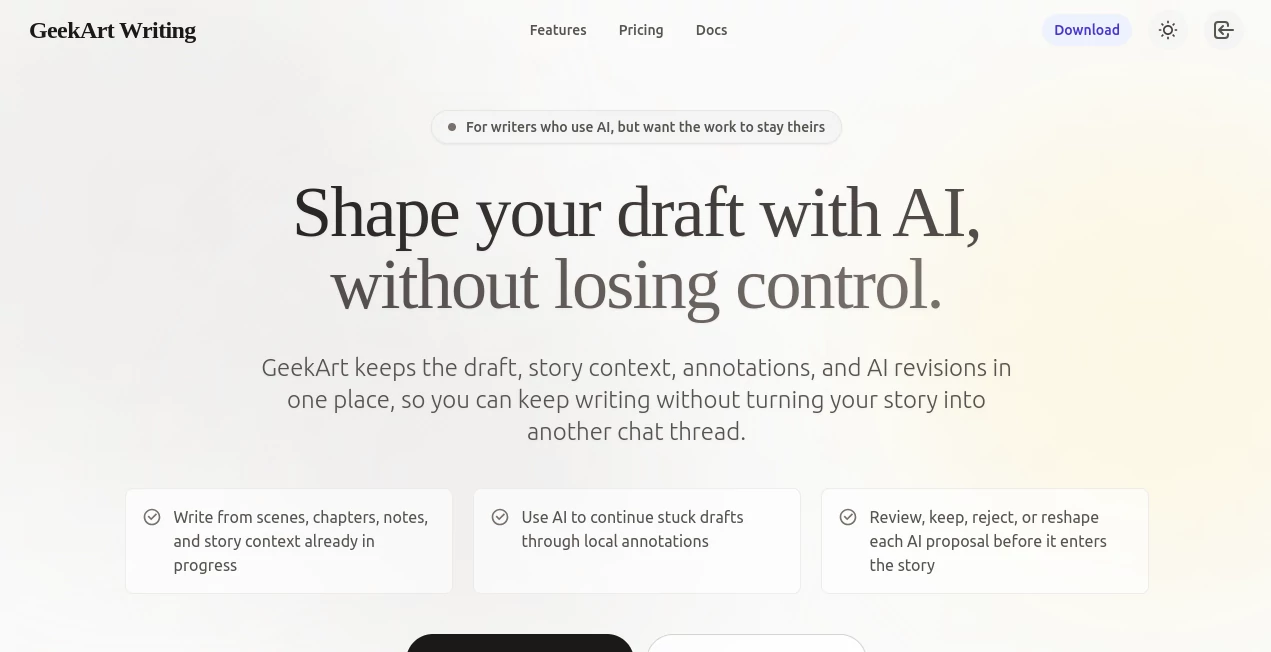
GeekArt Writing is an AI-native writing workspace designed for authors who want the practical benefits of artificial intelligence without handing over creative control. Instead of treating AI as a machine that silently replaces paragraphs, the platform brings suggestions directly into the writing process as visible, reviewable proposals.
This approach is particularly useful for fiction writers. A novel is not simply a collection of grammatically correct sentences. Character motivation, pacing, atmosphere, continuity, and voice all matter. The platform is built around that reality, allowing writers to work with their existing drafts while giving AI enough context to make more relevant suggestions.
Imagine reaching a scene where the plot is moving but a character's decision feels unconvincing. Rather than opening a separate chatbot and explaining the entire chapter again, a writer can work from the passage itself, add local direction, and review proposed changes before deciding what actually belongs in the manuscript.
Key Features
- AI-assisted revision that presents changes as proposals rather than silently replacing the original draft.
- Context-aware writing assistance that can work with the surrounding story and existing material.
- Annotations that provide local instructions about motivation, pacing, tone, conflict, or continuity.
- Structured outlining for chapters, scenes, and character arcs.
- Style polishing for clarity, atmosphere, and intensity while keeping the writer's direction in focus.
- Muse Mode for exploring plot turns, backstories, and worldbuilding ideas when the writing process stalls.
- Text-to-speech support for listening to passages and noticing dialogue, rhythm, and pacing issues.
- Cloud synchronization and backup for keeping writing projects accessible and recoverable.
- Writing analytics that help authors understand their writing activity and long-form progress.
User Interface
The interface is centered around the draft rather than forcing the writer to constantly move between a document editor and a separate AI chat window. This makes the workflow feel closer to an editorial workspace than a conventional prompt-and-answer application.
One especially useful idea is the visible revision system. When an AI suggestion is generated, the writer can inspect it before applying it. That small distinction can make a big difference during creative work because a polished sentence is not automatically the right sentence for a particular character or scene.
The annotation-based workflow is also practical. A note such as “slow this moment down” or “keep the character restrained” gives the AI a much more specific direction than a generic request to rewrite a paragraph.
Accuracy & Performance
For long-form writing, accuracy is not only about grammar. The more important question is whether a suggestion respects the context of the manuscript. The platform is designed to use draft context, annotations, and writing direction when proposing revisions, which can make its assistance more relevant than starting from an isolated text prompt.
Its strongest value is therefore contextual editing rather than simply producing large amounts of text. A writer can identify a specific weakness, ask for a focused revision, and then decide whether the proposed solution actually improves the passage.
Text-to-speech adds another useful layer of review. A paragraph that looks perfectly acceptable on screen can sound awkward when read aloud. Listening to dialogue and narration can reveal rushed pacing, unnatural rhythm, or sentences that need another pass.
Capabilities
The platform covers several stages of the creative writing process. Writers can plan chapters and scenes, develop character arcs, explore story ideas, work through stalled passages, polish existing prose, and review their work through AI-assisted suggestions.
Its Muse Mode is particularly appealing when a writer knows that a scene needs something but cannot immediately identify what. Exploring possible plot turns, character backgrounds, or worldbuilding details can provide enough momentum to continue without requiring the AI to write the entire story.
The revision workflow is equally important. Instead of accepting a complete replacement passage, writers can inspect individual proposals and keep, reject, or reshape them. This creates a more deliberate relationship between author and AI.
For example, if a character is intentionally quiet, an AI-generated sentence that makes the character suddenly explain their feelings may be grammatically strong but creatively wrong. A review-first workflow makes it easier to recognize and reject that kind of change.
Security & Privacy
The published privacy policy explains that the service may process account information, drafts, prompts, uploaded content, generated output, usage information, and technical data as needed to operate the service. It also states that content is not used to train its own AI models unless the user explicitly opts in, and that third parties are not allowed to train on the user's content.
The service may send necessary input and context to AI inference providers when delivering AI features. It also uses cloud infrastructure and storage providers to support synchronization and storage. As with any online writing platform, authors working with unpublished manuscripts should review the current privacy policy and understand how their content is processed before uploading sensitive material.
Use Cases
Fiction Writing: Authors can use AI assistance to explore scenes, character decisions, plot directions, and story development while keeping final creative decisions in their own hands.
Novel Development: Long projects can benefit from structured outlines, character arcs, story context, and focused revision instead of treating every chapter as an isolated piece of text.
Scene Revision: When a scene feels flat, rushed, confusing, or emotionally unconvincing, annotations can help turn a vague problem into a specific revision request.
Writer's Block: Muse Mode can provide possible plot developments, backstory ideas, and worldbuilding directions when the next step is difficult to find.
Dialogue Review: Text-to-speech can help writers hear whether dialogue feels natural and whether the pacing of a scene works outside the visual page.
Editing and Polishing: Writers who already have a draft can use AI suggestions to explore improvements without automatically replacing the original passage.
Pros and Cons
- Pros: Strong focus on author control and visible AI revisions.
- Pros: Designed specifically around long-form writing rather than generic chat.
- Pros: Context-aware assistance can work directly with existing drafts.
- Pros: Annotation-driven instructions make revision requests more precise.
- Pros: TTS provides another way to review pacing and dialogue.
- Pros: Outlining, story development, revision, and writing analytics are brought into one workspace.
- Cons: Writers looking only for a simple text generator may find the workflow more involved than a basic chatbot.
- Cons: Its strongest benefits are aimed at authors and long-form projects rather than every type of everyday writing.
Pricing Plans
Pricing and available plans can change as the product develops, so writers should check the current pricing information before subscribing. The platform's feature set is positioned around an integrated writing environment rather than a simple pay-per-generation text tool, making the value more relevant to users who expect to spend significant time developing manuscripts inside the workspace.
For anyone considering a paid plan, the most important factors to compare are the amount of AI assistance included, available writing features, project storage, synchronization, and any usage limitations that may apply.
How to Use the Platform
Start by bringing your existing writing project into the workspace or beginning a new draft. From there, organize the material into the structure that makes sense for your project, such as chapters, scenes, and supporting story information.
When you encounter a difficult passage, select the relevant section and describe the problem as clearly as possible. Instead of asking for a broad rewrite, give the AI a local instruction such as keeping the character's restrained voice, increasing tension gradually, or clarifying a motivation.
Review the resulting proposals carefully. Keep the changes that genuinely improve the passage, reject suggestions that do not fit, and reshape anything that is close but not quite right.
After revising, use the read-aloud functionality when appropriate. Hearing the passage can reveal issues that are easy to miss while reading silently. Continue this process scene by scene rather than expecting AI to make all of the creative decisions at once.
Comparison with Similar Tools
Many AI writing applications are built around a familiar chat interface: enter a prompt, receive an answer, and paste the useful parts back into a document. That approach works well for quick brainstorming, but it can become cumbersome when working on a long manuscript.
This platform takes a different route by keeping AI closer to the actual draft. The emphasis is on context, local annotations, visible changes, and author review. Instead of asking an AI system to produce a replacement chapter and then comparing it manually, writers can work with smaller, more controlled proposals.
That makes it particularly interesting for authors who already use AI but dislike the feeling that their writing is gradually being taken over by generated prose. The goal is not simply faster output. It is a workflow where the writer remains responsible for the final creative choices.
Conclusion
AI writing tools are often judged by how much text they can generate. For serious fiction writing, however, volume is rarely the hardest problem. Knowing what should change, what should stay untouched, and why a particular sentence belongs in a story can be much more important.
This writing environment takes a thoughtful position on that problem. AI suggestions remain visible, writers can provide local direction, and revisions can be accepted, rejected, or reshaped before becoming part of the manuscript. Combined with outlining, story development, style polishing, cloud synchronization, analytics, and text-to-speech review, the result is a workspace designed around the author's process rather than around AI generation alone.
For novelists, fiction writers, and long-form creators who want AI assistance without surrendering their voice, this is a compelling approach. It treats artificial intelligence as a collaborator that can offer possibilities and editorial help while leaving the most important decision exactly where it belongs: with the writer.
Frequently Asked Questions (FAQ)
Who is this writing platform designed for?
It is primarily suited to writers working on fiction and other long-form projects who want AI assistance integrated directly into their drafting and revision workflow.
Can AI suggestions be rejected?
Yes. The revision workflow is designed around visible proposals, allowing writers to keep, reject, or reshape suggested changes instead of automatically applying them.
Can it help with writer's block?
Yes. Muse Mode is designed to help writers explore plot turns, character backstories, and worldbuilding ideas when a story becomes difficult to move forward.
Does it support outlining?
Yes. Structured outlining can be used to plan chapters, scenes, and character arcs before or during the drafting process.
Can I listen to my writing?
Yes. Text-to-speech can be used to hear passages and identify problems with dialogue rhythm, pacing, tone, or sentences that feel different when spoken aloud.
Does the service use my writing to train its own AI models?
According to its published privacy policy, user content is not used to train its own AI models unless the user explicitly opts in, and third parties are not permitted to train on that content.
Is this better than using a general AI chatbot?
That depends on the workflow. A general chatbot can be excellent for quick questions and brainstorming, while this platform is more focused on keeping AI assistance connected to an ongoing draft, its context, annotations, and revision process.
Is it suitable for writing a novel?
Yes. Features such as structured outlining, story context, character development, long-form writing support, revision proposals, and writing analytics make it particularly relevant to novel-length projects.
AI Book Writing , AI Novel , AI Story Writing , AI Writing Assistants .
These classifications represent its core capabilities and areas of application. For related tools, explore the linked categories above.
GeekArt Writing details
Website unavailable — View Alternatives
Pricing
- Free
Apps
- Web App
Categories

GeekArt Writing Alternatives Product

MachineTrans…
ResumeTailor…
AiZolo

Sudowrite Mu…

SEOAuthori

AI Fanfic Ge…
ResumeFreePro
Quikauthor

Automateed