


















Gemini 3.1 TTS
What is Gemini 3.1 TTS?
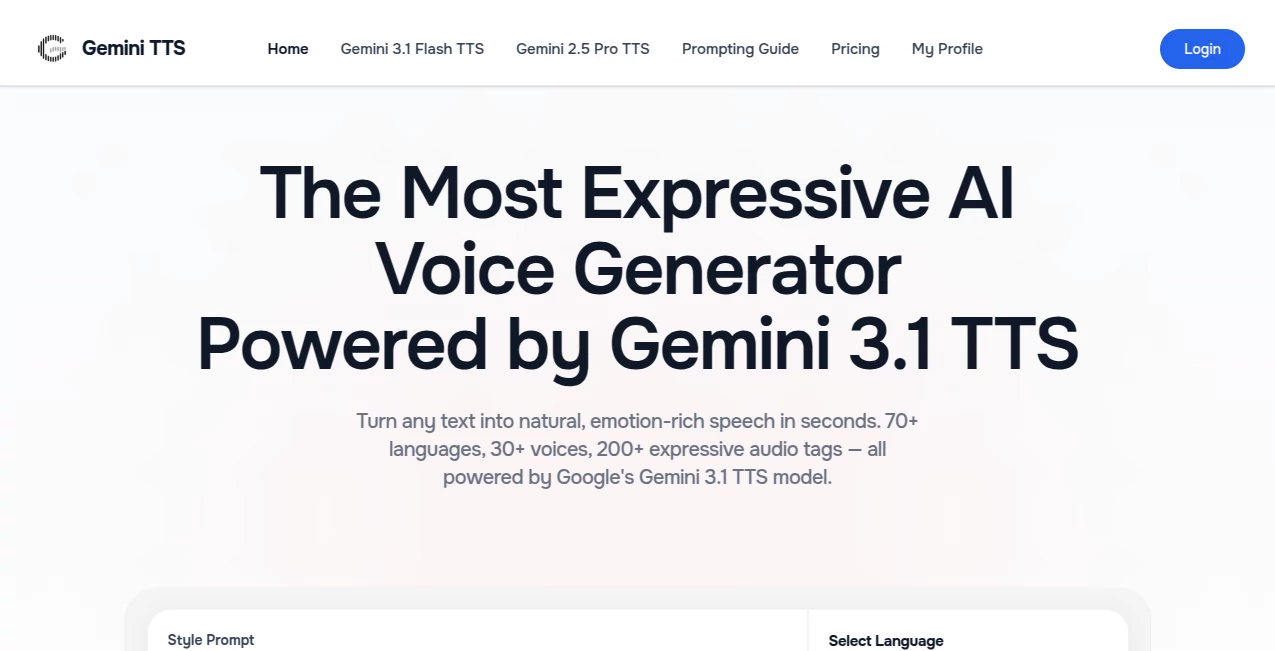
There’s a moment when you hear AI narration that doesn’t sound robotic—when pauses feel natural, emotion lands just right, and you forget for a second that no human recorded it. This tool delivers that experience consistently. Powered by Google’s latest Gemini 3.1 model, it turns plain text into speech that carries tone, rhythm, and feeling. I’ve used it for everything from quick video voiceovers to full audiobook chapters, and the results keep surprising me with how alive they sound. It’s not just another text-to-speech generator—it feels like a real voice actor who understands context and mood.
Introduction
Most AI voices still fall into that uncanny valley: too perfect, too flat, or strangely robotic when emotion is needed. This platform changes the game by giving you fine-grained control through simple audio tags—[excited], [whisper], [laughs], [slow], and over 200 more. Whether you’re creating content for YouTube, building conversational AI, localizing videos, or narrating stories, it produces broadcast-quality audio that respects the intention behind your words. The best part? You don’t need to be a sound engineer or spend hours in post-production. The voices feel human because the system actually understands how humans speak when they mean something.
Key Features
User Interface
The studio is clean and inviting. You type or paste your text, pick a language and voice, sprinkle in expressive tags where needed, and hit generate. Real-time previews let you hear changes instantly, and the layout stays out of your way. No overwhelming options or hidden menus—just a focused space that encourages creativity. Even my non-technical friends figured it out in under a minute and started experimenting with different emotions right away.
Accuracy & Performance
The voices maintain natural prosody—rising and falling intonation, breathing pauses, and emotional shifts that match the text. It handles long-form content without losing consistency, and multi-speaker dialogues feel like actual conversations. Generation is fast, even with complex tags, and the audio quality holds up for professional use. In my experience, the first or second take is usually usable, which is rare in this space.
Capabilities
Support for over 70 languages, 30+ distinct voice profiles, and more than 200 expressive audio tags gives you director-level control. You can create multi-speaker scenes, adjust pacing and tone mid-sentence, and generate everything from calm narration to excited storytelling. It shines for audiobooks, podcasts, video voiceovers, conversational agents, and game NPCs. The ability to mix languages and emotions in one script opens creative doors most other tools keep closed.
Security & Privacy
Your text and generated audio stay private during processing. No unnecessary data retention, and you can download and delete files as needed. For creators working with scripts, client content, or sensitive material, that respectful approach builds real confidence.
Use Cases
A YouTuber generates natural-sounding narration for explainer videos in minutes instead of booking studio time. An indie game developer creates distinct voices for multiple NPCs without hiring actors. A language teacher produces listening exercises in different accents and emotions for students. An author turns chapters into audiobook samples to test flow before full production. The flexibility makes it valuable for solo creators, small teams, and large organizations alike.
Pros and Cons
Pros:
- Voices sound remarkably human with genuine emotional range.
- Simple yet powerful audio tags give precise creative control.
- Excellent multi-language support without quality drops.
- Fast generation that supports quick iteration and tight deadlines.
- Free tier is generous enough for serious testing and small projects.
Cons:
- Long-form content may need splitting into smaller segments for best results.
- Some niche accents and ultra-specific emotions still benefit from careful prompting.
- Advanced commercial usage scales with paid plans.
Pricing Plans
The free tier offers solid daily generation limits—enough to explore voices, test scripts, and create short pieces without spending anything. Paid plans unlock higher volume, priority processing, commercial licensing options, and extended features for heavier users. The pricing feels fair for the quality jump it provides, especially when you compare it to traditional voice talent or studio sessions.
How to Use Gemini TTS
Head to the studio, paste or type your script, choose a voice and language, then add expressive tags like [excited], [whispers], or [laughs] where needed. Hit generate and listen to the preview. Tweak tags or wording as desired, then download the MP3 or WAV file. For multi-speaker scenes, label speakers clearly in the text. The process is intuitive enough that you’ll be creating polished audio within your first few minutes.
Comparison with Similar Tools
Many TTS platforms deliver flat, robotic-sounding speech or limited emotional control. This one stands out with its deep expressivity, natural flow, and easy-to-use audio tags that actually work as intended. Where others force you into rigid presets, it gives you director-like nuance without complexity. For creators who care about tone and feeling, the difference is noticeable from the very first generation.
Conclusion
Voice matters. Whether you’re telling stories, teaching, selling, or building experiences, the right voice can make all the difference. This tool brings that voice within reach—expressive, natural, and surprisingly affordable. It removes technical barriers so you can focus on what you want to say and how you want it to feel. In a world flooded with content, having a voice that truly connects is a real advantage—and this platform makes it accessible to anyone with an idea.
Frequently Asked Questions (FAQ)
How natural do the voices actually sound?
Extremely natural—many people mistake them for real recordings on first listen.
Can I use expressive tags in any language?
Yes—tags work across all supported languages for consistent emotional control.
Is it good for long-form content like audiobooks?
Yes—split longer scripts into sections for best pacing and quality.
Do I need technical skills to use it?
Not at all. The interface is designed for quick, intuitive use by creators of all levels.
Are commercial rights included?
Free tier allows personal and testing use; paid plans include full commercial licensing.
AI Voice Assistants , AI Text to Speech , AI Speech Synthesis , AI Voice & Audio Editing .
These classifications represent its core capabilities and areas of application. For related tools, explore the linked categories above.

Gemini 3.1 TTS Alternatives Product

Emochi

Krisp

Gpt Realtime…

Lyria.run

Qwen3 TTS

PureMIDI

Qwen3 TTS

Free GPT IMG
SpeechGen AI
