GenFlick
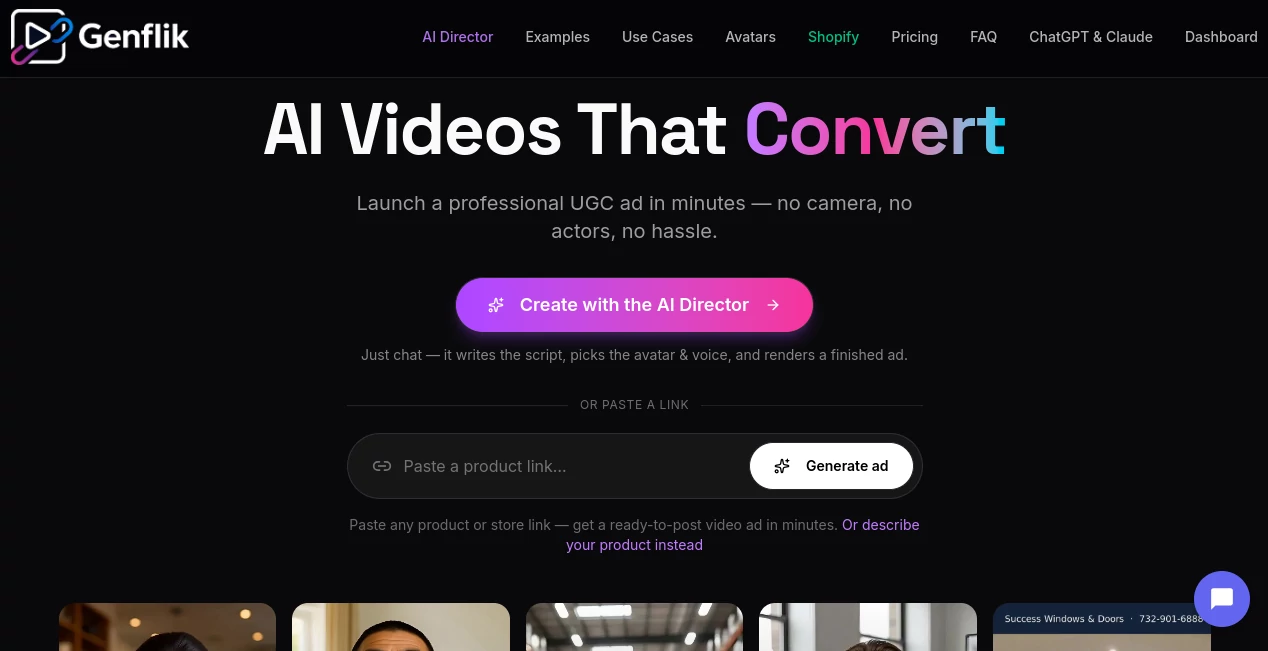
What is GenFlick?
Creating professional AI videos often means switching between multiple platforms for scripting, image generation, animation, editing, and publishing. This all-in-one creative studio changes that experience by bringing every stage of production into a single conversational workspace. Whether you are building cinematic trailers, social media reels, educational content, or marketing campaigns, the platform streamlines the entire creative workflow.
Instead of focusing on a single AI model, the platform combines multiple industry-leading video technologies into one environment. Users can brainstorm ideas, generate storyboards, create AI images, animate scenes, add realistic dialogue, edit sequences, and publish finished videos without leaving the project. This integrated approach makes professional-quality video creation accessible to creators, businesses, marketers, educators, and filmmakers alike.
The experience feels less like operating traditional editing software and more like collaborating with a creative production team that understands storytelling, visual composition, and content optimization. From short-form social content to longer cinematic productions, the workflow remains intuitive while offering impressive creative flexibility.
Key Features
User Interface
The interface is built around natural conversations instead of complicated timelines. Users simply describe the scenes they want to create, while the AI organizes characters, sequences, dialogue, pacing, and visual assets automatically. Project management remains clean even for larger productions, making it approachable for beginners while still offering advanced creative control.
Accuracy & Performance
The platform delivers high-quality visual output by supporting several modern AI video models, allowing creators to choose the most suitable engine for each scene. Character consistency, realistic motion, image animation, lip synchronization, and cinematic effects all contribute to polished final productions. Fast generation times also encourage experimentation without slowing creative momentum.
Capabilities
- Text-to-video generation
- Image-to-video animation
- AI movie creation
- Story planning with conversational AI
- Scene organization and storyboard creation
- Realistic AI lip sync
- Dialogue generation
- AI image generation
- Social media publishing
- Public movie hosting
- Multi-model AI video generation
- Creative project management
- AI-powered video editing
- Support for cinematic storytelling
Security & Privacy
User privacy receives thoughtful attention throughout the creative process. Projects remain private during development, while local file handling helps reduce unnecessary uploads before project creation. Creators maintain control over their productions until they decide to publish or share completed work.
Use Cases
- Creating YouTube videos and series
- Producing TikTok and Instagram Reels
- Developing AI-generated short films
- Designing marketing campaigns
- Building product advertisements
- Educational storytelling
- Generating animated explainer videos
- Producing movie trailers
- Creating branded social media content
- Rapid content production for agencies
Pros and Cons
Pros
- Complete end-to-end AI video production workflow.
- Combines multiple leading AI video models.
- Conversation-based creation simplifies complex projects.
- Supports cinematic storytelling and professional editing.
- Built-in publishing for major social media platforms.
- Suitable for beginners and experienced creators alike.
Cons
- Advanced projects may consume credits quickly.
- Premium features require a paid subscription.
- Rendering large productions can take longer than simple clips.
Pricing Plans
The platform offers multiple subscription tiers designed for different types of creators. Entry-level plans provide monthly generation credits for casual users, while larger plans significantly increase available credits for professional creators, agencies, and production teams. Additional credit packs are also available for users who require extra rendering capacity.
How to Use GenFlick
Start by creating an account and selecting a subscription or credit package. Describe your project using natural language, including the story, characters, style, and desired scenes. The AI organizes the production, generates visuals, creates animations, and helps assemble the final sequence. After reviewing and refining the output, export the finished video or publish it directly to supported social platforms for immediate distribution.
Comparison with Similar Tools
Unlike many AI video generators that focus only on text-to-video creation, this platform provides a complete production ecosystem. It combines planning, story development, image generation, animation, dialogue, editing, publishing, and distribution in one workspace. This significantly reduces the need for additional editing software while offering creators a more cohesive production experience than standalone AI video tools.
Conclusion
For creators seeking more than a simple video generator, this platform delivers an impressive production studio powered by artificial intelligence. Its conversational workflow, multi-model support, cinematic capabilities, and integrated publishing tools make it an excellent solution for content creators, marketers, educators, and filmmakers who want to produce engaging visual content faster without sacrificing creative quality. The combination of storytelling assistance and professional video generation creates a workflow that feels remarkably efficient from concept to final publication.
Frequently Asked Questions (FAQ)
Can beginners create videos without editing experience?
Yes. The conversational workflow makes it easy for new users to create professional-quality videos without learning traditional editing software.
Can I generate both images and videos?
Yes. The platform supports AI image generation alongside image-to-video and text-to-video workflows.
Does it support social media publishing?
Yes. Finished content can be prepared for publishing across several popular social media platforms.
Can I create longer cinematic projects?
Yes. The platform is designed for everything from short clips to multi-scene productions and AI-generated movies.
Is there a free version?
Some tools can be explored for free, while full media generation and advanced capabilities require a subscription or credit-based plan.
AI Image to Video , AI Video Generator , AI Video Editor , AI Text to Video .
These classifications represent its core capabilities and areas of application. For related tools, explore the linked categories above.

GenFlick Alternatives Product

Seedance 3.0
Meigen AI
FreeWanVideo

seedance 3.0

vizstudio

The Influenc…

Flow Veo 3

Seedance 2
hailuo03